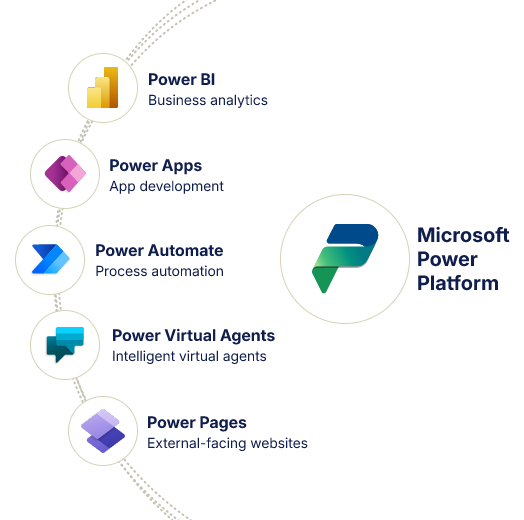



Microsoft Power Platform Services:
Apps, Automation and BI
At Alphavima, we help businesses create customized business applications using Microsoft Power Platform. Our services are focused on practical use cases – making it easier to automate workflows, integrate data, and build low-code apps that fit your existing processes.

Power Platform Services by Alphavima
Our comprehensive Power Platform solutions help you improve your business operations with low-code tools and
intelligent automation.

Our Power Platform Services
We deliver end-to-end Microsoft Power Platform solutions tailored to your specific business requirements, helping you achieve digital transformation efficiently.
Power Apps
Build low-code, scalable apps for inspections, approvals, and operations. Customize your business applications without extensive development resources.
Power Automate
Build low-code, scalable apps for inspections, approvals, and operations. Customize your business applications without extensive development resources.
Power BI
Build low-code, scalable apps for inspections, approvals, and operations. Customize your business applications without extensive development resources.
Power Pages
Build low-code, scalable apps for inspections, approvals, and operations. Customize your business applications without extensive development resources.
Governance & Support
Build low-code, scalable apps for inspections, approvals, and operations. Customize your business applications without extensive development resources.
Solution Visualization
Build low-code, scalable apps for inspections, approvals, and operations. Customize your business applications without extensive development resources.
See How Microsoft Power Platform Works in Real Business Scenarios
POWER APPS
Build Custom Apps
Create role-specific business apps for mobile or web without heavy coding. Ideal for teams managing inventory, inspections, fieldwork, or data collection.
- Built with low-code tools
- Works on phones and tablets
- Captures and syncs data in real time
POWER AUTOMATE
Approval Workflow
Save hours every week by automating approvals, notifications, and system updates. Popular for HR, finance, and compliance-driven teams.
- No-code process automation
- Conditional logic and branching
- Connects with Microsoft 365 apps
MICROSOFT COPILOT STUDIO - INTELLIGENT CHATBOT

Microsoft Copilot Studio (formerly Power Virtual Agents)
Deploy custom bots for internal IT support, HR queries, or customer service. No code required, integrates with Microsoft Teams or websites.
- Escalation rules with conversational logic
- Available in Teams, websites, or intranets
- Tracked using built-in analytics
POWER BI

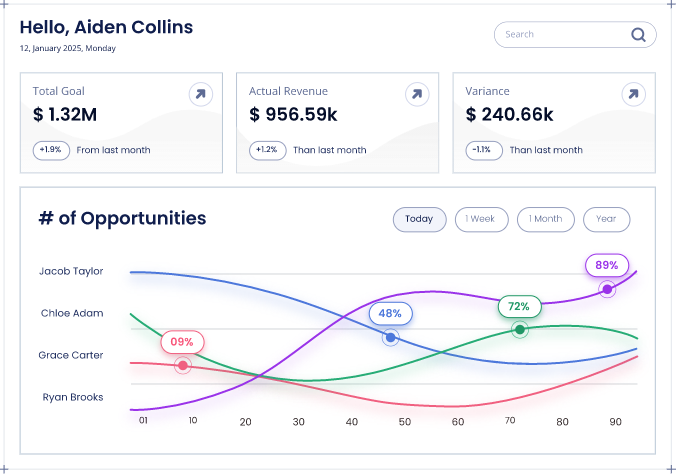
Power BI - Executive Dashboard
Build visual dashboards that pull real-time data from multiple systems. Used by operations, finance, and marketing to monitor KPIs and trends.
- Rich data visualizations
- Integrates data from multiple sources
- Auto-refresh and email alerts
POWER PAGES
Power Pages
Self-Service Portal for Public Engagement. Secure, mobile-friendly site where users can register, update information, and submit forms.
- Role-based login with access control
- Works across mobile and desktop
- Integrates with Dynamics 365 and Power Apps
DATA CONNECTOR & SYNC ENGINE

Data Connector & Sync Engine
Power Platform Integration Layer. Custom connectors and dataflows to sync Power Platform apps with Azure, SQL Server, Salesforce, or legacy systems.
- Built-in integration for portals and Teams
- Supports rules and logic triggers
- Dashboards for tracking sync performance
Microsoft Power Platform Integration
Extend Microsoft Dynamics 365 with low-code apps, automation tools, virtual agents, and reporting features that support real business needs.
Build Business-Specific Applications Without Extensive Coding
Power Platform works directly with Dynamics 365, allowing your team to build custom apps, automate repetitive processes, connect business systems, and analyze key data – all within a shared Microsoft environment.
Unified Data Platform
Use Microsoft Dataverse to store and manage business data centrally. Maintain consistency and accuracy across apps, workflows, and reports with a single source of truth.
Low-Code Development
Create applications with prebuilt templates, drag-and-drop tools, and responsive layouts. Reduce development time while maintaining flexibility for future updates.
AI Capabilities
Add AI features such as recommendations, form processing, and automated decision flows using Power Platform's built-in AI Builder-no advanced coding required.

Dynamics 365 Integration
All components of Power Platform are designed to work with Dynamics 365. This connection allows your CRM and business apps to share data, extend capabilities, and support more complex requirements without relying on third-party tools.
Power Platform Components
Discover how each component of the Power Platform can extend and enhance your Dynamics 365 implementation.
Power Apps
Build business applications that connect to your systems and address specific challenges-without extensive coding.
Canvas Apps
Design user-friendly interfaces using drag-and-drop features, accessible on any device.
Model-driven Apps
Create data-based apps that automatically adapt to your Microsoft Dataverse model.
Portals
Develop secure external websites that let partners, clients, or vendors sign in and interact with business data.
Use Case Example:
A field services company built a mobile app for technicians to manage work orders and update job details in real time, leading to a 34% improvement in first-time fix rates.
Power Automate
Reduce manual work and increase consistency by automating tasks across Microsoft and third-party applications.
Cloud Flows
Trigger workflows that run between more than 400+ apps, including Microsoft 365 and SharePoint.
Desktop Flows (RPA)
Use robotic process automation to handle desktop-level tasks on legacy systems.
Process Advisor
Identify which workflows can benefit from automation using built-in analytics.
Use Case Example:
A sales team automated their lead assignment and follow-up emails, reducing manual tasks and saving approximately 15 hours per week.
Power BI
Turn your business data into actionable insights through real-time reports, interactive dashboards, and AI analytics.
Interactive Dashboards
Visualize KPIs and data trends with real-time refresh options across departments.
Data Modeling
Link multiple data sources and shape relationships for more complete reporting.
AI-Powered Analytics
Use built-in AI to discover patterns and generate predictive insights from structured data.
Use Case Example:
A marketing team used Power BI to integrate Dynamics 365, Google Analytics, and social metrics into one view, boosting campaign ROI by 28%.
Microsoft Copilot Studio (formerly Power Virtual Agents)
Create intelligent chatbots that can resolve common customer and employee inquiries without coding, reducing support costs and improving satisfaction.
No-Code Bot Building
Use graphical tools to set up workflows and handle common queries quickly.
Natural Language Processing
Allow bots to understand questions and respond accurately using built-in Microsoft AI.
Smooth Escalation
Direct more complex requests to human support when bot responses aren’t sufficient.
Use Case Example:
A service team added a chatbot to their website, which resolved 65% of inquiries automatically and reduced support tickets by 40%, while keeping satisfaction above 90%.
Business Benefits
When Power Platform works alongside Dynamics 365, organizations see measurable improvements in productivity, cost control, and application delivery.
Accelerated Innovation
Use low-code development to build solutions in less time. Teams can address business needs directly-without waiting for lengthy IT development cycles.
Cost Efficiency
Lower development costs by up to 74% by reducing manual processes and replacing custom-coded tools with reusable low-code components.
Operational Flexibility
Adapt to new business needs more quickly using tools that support rapid development and data-driven workflows.
Microsoft's Low-Code Advantage
According to a Forrester study, organizations that use Microsoft Power Platform reported:
- 188% return on investment over 3 years
- 33% reduction in app development costs
- 3.2 hours saved weekly per user with automation
- Payback period of less than 6 months
Power Platform helped us simplify our Dynamics 365 rollout"
The ability to extend our CRM with low-code tools improved internal processes and provided fast business results.”

M&GN Joint Railway Society.
CRM & Member Portal Transformation
Real-World Experience with Microsoft Power Platform
We work with public sector organizations and enterprises to help them make better use of Microsoft Power Platform. Whether it’s building portals, automating approval flows, or creating reporting dashboards, our solutions are based on actual client needs-and designed to integrate with your current systems.
Highlights
Custom Power Apps
Build internal applications for collecting data, tracking tasks, or managing team activities-tailored to specific business workflows.
Automated Workflows
Use Power Automate to connect systems and reduce manual work across departments.
Business Intelligence Dashboards
Create visual reports in Power BI that help decision-makers monitor key metrics and performance trends in real time.
Web Portals
Set up self-service portals for clients, partners, or constituents using Power Pages, supporting registration, form submissions, or account access.
Microsoft Ecosystem Integrations
Connect Power Platform tools with Microsoft Dynamics 365, Azure, and other business systems to improve data accuracy and process coordination.
Use Cases
Helping Organizations Deliver Results
Industry Solutions
We develop customized Power Platform solutions across various industries, addressing specific challenges and
delivering measurable outcomes. Explore how our expertise translates to your sector.

Manufacturing
Streamline operations, improve quality control, and optimize production workflows with custom Power Platform solutions.
Production Optimization
Real-time monitoring and predictive maintenance
Equipment Monitoring
Real-time dashboards with maintenance alerts
Quality Control
Automated inspection workflows with photo capture
Supply Chain Integration
End-to-end visibility and inventory optimization

Retail
Digitize customer interactions, optimize inventory flows, and drive smarter promotions using Microsoft Power Platform.
Customer Engagement Hub
Personalized shopping experiences and loyalty programs
Store Analytics
Real-time customer behavior dashboards across locations
Loyalty Management
Power Apps for tracking rewards, redemptions, and segmentation
Promotion Performance
Automated tracking of campaigns and real-time ROI dashboards

Utility & Power
Enable connected operations, regulatory compliance, and predictive analytics with cloud-first Power Platform solutions.
Smart Utility Operations
Connected field operations and compliance reporting
Asset Lifecycle Monitoring
Real-time dashboards for field equipment and preventive alerts
Regulatory Reporting
Power BI dashboards with export-ready compliance formats
Service Scheduling
Automated job allocation and routing with Power Automate

Rental Business
Manage the full lifecycle of assets, billing, and service requests from one Power Platform-backed solution.
Connected Rental Management
Asset tracking and service management
Asset Tracking
Dashboards for location, status, and availability
Advanced Billing
Automated invoicing and payment reminders via Power Automate
Service Dispatching
Field techs use Power Apps for inspections and servicing

Education
Track student outcomes, automate academic workflows, and improve data transparency across departments.
Academic Process Optimization
Streamlined workflows and data-driven insights
Student Case Management
Power Apps for tracking academic support and interventions
Program Analytics
Dashboards on enrollments, graduation rates, and outcomes
Document Workflow
Automated transcript, application, and approval flows

Homeowner Insurance
Offer a seamless, self-service experience to homeowners, builders, and customer support teams.
Self-Service & Case Management
Streamlined support and warranty tracking
Warranty Case Tracking
SLA-driven support systems with Power Apps and Power Pages
Self-Serve Portals
Builders and homeowners log and track cases independently
Customer Analytics
Power BI views of case volumes, timelines, and satisfaction

Mining
Enhance operational safety, environmental tracking, and site visibility using Microsoft's modern data platform.
Mine Site Digitization
Safety tracking and environmental compliance
Inspection Logs
Power Apps-based safety checks with image and location capture
Environmental Compliance
Power BI dashboards to track emissions and audit logs
Resource Tracking
Realtime dashboards for material movement and equipment use

Nonprofit Solutions
Digitize customer interactions, optimize inventory flows, and drive smarter promotions using Microsoft Power Platform.
Customer Engagement Hub
Personalized shopping experiences and loyalty programs
Donor Management
Single view of every supporter, gift, and interaction
Grant Tracking
Applications, milestones, and funder reporting on-system
Volunteer Scheduling
Recruit, schedule, and track volunteer hours

Case Studies
Real organizations, real results with the Microsoft Power Platform.

M&GN
Membership organisation · United Kingdom
Power Platform implementation
- One clean register: A single de-duplicated database of every member
- Effortless renewals: Automated workflows replacing memory and goodwill
- Member self-service: A portal where members manage their own details
- Insight on demand: Real-time membership reporting for the committee
Before vs. After
Before
- Manual Excel spreadsheets
- Duplicate member entries
- No self-service options
- Limited reporting capabilities
After
- Centralised member database
- Automated renewal workflows
- Self-service member portal
- Real-time business insights
Solutions used:

CWF
Nonprofit · Canada · National conservation organisation
Power Platform implementation
- One member record: A single CRM view of every member, donor and interaction
- Automatic renewals: Reminders, processing and receipts without manual effort
- Live campaign view: Fundraising tracked in real time, not quarter-end
- Donor intelligence: Segmentation and analysis to grow lifetime giving
Before vs. After
Before
- Multiple disconnected systems
- Manual donation processing
- Delayed reporting, limited donor insight
After
- Unified CRM platform
- Automated donation receipts and renewals
- Real-time campaign tracking and donor segmentation
Solutions used:

CTOS Migration
Equipment & Fleet · Kansas City, USA
Data Engineering / ERP migration
- Unified schema
- Zero-downtime cutover
- Validated data integrity
- One platform post-migration
Before vs. After
Before
- Multiple disconnected ERPs
- Incompatible structures
- Migration risk
After
- One unified schema
- Zero downtime
- 100% validated data integrity
Solutions used:

Walmart Labs
Retail · Canada · AdTech & digital marketing
Data Engineering
- Single customer view: Join online and in-store signals into one profile
- Audience engine: Rule-based segment generation for every campaign
- Live insight: Behaviour and campaign performance in real time
- Close the loop: Tracking and retargeting that recover lost carts
Before vs. After
Before
- Multiple systems with disjointed customer data
- No audience targeting for campaigns
- No behavioural visibility or cart tracking
After
- Unified customer data across online & in-store
- Rule-based audience generation engine
- Real-time Power BI insight and retargeting
Solutions used:

CTOS Reporting
Equipment & Fleet · Kansas City, USA
Data Engineering
- One source of truth
- Real-time visibility
- Automated ingestion
- Trustworthy numbers
Before vs. After
Before
- 15-day manual reporting
- Disconnected ERPs
- Data silos
- Delayed decisions
After
- Real-time dashboards
- Centralized warehouse
- Automated ingestion
- Improved reporting accuracy
Solutions used:

TD Securities
Financial Services · Canada · Global trading operations
Data Engineering
- One risk platform: Consolidate every LOB’s trade data
- Scale without strain: Absorb billion-record days comfortably
- Catch risk early: Threshold rules that flag anomalies as they emerge
- Regulator-ready: A governance-ready reporting architecture
Before vs. After
Before
- No unified risk reporting platform
- 1B+ records/day with performance issues
- No early risk detection, regulatory misalignment
After
- Centralised risk reporting across all LOBs
- Scalable Hadoop + Spark intake framework
- Threshold rule engine, governance-ready reporting
Solutions used:

OEC
Utilities · Ontario, Canada
ERP consulting, integration optimisation
- One governed ERP: Centralise every business unit on a single platform
- Utility-grade analytics: Regulatory reporting generated, not assembled
- Integration health: Optimised, reliable connections across the estate
- Mobility: Full remote access for field and office teams
Before vs. After
Before
- Dispersed data across business units
- Poor ERP governance and performance
- Manual utility reporting processes
- Limited remote accessibility
After
- Centralised ERP with optimised integration
- Scalable system with improved efficiency
- Real-time reporting with utility analytics
- Full mobility and remote access enabled
Solutions used:

PWSC
Insurance & Warranty · Chantilly, VA, USA
Dynamics 365 CRM implementation, change management
- One CRM: Sales, warranty and claims unified on Dynamics 365
- Product agility: A data-driven design that welcomes new products
- Self-service: Portals for homeowners and builders
- Defined claims: Structured workflows with SLA tracking
Before vs. After
Before
- Multiple systems for sales and claims
- No flexibility to add new products
- No self-service portal for builders/homeowners
- Manual and undefined claims processing
After
- Centralised Dynamics 365 CRM
- Flexible, data-driven architecture
- Self-serve portals for reduced support load
- Structured claims workflows with SLA tracking
Solutions used:

Professional Services
Professional services · Client name withheld
Business Applications (Project Operations)
- One project thread: Quote, plan, staff, deliver and bill on one record
- Margin in flight: Profitability visible while work is underway
- Bill everything earned: Approved time flowing straight to invoices
- Utilisation truth: Bench and burnout visible before they bite
Before vs. After
Before
- Four disconnected tools
- Margin discovered after the fact
- Unbilled time leaking away
- Utilisation unknown
After
- One record from quote to cash
- Live in-flight margin
- Billing from approved time
- Utilisation visible weekly
Solutions used:

Healthcare
Healthcare · Client name withheld
CRM & accelerator implementation
- One patient view: Every interaction, appointment and referral in one record
- Fewer empty chairs: Automated multi-channel reminders and confirmations
- Referrals that arrive: End-to-end tracking with owners and status
- Coordinated care: Departments working from the same relationship record
Before vs. After
Before
- Engagement scattered across tools
- Manual reminders, high no-shows
- Referrals by fax and memory
- No single view of the patient
After
- One coordinated patient record
- Automated multi-channel reminders
- Referrals tracked end to end
- Care teams on the same page
Solutions used:

Construction
Construction · Client name withheld
Business Applications (job costing & field)
- Daily job truth: Committed and actual costs current every day
- Paid-for changes: Every change order priced and approved first
- Connected sites: Crews reporting from the field in real time
- Early warnings: Jobs trending red flagged while it matters
Before vs. After
Before
- Costs assembled weekly from paper
- Change orders priced after the work
- Field crews disconnected
- Profit known at completion
After
- Daily committed and actual costs
- Changes approved before execution
- Sites reporting in real time
- Red flags raised mid-project
Solutions used:
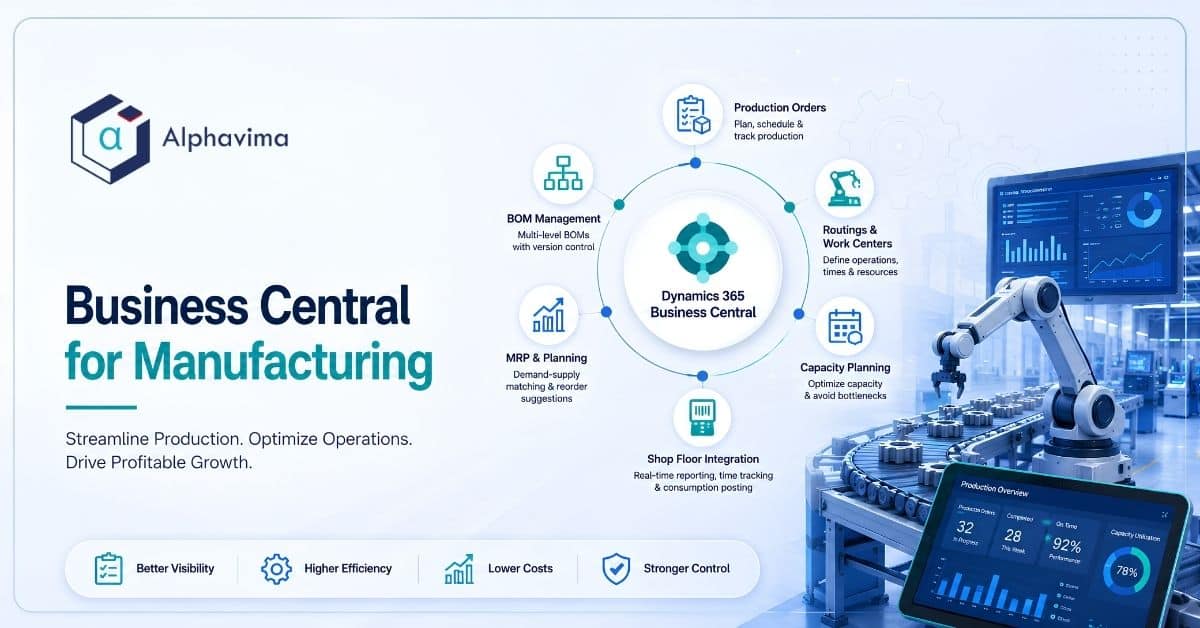
Food & Beverage
Food & beverage manufacturing · Client name withheld
ERP consulting (Business Central)
- Trace in minutes: Forward and backward lot tracing on demand
- True batch economics: Yields and costs captured per batch
- Always audit-ready: Compliance evidence as a by-product of work
- Right stock, fresh stock: Expiry-aware inventory and planning
Before vs. After
Before
- Paper batch records
- Recalls traced through binders for days
- Costs known long after production
- Audit prep as an emergency
After
- Governed recipes and lot control
- Full trace in minutes, both directions
- Batch-true yields and costing
- Audit evidence on demand
Solutions used:

Distribution
Wholesale distribution · Client name withheld
ERP consulting (Business Central)
- Count it once: Barcode-driven accuracy across every warehouse
- Touchless orders: EDI and portal orders straight into the system
- Promise with confidence: Real available-to-promise on every line
- Know the margin: Profitability by customer, SKU and lane
Before vs. After
Before
- Manual order entry and re-keying
- Paper picking, untrusted counts
- Promises made on guesswork
- Margin blurred by freight and rebates
After
- Touchless EDI and portal order flow
- Barcode accuracy at 99%+
- Real available-to-promise
- Live margin by customer and SKU
Solutions used:

Manufacturing
Discrete manufacturing · North America · Client name withheld
ERP consulting (Business Central)
- One system to run on: Finance, inventory and production on a single platform
- Shop-floor truth: Work-order status captured where the work happens
- Reliable planning: MRP driven by inventory numbers people trust
- Cost clarity: Real production costs, not standard-cost folklore
Before vs. After
Before
- Aging ERP covering finance only
- Paper travellers and manual tracking
- Inventory drifted from reality
- Planning from stale spreadsheets
After
- One platform from ledger to work centre
- Digital capture at the point of work
- Inventory accuracy people trust
- MRP planning from live demand and stock
Solutions used:

BYU
Higher education · Provo, Utah, USA
ERP modernisation, rental & inventory management
- Fill the gaps: Inventory and rental capability Workday lacks
- Track everything: Every asset visible, campus-wide
- Stay integrated: Real-time sync with Workday, not batch files
- One view: Centralised reporting across departments
Before vs. After
Before
- Legacy PeopleSoft with limited functionality
- Critical Workday gaps for inventory & rental
- No asset tracking or consolidated visibility
- Disconnected financial/procurement systems
After
- Modern campus-wide PREXA365 inventory & rental
- Real-time integration with Workday
- Asset tracking and centralised reporting
- Unified, scalable solution across departments
Solutions used:
What Our Clients Say
Be inspired by our clients’ journeys as we overcome challenges and achieve success together.
Brigham Young University
IT Operations Manager
Brigham Young University improved campus-wide inventory and rental tracking using PREXA365 integrated with Workday.

Holly Evans
Patient Support Officer, PC Project

Alltura Machinery Manufacturing
Lift equipments Operator

Shan Abbasi
Manager, Community Engagement, Volunteer MBC

Chad Jones
Managing Partner | SME | Integrator, Caprock Rentals, USA

Anick Silencieux
Executive Director, SBC

LBD Construction Group
Operations Manager

Daniel Ishikawa
CEO, Lyght Living
Lyght Living improved furniture rental operations using PREXA365 for inventory and order management.

Pascale Décosse Léger
Communication Director, SBC
Ready to Build with Power Platform?
Let’s discuss how your organization can benefit from apps, automation, dashboards, and portals tailored to your goals.
- Free initial consultation to assess your needs
- Tailored solutions that align with your business goals
- Expert team with real-world Power Platform experience