















Alphavima Technologies

Outgrown QuickBooks? Move to Microsoft Dynamics 365 Business Central.

Connect finance, sales, and operations in one cloud ERP. Implementation in weeks, not months.

Business professional using Dynamics 365 Business Central ERP for finance, sales, and project management – Alphavima Canada.

Adapt Faster

Scale with the secure, flexible Microsoft cloud.

Work Smarter

Empower teams with Copilot & Microsoft 365 integration.

Perform Better

Optimize financial close & decision-making with Power BI dashboards.

Microsoft Dynamics 365 Business Central:
Everything You Need in One ERP

Explore the core features, business benefits, platform capabilities, and services Alphavima provides to help you get the most out of Business Central.

Why Business Central is the Standard for SMBs

Stop paying for disconnected systems. Business Central unifies your accounting, inventory, and CRM into one real-time dashboard, eliminating double-entry and spreadsheet errors forever.

Core ERP Modules

Finance Sales Project Management Supply Chain Management Inventory Management Warehouse Management Manufacturing

Key Features

Woman using laptop showing Dynamics 365 Business Central features like automation, scalability, and Microsoft integration – Alphavima Canada.

Real Business Value

ROI over 3 years
0 %
Month Payback
0
Productivity Gain
0 %
Deploy the Cloud Faster, Reduce Downtime
Stronger Customer Relationships
Close More Deals with AI
Use Data to Improve Operations

Platform Features

Multi-currency, multi-entity finance

Manage accounting across different currencies and business units from a single ERP platform.

Project and job costing

Monitor expenses and allocate costs accurately for better project tracking.

Inventory and warehouse management

Track inventory status and manage stock with accurate records and reporting.

Advanced AI-powered Copilot insights

Leverage AI for intelligent suggestions, predictive analytics, and automated business insights.

Real-time dashboards and KPIs

Monitor performance metrics and KPIs with customizable dashboards and real-time reporting.

User roles and workflow automation

Assign tasks and permissions by role and reduce manual steps in recurring workflows.

Alphavima Services for Business Central

We offer ERP consulting services to support each stage of your Dynamics 365 Business Central implementation, from planning and configuration to training and support.

ERP discovery & process mapping

We assess your current systems and outline practical steps for transitioning to Business Central.

Solution design and configuration

We set up the ERP system to match your operations, reporting, and compliance requirements.

Integration with CRM, portals, analytics

We connect Dynamics 365 Business Central with your CRM, reporting tools, and external platforms.

User training and documentation

We provide structured training and reference material to support user adoption and consistency.

Data migration & QA

We migrate historical data into Business Central and verify system accuracy through QA checks.

Post-go-live support + upgrades

We offer ongoing support, system adjustments, and version updates as your business evolves.

Why Work with Alphavima

Recognized Microsoft Partner

Trusted by Microsoft as an Independent Software Vendor (ISV) and implementation expert for delivering scalable, enterprise-ready solutions using Business Central and related technologies.

20+ years of ERP experience

Deep industry knowledge and expertise with complex ERP implementations.

Industry-Focused Accelerators

Proven frameworks and ready-to-configure components designed to shorten implementation timelines and support rapid go-lives across verticals like utilities, construction, and services.

Global Delivery Network

Worldwide support model with delivery teams across North America, Europe, and Asia – ensuring scalable solutions, local context, and consistent communication at every stage.

Proven success with mid-market clients

Strong track record of successful implementations for growing businesses.

Our Specialized Solutions

Olix365 logo, representing ERP innovation in utility and energy sectors.

Trusted by Microsoft as an Independent Software Vendor (ISV) and implementation expert for delivering scalable, enterprise-ready solutions using Business Central and related technologies.

PulseNet365 logo for Alphavima’s SMB Accelerator Suite

Built for SMBs and service-based firms, PulseNet365 combines project tracking, time logging, and HR management into one platform. Enables real-time visibility into staffing, performance, and profitability.

Business Central Capabilities by Domain

Dynamics 365 Business Central supports operational and financial processes across key business functions. These built-in capabilities can be tailored through ERP consulting to align with your specific needs, using industry-informed best practices.

Finance
Finance Features
Additional Finance Features
Sales
Sales Features
Additional Sales Features
Inventory Management
Inventory Features
Additional Inventory Features
Project Management
Project Features
Additional Project Features
Supply Chain Management
Supply Chain Features
Additional Supply Chain Features

Explore Dynamics 365 Business Central in Action

Learn how Dynamics 365 Business Central supports real-time reporting, cloud-based deployment, and Microsoft Copilot AI compatibility across core business functions.

Microsoft Dynamics 365 Business Central Overview

Get an in-product view of how Business Central helps manage finance, operations, sales, and reporting. This video provides a snapshot of key ERP features, including AI-assisted insights through Microsoft Copilot.

Move to Cloud with Dynamics 365 Business Central

Learn more about the advantages and support from Microsoft in moving your business to the Cloud with Dynamics 365 Business Central.

Using Microsoft Copilot AI with Dynamics 365 Business Central

Learn how Copilot simplifies everyday tasks within Business Central by offering built-in suggestions, search support, and process assistance through natural language prompts.

Why Choose Business Central?

Go Live in Weeks, Not Months

Use our pre-configured templates to launch your ERP 40% faster. Avoid the multi-year implementation trap of traditional systems.

Bank-Grade Cloud Security

No more server maintenance. Your data is hosted on Microsoft Azure with 99.9% uptime and enterprise-grade security baked in.

Stop Guessing, Start Knowing

Replace static spreadsheets with live Power BI dashboards. See cash flow, inventory levels, and profit margins in real-time.

Works Where You Work

Stop toggling between apps. Edit invoices directly in Outlook and update inventory from Microsoft Teams. It just works.

Scale Without Breaking

Start with what you need today. Easily add users, entities, or custom apps (Power Apps) as your business expands.

Source: The Total Economic Impact™ of Microsoft Dynamics 365 Business Central, a commissioned study conducted by Forrester Consulting.

Return on Investment

Over 3 years

Technology consulting services and digital solutions overview

0%

172%

Achieve 172% ROI over 3 years by eliminating legacy server costs, reducing audit fees, and automating manual data entry. (Source: Forrester TEI Study)

Payback Period

Time to recover investment

7

Months

Microsoft cloud consulting services architecture diagram

Most businesses see full value in under 7 months thanks to lower upfront infrastructure costs and rapid user adoption.

Productivity Boost

For Finance & Operations

Finance and Ops teams reclaim 18% of their week by automating bank reconciliation, reporting, and recurring invoices.

Increase
0 %

Dynamics 365 Business Central: Built to Grow with You

Connect finance, operations, sales, and service in one flexible solution-designed for growing businesses that need real-time insights and Microsoft-powered performance.

All-in-One ERP

Run finance, projects, inventory, and CRM from a centralized Dynamics 365 Business Central interface.

Cloud computing platform and services icon

Cloud-Based and Scalable

Grow at your pace with flexible deployment options and scale resources as needed.

Technology platform integration framework diagram

AI Copilot and Automation

Use built-in Copilot features to handle repetitive tasks and support process accuracy in Business Central.

Real-time data processing and streaming analytics icon

Power BI Dashboards for ERP Reporting

Access built-in Power BI reports and KPIs to analyze finance, operations, and customer metrics in real time.

Data architecture and pipeline overview diagram

Microsoft 365 Collaboration Tools

Access Dynamics 365 Business Central directly within Teams and Office apps to support daily business workflows.

IT infrastructure architecture and systems icon

Customizable to Industry Needs

Support verticals like manufacturing, professional services, and distribution with tailored ERP configurations.

Cloud data storage and management icon

Audit-Ready Compliance & Security

Meet regulatory and security requirements using Microsoft-backed infrastructure and access controls.

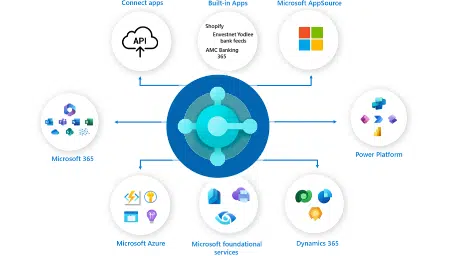
Dynamics 365 Business Central integration with Microsoft 365, Azure, Power Platform, and third-party apps for seamless ERP growth – Alphavima Canada.

Why Businesses Choose Us

ERP Partnership That Delivers Results

Accelerated ERP Success with a Microsoft ISV & Transformation Leader

Professionals shaking hands to symbolize ERP partnership success with Alphavima and Microsoft Dynamics 365 Business Central in Canada.
Microsoft certified partner program badge

We combine Microsoft’s powerful Business Central platform with Alphavima’s industry expertise to deliver tailored ERP solutions that drive real business results.

“Our collaboration with Microsoft ensures secure, performance-ready ERP systems-built to meet evolving industry requirements with confidence.”

Our Expertise
Our Approach

Faster Implementation

ERP Launch with Shorter Timelines: Our structured rollout methodology and reusable accelerators reduce setup timelines by as much as 40% compared to conventional ERP projects.

Certified Expertise

Skilled ERP Specialists:

Our consultants are Microsoft-certified and bring industry-specific insights across operations, finance, supply chain, and more.

Our Partnership Approach

01

Assessment

We review existing systems and clarify business objectives to set a practical ERP direction.

02

Planning

We configure and activate Dynamics 365 Business Central using Alphavima’s tested deployment framework.

03

Implementation

 We configure and activate Dynamics 365 Business Central using Alphavima’s tested deployment framework.

04

Ongoing Support

We deliver sustained support, issue resolution, and version alignment post-implementation.

ERP with Pre-Configured Industry Accelerators

Get started quickly with Alphavima’s purpose-built accelerators for utility and service-based industries. These solutions extend Dynamics 365 Business Central with key features, fast implementation, and measurable ROI.

Olix Technologies client company logo

Olix365 offers pre-built components tailored for utility providers, supporting fast, structured Business Central deployments with regulatory alignment.

Features

Benefits

Olix365 Utility ERP built on Microsoft Dynamics 365 Business Central for energy, water, and power management – Alphavima Canada.

Featured: OEC Utility Case Study

“Implementing Olix365 reduced our regulatory reporting time by 68% and improved our billing accuracy to 99.98%.”

– Sarah Johnson, CIO at OEC Utility

PulseNet365 logo

Tailored for SMBs and service businesses, PulseNet365 delivers a faster Business Central implementation with pre-configured modules for rapid deployment and ROI.

Features

Benefits

ERP analytics dashboard for small and mid-sized businesses

Featured: TechServe Solutions Success

“PulseNet365 allowed us to implement Business Central in just 5 weeks and reduced our administrative overhead by 42%.”

– Michael Chen, CEO at TechServe Solutions

Our FAQ for clear and insightful answers!

How long does a typical Dynamics 365 Business Central implementation take?
Do you migrate legacy Dynamics NAV/GP to the Cloud?
How much does Business Central consulting cost?
Can you migrate our data from legacy systems like QuickBooks, Sage, or Dynamics NAV?
How does Alphavima prevent ERP project failure?
Do I need to customize Business Central, or can I use it out-of-the-box?
Can Business Central handle multi-currency and multi-company operations?
Why should I choose a Microsoft Solutions Partner like Alphavima over a freelancer?

How long does a typical Dynamics 365 Business Central implementation take?

Typically, a standard Microsoft Dynamics 365 Business Central implementation takes 3 to 6 months for small-to-mid-sized businesses.

However, at AlphaVima, we use our proprietary "Industry Accelerators" (pre-configured templates) which can reduce this timeline by up to 40%. For complex enterprise projects involving custom development and global rollouts, timelines generally range from 6 to 12 months. We provide a detailed project roadmap during our initial discovery phase so there are no surprises.

Do you migrate legacy Dynamics NAV/GP to the Cloud?

Absolutely. We specialize in migrating legacy on-premise systems (Dynamics NAV, GP, SL) to Dynamics 365 Business Central Online.

Unlike a simple "lift and shift," we clean your historical data, map your old customizations to modern extensions, and ensure you utilize the new AI and automation features of the cloud. This ensures you aren't just moving old bad habits into a new system.

How much does Business Central consulting cost?

Costs are typically divided into two categories: Software Licensing and Professional Services.

  • Licensing: Microsoft charges approximately $70 USD per user/month for the Essentials plan and $100 USD per user/month for the Premium plan (required for Manufacturing & Service Management).
  • Implementation Services: This varies based on complexity. A standard "Quick Start" project typically ranges from $25,000 to $40,000, while complex enterprise deployments with custom development generally range from $50,000 to $150,000+.

We offer fixed-fee packages for standard implementations to minimize your financial risk.

Can you migrate our data from legacy systems like QuickBooks, Sage, or Dynamics NAV?

Yes. Data migration is our specialty. We have automated tools to securely migrate financial history, customer data, and inventory items from legacy systems (QuickBooks, Sage, Dynamics GP/NAV) into Business Central. We perform "Mock Migrations" first to ensure zero data loss before the actual Go-Live.

How does Alphavima prevent ERP project failure?

ERP projects often fail due to lack of adoption or undefined scope. We prevent this using our "Adopt-First" methodology. We involve your key users (Finance, Sales, Ops) from Day 1, ensuring the system is built for them. We also freeze the scope early to prevent "scope creep" and budget spikes.

Do I need to customize Business Central, or can I use it out-of-the-box?

We always recommend an "Out-of-the-Box First" approach. Business Central covers 90% of standard business processes. Customizing too early makes future upgrades difficult. We configure standard features first, and only write custom code (AL Language) for unique competitive advantages critical to your business.

Can Business Central handle multi-currency and multi-company operations?

Absolutely. Dynamics 365 Business Central is designed for global growth. It natively handles multi-currency, multi-language, and multi-entity consolidation. You can manage multiple subsidiaries within a single tenant and get a consolidated financial view in real-time.

Why should I choose a Microsoft Solutions Partner like Alphavima over a freelancer?

An ERP is the backbone of your company; it’s too risky for a freelancer. As a Microsoft Solutions Partner, Alphavima has direct access to Microsoft engineering support, certified consultants, and proven methodologies. We carry the insurance, team depth, and long-term stability required to support your financial systems for the next decade.


Use Cases

Helping Organizations Deliver Results

Industry Solutions

We develop customized Power Platform solutions across various industries, addressing specific challenges and
delivering measurable outcomes. Explore how our expertise translates to your sector.
Manufacturing industry digital transformation using Microsoft Dynamics 365, Azure, Power BI, and AI analytics by Alphavima

Manufacturing

Streamline operations, improve quality control, and optimize production workflows with custom Power Platform solutions.

35% efficiency increase

Production Optimization

Real-time monitoring and predictive maintenance

  • Equipment Monitoring

    Real-time dashboards with maintenance alerts

  • Quality Control

    Automated inspection workflows with photo capture

  • Supply Chain Integration

    End-to-end visibility and inventory optimization

Retail industry digital transformation using Microsoft Dynamics 365, Azure, and Power BI analytics by Alphavima

Retail

Digitize customer interactions, optimize inventory flows, and drive smarter promotions using Microsoft Power Platform.

28% improvement in campaign ROI

Customer Engagement Hub

Personalized shopping experiences and loyalty programs

  • Store Analytics

    Real-time customer behavior dashboards across locations

  • Loyalty Management

    Power Apps for tracking rewards, redemptions, and segmentation

  • Promotion Performance

    Automated tracking of campaigns and real-time ROI dashboards

Utility and Power industry digital transformation using Microsoft Dynamics 365, Azure, and Power BI analytics by Alphavima

Utility & Power

Enable connected operations, regulatory compliance, and predictive analytics with cloud-first Power Platform solutions.

40% Faster Reporting Turnaround

Smart Utility Operations

Connected field operations and compliance reporting

  • Asset Lifecycle Monitoring

    Real-time dashboards for field equipment and preventive alerts

  • Regulatory Reporting

    Power BI dashboards with export-ready compliance formats

  • Service Scheduling

    Automated job allocation and routing with Power Automate

Rental business digital transformation using Microsoft Dynamics 365, Azure, and automation solutions by Alphavima

Rental Business

Manage the full lifecycle of assets, billing, and service requests from one Power Platform-backed solution.

3x Faster Rental Turnaround Time

Connected Rental Management

Asset tracking and service management

  • Asset Tracking

    Dashboards for location, status, and availability

  • Advanced Billing

    Automated invoicing and payment reminders via Power Automate

  • Service Dispatching

    Field techs use Power Apps for inspections and servicing

Education digital transformation using Microsoft Dynamics 365, Azure, Power BI, and AI analytics by Alphavima

Education

Track student outcomes, automate academic workflows, and improve data transparency across departments.

30% Faster Access to Reporting Data

Academic Process Optimization

Streamlined workflows and data-driven insights

  • Student Case Management

    Power Apps for tracking academic support and interventions

  • Program Analytics

    Dashboards on enrollments, graduation rates, and outcomes

  • Document Workflow

    Automated transcript, application, and approval flows

Homeowner insurance digital transformation using Microsoft Dynamics 365, Azure, and AI solutions by Alphavima

Homeowner Insurance

Offer a seamless, self-service experience to homeowners, builders, and customer support teams.

35% Drop in Support Load Through Automation

Self-Service & Case Management

Streamlined support and warranty tracking

  • Warranty Case Tracking

    SLA-driven support systems with Power Apps and Power Pages

  • Self-Serve Portals

    Builders and homeowners log and track cases independently

  • Customer Analytics

    Power BI views of case volumes, timelines, and satisfaction

Mining industry digital transformation with Microsoft Dynamics 365, Azure, and Power BI solutions by Alphavima

Mining

Enhance operational safety, environmental tracking, and site visibility using Microsoft's modern data platform.

22% Reduction in Site Safety Incidents

Mine Site Digitization

Safety tracking and environmental compliance

  • Inspection Logs

    Power Apps-based safety checks with image and location capture

  • Environmental Compliance

    Power BI dashboards to track emissions and audit logs

  • Resource Tracking

    Realtime dashboards for material movement and equipment use

Nonprofit digital transformation solutions using Microsoft Dynamics 365, Azure, and AI analytics by Alphavima

Nonprofit Solutions

Digitize customer interactions, optimize inventory flows, and drive smarter promotions using Microsoft Power Platform.

28% improvement in campaign ROI

Customer Engagement Hub

Personalized shopping experiences and loyalty programs

  • Donor Management

    Single view of every supporter, gift, and interaction

  • Grant Tracking

    Applications, milestones, and funder reporting on-system

  • Volunteer Scheduling

    Recruit, schedule, and track volunteer hours

Case Studies

Real organizations, real results with Business Central and Dynamics 365 ERP.

M&GN Joint Railway Society CRM and Member Portal Transformation using Microsoft Power Platform

M&GN

Membership organisation · United Kingdom

Power Platform implementation

  • One clean register: A single de-duplicated database of every member
  • Effortless renewals: Automated workflows replacing memory and goodwill
  • Member self-service: A portal where members manage their own details
  • Insight on demand: Real-time membership reporting for the committee

Before vs. After

Before

  • Manual Excel spreadsheets
  • Duplicate member entries
  • No self-service options
  • Limited reporting capabilities

After

  • Centralised member database
  • Automated renewal workflows
  • Self-service member portal
  • Real-time business insights

Solutions used:

Power Apps
Power Automate
Power BI
Canadian Wildlife Federation Membership and Donation Tracking System using Microsoft Power Platform

CWF

Nonprofit · Canada · National conservation organisation

Power Platform implementation

  • One member record: A single CRM view of every member, donor and interaction
  • Automatic renewals: Reminders, processing and receipts without manual effort
  • Live campaign view: Fundraising tracked in real time, not quarter-end
  • Donor intelligence: Segmentation and analysis to grow lifetime giving

Before vs. After

Before

  • Multiple disconnected systems
  • Manual donation processing
  • Delayed reporting, limited donor insight

After

  • Unified CRM platform
  • Automated donation receipts and renewals
  • Real-time campaign tracking and donor segmentation

Solutions used:

Power Apps
Power Automate
Power Pages
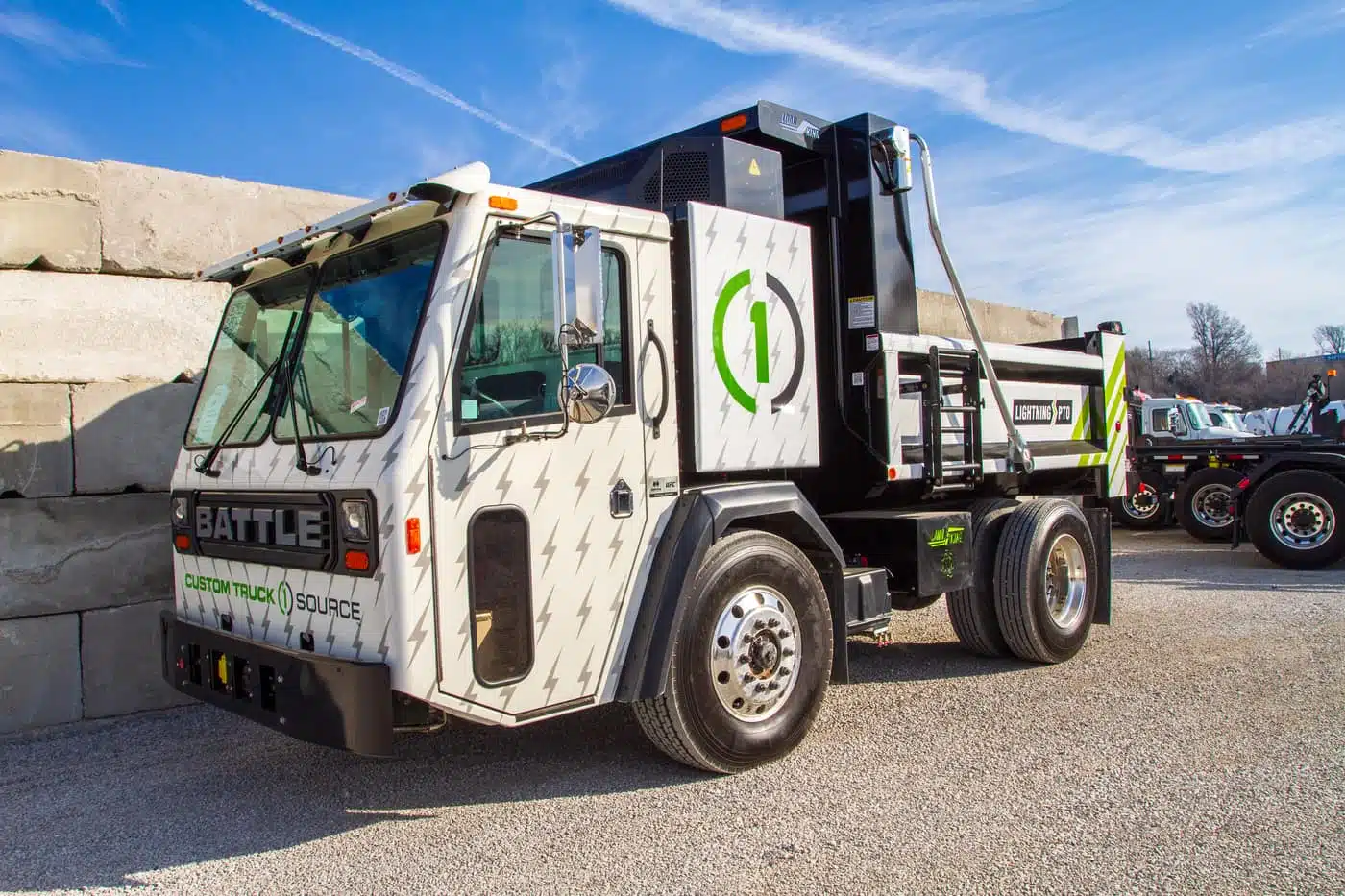
Custom Truck One Source Modernizes Reporting with Power BI & Azure

CTOS Migration

Equipment & Fleet · Kansas City, USA

Data Engineering / ERP migration

  • Unified schema
  • Zero-downtime cutover
  • Validated data integrity
  • One platform post-migration

Before vs. After

Before

  • Multiple disconnected ERPs
  • Incompatible structures
  • Migration risk

After

  • One unified schema
  • Zero downtime
  • 100% validated data integrity

Solutions used:

ETL Pipelines
Data Validation & Reconciliation
Walmart Labs Canada AdTech Platform Modernization using Google Cloud and Power BI

Walmart Labs

Retail · Canada · AdTech & digital marketing

Data Engineering

  • Single customer view: Join online and in-store signals into one profile
  • Audience engine: Rule-based segment generation for every campaign
  • Live insight: Behaviour and campaign performance in real time
  • Close the loop: Tracking and retargeting that recover lost carts

Before vs. After

Before

  • Multiple systems with disjointed customer data
  • No audience targeting for campaigns
  • No behavioural visibility or cart tracking

After

  • Unified customer data across online & in-store
  • Rule-based audience generation engine
  • Real-time Power BI insight and retargeting

Solutions used:
Power BI Embedded
Google Cloud Platform
React App
Custom Truck One Source ERP Data Migration and Integration with ETL Pipelines

CTOS Reporting

Equipment & Fleet · Kansas City, USA

Data Engineering

  • One source of truth
  • Real-time visibility
  • Automated ingestion
  • Trustworthy numbers

Before vs. After

Before

  • 15-day manual reporting
  • Disconnected ERPs
  • Data silos
  • Delayed decisions

After

  • Real-time dashboards
  • Centralized warehouse
  • Automated ingestion
  • Improved reporting accuracy

Solutions used:

Power BI
Azure Data Lake
Azure Data Factory
TD Securities Streamlines Risk Reporting with Hadoop & Spark

TD Securities

Financial Services · Canada · Global trading operations

Data Engineering

  • One risk platform: Consolidate every LOB’s trade data
  • Scale without strain: Absorb billion-record days comfortably
  • Catch risk early: Threshold rules that flag anomalies as they emerge
  • Regulator-ready: A governance-ready reporting architecture

Before vs. After

Before

  • No unified risk reporting platform
  • 1B+ records/day with performance issues
  • No early risk detection, regulatory misalignment

After

  • Centralised risk reporting across all LOBs
  • Scalable Hadoop + Spark intake framework
  • Threshold rule engine, governance-ready reporting

Solutions used:

Hadoop + Spark
Data Engineering
Risk & Compliance
Oakville Enterprises Corporation (OEC)

OEC

Utilities · Ontario, Canada

ERP consulting, integration optimisation

  • One governed ERP: Centralise every business unit on a single platform
  • Utility-grade analytics: Regulatory reporting generated, not assembled
  • Integration health: Optimised, reliable connections across the estate
  • Mobility: Full remote access for field and office teams

Before vs. After

Before

  • Dispersed data across business units
  • Poor ERP governance and performance
  • Manual utility reporting processes
  • Limited remote accessibility

After

  • Centralised ERP with optimised integration
  • Scalable system with improved efficiency
  • Real-time reporting with utility analytics
  • Full mobility and remote access enabled

Solutions used:

Olix365 ERP
Utility Analytics
Integration Optimisation
Professional Warranty Services Corporation (PWSC)

PWSC

Insurance & Warranty · Chantilly, VA, USA

Dynamics 365 CRM implementation, change management

  • One CRM: Sales, warranty and claims unified on Dynamics 365
  • Product agility: A data-driven design that welcomes new products
  • Self-service: Portals for homeowners and builders
  • Defined claims: Structured workflows with SLA tracking

Before vs. After

Before

  • Multiple systems for sales and claims
  • No flexibility to add new products
  • No self-service portal for builders/homeowners
  • Manual and undefined claims processing

After

  • Centralised Dynamics 365 CRM
  • Flexible, data-driven architecture
  • Self-serve portals for reduced support load
  • Structured claims workflows with SLA tracking

Solutions used:

Dynamics 365
Custom CRM Configuration
Self-Service Portals

Professional Services

Professional services · Client name withheld

Business Applications (Project Operations)

  • One project thread: Quote, plan, staff, deliver and bill on one record
  • Margin in flight: Profitability visible while work is underway
  • Bill everything earned: Approved time flowing straight to invoices
  • Utilisation truth: Bench and burnout visible before they bite

Before vs. After

Before

  • Four disconnected tools
  • Margin discovered after the fact
  • Unbilled time leaking away
  • Utilisation unknown

After

  • One record from quote to cash
  • Live in-flight margin
  • Billing from approved time
  • Utilisation visible weekly

Solutions used:

Project Operations
Dynamics 365
Power BI

Healthcare

Healthcare · Client name withheld

CRM & accelerator implementation

  • One patient view: Every interaction, appointment and referral in one record
  • Fewer empty chairs: Automated multi-channel reminders and confirmations
  • Referrals that arrive: End-to-end tracking with owners and status
  • Coordinated care: Departments working from the same relationship record

Before vs. After

Before

  • Engagement scattered across tools
  • Manual reminders, high no-shows
  • Referrals by fax and memory
  • No single view of the patient

After

  • One coordinated patient record
  • Automated multi-channel reminders
  • Referrals tracked end to end
  • Care teams on the same page

Solutions used:

PulseNet365
Dynamics 365
Power Automate
Mining industry digital transformation with Microsoft Dynamics 365, Azure, and Power BI solutions by Alphavima

Construction

Construction · Client name withheld

Business Applications (job costing & field)

  • Daily job truth: Committed and actual costs current every day
  • Paid-for changes: Every change order priced and approved first
  • Connected sites: Crews reporting from the field in real time
  • Early warnings: Jobs trending red flagged while it matters

Before vs. After

Before

  • Costs assembled weekly from paper
  • Change orders priced after the work
  • Field crews disconnected
  • Profit known at completion

After

  • Daily committed and actual costs
  • Changes approved before execution
  • Sites reporting in real time
  • Red flags raised mid-project

Solutions used:
Business Central
Field Service
Power Apps
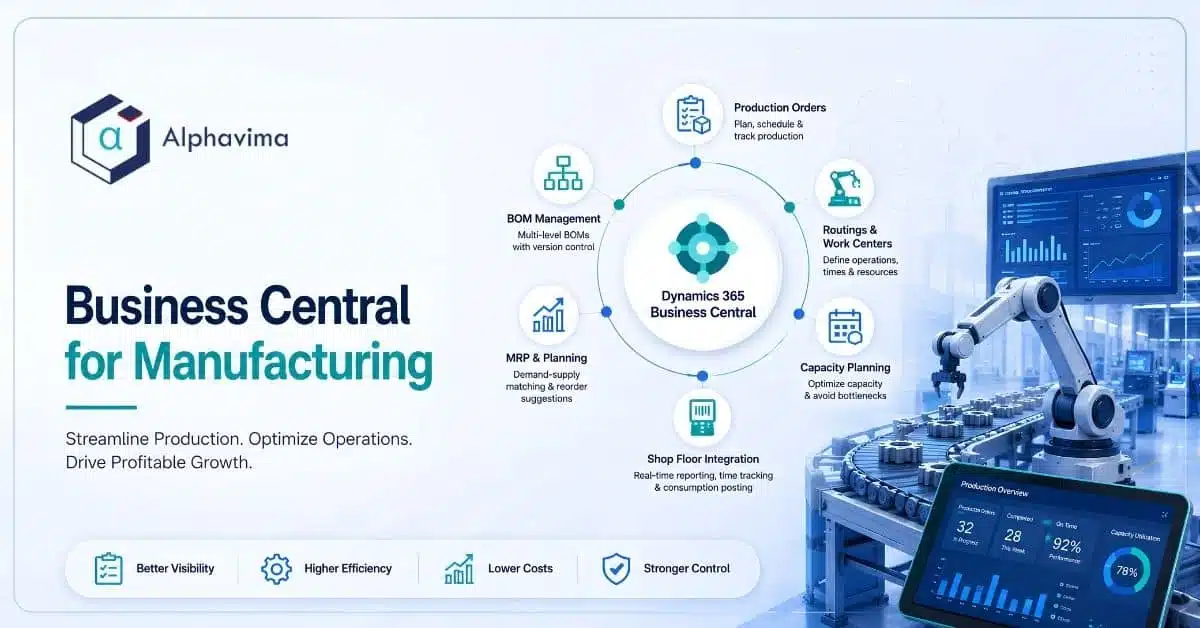
Dynamics 365 Business Central manufacturing implementation banner illustrating production orders, bills of materials, MRP planning, capacity planning, shop floor integration, and manufacturing ERP workflows.

Food & Beverage

Food & beverage manufacturing · Client name withheld

ERP consulting (Business Central)

  • Trace in minutes: Forward and backward lot tracing on demand
  • True batch economics: Yields and costs captured per batch
  • Always audit-ready: Compliance evidence as a by-product of work
  • Right stock, fresh stock: Expiry-aware inventory and planning

Before vs. After

Before

  • Paper batch records
  • Recalls traced through binders for days
  • Costs known long after production
  • Audit prep as an emergency

After

  • Governed recipes and lot control
  • Full trace in minutes, both directions
  • Batch-true yields and costing
  • Audit evidence on demand

Solutions used:

Business Central
Lot Traceability
Power BI
Retail industry digital transformation using Microsoft Dynamics 365, Azure, and Power BI analytics by Alphavima

Distribution

Wholesale distribution · Client name withheld

ERP consulting (Business Central)

  • Count it once: Barcode-driven accuracy across every warehouse
  • Touchless orders: EDI and portal orders straight into the system
  • Promise with confidence: Real available-to-promise on every line
  • Know the margin: Profitability by customer, SKU and lane

Before vs. After

Before

  • Manual order entry and re-keying
  • Paper picking, untrusted counts
  • Promises made on guesswork
  • Margin blurred by freight and rebates

After

  • Touchless EDI and portal order flow
  • Barcode accuracy at 99%+
  • Real available-to-promise
  • Live margin by customer and SKU

Solutions used:

Business Central
Warehouse Management
EDI
Manufacturing industry digital transformation using Microsoft Dynamics 365, Azure, Power BI, and AI analytics by Alphavima

Manufacturing

Discrete manufacturing · North America · Client name withheld

ERP consulting (Business Central)

  • One system to run on: Finance, inventory and production on a single platform
  • Shop-floor truth: Work-order status captured where the work happens
  • Reliable planning: MRP driven by inventory numbers people trust
  • Cost clarity: Real production costs, not standard-cost folklore

Before vs. After

Before

  • Aging ERP covering finance only
  • Paper travellers and manual tracking
  • Inventory drifted from reality
  • Planning from stale spreadsheets

After

  • One platform from ledger to work centre
  • Digital capture at the point of work
  • Inventory accuracy people trust
  • MRP planning from live demand and stock

Solutions used:

Business Central
Power Apps
Power BI
Brigham Young University ERP and Inventory Modernization with PREXA365 and Workday Integration

BYU

Higher education · Provo, Utah, USA

ERP modernisation, rental & inventory management

  • Fill the gaps: Inventory and rental capability Workday lacks
  • Track everything: Every asset visible, campus-wide
  • Stay integrated: Real-time sync with Workday, not batch files
  • One view: Centralised reporting across departments

Before vs. After

Before

  • Legacy PeopleSoft with limited functionality
  • Critical Workday gaps for inventory & rental
  • No asset tracking or consolidated visibility
  • Disconnected financial/procurement systems

After

  • Modern campus-wide PREXA365 inventory & rental
  • Real-time integration with Workday
  • Asset tracking and centralised reporting
  • Unified, scalable solution across departments

Solutions used:
PREXA365
Workday Integration
Asset & Inventory

What Our Clients Say

Be inspired by our clients’ journeys as we overcome challenges and achieve success together.

Brigham Young University

IT Operations Manager

Brigham Young University improved campus-wide inventory and rental tracking using PREXA365 integrated with Workday.

Holly Evans

Patient Support Officer, PC Project

“With GiveLife365, we have an integrated CRM to organize and connect with our patients, caregivers, physicians, researchers, industry partners and other contacts.”

Alltura Machinery Manufacturing

Lift equipments Operator

Alltura is a machinery manufacturing, used PREXA365 to manage lift equipment rentals, track assets, and handle rental operations with better control and accuracy.

Shan Abbasi

Manager, Community Engagement, Volunteer MBC

We believe that we’re now one of the leaders in the industry in providing critical information to clients. This helps us to win new business and enhance our service to existing clients.

Chad Jones

Managing Partner | SME | Integrator, Caprock Rentals, USA

“Caprock made a game-changing decision by partnering with Prexa365. With Prexa365’s support and guidance, we now offer unmatched service and efficiency.”

Anick Silencieux

Executive Director, SBC

“GiveLife365 gives us peace of mind to scale operations by helping customize, centralize, and automate daily, weekly or monthly tasks.”

Joe Alcock

CFO & COO of PWSC, Chantilly, VA

"Alphavima didn’t just deliver solutions - they became our trusted partner, asking the right questions, offering actionable insights, and managing our project flawlessly."

LBD Construction Group

Operations Manager

LBD Construction Group improved equipment rental invoicing and asset tracking using PREXA365.

Daniel Ishikawa

CEO, Lyght Living

Lyght Living improved furniture rental operations using PREXA365 for inventory and order management.

Pascale Décosse Léger

Communication Director, SBC

“GiveLife365 has allowed our organization to bring all aspects of contact and volunteer management to one platform and connect to our referral database. The customizable Power BI dashboards and comprehensive reports are what set it apart.”