












In a world where data drives every strategic decision, organizations need more than just isolated tools-they need a unified data platform. Traditionally, businesses have relied on two separate systems:
> Data Warehouses for tracking business performance
> Data Lakes for capturing operational insights and exploring the unknown
While both are essential, they often operate in silos, leading to conflicting reports and inefficiencies. This is where Azure Synapse Analytics delivers game-changing value-bringing data together for a single version of the truth.
What Is Azure Synapse Analytics?
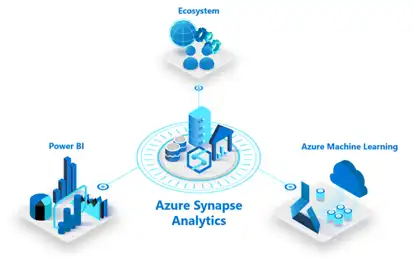
Azure Synapse Analytics is Microsoft’s integrated cloud platform that combines enterprise data warehousing and big data analytics in a single, streamlined solution. It breaks down data silos by enabling ingestion, preparation, management, and analysis from one unified interface.
By connecting with Power BI and Azure Machine Learning, Synapse empowers users to derive insights faster, collaborate across departments, and deploy AI at scale.
Key Features of Azure Synapse Analytics
1. Scalability at Its Core
Built on Azure’s serverless architecture, Synapse handles queries across petabyte-scale data-structured or unstructured. It supports both SQL and Spark, enabling teams to query any data using familiar tools without managing infrastructure.
2. Unified Analytics Workspace
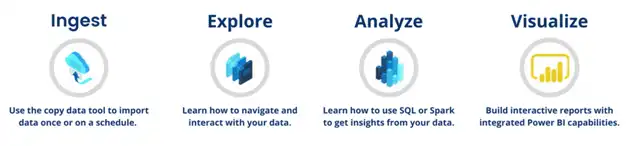
With Azure Synapse Studio, all stakeholders-engineers, analysts, and data scientists-can work within a shared, code-free workspace. Users can:
> Build data pipelines using Azure Data Factory
> Develop and train models in notebooks
> Create dashboards with Power BI
This collaboration eliminates handoff delays and improves time-to-insight.
3. Intelligent Integration with Power BI and Azure ML
Deep integration with Power BI and Azure ML allows users to not only explore and visualize their data but also enhance it with predictive analytics. It supports full-cycle machine learning within a single ecosystem.
4. Enterprise-Grade Security
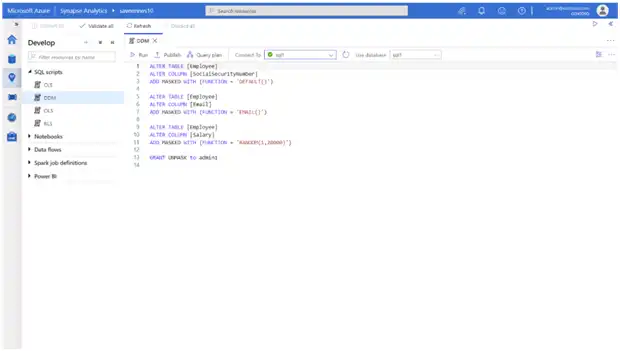
Azure leads in security and compliance. With always-on encryption, fine-grained access control, and compliance certifications, Synapse ensures your data remains protected both at rest and in transit.
Who Benefits from Azure Synapse Analytics?
> Data Engineers: Build scalable pipelines without coding
> Data Scientists: Use integrated notebooks for advanced modeling
> Business Analysts: Create real-time dashboards from a single source of data
IT Leaders: Deliver secure, compliant, and agile infrastructure
As Gartner highlights in its top trends in data and analytics, the shift toward integrated platforms like Azure Synapse Analytics is transforming how organizations derive value from data.
Conclusion: A True Data Transformation Catalyst
Azure Synapse Analytics is more than just a tool-it’s a strategic enabler. It empowers organizations to bridge the gap between operational insights and executive decision-making. By unifying your data environment, it unlocks a future of agility, scalability, and innovation.
Looking to make better use of your data with Azure Synapse?
Combine data integration, analytics, and reporting in one secure Microsoft platform – guided by Alphavima’s experts.
FAQs
What Is Azure Synapse Analytics and How Does It Work?
Azure Synapse Analytics is Microsoft's unified analytics platform that combines data integration, enterprise data warehousing, and big data analytics. It brings together SQL-based data warehousing, Apache Spark processing, and data pipeline orchestration into one service. Teams use it to ingest data from multiple sources, transform it at scale, and serve it to reporting tools. Azure Synapse Analytics connects natively with Power BI, Azure Machine Learning, and Purview. This gives data engineers and analysts a single workspace instead of juggling separate tools. Furthermore, it supports both serverless and dedicated resource models so organizations can start small and scale up. Alphavima's data platform specialists in Toronto design Synapse environments that match your team's skill set and workload needs.
What Types of Data Sources Can You Connect to Azure Synapse?
Azure Synapse connects to a wide variety of data sources through its built-in integration pipelines. It ingests data from Azure Data Lake Storage, Azure Blob Storage, and Azure SQL Database natively. Synapse also connects to on-premises databases using the self-hosted integration runtime. Third-party sources such as Salesforce, SAP, and REST APIs are supported through hundreds of built-in connectors. Additionally, streaming data from Azure Event Hubs and IoT Hub flows directly into Synapse pipelines. The Link feature connects Synapse to Dataverse, Dynamics 365, and Cosmos DB without data movement. This breadth of connectivity makes Synapse a central hub for enterprise data estates. Each connector uses a managed or self-hosted runtime depending on where the source data resides.
How Does Azure Synapse Analytics Handle Large-Scale Data Processing?
Azure Synapse Analytics handles large-scale processing through two main compute engines. The dedicated SQL pool provides high-performance warehousing for structured, query-intensive workloads. The serverless SQL pool lets analysts query data directly in the lake without provisioning resources. Apache Spark pools handle unstructured and semi-structured data transformation at petabyte scale. Synapse intelligently routes workloads to the appropriate engine based on query type and data format. Teams can use T-SQL, Python, Scala, or Spark SQL depending on their skills. Furthermore, automatic pause and resume on dedicated pools controls costs during idle periods. Azure Synapse Analytics scales horizontally to process billions of rows in minutes. This makes it suitable for organizations with growing data volumes and complex transformation requirements.
How Does Azure Synapse Analytics Integrate with Power BI?
Azure Synapse Analytics integrates directly with Power BI through the Synapse workspace interface. Analysts create Power BI datasets from Synapse SQL views or Spark tables without leaving the workspace. The DirectQuery mode connects Power BI dashboards to Synapse pools for real-time data refresh. Import mode brings a snapshot of Synapse data into Power BI for faster dashboard performance. Synapse Link for Power BI eliminates the need for manual export and refresh pipelines. Data engineers publish certified datasets from Synapse so report authors always use governed data. Additionally, row-level security defined in Synapse SQL passes through to Power BI automatically. Our Power Platform integration team in Toronto configures end-to-end pipelines from raw data to published Power BI reports.
What Security and Governance Features Does Azure Synapse Offer?
Azure Synapse Analytics provides enterprise-grade security across every layer of the platform. Managed virtual networks isolate Synapse workspaces from public internet traffic. Private endpoints restrict access to storage accounts and other linked services. Column-level and row-level security in dedicated SQL pools restricts data access by user role. Azure Active Directory integration enforces identity-based access control across all Synapse components. Data masking policies hide sensitive columns from users who lack permission to see full values. Additionally, Microsoft Purview connects to Synapse to classify and catalog sensitive data automatically. All data at rest uses Azure Storage encryption by default. Audit logs capture every query and pipeline run for compliance and forensic review purposes. These controls help organizations meet GDPR, HIPAA, and SOC 2 compliance requirements.
How Does Azure Synapse Compare to Traditional Data Warehouses?
Traditional data warehouses require separate tools for ingestion, storage, transformation, and reporting. Azure Synapse Analytics consolidates all of these functions into one governed workspace. On-premises warehouses use fixed hardware that limits scale and creates procurement delays. Synapse scales compute and storage independently based on workload demand. Traditional ETL tools require separate licensing and skill sets outside the warehouse platform. Synapse pipelines handle ETL natively using a drag-and-drop canvas that data engineers already know. Furthermore, traditional warehouses struggle with semi-structured data like JSON or Parquet files. Synapse processes both structured and unstructured data without schema-on-write constraints. The total cost of ownership for Synapse is typically lower because you pay only for what you use. Organizations that migrate to Synapse eliminate infrastructure maintenance overhead entirely.
How Does Alphavima Help You Implement Azure Synapse Analytics?
Alphavima delivers Azure Synapse Analytics implementations through a structured consulting and delivery process. We begin by assessing your current data sources, team skills, and reporting requirements. Then we design a Synapse architecture that fits your workload patterns and budget. Our engineers build the ingestion pipelines, transformation logic, and data models you need. We configure security, governance, and monitoring from day one. Every engagement includes knowledge transfer so your team understands and can extend the solution. We also connect Synapse to your existing Power BI environment for immediate reporting value. Review the official Microsoft Azure Synapse Analytics documentation to explore all platform capabilities. Alphavima reduces time to value by combining technical delivery with hands-on enablement for your data team.
What Are Common Use Cases for Azure Synapse Analytics in Business?
Organizations across industries use Azure Synapse Analytics to solve a wide range of data challenges. Financial services firms use it for fraud detection models that process transaction data in real time. Retail organizations build demand forecasting pipelines that combine sales history with weather and event data. Healthcare providers unify clinical and operational data for population health management dashboards. Manufacturing companies track production quality metrics by connecting sensor data from factory floors. Nonprofit organizations use Azure Synapse Analytics to consolidate program and donor data for impact reporting. Nonprofit organizations in Toronto leverage Synapse to create unified views of funding, programs, and outcomes. Every industry generates more data than traditional tools can handle — Synapse solves this at enterprise scale.