












Microsoft Fabric has quickly become the central nervous system for enterprise data. With Copilot AI in Microsoft Fabric, teams can accelerate analytics, reporting, and decision-making without relying on complex code. From a Dynamics 365 sales manager to a supply chain analyst, anyone can ask questions in plain English, generate dashboards instantly, and access real-time insights across the Microsoft ecosystem.
This blog explores the latest updates to Copilot AI in Microsoft Fabric (as of September 2025), its integration with Dynamics 365, and how organizations can use it to improve data work.
Talk to a Microsoft Fabric consultant
Book a quick call to talk through your Microsoft Fabric project. No pressure, just practical advice. Or see our Microsoft Fabric services.
What Is Copilot AI in Microsoft Fabric?
At its core, Copilot AI in Microsoft Fabric is a generative AI assistant embedded across Fabric workloads. Powered by Microsoft’s Azure OpenAI service (now on GPT-5), Copilot understands business context, reads metadata and schemas, and delivers answers, queries, or visualizations directly inside your workspace.
What it can do:
Interpret plain-language prompts (“Show me top customers by revenue last quarter”).
Generate SQL, DAX, and KQL queries.
Build and fix data pipelines.
Summarize performance logs, dataflows, and errors.
Suggest visuals in Power BI and even explain DAX formulas.
Create dashboards from real-time data streams. If you’re setting up the underlying storage layer these Copilot features query, see our step-by-step guide to building a Microsoft Fabric lakehouse.
Unlike generic AI assistants, Copilot in Microsoft Fabric is context-aware: it only works with the data you’re authorized to access, and it adapts to the workload you’re in – Data Factory, Lakehouse, Dataflows, Power BI, Real-Time Intelligence, or Notebooks.
Why Copilot AI in Microsoft Fabric Matters for Dynamics 365 Users
If your organization runs on Dynamics 365, you know the challenge: data is everywhere – CRM interactions, ERP transactions, IoT telemetry, supply chain updates. Copilot AI in Microsoft Fabric makes sense of it all, bringing analytics closer to business processes.
Example use cases:
Sales & Service: “Show me customer churn trends by region.”
Finance: “Summarize monthly cash flow anomalies.”
Supply Chain: “Highlight delayed shipments by vendor.”
Manufacturing: “Flag machines with frequent downtime.”
Copilot queries Fabric’s unified data (via OneLake, warehouses, or lakehouses) and generates insights that can be embedded directly back into Dynamics 365 dashboards or Power Apps.
Integration Highlights: Dynamics 365 + Fabric + Copilot
| Dynamics 365 Area | Fabric Capability | Copilot Outcome |
|---|---|---|
| Finance & Operations | Unified ledger + Power BI | Forecast adjustments, anomaly detection |
| Supply Chain | ERP + IoT/sensor data | Stock level optimization, shipment alerts |
| Sales & Customer Service | CRM + sentiment analytics | Churn risk detection, lead prioritization |
| Manufacturing | MES + telemetry | Predictive maintenance, downtime alerts |
What’s New in Copilot AI for Fabric (September 2025)
| Workload | Copilot Features | Status |
|---|---|---|
| Data Science & Engineering | Chat panel, code generation, error fixing, data visualization | Preview |
| Data Agent | Create Fabric data agents; connect to Copilot Studio | Preview |
| AI Functions | Enrich data with AI-driven transformations | Preview |
| Dataflows Gen2 | Generate queries, build custom columns | GA |
| Data Pipelines | Build, run, and summarize pipelines | GA |
| SQL Queries (Warehouse & DB) | Generate, fix, explain SQL | Preview |
| Power BI | Suggest visuals, explain reports, write DAX queries | GA |
| Real-Time Dashboards | Create dashboards from KQL/live streams | Preview |
| Licensing Update | Copilot now included with all paid SKUs (F2+) | Live |
September 2025 highlight: Copilot in Power BI is now turned on by default for most tenants, giving business users immediate access to generative AI without extra setup. Learn more about release status of AI and Copilot experiences in Fabric.
Copilot Across Fabric Workloads
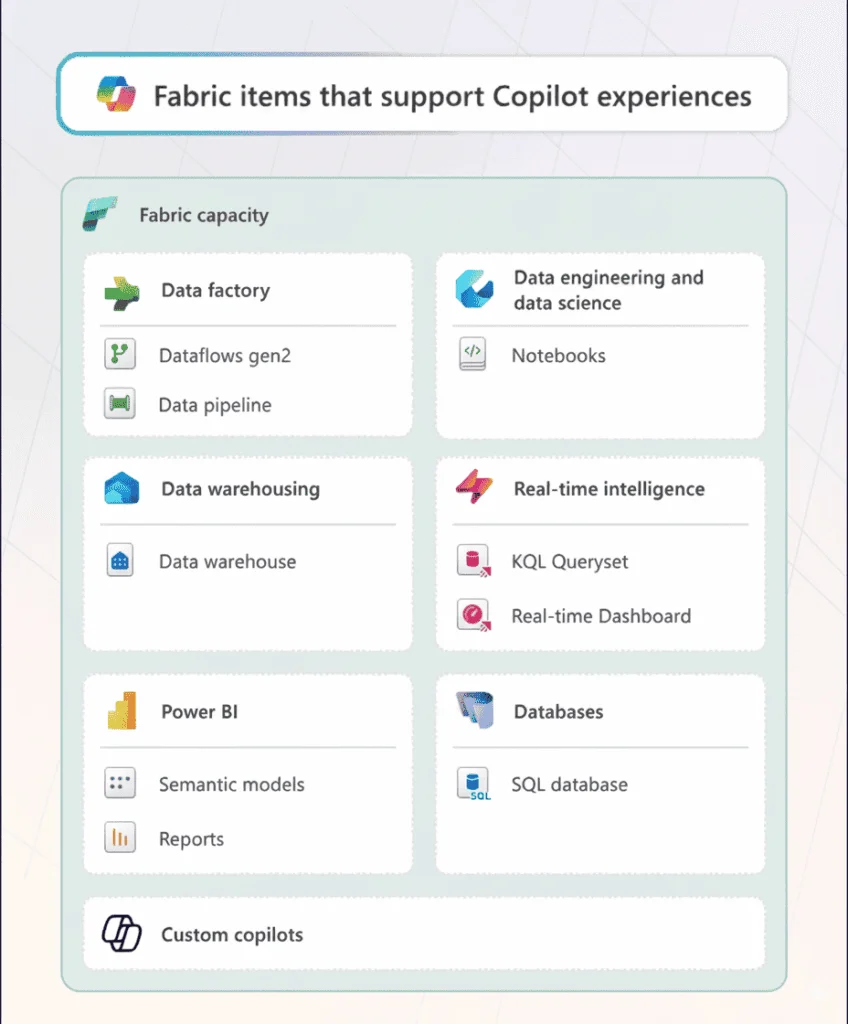
1. Data Factory: Pipelines in Plain English
Build a new pipeline with a single prompt.
Automate transformation steps like cleaning, joins, and feature engineering.
Debug errors – Copilot explains messages and suggests fixes.
Screenshot suggestion: Copilot summarizing a pipeline and offering fixes in Data Factory.
2. Dataflows Gen2: Smarter Business Logic
Generate queries automatically.
Add calculated columns by describing logic (“Add a 10% discount if total > 2000 and category = B”).
Explain queries for easier onboarding.
3. Notebooks: Code Generation for Data Science
Ask for Spark or Python code directly.
Generate ML workflows (e.g., “Build a logistic regression model for churn”).
Explain existing code blocks for learning and collaboration.
4. Lakehouse & Data Warehouse: SQL Simplified
Natural language to SQL queries.
Inline fixes and auto-joins.
Explanations for complex queries.
Example: “Show me top 5 products by sales last quarter” → Copilot writes optimized SQL with joins.
5. Power BI: Faster DAX, Richer Models
Generate DAX measures in plain English.
Suggest model relationships.
Explain and optimize existing measures.
Build semantic models from business descriptions.
6. Real-Time Analytics: Streaming Made Easy
Convert prompts into KQL queries.
Correlate anomalies in IoT or login events.
Recommend visualizations for streaming data.
Screenshot suggestion: Copilot generating a live dashboard from telemetry.
Real-Time Dashboard Creation with Copilot
One of the most powerful features for Dynamics 365 users is real-time dashboards. With Copilot in Real-Time Intelligence:
Select a live data stream (e.g., IoT from manufacturing, customer service queues).
Ask Copilot to create a dashboard.
Copilot builds:
Insights page: Key KPIs.
Data profile: Structure and statistics.
Visuals: Charts ready for action.
This bridges Fabric with Dynamics 365 operations, giving decision-makers dashboards that update continuously.
Real-World Outcomes: Copilot in Action
Vodafone: Rolled Copilot out to 68,000 employees, saving ~3 hours per user weekly.
Finastra: Reduced campaign analysis cycles from 3 months to <1.
Access Holdings: Cut ETL coding from 8 hours to 2.
Milpark Education: Reduced student support resolution time by 50%.
These stories show Copilot’s impact on efficiency and decision-making, not just technical convenience.
Responsible AI and Governance
Copilot AI in Microsoft Fabric is built with trust by design:
Only works with data you have access to.
Does not use customer data to retrain models.
Region-locked processing and audit logs for compliance.
Admin controls via Microsoft Purview for governance and data protection.
Best Practices for Getting Started
Check Licensing: Requires Fabric paid SKUs (F2+ or P1).
Enable Copilot: Switch it on in the Fabric Admin Portal.
Start Small: Use one business unit or process as a pilot.
Train Users: Teach effective prompting.
Monitor ROI: Track time saved, error rates, and adoption rates.
Final Thoughts
Copilot AI in Microsoft Fabric is not just a helper – it’s becoming a standard part of the Microsoft data stack. For Dynamics 365 organizations, it bridges CRM/ERP data with Fabric’s analytics power. Whether it’s forecasting revenue, optimizing supply chains, or building real-time service dashboards, Copilot gives teams faster insights and frees them from manual work.
If you’re ready to improve your Dynamics 365 analytics journey, now is the right time to explore Copilot AI in Microsoft Fabric.
FAQs
Ready to bring AI-driven insights into your data workflows?
Use Copilot AI in Microsoft Fabric to analyze data faster and make better decisions across your organization.
Related case study
CTOS Unifies Reporting & Data Warehouse with Power BI
Custom Truck One Source replaced 15 days of manual reporting with automated, real-time Power BI dashboards across multiple ERPs.
Read the case study · Next read: Microsoft Fabric pricing in 2026
What Is Copilot AI in Microsoft Fabric?
Copilot AI in Microsoft Fabric brings natural language interaction to every workload in the unified analytics platform. Data engineers, analysts, and business users describe what they want, and the assistant generates SQL, DAX, KQL, and PySpark code automatically. No installation or separate tool download is needed — the assistant lives directly inside every Fabric workload. Teams gain immediate productivity because the assistant handles mechanical coding tasks, freeing everyone to focus on analysis and decisions. The assistant reads your schema and data model context so every suggestion fits your actual environment rather than a generic template.
How Are SQL and DAX Queries Generated Automatically?
Open the SQL query editor or the Power BI report builder and the assistant panel appears immediately. Describe what you want — for example, show monthly revenue by region for the last two years — and the assistant writes the correct query syntax, explains every step, and lets you run or adjust it right away. Business users draft initial queries themselves, which reduces reliance on engineering support for routine data requests. When a query contains syntax errors, the assistant flags them and suggests fixes. For large datasets, the assistant also recommends performance optimizations that help analysts get faster results without manual tuning.
Do I Need Extra Licensing for Copilot AI in Microsoft Fabric?
Accessing Copilot AI features in Fabric requires a capacity license at the F64 tier or higher, or a Power BI Premium Per User license. Teams running F2 or F4 SKUs must upgrade their capacity before enabling the assistant. Some tenants with an existing enterprise productivity suite may already have overlapping features available. Check the current documentation for exact requirements because Microsoft revises capacity thresholds periodically. Most enterprise deployments recover the investment within the first quarter from the productivity gains the assistant delivers across every team using the platform.
Which Analytics Workloads Support Natural Language Queries?
Natural language capabilities extend across most major workloads in the platform today. Power BI users write DAX measures and build report pages by describing what they need in plain text. Data Factory users design pipeline transformation logic without manual drag-and-drop configuration. Lakehouse and Warehouse workloads let engineers generate SQL and PySpark code on demand. Real-Time Intelligence workloads convert plain language descriptions into KQL for streaming data scenarios. Every quarterly platform release expands coverage further, bringing natural language interaction to additional workloads and making analytics accessible for all skill levels.
How Do Data Pipelines Get Built Without Manual Coding?
Describe the transformation you need and the assistant builds the corresponding pipeline activities automatically. Entering plain language like join customer orders with the product catalog and filter for orders above five hundred dollars generates the correct steps without requiring deep engineering knowledge. Less experienced engineers learn best practices by reading the generated logic before running it. The assistant catches potential data quality problems during design, so teams fix issues before they reach production. Teams across industries report cutting routine pipeline creation time significantly, redirecting that capacity toward more complex integration work.
Can Copilot AI in Microsoft Fabric Assist with Real-Time Analytics?
Yes — Real-Time Intelligence in the platform handles streaming data from IoT sensors, web applications, and operational systems. Describe the query you need and the assistant writes valid KQL code instantly. Operations analysts and security engineers who previously lacked KQL expertise can now query live event streams through plain language alone. For real-time Power BI dashboards that refresh on every new streaming event, just describe the metrics you want to track and the assistant assembles the layout automatically. Teams configure entire streaming pipelines using plain language rather than hand-coding every transformation step from scratch.
Does This Platform Work with Dynamics 365 Applications?
Yes — Dynamics 365 link copies business application records into the analytics environment in near real time. Once sales, service, or finance data from Dynamics 365 lands in the platform, the assistant analyzes it alongside data from Azure SQL, SharePoint, or any external API. Asking for a churn risk report or a combined revenue and market trend analysis produces results from the merged data immediately. Organizations running Dynamics 365 gain a deeper analytics layer without standing up a separate data warehouse or writing custom ETL code to move records between systems. The integration supports real-time decision-making at every level of the business.
What Protections Exist for Business Data and Prompts?
Every existing security control in the platform applies to the assistant without exception. Row-level security in Power BI, workspace permissions, and data sensitivity labels all govern what the assistant can see and what it returns. Microsoft processes prompts and responses within a compliant cloud boundary and never uses them to train foundation models. Financial services firms, healthcare organizations, and government agencies already rely on the assistant with confidence that data governance requirements stay fully enforced. Enterprise customers who need formal audit evidence will find detailed compliance documentation covering the assistant's security and data handling practices.
How Does Copilot AI in Microsoft Fabric Help Your Organization?
Analytics delivery accelerates when teams stop waiting for engineers to write every query and report from scratch. Non-technical stakeholders explore data independently, and the engineering backlog for ad hoc requests shrinks week over week. Whether a team starts fresh with the platform or builds on an existing investment, the AI capabilities grow with data maturity and organizational scale. Power Apps developers in Toronto at Alphavima configure and deploy the Fabric platform for maximum business impact. Our Microsoft Copilot Studio specialists design the implementation roadmap from day one. We also help nonprofits find the right CRM solution in Toronto. Read the Microsoft Fabric documentation for the latest feature details.