











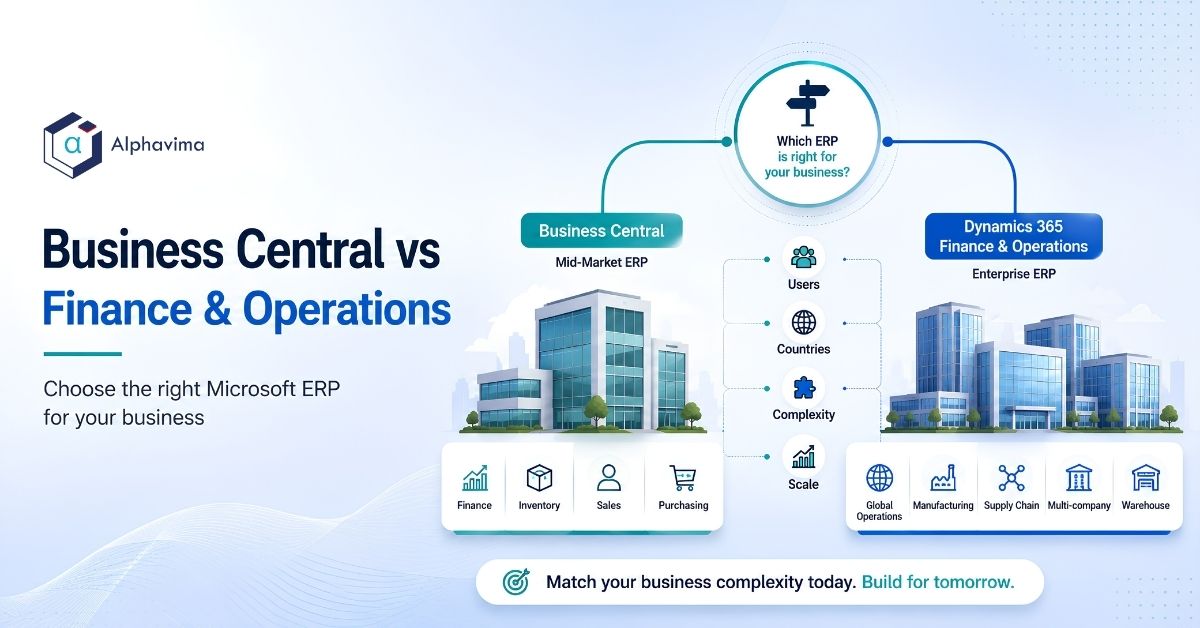
The Business Central vs Finance and Operations answer: choose Dynamics 365 Business Central if you are a single-country or few-country business under roughly 300 users with standard finance, distribution or light manufacturing needs.
Choose Dynamics 365 Finance & Operations if you run complex global operations: many legal entities, deep production scheduling, advanced warehouse automation, or statutory compliance across numerous countries. Most companies asking the question need Business Central.
That last sentence is the one partners avoid saying, because Finance & Operations is a larger sale. It is still true.
Executive summary
- Business Central is Microsoft’s mid-market ERP. Finance & Operations (now sold as Dynamics 365 Finance and Dynamics 365 Supply Chain Management) is Microsoft’s enterprise ERP. They are not two versions of the same product. They are different code bases, different implementation models and different cost structures.
- The decision is rarely about size. It is about process depth and geographic complexity.
- The most common buying error is over-purchasing out of fear: choosing F&O because “we might outgrow Business Central.” Business Central handles more volume than most buyers assume.
- Five-year total cost of ownership, not licence cost, is the number that matters. The gap is wider than the per-user price suggests.
- The two-tier model (F&O at corporate, Business Central at subsidiaries) is legitimate, common and frequently the correct answer for growing groups.
- An AppSource accelerator on Business Central sometimes removes the very requirement that was pushing a buyer toward F&O.
Table of contents
Talk to a Business Central consultant
Book a quick call to talk through your Business Central project. No pressure, just practical advice. Or see our Business Central services.
Business Central vs Finance and Operations: what each product actually is
Dynamics 365 Business Central is a cloud ERP for small and mid-sized organisations. It descends from Dynamics NAV. It covers financials, sales, purchasing, inventory, projects, service and light manufacturing. It is configured rather than engineered, extended with AL extensions, and typically implemented in 8 to 20 weeks.
Dynamics 365 Finance & Operations is Microsoft’s enterprise ERP, descended from Dynamics AX. Microsoft now sells it as separate applications, principally Dynamics 365 Finance and Dynamics 365 Supply Chain Management, though the market still calls the combined platform “F&O” or “FinOps”.
It is built for large, complex, multi-country organisations and is typically implemented in 9 to 24 months.
Both run on Azure. Both connect to Power Platform, Power BI, Dataverse and Microsoft Fabric. Both have Copilot capabilities. The Microsoft ecosystem story is the same for either. That is not a differentiator, so ignore any partner who leads with it.
The real difference is depth versus deployability. Finance & Operations can model almost any process, at the cost of a longer, heavier, more expensive project. Business Central models most mid-market processes well, quickly, and cheaply. You are choosing where on that curve you belong.
Business Central vs F&O: the eight-question decision framework
Score one point for each “yes”. This is the framework Alphavima uses in scoping conversations.
| # | Question | Yes = point toward F&O |
|---|---|---|
| 1 | Do you operate more than 8 legal entities, or expect to within 24 months? | 1 |
| 2 | Do you operate in more than 5 countries with distinct statutory reporting requirements? | 1 |
| 3 | Do you need advanced production scheduling (finite capacity, complex routings, multi-site planning)? | 1 |
| 4 | Do you need automated warehouse management (directed picking, wave planning, robotics, RF-driven putaway at scale)? | 1 |
| 5 | Do you process more than roughly 1 million order or transaction lines per year in a single company? | 1 |
| 6 | Do you have more than 300 named ERP users? | 1 |
| 7 | Do you have a dedicated internal ERP team (3 or more people whose full-time job is the ERP)? | 1 |
| 8 | Do you require industry depth Microsoft only ships in F&O (for example, complex retail POS at scale, or heavy asset-intensive manufacturing)? | 1 |
How to read your score:
- 0 to 2 points: Business Central. Confidently. Do not let anyone talk you into F&O.
- 3 to 4 points: Business Central, probably, plus an accelerator or extension. Look hard at whether an AppSource solution closes the gap. Re-score in 12 months.
- 5 points: Genuinely close. Model both. This is where a two-tier design often wins.
- 6 to 8 points: Finance & Operations. You have real enterprise complexity and Business Central will fight you.
Note the weighting is deliberate. Question 7 matters more than most buyers realise. Finance & Operations is not a system you run without internal capability. If you answered “no” to question 7 but “yes” to five others, your first problem is not the ERP.
It is that you do not have the team to operate the ERP you need.
Quantitative thresholds: when Business Central genuinely stops fitting
Competitors will not give you numbers. Here are ours, stated as indicative planning thresholds based on delivery experience, not as Microsoft-published limits.
| Dimension | Comfortable in Business Central | Getting tight | Points to F&O |
|---|---|---|---|
| Named users | Up to ~200 | 200 to 300 | 300+ |
| Legal entities | 1 to 5 | 6 to 8 | 9+ |
| Countries with statutory filing | 1 to 3 | 4 to 5 | 6+ |
| Annual transaction lines (per company) | Under 500,000 | 500,000 to 1M | 1M+ |
| Concurrent warehouse pickers | Under 20 | 20 to 40 | 40+ |
| Production complexity | Assembly, basic routings, MRP | Multi-level BOM, some capacity planning | Finite scheduling, multi-site planning, subcontracting chains |
| Consolidation entities | Up to ~8 with standard consolidation | 8 to 15 | 15+, or complex ownership structures |
| Internal ERP team size | 0 to 1 | 1 to 2 | 3+ |
The important caveat: these are not hard walls. Business Central runs well above several of these numbers with good design. They are the points at which the design work required to stay on Business Central starts to cost more than moving would.
ERP tier selection: feature depth comparison matrix
The useful comparison is not “does it have the feature” (both have general ledger, both have purchase orders). It is how deep the feature goes.
| Capability | Business Central | Finance & Operations | Does the gap matter to you? |
|---|---|---|---|
| General ledger and financials | Full, mid-market grade. Dimensions instead of a rigid segment structure. | Full, enterprise grade. Advanced ledger, multiple ledgers per entity. | Only if you need multiple accounting standards in parallel. |
| Multi-entity consolidation | Standard consolidation, works well to roughly 8 entities. | Deep, with complex ownership, eliminations, multiple hierarchies. | Matters above ~8 entities or with complex ownership. |
| Multi-currency | Yes, including revaluation. | Yes, plus advanced triangulation and reporting currency depth. | Rarely a deciding factor below 5 countries. |
| Global localisation | Available for many countries via Microsoft and partner localisations. | Broader out-of-the-box country coverage. | Matters if you are in 6+ countries. |
| Inventory | Full, including multiple locations and costing methods. | Full, plus advanced dimensions and site/warehouse hierarchies. | Matters at high SKU and site counts. |
| Warehouse management | Basic to advanced put-away and pick, RF-capable via ISVs. | Native advanced WMS: waves, work templates, directed operations. | This is a genuine dividing line. |
| Manufacturing | Assembly, discrete production, basic MRP, capacity. | Discrete, process, lean; finite scheduling; master planning at scale. | The second genuine dividing line. |
| Projects and jobs | Solid job costing and WIP. | Deep project accounting, complex revenue recognition. | Matters for large project-based businesses. |
| Retail / commerce | Via ISV. | Native Dynamics 365 Commerce integration. | Matters for multi-store retail. |
| Reporting | Standard reports plus Power BI. | Same, plus financial reporting depth. | Not a differentiator. Both use Power BI and Microsoft Fabric. |
| Power Platform, Dataverse, Copilot, Azure | Fully supported. | Fully supported. | Not a differentiator. Ignore anyone who claims otherwise. |
| Extensibility model | AL extensions, AppSource ecosystem. | X++ development, broader but heavier. | BC extensions are cheaper and faster to build. |
| Upgrade cadence | Two major updates a year, largely automatic. | Continuous updates, more regression testing required. | BC is materially lighter to keep current. |
Read the “does the gap matter” column carefully. Most of these rows do not apply to most companies. Two of them, warehouse management and manufacturing depth, do most of the actual deciding.
Dynamics 365 Finance vs Business Central cost: licences, implementation and five-year TCO
Licence cost
Business Central is licensed per user per month across two full tiers (Essentials and Premium) plus a low-cost Team Members licence for light users. Microsoft’s published list pricing rose with effect from 1 November 2025, the first Business Central increase in more than five years. Partner-published figures put Essentials near USD $80 per user per month and Premium near USD $110, with Team Members remaining a low-cost licence for light users.
Finance & Operations licences are substantially higher per user, and Microsoft typically applies a minimum seat commitment.
Confirm all current figures against Microsoft’s published pricing. The numbers below are indicative planning ranges, not quotes, and we flag them as such deliberately rather than publishing stale precision.
Five-year total cost of ownership (indicative)
Scenario: a 100-user mid-market business, 3 legal entities, distribution with light manufacturing.
| Cost element | Business Central (CAD) | Finance & Operations (CAD) | Business Central (USD) | Finance & Operations (USD) |
|---|---|---|---|---|
| Licences, 5 years (100 users, blended tier) | $600,000 – $780,000 | $1,300,000 – $1,800,000 | $440,000 – $570,000 | $950,000 – $1,315,000 |
| Implementation | $80,000 – $200,000 | $600,000 – $1,600,000 | $58,000 – $146,000 | $438,000 – $1,168,000 |
| Integrations | $15,000 – $50,000 | $80,000 – $300,000 | $11,000 – $36,000 | $58,000 – $219,000 |
| Annual support and enhancement (5 yrs) | $75,000 – $150,000 | $300,000 – $750,000 | $55,000 – $110,000 | $219,000 – $547,000 |
| Update / regression testing effort (5 yrs) | $25,000 – $60,000 | $150,000 – $400,000 | $18,000 – $44,000 | $110,000 – $292,000 |
| Internal ERP headcount (5 yrs) | $0 – $500,000 (0 to 1 FTE) | $1,000,000 – $2,000,000 (2 to 4 FTE) | $0 – $365,000 | $730,000 – $1,460,000 |
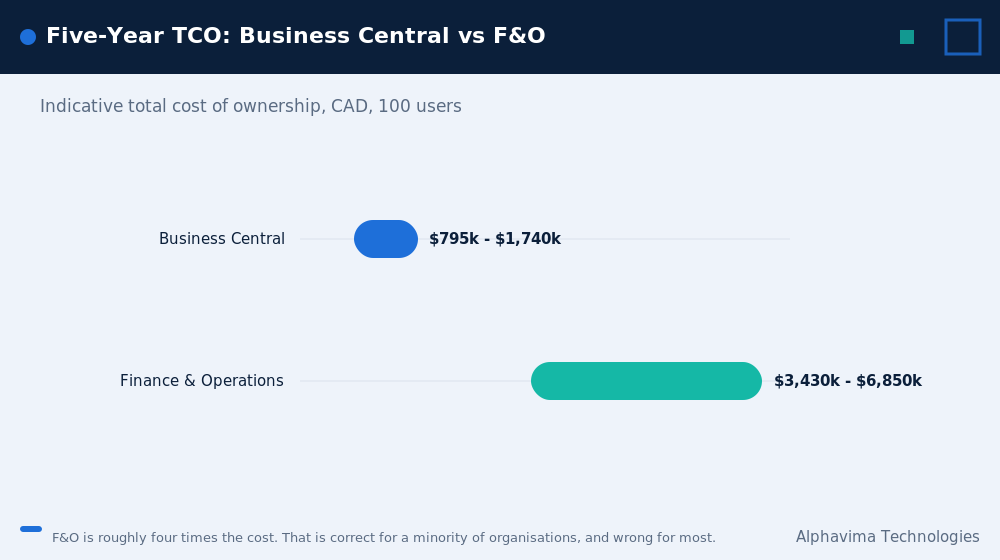
| Indicative 5-year TCO | $795,000 – $1,740,000 | $3,430,000 – $6,850,000 | $582,000 – $1,271,000 | $2,505,000 – $5,001,000 |
Assumptions stated explicitly: North American partner and salary rates; USD converted at roughly 1.37 CAD to 1 USD and rounded; licence figures modelled on historical Microsoft list pricing and are indicative only; internal headcount costed at approximately CAD $125,000 per FTE fully loaded.
Your actual numbers will differ. The point of this table is the ratio, not the absolute values.
The ratio is the finding. Finance & Operations typically costs three to four times Business Central over five years for the same headcount, and the licence line is not where most of the gap comes from.
It comes from implementation, support and internal team. If you choose F&O, choose it because you need the capability, not because the per-user price looked survivable.
Which Dynamics 365 ERP: the two-tier model
This is the option nobody writes about, and it is frequently the right one.
The pattern: Finance & Operations runs at corporate, handling consolidation, group reporting, complex manufacturing and the largest operating entity. Business Central runs at subsidiaries, handling local finance and operations, and feeding the corporate system.
| Aspect | Two-tier approach |
|---|---|
| Best for | Groups with one large complex entity and several smaller, simpler ones. Acquisitive companies. Groups expanding into new countries. |
| Subsidiary rollout time | 6 to 12 weeks per subsidiary on Business Central, versus 6 to 12 months to roll F&O into a small entity |
| Subsidiary licence cost | Materially lower per user |
| Integration | Via Dataverse, Power Platform, or direct API. Financial data consolidates to the corporate ledger. |
| Reporting | Unified in Power BI or Microsoft Fabric across both tiers |
| Risk | Two systems to govern. Requires a clear master data policy and a single chart of accounts standard. |
| When it fails | When the group has no data governance discipline, or when subsidiaries are allowed to diverge on the chart of accounts |
If you are an acquisitive mid-market group, two-tier is often the fastest way to bring an acquisition onto a supported platform. Rolling Business Central into a newly acquired 40-person business takes weeks. Rolling F&O into it takes most of a year, and the acquisition will not wait.
When Business Central vs Finance and Operations has an obvious answer
No partner writes this section, so here it is.
You bought for an aspiration, not a reality. A company plans to triple in three years, buys enterprise ERP for the company it intends to become, and then does not become it. Five years later it is carrying enterprise cost and complexity for mid-market operations, with an ERP that requires three full-time staff to keep running.
You do not have the internal team. F&O without internal capability becomes permanently partner-dependent, and the support bill reflects it.
Your complexity is in one process, not across the business. If your only F&O-shaped requirement is warehouse automation or a vertical process, an ISV solution on Business Central will usually cost a fraction of an F&O programme.
You want to move quickly. F&O programmes run 9 to 24 months. If your business needs an ERP inside two quarters, the answer is Business Central, and it will still be Business Central after you have thought about it for another quarter.
The reverse migration is real. Companies do move from F&O to Business Central. It happens when the complexity that justified the enterprise system was never actually there. It is not a failure. It is a correction, and the ongoing savings are substantial.
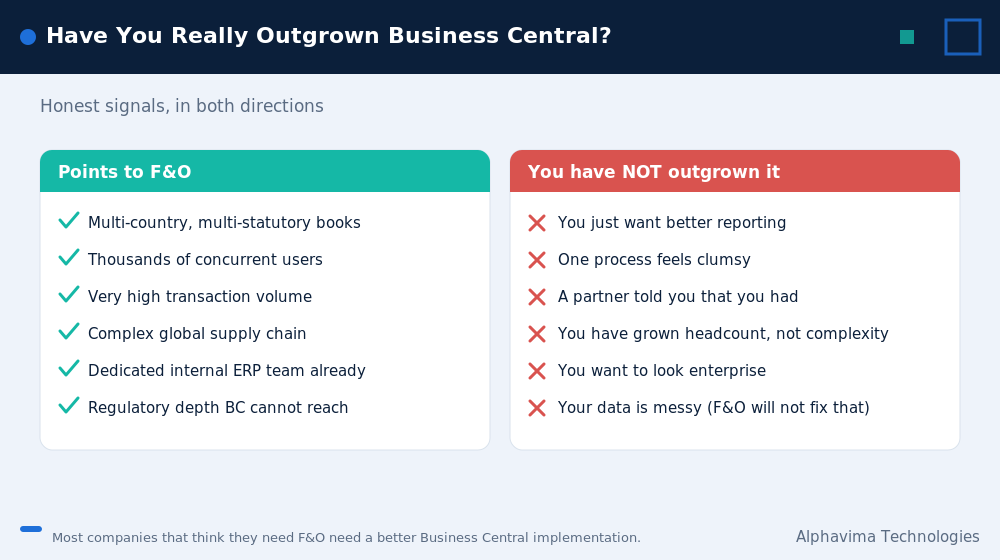
Signals you have outgrown Business Central (and signals you have not)
| You have genuinely outgrown it if… | You have NOT outgrown it if… |
|---|---|
| Month-end consolidation across entities has become a manual spreadsheet exercise that Business Central’s standard consolidation cannot support | Month-end is slow because your processes are messy, not because the system is limited |
| Production scheduling requires finite capacity across multiple sites, and your planners are re-planning by hand | Your production is complex but single-site and MRP-shaped |
| Warehouse throughput requires directed, wave-based operations and you have 40+ concurrent pickers | You want barcode scanning and better picking, which ISVs deliver on Business Central |
| You now file statutory returns in 7 countries and each one needs distinct localisation | You have foreign entities but consolidated reporting is straightforward |
| Performance is degrading on genuinely high transaction volumes after proper optimisation | Performance is poor because of unoptimised custom code or bad reporting queries |
| You have an internal ERP team of 3+ who are constrained by the platform | You have one part-time super-user who is overwhelmed. That is a resourcing problem, not a platform problem. |
The distinction in the right-hand column is the whole article. Most companies that believe they have outgrown Business Central have instead outgrown their own processes, their internal capability, or a poorly designed original implementation. Replatforming to an enterprise ERP does not fix any of those. It multiplies them.
The accelerator route: a third option
Between “standard Business Central” and “escalate to Finance & Operations” sits a third route that most comparison articles ignore entirely: a Microsoft AppSource accelerator that models your vertical process natively on Business Central.
Alphavima builds four of these:
| Accelerator | Vertical | The F&O escalation it can prevent |
|---|---|---|
| PREXA365 | Equipment rental | Rental lifecycle, asset availability, contract billing and returns modelled on Business Central, instead of custom-building rental in an enterprise ERP |
| Olix365 | Utility and energy | Utility billing, metering and customer service processes on Business Central and Dynamics 365, instead of a heavy enterprise industry build |
| GiveLife365 | Nonprofit | Donor, programme and grant management alongside Business Central finance, rather than an enterprise CRM plus ERP programme |
| PulseNet365 | SMB ERP and HRMS | Combined ERP and HR capability for smaller organisations, avoiding a multi-product enterprise stack |
When the accelerator route works: when your F&O score in section 2 is 3 to 5 points and at least one of those points is a vertical process requirement rather than a scale requirement. Vertical depth is the gap an accelerator closes. Genuine scale is not.
When it does not work: when you scored 6 or above, or when your points come from entity count, transaction volume and user count. No accelerator fixes scale.
Migration paths and what they cost
| Path | Typical duration | Indicative cost (CAD) | Notes |
|---|---|---|---|
| QuickBooks / Sage to Business Central | 8 to 16 weeks | $60,000 – $140,000 | Most common mid-market move |
| Dynamics NAV / GP to Business Central | 10 to 20 weeks | $80,000 – $180,000 | Data and process familiarity shortens discovery |
| Business Central to Finance & Operations | 9 to 18 months | $600,000 – $1,600,000 | A re-implementation, not an upgrade. Different code base. |
| Dynamics AX to Finance & Operations | 9 to 24 months | $700,000 – $2,000,000+ | Data migration is the dominant cost |
| Finance & Operations to Business Central | 4 to 9 months | $200,000 – $450,000 | The correction path. Rarely discussed, occasionally correct. |
| Add Business Central at subsidiaries (two-tier) | 6 to 12 weeks per entity | $40,000 – $90,000 per entity | Fastest way to bring an acquisition onto a supported platform |
Critical point that changes the whole calculation: moving from Business Central to Finance & Operations is not an upgrade path. It is a full re-implementation on a different product. Microsoft does not provide a lift-and-shift.
This matters because the fear driving over-purchase is “we don’t want to re-implement in three years”, and buyers assume F&O protects them from that. It does not remove the re-implementation. It just moves it forward and makes it more expensive.
Given that, the rational strategy for a company scoring 3 to 5 is usually: implement Business Central now for CAD $100,000, run it for three to five years, and re-evaluate. If you genuinely grow into F&O, you will do that project with a much clearer picture of your requirements, funded by a business that has actually scaled.
If you do not grow into it, you saved several million dollars.
Myths vs facts
| Myth | Fact |
|---|---|
| “Business Central is just for small businesses.” | Business Central runs comfortably at 200 to 300 users and multiple entities. The constraint is process depth, not company size. |
| “Finance & Operations is the upgrade from Business Central.” | It is a different product on a different code base. Moving between them is a re-implementation, not an upgrade. |
| “F&O gives you better Power BI and Copilot.” | Both products integrate fully with Power BI, Power Platform, Dataverse, Microsoft Fabric, Azure and Copilot. This is not a differentiator. |
| “We’ll outgrow Business Central in three years, so buy F&O now.” | Buying enterprise ERP early does not prevent a future project. It brings forward a cost you may never need to incur. |
| “Business Central can’t handle manufacturing.” | It handles assembly, discrete production, BOMs, routings and MRP well. It struggles with finite capacity scheduling across multiple sites. Know which one you actually need. |
| “F&O is more secure or more compliant.” | Both run on Azure with the same security and compliance foundation. F&O offers broader out-of-the-box country localisations, which is a functional difference, not a security one. |
| “Once you’re on F&O you’re set for life.” | F&O requires continuous internal investment: regression testing, an internal team, and ongoing configuration governance. |
Get an honest answer on Business Central vs Finance & Operations
Bring your entity count, your countries and your process complexity. We will score it with you and tell you which tier you actually need.
Pros and cons
Business Central – Pros: Fast to implement (8 to 20 weeks). Materially lower TCO. Light upgrade burden. Large AppSource ecosystem. Can be run by a small internal team or none at all. Extensions are cheap to build.
– Cons: Depth limits in advanced warehousing and finite production scheduling. Consolidation gets awkward beyond roughly 8 entities. Fewer out-of-the-box country localisations.
Finance & Operations – Pros: Genuine enterprise depth. Advanced WMS and production planning. Broad global localisation. Handles very high transaction volumes and complex organisational structures. – Cons: Long implementations (9 to 24 months). Three to four times the five-year TCO. Requires a dedicated internal team. Heavier regression testing on updates. Over-specified for most mid-market businesses.
Common mistakes
- Choosing F&O out of fear of outgrowing Business Central. The most expensive emotion in ERP buying.
- Comparing per-user licence cost and stopping there. The licence line is the smaller half of the gap.
- Letting a partner scope the answer. Partners with an F&O practice find F&O requirements. Ask any partner directly: “under what conditions would you tell me to buy the cheaper product?” The answer tells you a lot.
- Ignoring internal capability. F&O without an internal ERP team becomes a permanent, expensive dependency.
- Treating one complex process as evidence of enterprise complexity. One deep requirement usually calls for an ISV, not a different ERP.
- Never considering two-tier. For groups with one big entity and several small ones, two-tier is often clearly better than either single-product answer.
- Assuming the Microsoft stack story differs. It does not. Power BI, Fabric, Dataverse, Azure and Copilot work with both.
Expert recommendations on Business Central vs Finance and Operations
- Score the eight Business Central vs Finance and Operations questions honestly before you talk to any vendor. Do it internally. Do it in a room with your CFO and your operations lead, and write the score down.
- If you score 5, model both properly. Build a five-year TCO with your real numbers, not ours.
- If you score 3 to 5 and your points come from vertical depth, investigate AppSource accelerators before you investigate F&O.
- If you are acquisitive, design for two-tier from the start. It is much harder to retrofit.
- Do not buy for the company you plan to become. Buy for the company you are, plus 24 months. ERP re-implementation in year five, funded by a business that actually grew, is a better outcome than enterprise cost in year one for growth that did not arrive.
- Ask every partner to name their walk-away threshold. A partner who cannot describe a scenario in which they would recommend the smaller product is not advising you. They are selling.
Key takeaways
- In Business Central vs Finance and Operations, Business Central is the right answer for most companies asking the question.
- The decision is driven by process depth and geographic complexity, not headcount or revenue.
- Finance & Operations typically costs three to four times as much over five years, and the licence line is not where most of the gap sits.
- Moving from Business Central to F&O is a re-implementation, not an upgrade, so buying F&O early does not protect you from a future project.
- Two-tier ERP and AppSource accelerators are legitimate third options that most comparison articles omit.
- Score the eight questions. Six or more points means F&O. Two or fewer means Business Central. Everything in between deserves a proper model.
Conclusion
The honest version of Business Central vs Finance and Operations is short. Most organisations searching “Business Central vs Finance & Operations” are mid-market companies with a nagging worry that they might be underbuying. They are usually not.
Score the eight questions. If you land at two or below, stop researching and start implementing. If you land at six or above, you have real enterprise complexity and you should plan a serious programme with the internal team to match.
If you land in the middle, that is where the money is won or lost, and it is worth two hours with someone who will tell you the smaller product is enough when it is.
Book a 30-minute ERP fit assessment
Alphavima is a Microsoft Solutions Partner with 20+ years of Dynamics delivery across Canada, the USA, the UK, the UAE and India. We implement both Business Central and Dynamics 365 Finance & Operations, which means we have no incentive to steer you toward either one.
Book a 30-minute ERP fit assessment and we will score your eight questions with you, model your five-year TCO on both products, and tell you plainly which one you need.

Related case study
Manufacturing ERP on Business Central
A manufacturer put the shop floor, stockroom and finance on one Dynamics 365 Business Central ERP.
Read the case study · Next read: Business Central pricing guide
Frequently asked questions
What is the difference between Business Central and Dynamics 365 Finance & Operations?
Business Central is Microsoft's mid-market ERP, descended from Dynamics NAV, implemented in 8 to 20 weeks. Finance & Operations, now sold as Dynamics 365 Finance and Dynamics 365 Supply Chain Management, is Microsoft's enterprise ERP, descended from Dynamics AX, typically implemented in 9 to 24 months. They are different products on different code bases, not two tiers of the same product.
How many users can Business Central handle?
Business Central runs comfortably in the 200 to 300 named user range and is used above that with careful design. User count is rarely the real constraint. Process depth, particularly advanced warehouse management and finite production scheduling, is what pushes companies to Finance & Operations.
Is Finance & Operations an upgrade from Business Central?
No. Moving from Business Central to Finance & Operations is a full re-implementation on a different platform. Microsoft does not provide an upgrade path between them. This is the single most misunderstood point in the comparison.
Which is more expensive, Business Central or Finance & Operations?
Finance & Operations, substantially. For a 100-user business, indicative five-year total cost of ownership is roughly CAD $800,000 to $1.7 million for Business Central and CAD $3.4 million to $6.9 million for Finance & Operations. Implementation, support and internal headcount, not licences, account for most of the gap.
Can Business Central handle manufacturing?
Yes, for assembly, discrete production, bills of materials, routings, MRP and basic capacity planning. It is not designed for finite capacity scheduling across multiple plants or complex process manufacturing. If you are re-planning by hand because the system cannot schedule your constraints, that is a genuine signal to look at Finance & Operations.
What is a two-tier ERP strategy?
Running Finance & Operations at corporate for consolidation and complex operations, while running Business Central at subsidiaries for local finance and operations. It suits acquisitive groups and international expansion, because a new subsidiary can be live on Business Central in 6 to 12 weeks rather than most of a year.
Do both products support Copilot, Power BI and Microsoft Fabric?
Yes. Both run on Azure and integrate with Power Platform, Power BI, Dataverse, Microsoft Fabric and Copilot. Any partner presenting the Microsoft ecosystem as a reason to choose one over the other is not giving you useful information.
Should we buy Finance & Operations now because we plan to grow?
Almost never. Because moving between the products is a re-implementation either way, buying enterprise ERP early does not remove a future project. It brings forward substantial cost for growth that may not arrive. Implement Business Central, run it for three to five years, and re-evaluate with real data.