











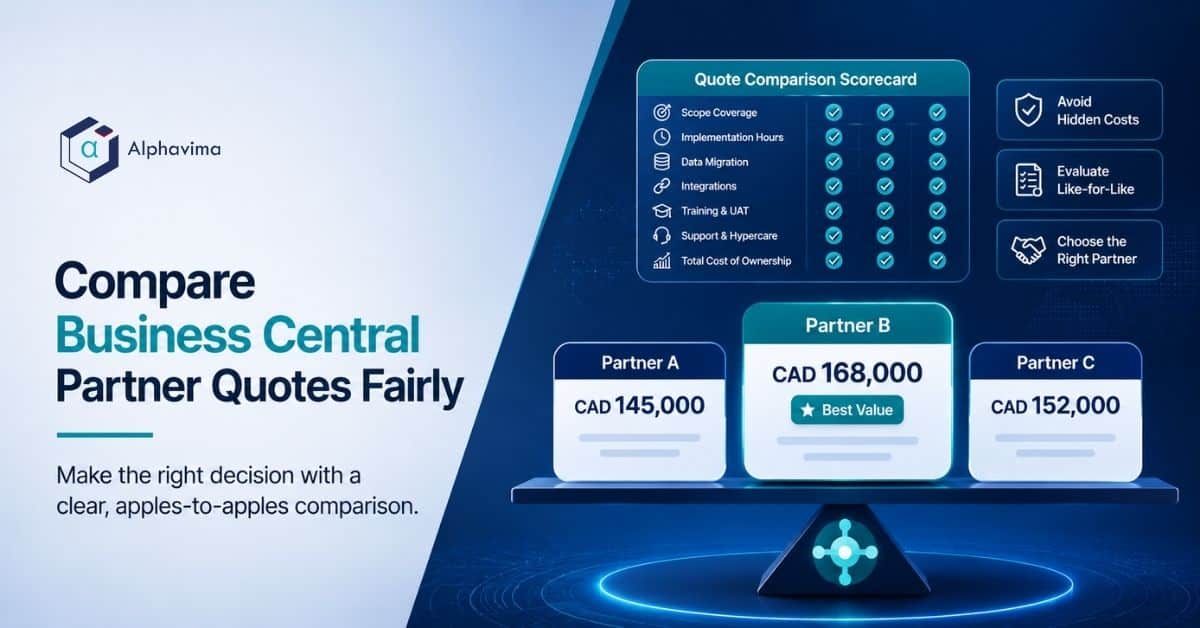
To compare Business Central quotes from multiple partners fairly, rebuild every proposal onto one identical scope baseline before you look at the total price. Line up hours by workstream, add back anything a partner excluded, adjust for consultant seniority, then compare.
Price gaps that looked like 3x usually shrink to under 25 percent once the quotes are normalised.
Table of contents
Executive summary
- Business Central quotes from different partners are rarely comparable as written. They differ in scope, exclusions, assumed data quality and consultant seniority, not just in price.
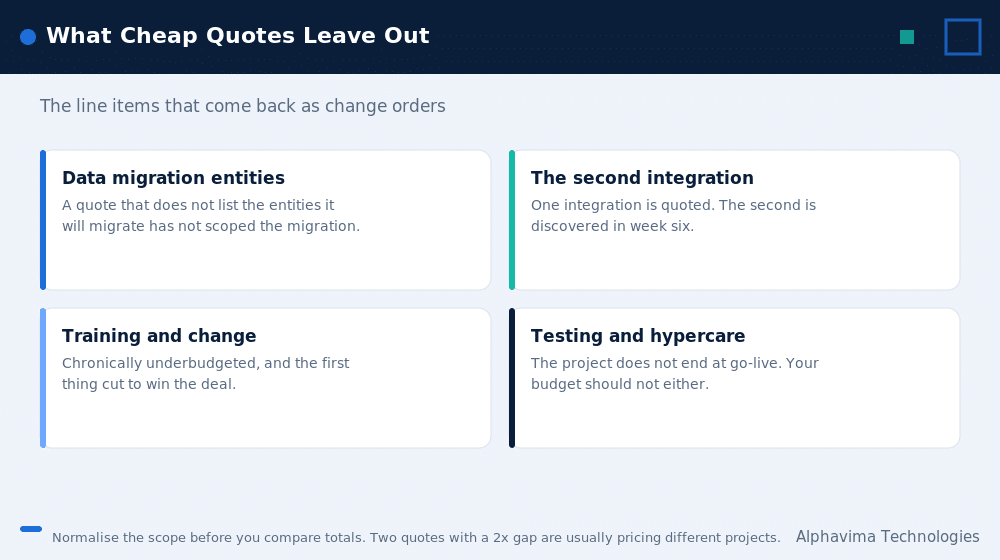
- The cheapest quote is often the one with the smallest discovery phase, the smallest data migration line and the smallest testing allocation. Those three items are where overruns live.
- A complete Business Central quote contains 14 specific line items. Count them. Missing lines are not savings.
- A blended hourly rate tells you almost nothing until you know the seniority mix behind it.
- The exclusions page is the most informative page in any statement of work. Read it before the price page.
- Use the normalisation worksheet in this article to make unlike quotes comparable in about two hours of work.
Talk to a Business Central consultant
Book a quick call to talk through your Business Central project. No pressure, just practical advice. Or see our Business Central services.
Why you must compare Business Central quotes carefully: a 3x gap explained
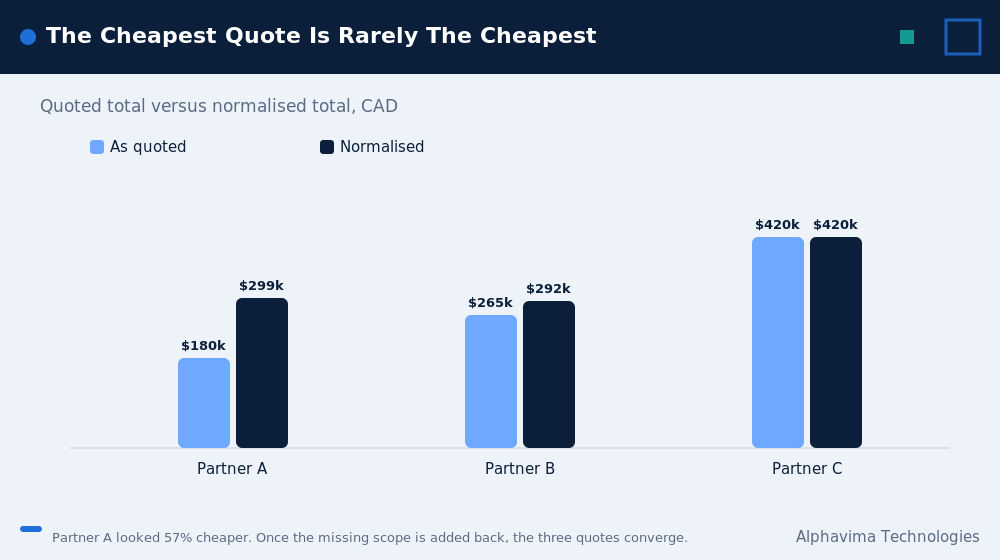
You sent the same requirements document to three Microsoft partners. One came back at $180,000. One at $265,000. One at $420,000. Same software, same user count, same go-live date.
Your first instinct is that someone is overcharging. Usually that is not what happened.
What happened is that the three partners made different assumptions, wrote down different amounts of those assumptions, and left the rest for you to find out about later. The $180,000 quote might be an honest quote for 60 percent of the work. The $420,000 quote might include three things the others quietly excluded.
Price differences in Business Central proposals come from five sources:
- Scope included versus scope excluded. Data migration, integrations, reporting and training are the four most commonly trimmed items.
- Assumed data quality. A partner who assumes your legacy data is clean will quote a fraction of the migration hours of one who assumes it is not.
- Consultant seniority. A team of two senior consultants and one junior costs more per hour and fewer hours than a team of one senior and four juniors. Sometimes it costs less in total.
- Delivery model. Onshore, nearshore and offshore blends move the rate substantially.
- Commercial structure. A fixed price includes a risk premium. Time and materials does not, which is why it looks cheaper and often is not.
Until you separate these five, you are not comparing quotes. You are comparing sales documents.
The 14 line items every ERP implementation proposal must contain
If a proposal is missing any of these, it is not cheaper. It is incomplete. Ask the partner to price the missing line, then re-compare.
| # | Line item | Why it matters | Common failure |
|---|---|---|---|
| 1 | Discovery / fit-gap analysis | Establishes what is standard and what needs an extension | Compressed to a few days to lower the headline price |
| 2 | Solution design document | The contract between you and the build team | Bundled into discovery and never actually produced |
| 3 | Environment setup (sandbox, UAT, production) | You need three environments, not one | Only production is quoted |
| 4 | Base configuration (chart of accounts, dimensions, posting groups) | The financial backbone of Business Central | Assumed to be a “quick setup” |
| 5 | Data migration (per entity, with cleansing) | Usually the single largest source of overrun | Quoted as a flat lump sum with no entity list |
| 6 | Integrations (each system named individually) | Every integration is a mini project | Listed as “integrations: TBD” |
| 7 | Custom development / AL extensions | Everything not covered by standard functionality | “Minimal customisation anticipated” with no hours attached |
| 8 | Reporting and Power BI | Business Central’s built-in reports rarely match your current pack | Excluded entirely or “client to build” |
| 9 | Security roles and permission sets | Segregation of duties, audit readiness | Assumed to be default roles |
| 10 | Testing: SIT and UAT support | Someone has to build test scripts and support your users | Capped at a token number of hours |
| 11 | Training (end user and admin, with materials) | Adoption failure is usually a training failure | “Train the trainer, 1 day” |
| 12 | Cutover and go-live weekend | Data freeze, final migration, opening balances, parallel run | Quoted as “included” with no hours |
| 13 | Hypercare (post-go-live support window) | The first 30 days generate the most tickets | 5 days, or missing |
| 14 | Project management | Typically 12 to 18 percent of total effort | Quoted at 5 percent, then padded via change orders |
Rule of thumb: if project management is under 10 percent of total hours, the partner has either underquoted PM or is planning to run the project informally. Both cost you later.
The scorecard to compare Business Central quotes
Score each proposal out of 3 on every row: 0 = absent, 1 = mentioned but not priced, 2 = priced but assumption-light, 3 = priced with stated assumptions and an entity/system list.
| Scorecard row | Partner A | Partner B | Partner C | What a “3” looks like |
|---|---|---|---|---|
| Discovery hours stated separately | Named days, named participants, named deliverable | |||
| Named list of data entities to migrate | “Customers, vendors, GL history 2 years, open AR/AP, item master, BOMs” | |||
| Data cleansing responsibility assigned | Explicitly says who cleans the data and what happens if it is dirty | |||
| Each integration named with method | “Shopify to BC via Power Automate, order + inventory sync, 2-way” | |||
| Custom extensions listed with hours | Each AL extension with an hour estimate and a functional description | |||
| Reporting deliverables listed | Named reports and Power BI dashboards, with count | |||
| Number of environments provisioned | Sandbox, UAT, production | |||
| Test scripts: who writes them | Partner writes SIT scripts, client writes UAT scripts, both stated | |||
| Training hours and format | Hours per role, materials included, recorded sessions | |||
| Cutover plan with hours | Dry run included, cutover weekend hours, rollback plan | |||
| Hypercare duration and response times | 30 days, named SLA, named consultant | |||
| PM as a percentage of total effort | 12 to 18 percent, stated | |||
| Change order process and rate | Written process, agreed rate card, approval threshold | |||
| Exclusions page present and specific | A full page of exclusions, not one line | |||
| Assumptions page present and specific | Data quality, availability of your staff, decision turnaround | |||
| Total (out of 45) |
A proposal scoring under 25 is not ready to be compared. Send it back.
Nine red flags in a Dynamics partner evaluation
| What you see in the quote | What it usually means | What to ask |
|---|---|---|
| “Integrations: TBD” or “to be scoped” | The partner has no idea what your integrations require and will bill them as change orders | “Give me a not-to-exceed number per integration, or a discovery day to size them.” |
| “Minimal customisation anticipated” | Nobody has done fit-gap yet. This sentence is free to write. | “Which of my 40 requirements are standard and which need an extension? Show me the list.” |
| Data migration quoted as one lump sum | No entity-level thinking. This is the number that moves most. | “Break migration down by entity, with row counts and cleansing assumptions.” |
| Discovery under 5 percent of total effort | The partner is buying the deal and will re-scope after signature | “What happens to the price if discovery finds more than you assumed?” |
| Training listed as “train the trainer, 1 day” | Adoption risk is being pushed onto you | “How many end users, in how many roles, and what materials do we get?” |
| Hypercare of 5 days or less | You will be on your own in week two | “What is the ticket volume you typically see in the first 30 days?” |
| No named consultants or CVs | You will get whoever is on the bench in month three | “Name the functional lead and the technical lead, and commit them in the SOW.” |
| Blended rate significantly below market | Seniority mix is junior-heavy, or delivery is offshore without a named onshore lead | “What is the seniority mix, and who is accountable in my timezone?” |
| Fixed price with a thin assumptions page | The fixed price is fixed only for the scope the partner imagined | “Show me the assumptions. What voids the fixed price?” |
The single most useful sentence you can say in a pre-sales meeting: “Walk me through your exclusions page.” The answer tells you more than the price.
The blended rate trap
Blended rates hide the seniority mix. Two partners can quote the same rate and deliver very different projects.
| Scenario | Blended rate | Team mix | Hours to deliver a given workstream | Total cost |
|---|---|---|---|---|
| Senior-led | $175/hr | 2 senior, 1 mid | 400 | $70,000 |
| Balanced | $140/hr | 1 senior, 2 mid, 1 junior | 520 | $72,800 |
| Junior-heavy | $95/hr | 1 senior, 4 junior | 820 | $77,900 |
Assumption: these are illustrative ratios drawn from Alphavima’s observed effort multipliers on comparable Business Central workstreams. Your mileage will vary by module complexity. The point is directional, not absolute.
The junior-heavy option looks 45 percent cheaper per hour and finishes more expensive, later, and with more rework. It also consumes more of your team’s time, which never appears on any quote.
What to ask: “For each rate card tier, how many hours of this project are allocated to that tier?” A partner who cannot answer has not planned the project.
Typical effort ranges by workstream (25 to 75 users)
These are Alphavima’s observed ranges for a Business Central implementation covering finance, sales, purchasing, inventory and basic warehousing, with two integrations and moderate data quality. They are not a quote. Manufacturing, projects, service and multi-entity consolidation push these ranges up.
| Workstream | Low (hours) | Typical (hours) | High (hours) | Notes |
|---|---|---|---|---|
| Discovery and fit-gap | 60 | 100 | 160 | Higher if multi-entity or multi-currency |
| Solution design | 40 | 70 | 110 | |
| Environment setup | 15 | 25 | 40 | |
| Base configuration | 90 | 150 | 240 | Chart of accounts and dimensions dominate |
| Data migration | 100 | 200 | 400+ | The widest range on this table, by far |
| Integrations (per integration) | 40 | 90 | 200 | Power Automate simple, custom API complex |
| AL extensions / custom dev | 60 | 180 | 500+ | Entirely dependent on fit-gap output |
| Reporting and Power BI | 50 | 100 | 200 | |
| Security and permissions | 20 | 40 | 80 | |
| SIT and UAT support | 80 | 140 | 240 | Frequently underquoted |
| Training | 40 | 80 | 150 | |
| Cutover and go-live | 30 | 60 | 100 | Include a dry run |
| Hypercare (30 days) | 40 | 70 | 120 | |
| Project management | 12% | 15% | 18% | Of the sum of the above |
If a quote’s data migration line is at the low end and the partner has not seen your data, treat that number as a placeholder.
Cost tables in CAD and USD
Software licensing and services are separate budgets. Do not let a partner blend them.
Business Central licensing (list pricing, per user per month, before partner or CSP discounts):
| Licence | USD/user/month | Approx. CAD/user/month | Who needs it |
|---|---|---|---|
| Business Central Essentials | ~$80 | ~$108.50 | Most finance, sales, purchasing and inventory users |
| Business Central Premium | ~$110 | ~$149.20 | Users who need manufacturing or service management |
| Team Members | ~$8 | ~$10.90 | Read, approve, and light data entry only |
Assumption: Microsoft list pricing as published for the United States and Canada, checked in August 2026. Confirm current list pricing with your partner or on Microsoft’s Business Central pricing page before you sign.
Implementation services, indicative total project cost:
| Project tier | Users | Typical scope | CAD range | USD range |
|---|---|---|---|---|
| Fast-start | 10 to 25 | Finance + sales + purchasing, minimal customisation, 1 integration | $75,000 to $140,000 | $55,000 to $105,000 |
| Standard | 25 to 75 | Above plus inventory, warehousing, reporting, 2 to 3 integrations, some AL | $150,000 to $340,000 | $110,000 to $250,000 |
| Complex | 75 to 250 | Multi-entity, manufacturing or service, 4+ integrations, significant AL, data-heavy migration | $350,000 to $900,000+ | $260,000 to $670,000+ |
Assumption: these ranges reflect Canadian and US market services pricing observed by Alphavima across recent Business Central engagements. They exclude licensing, internal staff time and infrastructure. Treat them as a soundness check on quotes, not as a quote.
If a proposal sits well below the low end of the relevant tier, something is excluded. Find it.
The ERP quote comparison worksheet: making unlike quotes comparable
This is the part nobody else publishes. Work through it in a spreadsheet. It takes about two hours and it is the highest-return two hours of your selection process.
Step 1: Build the master scope list
Take the union of every scope item mentioned in any quote. If Partner C priced a “Shopify integration” and Partners A and B did not mention it, it goes on the master list. You are building the true scope of the project, not the scope of the cheapest proposal.
Step 2: Mark inclusion status for each partner
For every master scope item, mark each partner as: Included and priced, Included but not priced, Explicitly excluded, or Not mentioned.
“Not mentioned” is the dangerous one. It becomes a change order.
Step 3: Price the gaps
For each item a partner did not price, ask that partner for a number. If they will not give you one, use the midpoint of the other partners’ prices for that same item as your placeholder, and note that you have done so.
Step 4: Add back the gaps
| Partner | Quoted total (CAD) | Gap items added back | Normalised total |
|---|---|---|---|
| Partner A | $180,000 | Data migration entities not listed (+$55,000), UAT support (+$28,000), Power BI pack (+$22,000), hypercare 30 days (+$14,000) | $299,000 |
| Partner B | $265,000 | Second integration (+$18,000), training materials (+$9,000) | $292,000 |
| Partner C | $420,000 | None (nothing excluded) | $420,000 |
Illustrative example, not a real client. The pattern, however, is extremely common: the headline spread of 2.3x collapses to roughly 1.4x once you normalise, and the “cheapest” quote is no longer meaningfully cheaper than the middle one.
Step 5: Adjust for seniority and delivery model
Add a risk loading to any partner whose seniority mix is junior-heavy or whose delivery is fully offshore with no onshore accountable lead. A 10 to 20 percent loading is a reasonable and defensible adjustment. Write down why you applied it.
Step 6: Add your internal cost
Every quote assumes some amount of your team’s time. A partner who assumes your finance lead is available three days a week is imposing a real cost on you. Estimate the internal days each proposal requires and cost them at your fully loaded rate.
| Partner | Normalised partner cost | Internal days required | Internal cost @ $600/day | True cost |
|---|---|---|---|---|
| Partner A | $299,000 | 120 | $72,000 | $371,000 |
| Partner B | $292,000 | 85 | $51,000 | $343,000 |
| Partner C | $420,000 | 60 | $36,000 | $456,000 |
Now you have a comparison. Partner B, which looked like the middle option, is the lowest true cost. Partner A, which looked like a bargain, is not. Partner C may still be right if your risk tolerance is low and your internal team is thin.
Step 7: Score on non-price factors
Price is one input. Score each partner on: Business Central depth (versus generalist Dynamics shops), industry experience, named consultants, references you actually called, support model after go-live, and whether their AppSource products or IP reduce your build.
Business Central partner selection: questions to ask every partner
Ask all of these. Ask them in the same order to every partner. Write the answers down.
On scope 1. Which of my requirements are met by standard Business Central, and which need an extension? Show me the list. 2. What is explicitly excluded from this price? 3. What assumptions, if wrong, would change this price by more than 10 percent?
On data 4. What data entities are you migrating, and how many rows in each? 5. Who cleans the data, and what happens if my data is worse than you assumed? 6. Are you migrating GL history, and how many years?
On the team 7. Who is the functional lead and the technical lead, by name? Will they be in the SOW? 8. What is the seniority mix, in hours, by rate tier? 9. How many Business Central projects has this exact team delivered?
On commercials 10. What is the change order process, the rate, and the approval threshold? 11. Is this an estimate, a budget, or a fixed price? What is the difference in your contract? 12. What is your hypercare period, and what does it cost after that?
On risk 13. Tell me about a Business Central project that went badly and what you changed afterwards. 14. Can I speak to a reference whose project overran?
Question 14 is the best question in the list. Every partner has a project that overran. A partner who claims otherwise is either new or not being straight with you.
Fixed price, time and materials, or capped T&M?
| Model | Best when | Risk sits with | Watch out for |
|---|---|---|---|
| Fixed price | Scope is genuinely stable and discovery is complete | Partner | Thin assumptions page; every deviation becomes a change order |
| Time and materials | Scope is genuinely uncertain, or you have strong internal PM | Client | No ceiling, no urgency, budget drift |
| Capped T&M (T&M with a not-to-exceed) | Most Business Central projects | Shared | The cap only holds if scope is defined; make sure the cap is per workstream, not just overall |
| Phased fixed price | Large or multi-entity projects | Shared, phase by phase | Discovery is fixed price and paid separately; the build is priced after discovery |
Our practitioner view: the healthiest structure for a mid-market Business Central project is a small, separately contracted, fixed-price discovery phase, followed by a capped T&M build priced from the discovery output. It costs slightly more on paper and reliably costs less in reality, because the build is priced against known scope rather than guessed scope.
Be wary of any partner who refuses to sell you discovery as a standalone engagement. It usually means discovery is where they hide their margin.
What happens after go-live (and why quotes ignore it)
Almost every Business Central quote ends at go-live plus a short hypercare window. Your budget does not.
| Post-go-live cost | Typical annual range (CAD) | Notes |
|---|---|---|
| Licensing (25 users, mostly Essentials) | $28,000 to $34,000 | Recurring, indexed to Microsoft list changes |
| Managed support / AMS retainer | $18,000 to $60,000 | Depends on ticket volume and SLA |
| Enhancements and phase 2 | $30,000 to $120,000 | Nearly every client does a phase 2 within 12 months |
| Business Central release upgrades (2 per year) | $6,000 to $20,000 | Regression testing of extensions and integrations |
| Power BI / reporting evolution | $10,000 to $40,000 |
Assumption: ranges reflect Alphavima’s observed post-go-live run rates for 25 to 75 user Canadian Business Central clients. Yours will differ with the number of custom extensions you carry.
The extension tax. Every AL extension you build must be regression tested against Microsoft’s two major releases per year. Ten custom extensions is a permanent annual cost, not a one-time build cost. Ask each partner: “What will these customisations cost me to maintain, every year, forever?” Very few buyers ask this. It changes the comparison.
Myths vs facts
| Myth | Fact |
|---|---|
| “The cheapest quote saves money.” | The cheapest quote usually has the smallest discovery, migration and testing lines. Those are the three lines that overrun. |
| “A fixed price protects me.” | A fixed price protects you only within its assumptions. Read the assumptions page before you read the number. |
| “All Microsoft partners have the same access to Business Central.” | They have the same software. They do not have the same people, the same industry IP, or the same delivery track record. |
| “Customisation is bad, so a quote with no customisation is better.” | A quote with no customisation and no fit-gap is not a quote with no customisation. It is a quote with undiscovered customisation. |
| “Offshore delivery is always cheaper.” | Offshore is cheaper per hour. Total cost depends on hours, rework, timezone friction and how much of your own team’s time it consumes. A well-run global delivery model with an onshore accountable lead can be excellent value. A poorly run one is not. |
| “We can compare quotes by looking at the totals.” | You can compare totals only after normalisation. Before that, you are comparing different projects. |
Get your Business Central quotes normalised before you sign
Send us the quotes you have. We will normalise them to the same scope and show you what each one quietly leaves out.
Common mistakes buyers make
- Sending a requirements list instead of a scope document. Partners then guess, and they guess differently. Give them the same entity list, the same integration list and the same data volumes.
- Not sharing your data. Let each partner see a sample of your real data. Migration estimates made without seeing data are fiction.
- Comparing on price before normalising. This rewards the partner who excluded the most.
- Skipping reference calls. Call two references per partner, and ask specifically what went wrong.
- Letting the sales team disappear after signature. Insist on named delivery staff in the SOW.
- Ignoring the exclusions page. It is the truest page in the document.
- Forgetting internal cost. Your controller’s time is not free.
- Not asking about the annual cost of the customisations you are about to commission.
How we would compare Business Central quotes in your position
If we were the buyer, not the partner, here is the process we would run:
- Write a one-page scope baseline. Name the modules, the integrations, the data entities, the user counts and the go-live date. Send the identical document to every partner.
- Buy a paid discovery from your two front-runners if the deal is large. Two discoveries at $15,000 each is cheap insurance on a $300,000 decision.
- Demand the exclusions page and the assumptions page. Score them.
- Normalise the quotes using the worksheet above.
- Add internal cost and a seniority risk loading.
- Call references, including one whose project overran.
- Choose on true cost plus delivery confidence, not headline price.
- Contract as a fixed-price discovery followed by a capped T&M build.
That process costs you about a week of effort. It routinely saves six figures.
Key takeaways
- Never compare Business Central quotes on headline price. Normalise first.
- The 14-line-item scorecard tells you whether a quote is complete. Missing lines are future change orders.
- Data migration, testing and discovery are the three lines that get shaved to win deals, and the three lines that overrun.
- A low blended rate is not a low total cost.
- The exclusions page and the assumptions page are more informative than the price page.
- Post-go-live run rate, especially the annual maintenance cost of custom extensions, belongs in the comparison.
- The right commercial structure for most mid-market projects is fixed-price discovery followed by capped T&M build.
Talk to Alphavima
Send us the quotes you have already received. We will run them through this normalisation worksheet with you, line by line, at no charge and with no obligation to include us in the bid. You will leave the session knowing exactly what each proposal actually covers and what it will cost you in year two.
Book a Business Central quote review with Alphavima’s ERP practice. Twenty years of Microsoft delivery, ISO 27001 and ISO 9001 certified, Canadian-headquartered with delivery teams across Canada, the US, the UK, the UAE and India.
Conclusion
Comparing Business Central quotes is not a procurement exercise. It is a scope-reconstruction exercise. The partners are not quoting the same project, and the document that looks cheapest is usually the document that describes the least work.
Do the normalisation. Add back the gaps. Price your own team’s time. Ask the fourteen questions. Then choose the partner whose proposal, once made honest, still makes sense, and whose people you would actually want in the room on cutover weekend.

Related case study
Manufacturing ERP on Business Central
A manufacturer put the shop floor, stockroom and finance on one Dynamics 365 Business Central ERP.
Read the case study · Next read: Business Central pricing guide
Frequently asked questions
How do I compare Business Central quotes from different partners?
Build one master scope list from the union of everything mentioned in any quote, mark what each partner included, priced, excluded or omitted, price the gaps, add them back, then adjust for consultant seniority and your own internal time cost. Only then compare totals.
How much does a Business Central implementation cost?
For a 25 to 75 user implementation covering finance, sales, purchasing and inventory with two or three integrations, expect roughly CAD $150,000 to $340,000 in services, plus licensing at roughly CAD $95 per Essentials user per month. Simpler projects start near CAD $75,000. Complex multi-entity or manufacturing projects exceed CAD $350,000.
Why is one Business Central quote so much cheaper than the others?
Almost always because it excludes something. The most commonly excluded items are data migration detail, user acceptance testing support, reporting and Power BI, training materials and hypercare. It can also reflect a junior-heavy team, which lowers the rate and raises the hours.
What should a Business Central statement of work contain?
Discovery, solution design, environment setup, base configuration, data migration by entity, each named integration, custom extensions with hours, reporting deliverables, security roles, SIT and UAT support, training, cutover, hypercare, project management, plus explicit assumptions and exclusions pages.
Is fixed price or time and materials better for Business Central?
For most mid-market projects, a fixed-price discovery followed by a capped time-and-materials build works best. Fixed price alone only protects you if discovery is already complete. Pure time and materials has no ceiling.
What are the biggest red flags in an ERP quote?
"Integrations: TBD", data migration quoted as a single lump sum with no entity list, discovery under 5 percent of total effort, hypercare of five days or less, no named consultants, and a fixed price supported by a thin assumptions page.
How long does a Business Central implementation take?
A fast-start project for 10 to 25 users typically runs 10 to 16 weeks. A standard 25 to 75 user project typically runs 4 to 7 months. Complex multi-entity or manufacturing projects run 8 to 14 months. Timelines slip most often because of data quality and slow client-side decision making, not partner capacity.
Should I include the cost of my own team in the comparison?
Yes. Different partners require very different amounts of client time. A proposal that assumes 120 days of your staff's involvement is materially more expensive than one that assumes 60, even if the invoice is smaller.