











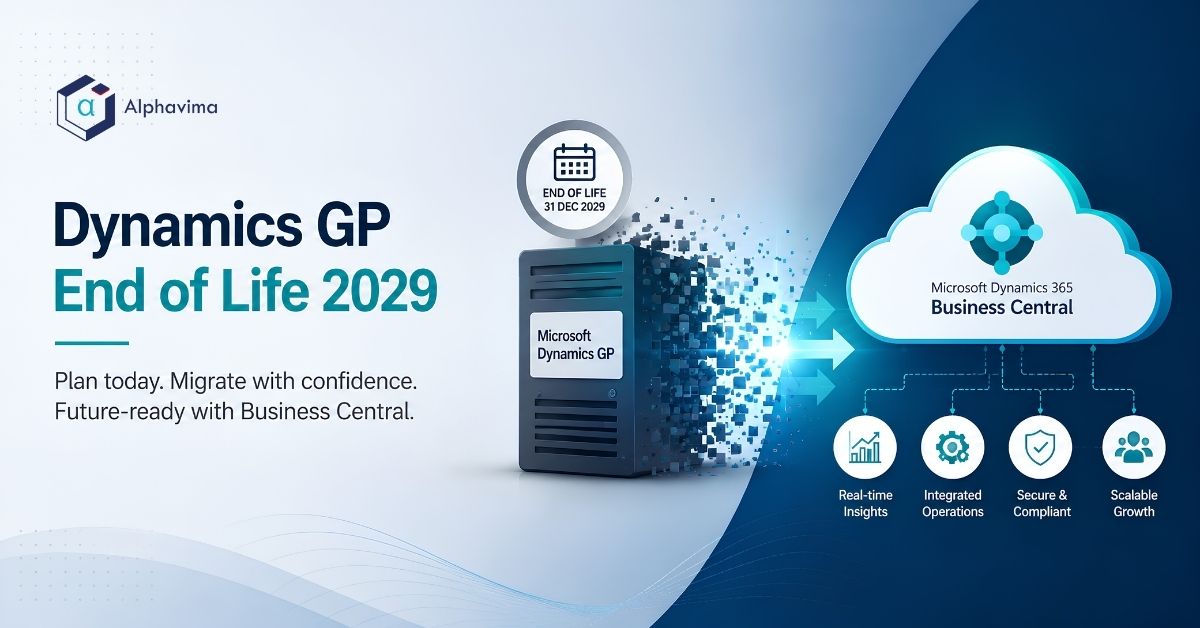
What happens when Dynamics GP reaches end of life? Nothing dramatic on the day itself. Your GP system keeps running. What stops is Microsoft’s support, security updates and tax and regulatory updates. That turns a working system into an unsupported one, which is a compliance, audit and security problem long before it is a functional one.
Executive summary
- GP does not switch off. It becomes unsupported. The risk is security, compliance, payroll and tax updates, and audit findings, not a system that stops.
- Microsoft has closed GP to new customers and published end dates. Verify the current dates on Microsoft’s Lifecycle Policy page before you plan; our summary table below is current as of August 2026.
- You have five options, not two. Two of them involve buying nothing from a Microsoft partner. We compare all five.
- Business Central is the natural successor for most GP customers under about 300 users. Dynamics 365 Finance & Operations is the right tier for larger or more complex organisations.
- Indicative migration cost: CAD 120,000 to 450,000 (USD 89,000 to 333,000) depending on complexity. Assumption: typical GP customer scope; confirm with a partner quote.
- The hard part is not the ledger. It is twenty years of undocumented customisation and the question of what to do with your history.
- Start the decision 18 to 24 months before your deadline. Not the migration. The decision.
Introduction
If you run Microsoft Dynamics GP, you have probably been getting emails about this for two years. Most of them are designed to make you anxious, because anxiety shortens sales cycles.
Here is the calmer version. GP is a mature, stable, well-understood ERP that has been running businesses reliably for decades. It is not going to fail on a specific Tuesday. But Microsoft has closed it to new customers and published an end to support, and an unsupported financial system is a problem your auditor, your insurer and your security team will eventually raise.
So you need a plan. Not a panic. This article gives you the dates, the five real options, honest cost ranges, and a timeline you can work backward from.
Table of contents
Talk to a Business Central migration consultant
Book a quick call to talk through your migration project. No pressure, just practical advice. Or see our Business Central services.
What Dynamics GP end of life actually means
Three separate things end, at three different times, and they matter differently.
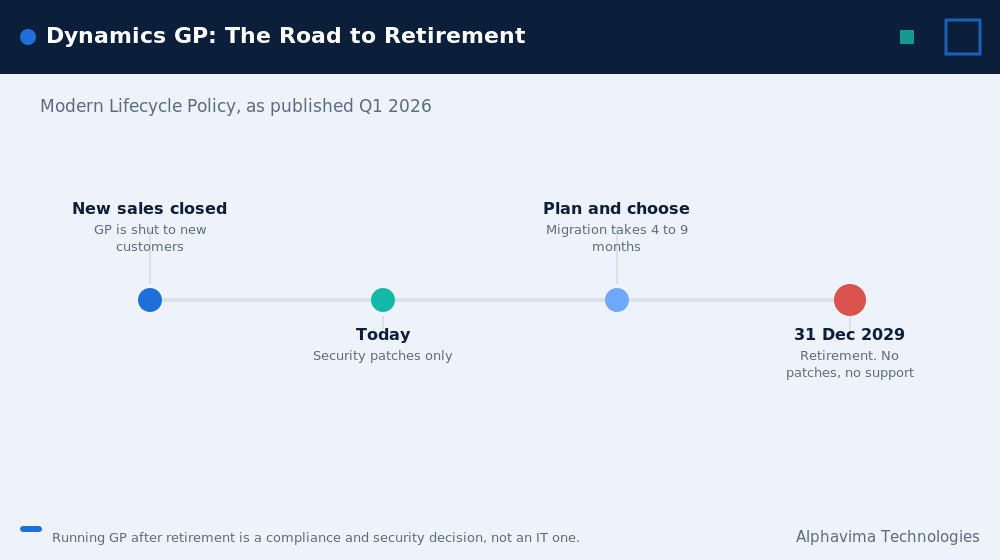
- End of new sales. Microsoft stopped selling GP to new customers. Existing customers were not affected on that date. This is a signal about direction, not an operational event.
- Retirement date (Modern Lifecycle Policy). Microsoft stops issuing functional updates, and stops providing standard technical support. Critically, this includes tax, payroll and regulatory updates, which is what most GP customers actually depend on year to year.
- After retirement: no support, no updates. Microsoft stops issuing security patches. From this point, running GP is a documented security exposure. Your auditors and cyber insurers will treat it as one.
Your GP installation will continue to run after all three dates. It is your software, on your SQL Server, in your data centre or your hosting provider’s. Nobody turns it off. The question is whether you are willing to run your financial system without patches, without payroll tax updates, and without a vendor to call.
Dynamics GP end of life: the lifecycle dates
| Milestone | Date (as published, checked August 2026) | What it means for you |
|---|---|---|
| End of new customer sales | Passed (1 April 2026) | GP is closed to new customers. Existing customers unaffected operationally. Signals Microsoft’s direction. |
| Retirement date (Modern Lifecycle Policy) | 31 December 2029 | No more functional updates. Critically, no more payroll, tax and regulatory updates. This is the date most GP customers should plan around. |
| End of security updates | 30 April 2031 | Final security patches issued. Running GP after this is a documented security and compliance exposure. |
Important: verify these dates directly on Microsoft’s Lifecycle Policy page before you commit to a plan. Microsoft has revised lifecycle dates before, and this table is a summary current as of August 2026, not a substitute for the official source.
The date that should drive your plan is the end of Microsoft support, not the end of security updates. If you run payroll or file tax in GP, the loss of regulatory updates is what forces your hand, and it arrives roughly sixteen months earlier than most people assume.
What actually breaks, and when
| Risk | When it bites | Severity |
|---|---|---|
| Payroll tax tables go stale | First tax year after Microsoft support ends | High for anyone running GP payroll |
| Sales tax and VAT/GST rate changes not delivered | Immediately after Microsoft support ends | High |
| Year-end closing updates stop | First year-end after support ends | High |
| No vendor to escalate to when something breaks | Immediately | Medium, rises over time |
| Security patches stop | After April 2031 | High, and rising monthly |
| Cyber insurance premium increases or coverage refusal | Insurers typically ask about unsupported systems at renewal | Medium to high |
| Audit findings on unsupported financial systems | At your next audit after Microsoft support ends | Medium |
| SQL Server and Windows Server compatibility drift | Gradual, as your infrastructure updates | Medium |
| Talent: GP consultants become scarce and expensive | Already happening | Medium and worsening |
The talent point deserves emphasis. The GP consulting community is shrinking every year. The cost and availability of help degrades well before any official date.
What replaces Dynamics GP: your five options, honestly compared
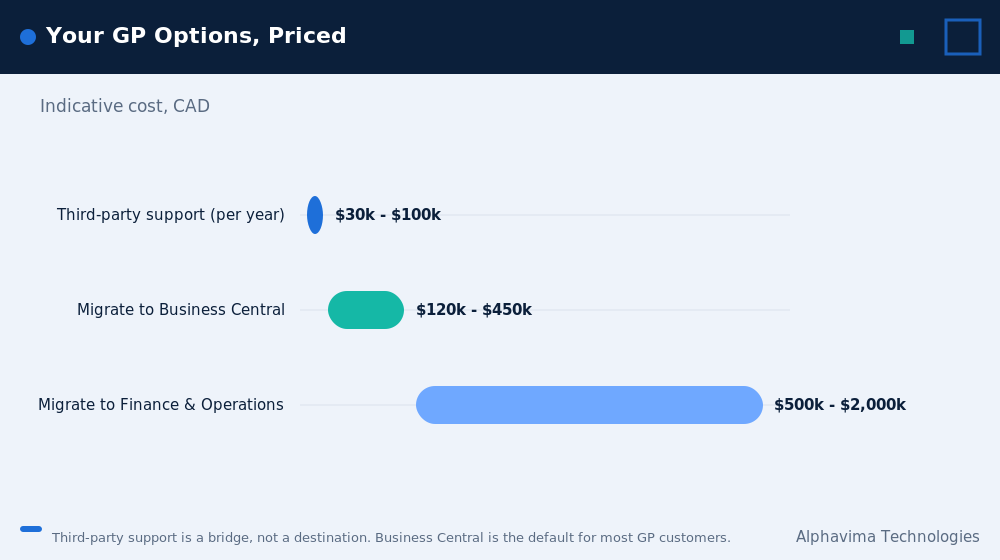
| Option | What it is | Best for | Indicative cost (CAD) | Timeline | Honest verdict |
|---|---|---|---|---|---|
| 1. Migrate to Dynamics 365 Business Central | Microsoft’s designated successor for SMB and mid-market | Most GP customers under ~300 users | $120,000 – $450,000 one-time, plus subscription | 4-14 months | The default answer for most GP customers, and it is the default for good reasons, not just partner incentives |
| 2. Migrate to Dynamics 365 Finance & Operations | Microsoft’s enterprise ERP tier | Complex, large, multi-country organisations | $500,000 – $2,000,000+ | 9-18 months | Correct for a minority. If a partner proposes this for a 60-user company, get a second opinion |
| 3. Move to a non-Microsoft ERP | NetSuite, Sage Intacct, Acumatica, others | Companies with no Microsoft commitment, or specific vertical needs | Comparable to option 1 or higher | 5-12 months | Legitimate. Your GP investment does not obligate you to Microsoft. Evaluate on merit |
| 4. Stay on GP and accept the risk | Run it unsupported | Companies being acquired, wound down, or with a short remaining horizon | Near zero, plus rising risk | N/A | Rational in narrow circumstances. Irrational as a long-term strategy. Document the decision for your auditor |
| 5. Third-party support | Independent providers offering GP support after Microsoft stops | Companies needing a defined bridge of 1-3 years | $30,000 – $100,000/year | Immediate | A genuine bridge, not a destination. Useful if you need to defer a migration past a merger, a peak season, or a leadership change |
Assumption: cost ranges are indicative for a typical mid-market GP customer as of Q1 2026. Confirm with quotes.
We implement Business Central. We have also told GP customers to take option 4 or option 5, when the circumstances warranted it. If a partner presents you with only options 1 and 2, they are selling, not advising.
Dynamics GP migration cost by complexity, in CAD and USD
The variable that drives GP migration cost is not user count. It is customisation and integration debt.
| Complexity tier | Profile | Business Central cost (CAD) | Business Central cost (USD) | Timeline |
|---|---|---|---|---|
| Tier 1: Clean GP | 1 entity, 15-40 users, near-vanilla GP, few integrations, standard modules | $120,000 – $200,000 | $89,000 – $148,000 | 4-6 months |
| Tier 2: Typical GP | 2-4 entities, 30-80 users, several Dexterity customisations, 2-4 integrations, some ISVs, heavy SmartList use | $200,000 – $320,000 | $148,000 – $237,000 | 6-9 months |
| Tier 3: Heavily customised GP | 5+ entities, 80+ users, extensive Dexterity code, eConnect integrations, custom SQL reporting layer, multiple ISVs, 15+ years of history | $320,000 – $450,000+ | $237,000 – $333,000+ | 9-14 months |
Assumption: these are one-time migration and implementation costs, excluding Business Central subscription. Based on typical Canadian and US mid-market GP scope as of Q1 2026. Confirm with a partner quote after a proper customisation audit.
What drives you up a tier
| Cost driver | Impact |
|---|---|
| Undocumented Dexterity customisations | High. Each one must be assessed, and a decision made: rebuild, replace with standard functionality, or drop |
| eConnect / Integration Manager jobs | High. These often encode business rules nobody has written down |
| Custom SQL reports and SmartLists | Medium. Rebuilding in Power BI is usually an improvement, but it is still work |
| Third-party ISV add-ons | Medium to high. Check whether the ISV has a Business Central equivalent. Many do. Some do not |
| Years of history to migrate | Medium. This is the cost most easily reduced. See the archive section below |
| Number of legal entities | Medium |
| GP payroll | High if you use it. GP payroll does not map directly and usually means selecting a payroll solution |
Where GP still beats Business Central
Any partner unwilling to answer this is not being straight with you.
- You already own it. Perpetual licences are a sunk cost, and moving to a subscription changes your cost structure from capital to operating. That is a real CFO conversation, not a detail.
- It is deeply understood by your team. Twenty years of institutional knowledge lives in your finance team’s fingers. That has genuine value, and you will lose some of it.
- Certain deep customisations work exactly as your business needs. Some Dexterity mods encode decades of refined process. Business Central can usually match them, but usually is not always, and never for free.
- On-premises control. Some organisations have genuine data residency or connectivity constraints. Business Central is cloud-first.
- No project risk. Doing nothing carries no implementation risk. It carries other risks, which are the point of this article, but the implementation risk is real and should be acknowledged.
Business Central wins on cloud infrastructure, security, Microsoft 365 and Excel integration, Power BI and Microsoft Fabric analytics, Copilot, the AppSource ecosystem, twice-yearly updates and a long support horizon. But it does not win on every axis, and you should go in with clear eyes.
A Dynamics GP end of life decision framework
Work through these in order.
- Are you being acquired, merged or wound down within 24 months? Yes: consider option 4 or 5. Do not implement an ERP you will be migrated off. No: continue.
- Do you run payroll or file tax directly out of GP? Yes: your effective deadline is the end of Microsoft support, not the end of security updates. Move your planning forward by roughly 16 months. Continue.
- How many users, entities and countries? Under 300 users, fewer than eight entities, one to three countries: Business Central. Above that, or heavy manufacturing and global complexity: evaluate Dynamics 365 Finance & Operations.
- Are you committed to Microsoft? Yes: Business Central is the efficient path, and your Microsoft 365 investment carries over. No: evaluate Business Central alongside NetSuite, Sage Intacct or Acumatica on five-year cost, without sentiment about your GP history.
- Do you have the internal capacity to run a 6-9 month project starting within a year? No: use third-party support as a deliberate, documented bridge, and fix the capacity problem. Yes: start your selection now.
Dynamics GP end of support: working backward from your deadline
Do not plan forward from today. Plan backward from the date support ends.
Assume a Tier 2 (typical) GP customer with an effective deadline of 31 December 2029 (end of Microsoft support).
| Milestone | Work backward to | Why |
|---|---|---|
| Support ends | Dec 2029 | Your hard deadline |
| Live and stable, post first year-end | Jan 2029 | You want one full year-end closed in the new system before support ends |
| Go-live | Sept 2028 | Go live at a period end, ideally a quarter end, never mid-month or in your peak season |
| Implementation starts | Jan 2028 | 6-9 months for a Tier 2 migration |
| Partner selected and contracted | Oct 2027 | Allow 8-12 weeks for contracting and scoping |
| Selection process complete | Aug 2027 | RFP, demos, references, negotiation |
| Customisation audit complete | May 2027 | You cannot get a credible quote without this. It is the gating item |
| Decision to start | Q1 2027 | This is the date that matters |
If your effective deadline is December 2029, your decision date is early 2027. That is closer than it looks. Companies that leave the decision to 2028 end up paying rush rates and going live in December, which nobody enjoys.
The customisation inventory you need before you scope
No partner can give you a credible number without this. If one does, be suspicious.
Audit and document each of the following:
- [ ] Dexterity customisations. List every one. For each: what it does, who built it, who understands it now, is it still used.
- [ ] eConnect integrations. Every inbound and outbound integration, with the business rules embedded in them.
- [ ] Integration Manager jobs. These frequently run undocumented nightly and nobody notices until they stop.
- [ ] Custom SQL objects. Views, stored procedures, triggers and reporting tables built against GP’s database over the years.
- [ ] SmartLists and SmartList Builder objects. These are your users’ real reporting layer. Inventory them.
- [ ] Management Reporter / FRx reports. Every financial statement, with its underlying row and column definitions.
- [ ] Third-party ISV products. Every one, with vendor, version and whether a Business Central equivalent exists.
- [ ] Crystal Reports and SSRS reports. Which are used, which are ceremonial.
- [ ] Modified GP forms and windows. Modifier and VBA customisations.
- [ ] Excel add-ins and macros that read from or write to GP.
- [ ] Scheduled jobs and batch processes.
- [ ] Custom fields and user-defined fields in use across modules.
Practitioner note: the single most common surprise in a GP migration is an integration or customisation that nobody remembered, surfacing in week eight, that turns out to be load-bearing. The audit above is the cheapest insurance you can buy. Budget two to four weeks for it.
What migrates and what gets archived
This is where GP customers over-spend, and it is entirely avoidable.
| Data | Recommendation | Rationale |
|---|---|---|
| Chart of accounts | Redesign, do not copy | Your GP COA has twenty years of accretion. Fix it now or live with it for another twenty |
| Customers, vendors, items | Migrate, after cleansing | Expect substantial duplicate and inactive records |
| Open AR and AP | Migrate | Standard |
| Opening balances | Migrate | By account, as of cutover |
| Inventory quantities and costs | Migrate, with a physical count | Do not migrate a number you do not believe |
| Fixed assets | Migrate | Assess depreciation methods carefully; GP and Business Central handle some methods differently |
| Open sales and purchase orders | Migrate | Standard |
| Historical transactions (3+ years old) | Archive, do not migrate | This is the big one. See below |
| SmartLists | Rebuild in Power BI | An upgrade, not a loss |
| Management Reporter statements | Rebuild in Business Central financial reporting or Power BI | Budget for this properly; it is often underestimated |
| GP payroll history | Archive | Retain access; do not migrate |
The history question
Most GP customers ask to migrate ten to twenty years of transaction history. Then they use it approximately never.
The cost of migrating full detailed history is significant, and it degrades your new system’s performance and data quality. The cost of archiving it, keeping a read-only GP instance or a queryable SQL archive with a Power BI reporting layer over it, is a small fraction of that.
Our standard recommendation: migrate two years of detail plus summary balances. Archive everything older into a read-only environment with Power BI access. Keep it for as long as your retention policy requires.
This one decision routinely takes 15% to 25% off a GP migration budget.
Migration checklist
- Verify current lifecycle dates on Microsoft’s official Dynamics GP lifecycle page.
- Determine your effective deadline (Microsoft support, not security updates, if you use payroll or tax).
- Complete the customisation inventory above.
- Identify which third-party ISVs have Business Central equivalents.
- Decide the history strategy: migrate two years, archive the rest.
- Redesign the chart of accounts and the dimension strategy.
- Name an internal project owner with authority and at least half their time.
- Identify the two or three people who understand your GP customisations, and secure their time.
- Get a fixed-range estimate after, not before, the customisation audit.
- Choose a go-live at a quarter end, outside your peak season.
- Plan two full UAT cycles with real users and real transactions.
- Plan role-based training, not module-based training.
- Budget hypercare through the first month-end and the first year-end.
- Retain read-only GP access for at least two years post go-live.
- Document the decision, including options considered, for your auditor.
Myths vs facts
| Myth | Fact |
|---|---|
| “GP will stop working on the end-of-life date.” | It will not. It keeps running. What stops is support, security patches and regulatory updates. The risk is compliance and security, not function. |
| “We have until 2031.” | Only if you do not run payroll or tax out of GP. If you do, your real deadline is the end of Microsoft support, roughly sixteen months earlier. |
| “We have to move to Business Central.” | You do not. Business Central is the natural fit for most GP customers, but non-Microsoft ERPs, third-party support and staying put are all legitimate options for specific situations. |
| “We should migrate all twenty years of history.” | You should not. Migrate two years, archive the rest. This routinely saves 15% to 25% of the budget and produces a cleaner system. |
| “Our customisations will migrate.” | Dexterity code does not migrate. Each customisation must be assessed and either rebuilt as an AL extension, replaced by standard Business Central functionality, or dropped. Many can simply be dropped. |
| “Business Central cannot do what GP does.” | It does most of it, and a great deal GP never could. But it is not GP, and some deep customisations will need to be rethought rather than replicated. |
| “We can decide next year.” | If your deadline is 2029, your decision date is 2027. Work it backward. |
| “A partner can quote us without seeing our system.” | They can produce a number. It will not be a quote. Insist on a customisation audit first. |
Plan your Dynamics GP exit while you still have runway
Bring your GP version, your customisation list and your deadline. We will give you a costed, dated migration plan you can take to your board.
Pros and cons of Dynamics GP to Business Central migration
Pros: long support horizon on Microsoft’s Modern Lifecycle, cloud infrastructure on Azure with no server to patch, native Microsoft 365, Outlook and Excel integration, Power BI and Microsoft Fabric for analytics, Copilot for finance workflows, twice-yearly feature updates, large AppSource ecosystem, upgrade-safe AL extension model, familiar Microsoft look and feel that eases the change for GP users, Power Platform and Dataverse for extending beyond finance.
Cons: perpetual licence becomes a subscription, real project cost and real project risk, Dexterity customisations must be rebuilt or dropped, some GP behaviours have no direct equivalent, a genuine learning curve for long-time GP users, requires an internal project owner, partner quality varies significantly and must be vetted.
Common mistakes
- Waiting for a deadline instead of working backward from one. The decision date is roughly two years ahead of the deadline, not two months.
- Getting a quote before the customisation audit. The number will be wrong, and the change orders will follow.
- Migrating all history. Expensive, slow, and you will not use it.
- Copying the chart of accounts. You get a 2026 system producing 2006 reports.
- Rebuilding every customisation. Ask first whether standard Business Central functionality now covers it. Frequently it does. Every customisation you do not rebuild is money and future upgrade risk saved.
- Going live in your peak season or at year-end. Choose a quarter end in a quiet month.
- Losing the people who understand GP. Your two GP experts are the most valuable resource in the project. Secure their time formally, before someone books them elsewhere.
- Treating it as a data migration. It is a process redesign that happens to involve data. Companies that treat it as a lift-and-shift rebuild their 1998 processes in a 2026 system and wonder why nothing improved.
- Under-budgeting the reporting rebuild. Management Reporter statements and SmartLists represent years of accumulated work. Rebuilding them in Power BI is worth doing well, and it takes real time.
- Not documenting the decision. Whatever you choose, including staying on GP, write down the options you considered and why. Your auditor will ask.
Expert recommendations
Plan your Dynamics GP end of life work by doing the customisation audit first, before you talk to partners. Two to four weeks of internal work will give you a document that makes every subsequent quote more accurate and every negotiation more informed. It is the highest-return activity in the entire process.
Set your effective deadline based on payroll and tax, not security patches. If regulatory updates matter to you, and for most GP customers they do, your real horizon is shorter than you think.
Archive history, do not migrate it. Two years of detail in the new system. Everything else in a read-only archive with Power BI over it. This is the single biggest cost lever you have.
Use the migration to fix the chart of accounts and the dimension strategy. You will not get another chance for a decade.
If you genuinely need more time, buy it deliberately. Third-party support for a defined 12 to 24 month bridge, with a documented plan for what happens after, is a professional decision. Drifting past the deadline with no plan is not.
Insist on a fixed-range estimate. After a proper audit, any competent partner can give you a defensible range. If they will not, that tells you something.
Key takeaways
- Dynamics GP end of life does not stop GP working. It stops it being supported, patched and updated for tax and payroll.
- Your effective deadline is the end of Microsoft support, particularly if you run payroll or file tax in GP.
- You have five options, and two of them do not involve buying anything from a Microsoft partner.
- Business Central is the natural successor for most GP customers under about 300 users. Finance & Operations is for the larger minority.
- Indicative migration cost: CAD 120,000 to 450,000 (USD 89,000 to 333,000) depending on customisation debt, not user count.
- The customisation audit is the gating item. Do it before you get a quote.
- Archive your history rather than migrating it. This alone can save 15% to 25% of the budget.
- Work backward from your deadline. If support ends in 2029, your decision date is 2027.
Conclusion
Dynamics GP end of life is a scheduling problem, not an emergency. Handled with two years of runway, it is a well-understood project with a well-understood cost. Handled with six months of runway, it becomes an expensive scramble.
The two things that most determine your outcome are both within your control today. First, complete the customisation audit, so you know what you actually have. Second, decide what to do about your history, so you are not paying to migrate twenty years of data you will never open. For a community-sourced view of what real GP admins are worried about ahead of 2029, read our field notes on the Dynamics GP end of life migration roadmap.
Do those two things, and every conversation that follows gets easier and cheaper.
Get a real number, based on your real system
Alphavima has delivered Microsoft business applications for over 20 years across Canada, the USA, the UK, the UAE and India, and we are ISO 27001 and ISO 9001 certified. We will audit your GP customisations, integrations and reporting layer, then give you a fixed-range migration estimate in CAD and USD, with a timeline that works backward from your deadline.
Request a Dynamics GP migration assessment. Two to four weeks, fixed fee, and you keep the documentation whether or not you work with us.

Related case study
Custom Truck One Source: Multi-ERP Migration, Zero Downtime
Custom Truck One Source migrated legacy data from multiple ERPs with full audit validation and no business downtime.
Read the case study · Next read: Business Central implementation cost
Frequently asked questions
When exactly does Dynamics GP support end?
As published and current as of August 2026: Microsoft support, including product enhancements and regulatory and tax updates, ends 31 December 2029. Security updates continue separately until 30 April 2031. GP is already closed to new customers. Verify these dates on Microsoft's official Lifecycle Policy page before planning; Microsoft revised this date once already, from an initial September 30, 2029 announcement to the current December 31, 2029.
Will Dynamics GP stop working after end of life?
No. GP runs on your own SQL Server and will keep running. What ends is Microsoft support, security patching, and tax, payroll and regulatory updates. The risk is compliance, audit and security exposure, not sudden failure.
Do I have to move to Business Central?
No. Business Central is Microsoft's designated successor and the right fit for most GP customers under about 300 users, but Dynamics 365 Finance & Operations, non-Microsoft ERPs, third-party support and staying on GP are all legitimate options depending on your situation.
How much does it cost to migrate from GP to Business Central?
Indicatively, CAD 120,000 to 450,000 (USD 89,000 to 333,000) as a one-time cost, plus Business Central subscription. The main driver is customisation and integration complexity, not user count. Assumption: typical mid-market GP scope, Q1 2026. Confirm with a partner quote after a customisation audit.
How long does a GP to Business Central migration take?
Four to six months for a near-vanilla GP installation. Six to nine months for a typical one. Nine to fourteen months for heavily customised environments with extensive Dexterity code and many integrations.
Can we keep our GP history?
Yes, and you should, but not inside Business Central. Migrate two years of detail plus opening balances, and archive the rest in a read-only environment with Power BI reporting access. This is cheaper, faster and produces a cleaner new system.
What happens to our Dexterity customisations?
They do not migrate. Each one must be assessed. Some are replaced by standard Business Central functionality that did not exist when the customisation was written. Some are rebuilt as AL extensions. Some are simply dropped because nobody uses them any more. Auditing them is the first step.
Is third-party GP support a real option?
Yes, as a bridge. Independent providers can support GP after Microsoft stops, typically for CAD 30,000 to 100,000 a year. It is a legitimate way to defer a migration past a merger, an acquisition or a leadership transition. It is not a long-term strategy, and it does not solve the regulatory update problem.