











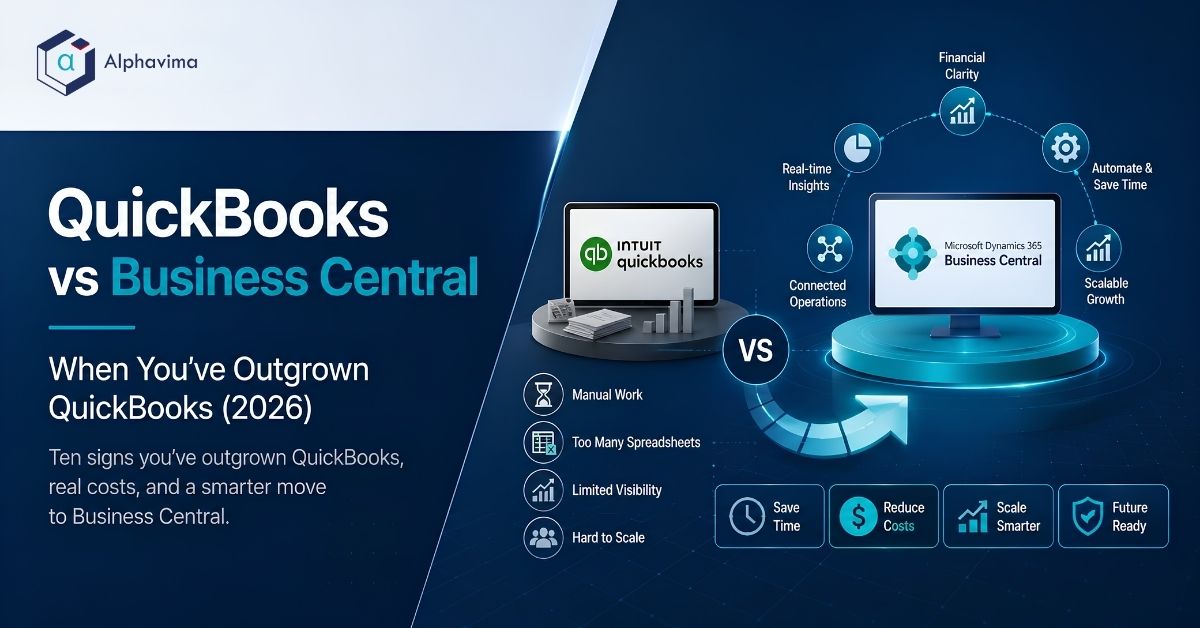
When should you leave QuickBooks? The QuickBooks vs Business Central decision turns on one thing: move to Microsoft Dynamics 365 Business Central when QuickBooks starts costing you more in workarounds than it saves in licence fees.
The usual triggers: multiple legal entities, real inventory, month-end taking more than ten days, or a finance team maintaining a dozen spreadsheets because nobody trusts the reports.
Executive summary
- QuickBooks is excellent accounting software. It is not an ERP. That distinction is the whole article.
- The trigger is rarely accounting. Companies leave QuickBooks over inventory, multi-entity consolidation, approvals and reporting, not over the general ledger.
- The real cost of staying is hidden in Excel. Count the hours your team spends rebuilding numbers outside the system. That is your actual software bill.
- Business Central costs more per user but replaces the spreadsheets, the manual consolidation and often two or three bolt-on tools.
- A finance-first migration is realistic in 90 days. Full scope with inventory and integrations takes 16 to 26 weeks.
- Some companies should stay on QuickBooks. We say who, and why, below.
- Indicative migration cost for a 20-user company: CAD 85,000 to 190,000 (USD 63,000 to 140,000) one-time, plus subscription. Assumption: mid-market scope; confirm with a partner quote.
Introduction
Nobody leaves QuickBooks because they woke up wanting a harder accounting system. They leave because the business grew and the software did not grow with it.
The pattern is consistent. First you add a spreadsheet to handle something QuickBooks cannot do. Then another. Two years later, the finance team spends the first ten days of every month rebuilding reality in Excel, and the CFO is making decisions on numbers that are three weeks old.
This article is about knowing when that moment has arrived, and what it costs to fix it. We are a Microsoft partner, so we implement Business Central. We have also told companies to stay on QuickBooks, and we explain below exactly when that is the right call.
Table of contents
Talk to a Business Central consultant
Book a quick call to talk through your Business Central project. No pressure, just practical advice. Or see our Business Central services.
QuickBooks vs Business Central: the honest difference
QuickBooks records what happened. An ERP runs what is happening.
QuickBooks is built around the general ledger. It records transactions, produces financial statements and handles payroll and tax. It does this very well, cheaply, and with a gentle learning curve. Millions of businesses will never need anything else.
Microsoft Dynamics 365 Business Central is an ERP. It includes the accounting, but it also runs inventory, warehousing, purchasing, sales orders, projects, service, approvals and light manufacturing, in one database, with dimensional reporting across all of it. It sits on Azure, connects to Microsoft 365, and works with Power BI, Power Automate, Dataverse and Copilot.
The practical difference: in QuickBooks, operational data lives outside the system and gets summarised into it. In an ERP, operational data is the system, and the accounting falls out of it automatically.
Ten signs you are outgrowing QuickBooks
Tick the ones that apply. Five or more, and you should be running the numbers.
- Your month-end close takes more than ten business days. Not because your team is slow, but because the numbers have to be assembled from outside the system.
- You consolidate multiple companies in Excel. QuickBooks has no true multi-entity consolidation. If you have three entities, you have three books and a spreadsheet.
- Inventory accuracy is a running argument. No landed cost, no serial or lot tracking worth the name, no real warehouse management, no multi-location valuation you trust.
- You have more than a handful of approval steps done by email. Purchase approvals, expense approvals, credit limits: all managed by someone remembering to ask.
- Your real reporting lives in spreadsheets. If the board pack is built in Excel from exports, your ERP is Excel and QuickBooks is just a data entry screen.
- You have hit a hard limit. List limits, file size limits, user limits, performance degradation on large files. QuickBooks publishes these; when you hit them, you have your answer.
- You cannot see profitability by the dimension that matters. Project, department, location, product line, customer segment. If you cannot slice it in the system, you cannot manage it.
- Different people give different answers to the same question. Two versions of revenue by region, both defensible, neither trusted.
- You are running three or four bolt-on tools for inventory, expenses, reporting and CRM, and none of them talk to each other properly. (Custom Azure-based integration can patch this, but it is a workaround, not a fix.)
- Audit is painful. Weak audit trails, editable history and manual journal entries in volume make external audit slow and expensive.
The trigger thresholds table
Vague advice is useless. Here are concrete numbers. These are the points at which, in our delivery experience, QuickBooks stops being the economical choice.
| Dimension | QuickBooks is fine | Starts to strain | Move to an ERP |
|---|---|---|---|
| Finance and ops users | 1-5 | 6-15 | 15+ |
| Legal entities | 1 | 2-3 | 4+ |
| Currencies | 1-2 | 3 | 4+ |
| Inventory SKUs | 0-500 | 500-3,000 | 3,000+ |
| Warehouse locations | 1 | 2 | 3+ |
| Month-end close | Under 5 days | 5-10 days | Over 10 days |
| Monthly transaction volume | Under 5,000 | 5,000-20,000 | 20,000+ |
| Approval workflows | Informal | Email-based | Needs enforcement |
| Reporting dimensions needed | 1-2 | 3 | 4+ |
| Annual revenue (rough guide) | Under CAD 10M | CAD 10M-25M | CAD 25M+ |
Assumption: these are practitioner thresholds based on typical mid-market patterns, not vendor-published limits. Revenue is the weakest indicator on this list; a CAD 60M services firm with one entity may be perfectly happy on QuickBooks, while a CAD 12M distributor with four warehouses is already suffering.
QuickBooks Online vs QuickBooks Enterprise vs Business Central
Most comparisons treat “QuickBooks” as one product. It is not. Here is the three-way view.
| Capability | QuickBooks Online (Advanced) | QuickBooks Desktop Enterprise | Dynamics 365 Business Central |
|---|---|---|---|
| Deployment | Cloud | Desktop / hosted | True cloud on Azure |
| Typical users | 1-25 | 1-40 | 10-300 |
| Multi-entity consolidation | No native consolidation | Limited; separate company files | Yes, with intercompany and consolidation features |
| Inventory | Basic | Advanced Inventory add-on | Full inventory, WMS, multi-location, costing methods |
| Landed cost | No | Limited | Yes |
| Lot / serial tracking | No | Yes (Advanced Inventory) | Yes, native |
| Manufacturing | No | Light assemblies | Full (Premium licence) |
| Approval workflows | Basic | Limited | Native workflow plus Power Automate |
| Dimensional reporting | Classes and locations (limited) | Classes | Up to eight dimensions, fully reportable |
| Audit trail | Basic | Basic | Full change log |
| Reporting / BI | Built-in reports | Built-in reports | Power BI, Microsoft Fabric, Excel-native |
| AI assistance | Intuit Assist features | Limited | Copilot in Business Central and across Microsoft 365 |
| Extensibility | Apps marketplace | Limited | AL extensions, AppSource, Power Platform, Dataverse |
| Microsoft 365 integration | Basic Excel export | Basic Excel export | Native Outlook, Excel, Teams |
| Indicative annual cost (20 users) | CAD 6,000-12,000 | CAD 12,000-30,000 | CAD 35,000-55,000 |
Assumption: costs as of Q1 2026, indicative only, before implementation. Business Central is materially more expensive per year. The rest of this article is about whether it is worth it.
The Excel shadow system: what staying really costs
This is the calculation almost nobody runs, and it is usually decisive.
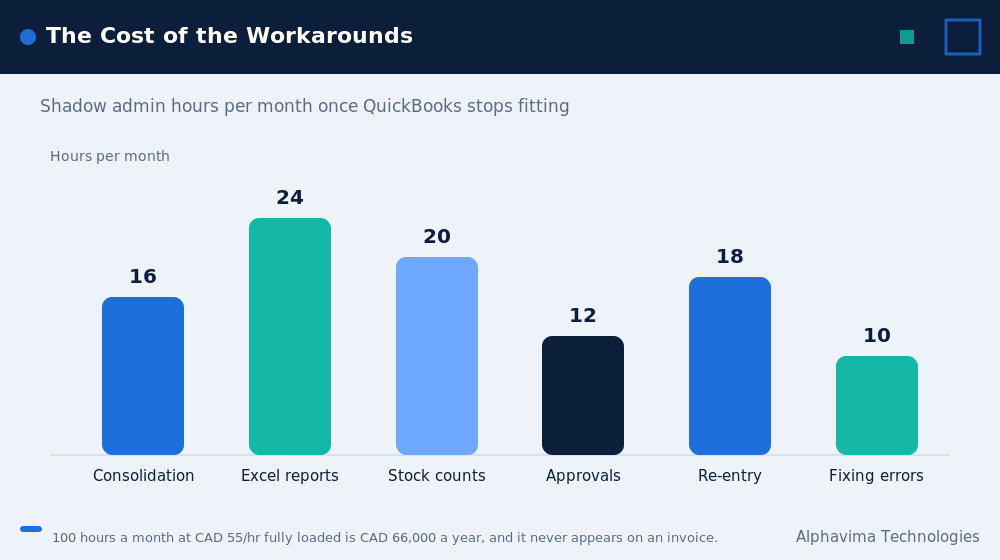
| Shadow activity | Typical hours per month | Fully loaded cost at CAD 55/hr | Annual (CAD) | Annual (USD) |
|---|---|---|---|---|
| Manual multi-entity consolidation | 16 | $880 | $10,560 | $7,800 |
| Rebuilding management reports in Excel | 24 | $1,320 | $15,840 | $11,700 |
| Inventory reconciliation and stock counts | 20 | $1,100 | $13,200 | $9,750 |
| Chasing and recording approvals by email | 12 | $660 | $7,920 | $5,850 |
| Manual data re-entry between systems | 18 | $990 | $11,880 | $8,780 |
| Fixing errors caused by the above | 10 | $550 | $6,600 | $4,880 |
| Total | 100 hrs/month | $5,500/month | $66,000 | $48,760 |
Assumption: a 20-user company with two legal entities and real inventory, blended fully loaded finance and ops labour cost of CAD 55 per hour. Your numbers will differ. Run this table with your own hours before you make any decision. USD converted at approximately 0.74.
The point is not the exact total. The point is that a company paying CAD 10,000 a year for QuickBooks may be spending CAD 66,000 a year working around it. The licence fee was never the cost.
QuickBooks vs Business Central cost comparison in CAD and USD
Indicative figures for a 20-user company with two legal entities, moderate inventory, one country, as of Q1 2026.
| Cost element | QuickBooks (stay) CAD | QuickBooks (stay) USD | Business Central CAD | Business Central USD |
|---|---|---|---|---|
| Annual software subscription | $8,000 – $18,000 | $6,000 – $13,500 | $35,000 – $55,000 | $26,000 – $41,000 |
| Bolt-on tools (inventory, expenses, reporting) | $10,000 – $25,000 | $7,400 – $18,500 | $0 – $8,000 | $0 – $6,000 |
| Excel shadow-system labour (from table above) | $50,000 – $80,000 | $37,000 – $59,000 | $8,000 – $18,000 | $6,000 – $13,300 |
| One-time implementation | $0 | $0 | $70,000 – $150,000 | $52,000 – $111,000 |
| Data migration | $0 | $0 | $10,000 – $25,000 | $7,400 – $18,500 |
| Integrations | $0 | $0 | $5,000 – $20,000 | $3,700 – $14,800 |
| Training and change management | $0 | $0 | $8,000 – $20,000 | $6,000 – $14,800 |
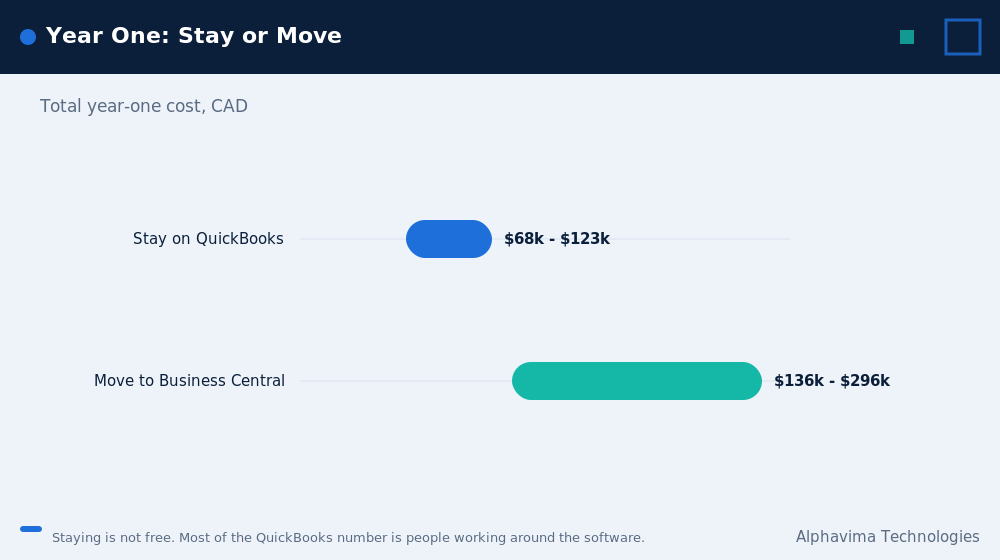
| Year 1 total | $68,000 – $123,000 | $50,000 – $91,000 | $136,000 – $296,000 | $100,000 – $219,000 |
| Year 2+ annual run rate | $68,000 – $123,000 | $50,000 – $91,000 | $43,000 – $81,000 | $32,000 – $60,000 |
Assumption: indicative mid-market ranges, Q1 2026, confirm with a partner quote. The shadow-system labour line is the swing factor and the one most companies refuse to count.
The pattern is clear. Business Central costs materially more in year one. From year two, the run rate is typically lower than staying on QuickBooks, once the workaround labour is counted. Typical payback in our experience: 18 to 30 months.
Business Central for small business: when to stay on QuickBooks instead
A Microsoft partner telling you not to buy Microsoft software should get your attention. Here is when staying is the right call.
- You have one legal entity, one location, and no inventory. A services firm billing time has very little to gain.
- Your month-end closes in under five days and nobody complains. If the process works, do not rebuild it.
- You have fewer than six people touching the finance system. The per-user economics do not favour an ERP at that scale.
- You are about to be acquired. Let the acquirer choose the system. Do not spend six months implementing an ERP you will be migrated off.
- Your growth is flat and you have no plan to change that. ERP is an investment in a future volume you have to actually expect.
- You have no internal capacity to run a project. An ERP implementation with no internal owner will fail. Fix the capacity problem first, or wait.
If none of these apply and you ticked five or more warning signs above, you have your answer. If you decide to stay for now, you do not have to live with disconnected systems. See our guide to connecting QuickBooks to Azure and Dynamics 365 for a middle-ground option.
A QuickBooks alternative decision tree
Answer in order.
- Do you have more than one legal entity that must be consolidated?
Yes, and it is done in Excel today: go to step 4. No: continue. - Do you hold and value physical inventory across more than one location?
Yes: go to step 4. No: continue. - Does your month-end close take more than ten business days, or does your board pack get built outside the system?
Yes: go to step 4. No: stay on QuickBooks and revisit in twelve months. - Do you have an internal person who can own a 3-6 month project?
No: fix that first. An ERP without an internal owner will not land. Yes: continue. - Do you already run Microsoft 365?
Yes: Business Central is the efficient default. Shortlist it and one alternative.
No: shortlist Business Central alongside Sage Intacct or NetSuite, and score on five-year cost.
QuickBooks to ERP: what actually migrates
Set expectations here early. This is where migrations get emotional.
| Data | Migrates cleanly | Notes |
|---|---|---|
| Chart of accounts | Yes, but redesign it | Do not copy your QuickBooks COA across. This is your one chance to fix it |
| Customers and vendors | Yes | Cleanse duplicates first. Every QuickBooks file has them |
| Items / products | Yes | Expect significant cleanup, especially on units of measure and costing |
| Open AR and AP | Yes | Standard practice: migrate open transactions, not full detail |
| Opening balances | Yes | By account, as of the cutover date |
| Inventory quantities and values | Yes | Requires a physical count at cutover. Plan for it |
| Historical transactions | Partially | Typically 1-2 years summarised. Full history is expensive and rarely used |
| Attachments and documents | Sometimes | Depends on volume. Often better archived than migrated |
| Custom QuickBooks reports | No | They must be rebuilt, usually in Power BI. This is an upgrade, not a loss |
| Payroll history | Usually not | Keep QuickBooks read-only access for historical payroll, or archive |
Practitioner note: keep your QuickBooks file in read-only mode for at least two years after cutover. It costs almost nothing and it ends every argument about historical numbers. For the field-by-field export and import steps, see our full QuickBooks to Business Central migration guide.
The 90-day migration plan
This is a finance-first implementation: general ledger, AP, AR, banking, basic inventory and reporting. Add 6 to 12 weeks for full inventory, warehousing, manufacturing or heavy integrations. If you want the extended timeline with a wider scope, our step-by-step Business Central migration guide breaks out a 16 to 18 week plan.
| Phase | Weeks | Activities | Owner |
|---|---|---|---|
| 1. Discovery and design | 1-2 | Process walkthrough, chart of accounts redesign, dimension strategy, reporting requirements | Partner + internal lead |
| 2. Data cleansing | 2-5 | De-duplicate customers, vendors, items. Fix units of measure. This is client work and it always takes longer than expected | Client |
| 3. Configuration | 3-7 | Company setup, posting groups, number series, approval workflows, security roles | Partner |
| 4. Migration build | 5-8 | Load master data into sandbox, validate, load again | Partner |
| 5. Integration | 5-9 | Bank feeds, payroll, e-commerce, CRM. Power Automate for the light stuff | Partner |
| 6. Reporting | 6-10 | Financial statements in Business Central, management reporting in Power BI | Partner + Finance |
| 7. User acceptance testing | 8-11 | Two full cycles. Real transactions, real people, real edge cases | Client |
| 8. Training | 9-12 | Role-based training in the sandbox with client data | Partner |
| 9. Cutover | 12 | Physical inventory count, final QuickBooks close, opening balances, go live | Both |
| 10. Hypercare | 13-16 | Daily support through the first month-end close | Partner |
The first month-end close after go-live is the real go-live. Do not declare success until it is done.
Migration checklist
- Named internal project owner with authority to make decisions and at least 50% of their time allocated.
- Chart of accounts redesigned, not copied.
- Dimension strategy agreed (what do you actually want to report by?).
- Master data cleansed: customers, vendors, items, with duplicates removed.
- Decision made on how much history migrates, in writing.
- QuickBooks archive plan agreed (read-only access, for how long).
- Physical inventory count scheduled for the cutover weekend.
- Integration list confirmed with an approach per system.
- Bank feeds tested in the sandbox before cutover.
- Two full UAT cycles scheduled, with named testers.
- Role-based training booked, not module-based.
- Power BI reporting requirements gathered during discovery, not after.
- Cutover date chosen at a period end, never mid-month.
- Hypercare support agreed through the first close.
- Bookkeeper concerns documented and addressed. They usually know something you do not.
Myths vs facts
| Myth | Fact |
|---|---|
| “QuickBooks is bad software.” | QuickBooks is excellent at what it does. The problem is that you started doing things it was never built to do. |
| “Business Central is just QuickBooks with a bigger price tag.” | Business Central is an ERP. Inventory, warehousing, manufacturing, workflows and dimensional reporting are core, not add-ons. |
| “Migration means losing all our history.” | You keep your QuickBooks file read-only. You migrate open items and opening balances. History is preserved, just not inside the new system. |
| “We can migrate our chart of accounts as is.” | You can. You should not. A messy COA in a new ERP is a messy ERP. |
| “The team will pick it up in a week.” | They will not. Business Central has a real learning curve. Budget for proper role-based training. |
| “We need every module on day one.” | No. Finance-first in 90 days, then add inventory, projects and manufacturing in phases. Phased projects land more often than big-bang ones. |
| “ERP is only for big companies.” | Business Central serves companies from roughly ten users upward. The question is complexity, not headcount. |
| “Once we go live, we are done.” | The first month-end close is the real test. Budget for hypercare through it. |
Find out whether you have actually outgrown QuickBooks
Bring your entity count, your monthly close time and your shadow-spreadsheet list. We will tell you honestly whether to move or stay.
QuickBooks vs Business Central: pros and cons
Staying on QuickBooks
Pros: low cost, familiar to every bookkeeper, quick to hire for, no project risk, excellent for simple single-entity businesses, strong payroll and tax support in North America.
Cons: no true multi-entity consolidation, weak inventory, minimal workflow, limited dimensional reporting, hard system limits, forces spreadsheet workarounds, poor audit trail, does not scale operationally.
Moving to Business Central
Pros: one system for finance and operations, real inventory and warehousing, up to eight reporting dimensions, native approval workflows, Power BI and Microsoft Fabric for analytics, Copilot support, native Microsoft 365 integration, AppSource ecosystem, room to grow to 300+ users.
Cons: higher subscription cost, a real implementation project with real cost and risk, steeper learning curve, requires an internal project owner, requires a partner and partner quality varies, Power BI Pro licences are separate.
Common mistakes
- Migrating the chart of accounts unchanged. You get a new system that produces the same unhelpful reports.
- Treating data cleansing as the partner’s job. It is not. Only you know which of those three “Acme Corp” records is real.
- Going live mid-month. Always cut over at a period end.
- Skipping the physical inventory count. Your QuickBooks inventory numbers are wrong. Find out by how much before you migrate them, not after.
- Big-bang scope. Finance, inventory, manufacturing, CRM and e-commerce, all at once, in one project. This is how deadlines die. Phase it.
- No internal owner. The most common single cause of failure, in every ERP project, on every platform.
- Underestimating training. A two-hour demo is not training. Role-based, hands-on, in the sandbox, with your data.
- Ignoring the bookkeeper’s objections. They have eleven years of context on why things are done a certain way. Some of it is habit. Some of it is a legal requirement you did not know about.
- Declaring victory at go-live. The first close is the real milestone.
- Buying Premium when Essentials is enough. Only buy the Premium licence if you actually need service management or manufacturing.
Expert recommendations
Before you weigh QuickBooks vs Business Central, run the shadow-system calculation. Before you look at a single demo, count the hours your team spends working around QuickBooks. If it is under 30 hours a month, stay. If it is over 80, you already know.
Redesign the chart of accounts and the dimension strategy during discovery. These are the two highest-value days of the entire project. Get it wrong and you will live with it for a decade.
Go finance-first. Get the general ledger, AP, AR and reporting live in 90 days. Add inventory and operations in phase two. You will build internal confidence and the team will absorb the change.
Name the internal owner before you sign. Half their time, minimum. Authority to make decisions without a committee.
Ask for a fixed-range estimate. Any competent partner can give you a defensible range after a proper discovery. If they will not, that is information.
Key takeaways
- In QuickBooks vs Business Central, QuickBooks is not the problem. Using QuickBooks for work it was never designed to do is the problem.
- The real cost of staying is the Excel shadow system, not the subscription fee.
- Concrete triggers: four or more entities, 3,000+ SKUs, month-end over ten days, three or more warehouses.
- Business Central costs more in year one and typically less from year two once workaround labour is counted. Payback is usually 18 to 30 months.
- Some companies genuinely should stay on QuickBooks. Check the list before you spend anything.
- Redesign the chart of accounts. Cleanse the data. Name an internal owner. Go finance-first.
Conclusion
The QuickBooks vs Business Central question is not about failure. It is what happens when a business gets more complicated than the software it started with, which is a good problem.
The mistake is waiting too long. Companies typically stay on QuickBooks about eighteen months past the point where it stopped paying for itself, because the licence fee is small and the workaround labour is invisible. Make it visible, and the decision usually makes itself.
Get a straight answer on whether you are ready
Alphavima has implemented Microsoft business applications for over 20 years across Canada, the USA, the UK, the UAE and India. We will run your shadow-system numbers with you, and if the answer is “stay on QuickBooks for another year,” that is what we will tell you.
Book a 30-minute Business Central readiness assessment. We will review your entity structure, inventory, close cycle and reporting, and send you a fixed-range migration estimate in CAD and USD.

Related case study
Manufacturing ERP on Business Central
A manufacturer put the shop floor, stockroom and finance on one Dynamics 365 Business Central ERP.
Read the case study · Next read: Business Central pricing guide
Frequently asked questions
Is Business Central better than QuickBooks?
Not universally. Business Central is a full ERP with inventory, warehousing, workflows and multi-entity reporting. QuickBooks is accounting software. If you only need accounting, QuickBooks is better because it is cheaper and simpler. If you need to run operations, QuickBooks cannot do it.
How much does it cost to migrate from QuickBooks to Business Central?
For a 20-user company with two entities and moderate inventory, expect CAD 85,000 to 190,000 (USD 63,000 to 140,000) one-time, plus annual subscription of roughly CAD 35,000 to 55,000. Assumption: mid-market scope, Q1 2026, confirm with a partner quote.
How long does the migration take?
A finance-first migration takes about 90 days. Adding full inventory, warehousing, manufacturing or complex integrations pushes it to 16 to 26 weeks.
Will we lose our QuickBooks history?
No. Standard practice is to migrate open transactions and opening balances, then keep the QuickBooks file in read-only mode for two years or more. Your history stays accessible; it just does not live in the new system.
Can Business Central handle multiple companies?
Yes. Business Central supports multiple companies with intercompany transactions and consolidation. This is one of the most common reasons companies move off QuickBooks, which has no true consolidation.
Is Business Central hard to learn?
It has a real learning curve, and anyone who tells you otherwise is selling. It is more capable than QuickBooks, so it has more to learn. Budget for role-based training, and expect three to six weeks before your team is comfortable.
Do we need Power BI as well?
You do not strictly need it. Business Central has built-in financial reporting. But most companies that were living in Excel end up using Power BI for management reporting, and Power BI Pro licences are purchased separately. Budget for them from the start.
What if we are not sure we are ready?
Run the shadow-system hours calculation in this article. If your team spends fewer than 30 hours a month working around QuickBooks, you are probably not ready and should stay. That is a legitimate answer.