








Alphavima Technologies

June 24th, 2026

Business Central Subscription Billing: A Practical Setup Guide

Business Central subscription billing gives finance and IT teams a native way to invoice contractually agreed services on a recurring schedule. Since the 2024 release wave 2, this capability is built directly into the product, so most core recurring-billing scenarios no longer depend on a third-party add-on.

If your company sells maintenance contracts, software licenses, memberships, or equipment rental, manual invoice creation adds up fast. The native feature replaces that effort with a structured path from contract to posted invoice. In this guide, we walk through the building blocks, then a numbered setup, and finally how to handle renewals and changes over time. By the end, you should know which objects to configure first and how the pieces connect.
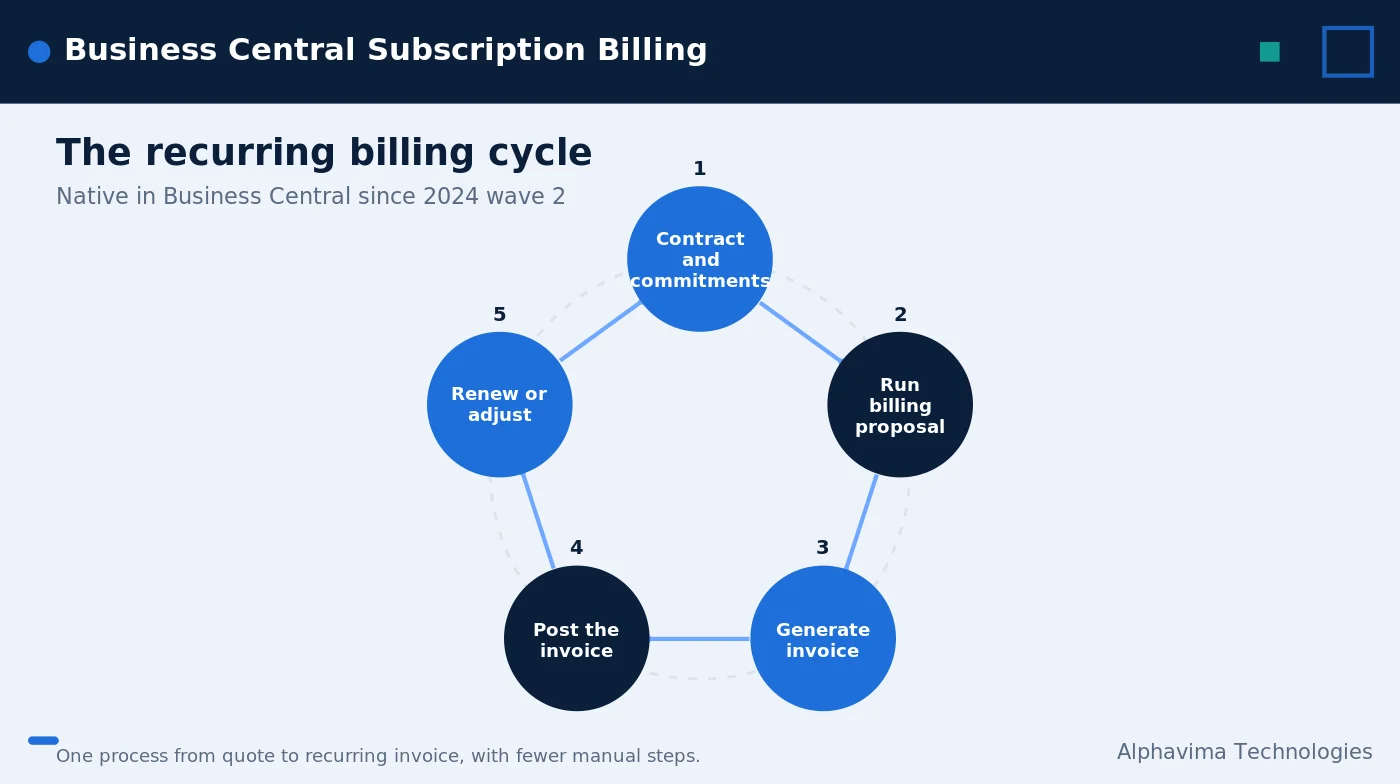
Business Central subscription billing core building blocks diagram

Why recurring billing matters for finance teams

Recurring revenue is predictable, but only when the billing process behind it is reliable. When invoices are created by hand each month, errors creep in, periods get missed, and reconciliation takes longer than it should.

Native recurring billing in Business Central addresses these gaps in a few ways. First, it reduces manual errors because the system calculates dates and amounts from your contract terms. Second, it creates a clear path from quote to recurring invoice, so everyone follows the same process. Third, billing runs can be automated, which frees your team for higher-value work. Finally, it supports revenue deferral and recognition, so the accounting side stays accurate as service is delivered.

The feature also supports flexible billing models. You can define pricing models, manage prices, schedule renewals, and apply different billing periods and frequencies. That flexibility matters because few subscription products bill the same way.

For many teams, the bigger win is consistency. When every recurring invoice follows the same contract-driven logic, audits get easier and disputes drop. Customers receive the right amount on the right date, and your team spends less time explaining corrections. Over a full year, that consistency compounds into real time savings and steadier recurring revenue in Business Central.

Core building blocks of Business Central subscription billing

Before you configure anything, it helps to understand the objects involved. Three pieces do most of the work, and each has a clear purpose. Together they connect a service you sell to the recurring invoices your customers receive.

Service commitment packages define the rules. Customer and vendor contracts hold what you bill or get billed for. Billing templates control which commitments get picked up and for which dates. The table below summarizes how these pieces fit together.

Setup objectPurpose
Service Commitment PackageDefines billing frequency, whether the commitment is invoiced in a customer or vendor contract, how the price is calculated, the initial term, and renewal behavior.
Customer / Vendor ContractHolds the service commitments you bill to a customer or get billed for by a vendor.
Billing TemplateIncludes filter criteria and date formulas; actual dates are calculated from the working date when you select the template.

For background on how Microsoft positions the feature, see the official subscription billing overview on Microsoft Learn.

Step-by-step subscription billing setup

Now to the practical part. The following numbered steps move from initial configuration through your first recurring invoice run. Details vary by version, so confirm field names against your environment as you go.

  1. Set up items or resources as service commitment items. Mark the items or resources you sell on a subscription basis so the system treats them as recurring commitments rather than one-time sales.
  2. Create service commitment packages. Define the billing frequency and the terms. Here you set how the price is calculated, the initial term, and how renewals behave.
  3. Create a customer contract and add the commitments. Build a contract for the customer, then attach the service commitments you plan to invoice.
  4. Configure billing templates. Set the filter criteria and date formulas. Because dates are calculated from the working date when you select the template, the same template stays usable across periods.
  5. Run a billing proposal. The proposal gathers the commitments due and generates the draft recurring invoices for review.
  6. Post the invoices. Once the proposal looks correct, post the invoices so they hit the customer ledger and your revenue accounts.
  7. Manage renewals, price changes, and cancellations. Over the contract life, adjust prices, process renewals, and handle cancellations as terms evolve.

This sequence keeps the process consistent month after month. After the first run, most of your effort shifts to reviewing proposals and managing contract changes rather than building invoices from scratch.

A short planning note helps here. Before step one, list every recurring product you sell and the way each one is invoiced. Then group them by billing frequency and price logic. With that map in hand, you can create fewer, cleaner service commitment packages instead of one package per product. Fewer packages mean less to maintain later, which keeps your subscription billing setup easier to support as the catalog grows.
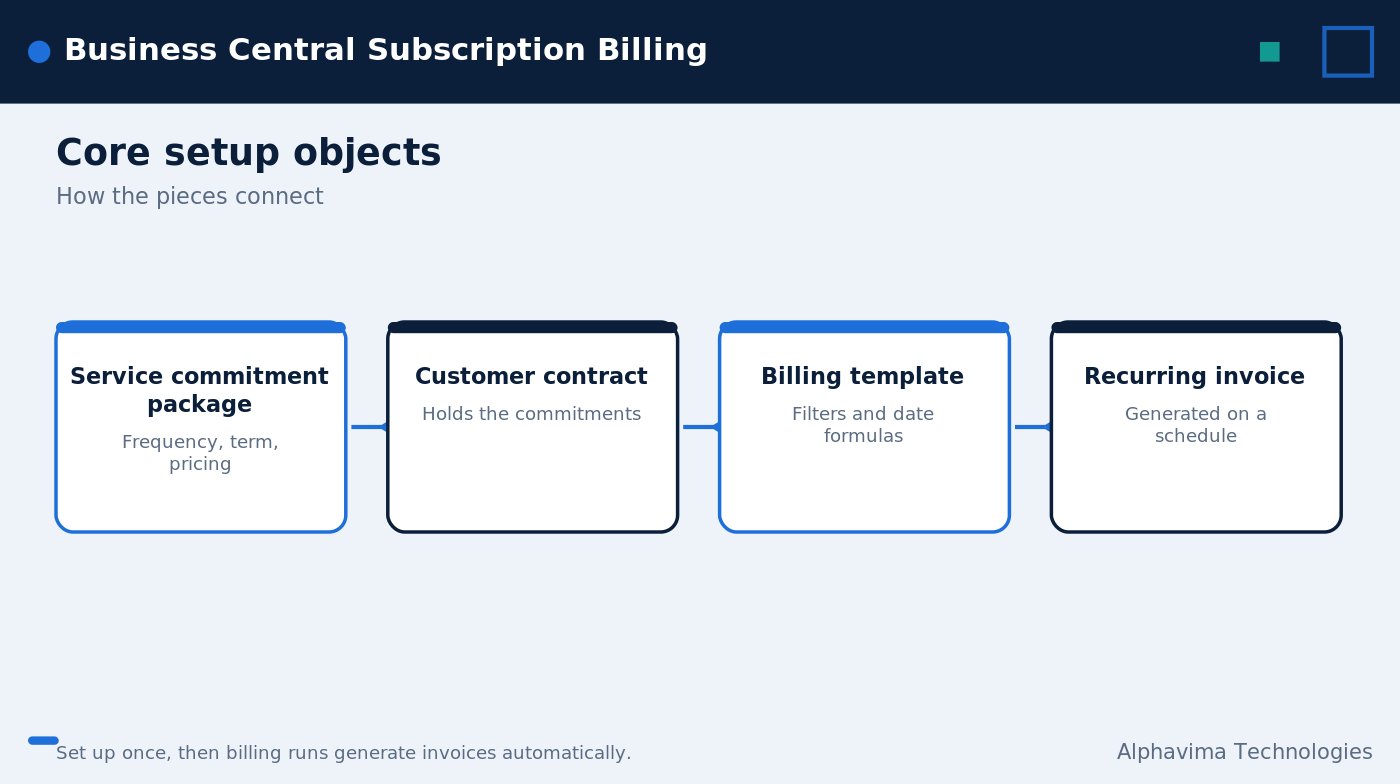
Recurring billing in Business Central proposal-to-invoice flow

Example subscription scenarios

The native feature suits a range of recurring services. The examples below show how billing frequency can differ across common contract types, which is exactly what the flexible billing models support.

For detailed walkthroughs of these patterns, review the Microsoft recurring billing guidance and the published setup examples.

How billing templates calculate dates

Billing templates deserve a closer look because they drive timing. A template carries filter criteria plus date formulas rather than fixed dates. When you select the template, Business Central calculates the actual dates from the working date.

That design keeps templates reusable. You set the logic once, and the recurring invoices line up with the correct period each time you run a proposal. As a result, you avoid editing dates by hand for every cycle.

In practice, most teams build a small set of templates that match their billing calendar. One template might cover monthly contracts, while another covers annual ones. Because the filter criteria control which commitments are picked up, you can also separate runs by customer group or contract type. This separation makes review faster, since each proposal contains only the invoices you expect to see.

Managing renewals and price changes over time

Setup is the start, not the finish. Contracts renew, prices move, and customers cancel, so BC subscription management has to handle change gracefully. The native feature is built for this, which is why renewal behavior is defined on the service commitment package rather than added on later.

When a renewal is due, the system follows the rules you set on the package. Price changes can be applied without rebuilding the contract, and cancellations close out future commitments. Because these actions live inside the same structure, your billing history stays intact and traceable. That continuity matters at audit time and when finance reviews recurring revenue trends.

Where pricing and integrations fit in

Subscription billing rarely lives in isolation. Pricing decisions feed it, and downstream systems often consume the invoices it produces. Planning these connections early saves rework later.

If you are still sizing the platform, our Business Central pricing guide explains licensing considerations. To automate handoffs around billing runs, see how teams connect flows with Power Automate and the Business Central API. And for compliant invoice delivery, our overview of electronic documents in Business Central covers the output side.

Because recurring billing touches revenue recognition, work with your accounting team to confirm deferral settings before the first live run. Getting this right early keeps your financial statements clean as contracts scale.

Billing customers on a recurring basis?

Alphavima configures Business Central subscription billing, from contracts to revenue recognition.

Conclusion

Native recurring billing in Business Central turns a manual, error-prone chore into a repeatable process: define commitments, attach them to contracts, set templates, run proposals, and post. The result is cleaner recurring revenue and far less month-end firefighting.

Setting it up well still takes planning, especially around pricing models and revenue recognition. Alphavima helps companies configure subscription billing, model contracts, and connect billing to revenue recognition. To plan your rollout, explore our ERP consulting services and talk with our Business Central team.

FAQs

Is Business Central subscription billing a third-party add-on?

No. Since the 2024 release wave 2, recurring billing in Business Central is built into the product natively. Most core scenarios no longer need a separate add-on, though specifics vary by version.

What can I bill with recurring invoices in Business Central?

Typical uses include support and maintenance contracts, software licenses, memberships, equipment rental, and other recurring services. Any contractually agreed service on a repeating schedule is a candidate.

What is a service commitment package?

A service commitment package defines the rules for a recurring commitment. It sets the billing frequency, whether the commitment is invoiced in a customer or vendor contract, how the price is calculated, the initial term, and how renewals behave.

How do billing templates know which dates to use?

Templates store filter criteria and date formulas rather than fixed dates. When you select a template, Business Central calculates the actual dates from the working date, so the same template works across periods.

Does subscription billing support revenue recognition?

Yes. Among its benefits, the feature supports revenue deferral and recognition. That keeps your accounting accurate as services are delivered across the contract term.

What does a billing run actually do?

You run a billing proposal, which gathers the commitments that are due and generates draft recurring invoices. After you review them, you post the invoices so they update the ledger.

Can I change prices or cancel mid-contract?

Yes. BC subscription management includes ongoing handling of price changes, renewals, and cancellations, so contracts can evolve without rebuilding them from scratch.

    Get in Touch