











Distribution and wholesale businesses operate on tight margins with high transaction volumes, complex pricing structures, and demanding customers who expect accurate, on-time delivery. The ERP system underpinning these operations is not just an accounting tool — it is the operational backbone for purchasing, inventory management, warehouse operations, and customer fulfilment.
Dynamics 365 Business Central is designed for exactly this operating model. Its Essentials licence includes a comprehensive warehouse management system, advanced purchasing, multi-tier pricing, and the integrations that distribution businesses depend on. This guide walks through Business Central’s capabilities for distribution and wholesale, and provides a structured implementation approach.
Table of contents
Talk to a Business Central consultant
Book a quick call to talk through your Business Central project. No pressure, just practical advice. Or see our Business Central services.
Why Distribution Companies Choose Business Central
Distribution businesses replacing legacy ERP systems or outgrowing accounting software consistently cite the same pain points:
- Inventory inaccuracy: Stock counts that don’t match the system, leading to over-ordering or stockouts
- Manual order processing: Sales orders entered manually from emails, spreadsheets, or phone calls
- Pricing complexity: Multiple price lists, customer-specific pricing, volume discounts, and promotional prices that are impossible to maintain accurately in a spreadsheet
- No real-time warehouse visibility: Paper-based picking with no scan confirmation, leading to fulfilment errors
- Disconnected purchasing: Purchasing decisions based on instinct rather than demand data
Business Central addresses all of these through its integrated ERP architecture — the same data that drives a sales order flows through warehouse operations to the purchase order and financial posting, with no re-keying.
Business Central's Core Distribution Capabilities
Warehouse Management System (WMS)
Business Central Essentials includes a full Warehouse Management System at no additional cost. The WMS covers:
Bin Management: – Define bin locations within each warehouse location (bay, row, shelf, level) – Assign items to bins; system directs putaway and pick to the correct bin – Bin ranking for FEFO (first expired, first out) and FIFO picking
Inbound (Receiving): – Warehouse receipt against purchase orders – Directed putaway — system calculates optimal bin based on capacity and bin ranking – Cross-docking: receive goods directly to outbound pick zone for same-day despatch
Outbound (Picking and Shipping): – Warehouse pick instructions generated from sales orders, transfer orders, and production orders – Scan-to-confirm picking using handheld scanners or mobile devices – Packing instructions and cartonisation – Warehouse shipment confirmation triggers sales order shipment posting
Inventory Counting: – Scheduled and ad hoc cycle counts – Physical inventory journal with variance reporting – Count by bin location
Sales Order Management
For distribution, Business Central’s sales module provides:
- Blanket orders: Long-term customer supply agreements with call-off orders against the blanket quantity
- Drop shipment: Direct vendor-to-customer despatch — purchase order raised to vendor, goods shipped directly to customer, both invoices posted in Business Central
- Assembly to order: Configure-to-order scenarios where specific item combinations are assembled on receipt of order
- Back-order management: Automatic back-order creation for unfulfilled quantities when partial shipments are processed
- Order promising: Available-to-promise (ATP) and capable-to-promise (CTP) calculations to provide reliable delivery dates
Purchasing and Supplier Management
Business Central’s purchasing module includes:
- Purchase orders, blanket purchase orders, and framework agreements
- Vendor item catalogues: Map your internal item numbers to vendor catalogue numbers and vendor item descriptions
- Landed cost integration: Allocate freight, customs, and duty costs to item cost via ISV extensions
- Purchase price history: Track price changes per vendor per item over time
- Requisition management: Automated replenishment suggestions based on MRP or reorder point calculations, reviewed and approved before purchase orders are raised
Multi-Tier Pricing and Discounts
Distribution businesses typically maintain complex pricing structures. Business Central supports:
- Customer-specific prices: Individual item prices per customer or customer group
- Volume discounts: Tiered pricing based on order quantity (buy 10 at £10; buy 50 at £9; buy 100 at £8)
- Campaign prices: Promotional pricing active for defined date ranges
- Invoice discounts: Percentage or value discounts applied at order header level
- Currency pricing: Customer-specific prices maintained in the customer’s trading currency
All pricing is resolved automatically when a sales order line is entered — the system applies the most specific and favourable price for the customer based on the priority hierarchy.
Order Fulfilment Process
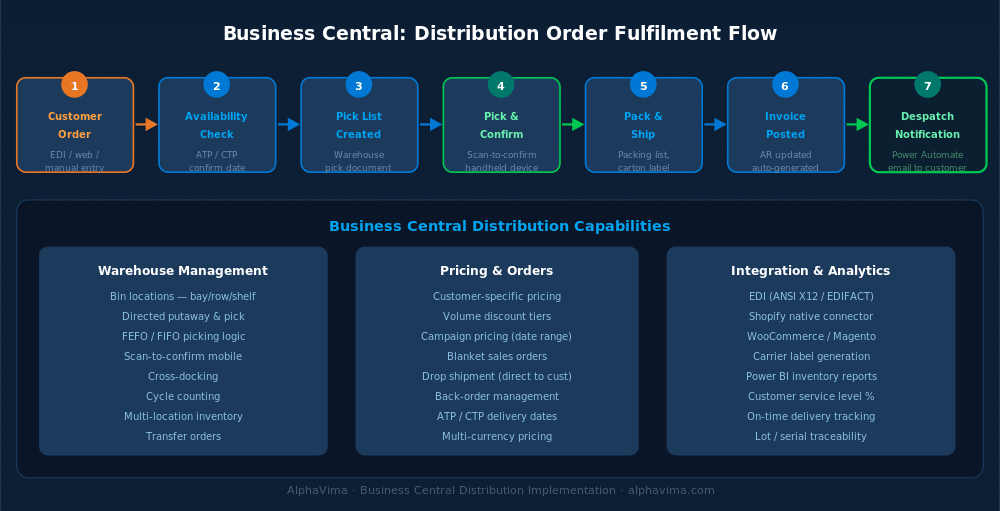
The end-to-end order fulfilment process in a Business Central distribution environment follows this flow:
- Sales order created — via manual entry, EDI import, or e-commerce integration
- ATP check — Business Central confirms available-to-promise quantity; back-orders created if insufficient stock
- Warehouse pick created — pick instruction generated and assigned to warehouse operative
- Pick confirmed — scan-to-confirm on handheld device; Business Central updates bin contents
- Packing — carton labels and packing lists printed
- Shipment posted — Business Central updates inventory and creates the shipment record
- Invoice posted — Sales invoice created and posted to the receivables ledger
- Despatch notification — Power Automate sends automated despatch notification to customer
(See order fulfilment diagram below)
For automating despatch notifications, approval workflows, and customer communication, see our guide on Business Central Power Automate integrations.
EDI Integration for Distribution
Most mid-market distributors trade with retail or wholesale customers that require Electronic Data Interchange (EDI) — structured electronic transmission of purchase orders, advance ship notices (ASN), and invoices. Business Central’s API architecture supports EDI integration through:
- Direct API integration: EDI platforms (TrueCommerce, SPS Commerce, Cleo) connect directly to Business Central via the REST API
- Power Automate middleware: For lighter EDI requirements, Power Automate can parse and post EDI-format files to Business Central without a dedicated EDI platform
- AppSource EDI extensions: Certified EDI connectors on Microsoft AppSource provide pre-built integration for major EDI standards (ANSI X12, EDIFACT, GS1)
Implementation Approach
Phase 1: Discovery and Scope Definition (Weeks 1–4)
Operational Assessment: – Current warehouse locations, bin structure, and picking process – Item catalogue size and complexity (simple SKUs vs. configurable products) – Customer pricing structure — number of price lists and discount tiers – Current EDI trading partners and EDI standards required – Integration requirements: e-commerce, 3PL systems, carrier integrations, accounts payable
Data Quality Assessment: – Item master data: how many active SKUs? Are descriptions, units of measure, and costs accurate? – Customer master data: account structure, payment terms, credit limits – Vendor data: supplier catalogue, lead times, minimum order quantities – Opening stock: accuracy of current inventory valuation
Phase 2: System Configuration (Weeks 4–10)
Location and Bin Setup: – Configure warehouse locations with bin management enabled – Define bin types (receive, bulk storage, pick, ship, cross-dock) – Set up bin ranks for putaway and pick priority – Configure pick templates and put-away templates
Item and Inventory Setup: – Item categories and posting groups for correct GL mapping – Unit of measure conversions (pallet → case → each) – Lot and serial tracking for regulated or high-value items – Item cross-references for customer order numbers and vendor catalogue codes
Pricing Configuration: – Build customer price groups and populate price lists – Configure discount structures and campaign templates – Set invoice discount thresholds per customer
Purchasing Setup: – Vendor item catalogues and cross-reference codes – Reorder policies and safety stock levels per item – Purchase approval workflows via Power Automate
Phase 3: Integration Development (Weeks 8–14, overlapping)
Build or configure integrations: – EDI platform integration (purchase order import, ASN export, invoice export) – E-commerce order import (Shopify, WooCommerce, Magento via AppSource connectors) – Carrier integration for shipping label generation and tracking number import – 3PL integration if any warehouse operations are outsourced
Phase 4: Data Migration (Weeks 10–14)
Migrate from legacy system: – Item master with opening stock quantities and costs – Customer and vendor master data – Open sales orders and purchase orders – Pricing and discount tables – Historical transaction data (recommended 2–3 years for reporting continuity)
Phase 5: Warehouse Testing (Weeks 14–18)
Test warehouse operations with physical handheld devices: – Receive a purchase order and confirm putaway – Pick and ship a sales order using scan-to-confirm – Process a return and put-away to the correct bin – Run a cycle count for a specific zone
Phase 6: Training and Go-Live (Weeks 18–22)
Role-based training: – Warehouse operatives: Scan-to-receive, scan-to-pick, handheld device operation – Sales order processors: Order entry, ATP check, blanket order management, pricing – Purchasing team: Replenishment planning, purchase order management, vendor communication – Finance: Payables, receivables, inventory valuation, month-end close
Get your distribution operation scoped by people who know it
Bring your SKU count, your warehouse layout and your order volumes. We will show you what Business Central handles natively and what needs more.
Conclusion
Distribution and wholesale businesses demand an ERP system that keeps pace with order volumes, warehouse complexity, and customer expectations. Dynamics 365 Business Central Essentials delivers a comprehensive, cloud-native platform that covers the full order-to-cash and purchase-to-pay cycle — with a built-in WMS, multi-tier pricing, EDI integration capability, and native Microsoft 365 connectivity.
Whether you are migrating from a legacy distribution ERP, replacing disconnected systems, or scaling beyond what your current accounting software can support, Business Central is designed for the operational demands of modern distribution.
Ready to modernise your distribution operations? Alphavima’s Business Central specialists have delivered implementations for wholesale distributors across food, pharmaceutical, industrial, and consumer goods sectors. Contact us for a distribution readiness assessment.
Running distribution or wholesale operations and evaluating your ERP options? Leave a comment or get in touch — we’re happy to discuss your specific requirements.

Related case study
Distribution Inventory Accuracy with Business Central
A distributor reached single-count inventory accuracy across every SKU and location with Dynamics 365 Business Central.
Read the case study · Next read: Business Central pricing guide
Frequently asked questions
Does Business Central support handheld scanners for warehouse operations?
Yes. Business Central's warehouse management module is designed for handheld scanner operation. The browser-based interface works on any Android or iOS device through the Business Central mobile app or mobile browser. Handheld barcode scanners connect via Bluetooth or USB to mobile devices running the Business Central warehouse worker interface. Scan-to-receive, scan-to-pick, scan-to-putaway, and cycle counting are all supported via mobile.
Can Business Central handle multiple warehouse locations?
Yes. Business Central supports unlimited warehouse locations — distribution centres, regional depots, third-party logistics warehouses, and consignment locations. Each location has its own bin structure, inventory records, and warehouse documents. Transfer orders move stock between locations with full in-transit tracking. Consolidation of inventory across all locations is available in standard inventory reports and Power BI.
How does Business Central manage customer-specific pricing for a large distribution customer base?
Business Central's pricing engine supports unlimited customer price lists and customer discount groups. For large distribution businesses with hundreds of individually priced customers, pricing is managed through customer price groups — customers are assigned to a group, and prices are maintained at group level. Where a customer has unique pricing, individual customer prices override the group price. Bulk updates to price lists can be performed via Excel import.
Does Business Central integrate with e-commerce platforms for order import?
Yes. Business Central integrates with major e-commerce platforms via certified AppSource connectors. Shopify has a native Business Central connector built by Microsoft. WooCommerce, Magento, and BigCommerce connectors are available from ISV publishers on AppSource. Orders flow from the e-commerce platform into Business Central sales orders, with inventory availability synchronised back to the platform. For custom e-commerce platforms, the Business Central API supports direct order import.
How does Business Central handle lot tracking and expiry date management for food or pharmaceutical distributors?
Business Central's lot tracking supports full FEFO (first expiry, first out) picking for lot-tracked items. Each inventory lot is assigned an expiry date on receipt. When a warehouse pick is generated, Business Central selects lots in expiry date order, ensuring the earliest expiring stock is despatched first. Full lot traceability — from vendor receipt through customer despatch — is available in the item tracing report.
Can Business Central manage vendor-managed inventory (VMI) or consignment stock?
Business Central supports consignment and VMI scenarios through configuration. Consignment stock held at customer premises can be tracked as inventory in a dedicated location assigned to that customer. When the customer uses the stock, a transfer or sale transaction records the consumption. VMI scenarios where you manage inventory at a customer's site can be handled through combination of Business Central inventory management and Power Automate for automated replenishment.
How does Business Central handle returns and reverse logistics?
Business Central supports sales returns and purchase returns natively. A sales return order creates a warehouse receipt for the returned goods, which are put away to a designated returns bin. From there, the goods can be inspected and either returned to sellable stock, scrapped, or sent back to the vendor on a purchase return order. Credit notes are generated automatically from the return order. For businesses with high return volumes, ISV extensions on AppSource provide enhanced returns management workflows.
What Power BI reports are available out of the box for distribution businesses?
Business Central ships with pre-built Power BI content packs covering inventory analysis (stock value, turnover, slow-moving items), purchasing analysis (spend by vendor, purchase price variance, lead time performance), and sales analysis (revenue by customer, order fill rate, on-time delivery). These are available immediately upon connecting Power BI to Business Central. For more tailored KPIs — such as pick accuracy rates, warehouse labour productivity, or customer service level reporting — custom Power BI models can be built on top of the Business Central data. See our guide on Power BI and Business Central reporting for configuration details.