











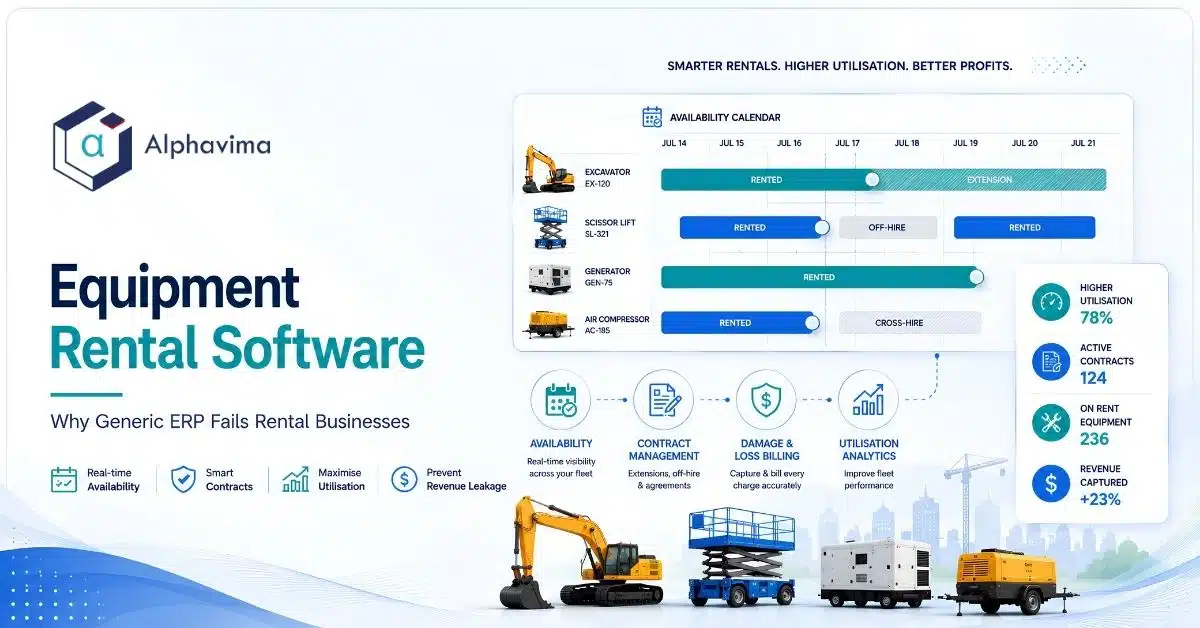
Generic ERP is built around a transaction: you sell an item, you ship it, you recognise revenue, the item is gone. Rental is built around an asset that comes back. The same scissor lift is quoted, reserved, dispatched, extended, returned, inspected, repaired, and rented again, forty times a year, and every one of those events has to update its availability, its utilisation, its maintenance schedule, and its book value.
Generic ERP has no data structure for any of that. This is why rental businesses that force-fit NetSuite, SAP Business One, or plain Business Central end up running the real business in spreadsheets.
Table of contents
Executive summary
- The failure is structural, not cosmetic. Generic ERP models “sell one, ship one.” Rental models “one asset, many revenue events, always returning.”
- The four things generic ERP cannot do without heavy custom development: a real availability calendar, contract extensions and off-hire, damage and loss billing tied to return inspection, and maintenance scheduled against return dates and meter readings.
- The cost is not inconvenience. It is revenue leakage: unbilled extensions, uncharged damage, missing consumables, undercharged delivery, and assets sitting idle because nobody could see they were free.
- Utilisation is the only metric that runs a rental business, and generic ERP cannot calculate it, because it does not know an asset was rented rather than sold.
- PREXA365, Alphavima’s rental accelerator on Dynamics 365, exists because customising a generic ERP into a rental system costs more than buying one that was built for it.
- There are cases where a generic ERP is genuinely enough. We name them below.
Talk to a Business Central consultant
Book a quick call to talk through your Business Central project. No pressure, just practical advice. Or see our Business Central services.
Why generic ERP and equipment rental software are structurally mismatched
A generic ERP’s core object is a transaction line: item, quantity, price, date. Once it ships, the item leaves your balance sheet as inventory and appears in cost of goods sold. Clean, simple, finished.
A rental business’s core object is an asset over time. The asset does not leave. It has a calendar. It has a condition. It has a meter. It has a maintenance history. It has a book value that declines while it earns.
And it can be double-booked, which is a business-ending error that a generic ERP has no concept of preventing.
You can bolt calendars onto a generic ERP. People do. What you cannot bolt on cheaply is the requirement that every single module (quoting, order management, inventory, service, finance) understands that this item is coming back on the 22nd and is therefore not available on the 20th.
That is why the customisation bill is not linear. It touches everything.
The rental lifecycle, and where generic ERP breaks
| Stage | What happens | Generic ERP behaviour | Breaks? |
|---|---|---|---|
| Quote | Customer asks for a boom lift, 2 weeks, starting the 14th | Quotes a sale price for an item in stock | Yes. No concept of “available on those dates” |
| Reserve | Hold the asset for those dates | Can reserve inventory quantity, not a time window | Yes. Reserves it forever, or not at all |
| Dispatch | Deliver, capture condition, meter reading, signature | Ships an item; no condition capture | Yes |
| On rent | Accrue rental revenue daily/weekly; asset unavailable | Nothing accrues; item is “sold” | Yes |
| Extend | Customer keeps it another 10 days | Requires a new order, breaking the original | Yes. Biggest leakage point |
| Off-hire / return | Customer calls it off; asset in transit back | No concept of off-hire | Yes |
| Inspect | Condition vs dispatch condition; damage found | No inspection object | Yes |
| Bill | Rental days + damage + fuel + delivery + waiver | Can invoice, but only what someone remembered to add | Partially |
| Maintain | Service before it goes back out | Service module exists but is date-driven, not return-driven | Yes |
| Re-rent | Back on the availability calendar | No availability calendar | Yes |
Nine of ten stages break. That is the article in one table.
Rental management software requirements generic ERP misses
| # | Requirement | Why rental needs it | What generic ERP does instead | Result |
|---|---|---|---|---|
| 1 | Availability calendar per asset | You must know if a specific unit is free on specific dates | Tracks quantity on hand | You promise equipment you don’t have |
| 2 | Rental items vs sale items vs consumables in one order | A customer rents a generator, buys fuel, and buys a spill kit, on one contract | Treats all lines as sale lines | Manual splitting, missed consumable revenue |
| 3 | Serialised and non-serialised (bulk) rental | Scissor lifts are serialised. Traffic cones are bulk. Both rent | Serial tracking exists but not for time-based hire | Two systems, or none |
| 4 | Rate structures: hourly, daily, weekly, monthly, with step-down | Day 8 costs less than day 1. Rates step to weekly automatically | One unit price | Chronic overcharging or undercharging |
| 5 | Contract extension without re-cutting the contract | Extensions are the norm, not the exception | New sales order | Unbilled days. The largest leakage source |
| 6 | Off-hire date vs return date | The customer stops the clock when they call, not when the truck arrives | No such concept | Disputes with customers, or lost days |
| 7 | Return inspection with condition and photos | Damage billing lives or dies here | No inspection object | Unwinnable damage disputes |
| 8 | Damage, loss and cleaning billing | Real revenue, and real cost recovery | Manual invoice line, if remembered | Money left on the table |
| 9 | Damage waiver / rental protection | A percentage-of-rental add-on charge | Manual line | Inconsistent application |
| 10 | Maintenance triggered by return date and meter reading | Service the unit when it comes back, before it goes out again | Calendar-based preventive maintenance | Units go out unserviced, or sit idle waiting |
| 11 | Utilisation reporting (time and financial) | The single metric that determines fleet purchasing | Cannot compute; no rental duration data | Fleet decisions made on gut feel |
| 12 | Cross-hire / sub-rental from another yard | When your fleet is full, you rent in and rent out | Purchase order plus sales order, disconnected | No margin visibility on cross-hire |
| 13 | Delivery and pickup scheduling | Logistics is half the operation | Basic shipping | Trucks routed by whiteboard |
| 14 | Rental asset depreciation alongside rental revenue | Asset is a fixed asset and a revenue unit at once | Fixed asset module, unconnected to rental revenue | Cannot compute return on capital per unit |
| 15 | Customer self-service portal (on-rent list, off-hire request, extend) | Reduces phone volume and creates an audit trail for extensions | Not applicable | Extensions still happen by phone, and leak |
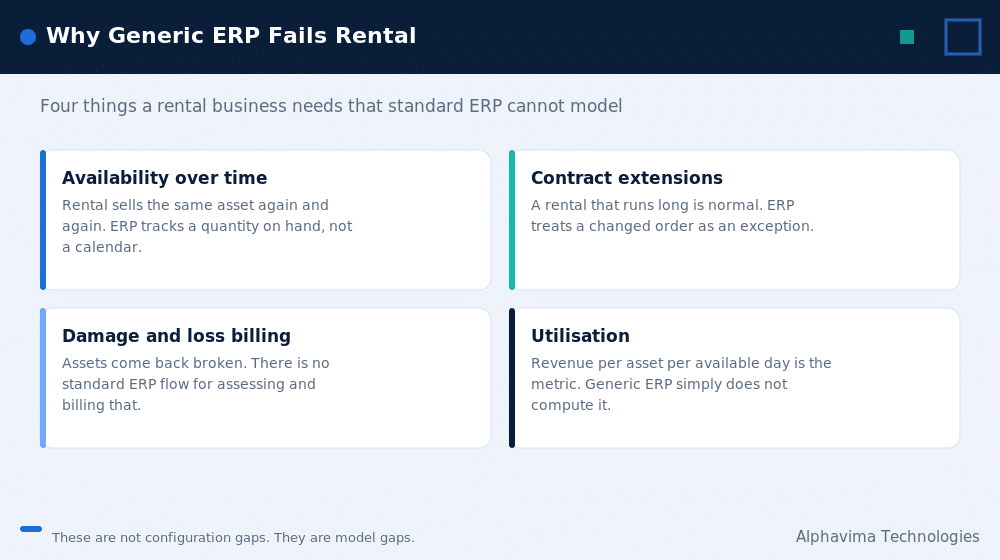
Availability: the core data structure
Everything in rental hangs off one question: can I promise this unit on those dates?
A generic ERP answers “we have 4 in stock.” That is the wrong answer. The right answer is “we have 4 units; unit 3 is on rent until the 19th; unit 1 is in for service until the 16th; units 2 and 4 are free, but unit 2 is reserved for a customer who has not confirmed.”
Availability must account for: – On-rent windows (booked) – Reserved but unconfirmed (soft holds, with expiry) – In maintenance / out of service – In transit (delivered but not yet on-site; returned but not yet inspected) – Cross-hired in (available but not owned)
If your system cannot show that view in one screen, your counter staff will build it in Excel. They already have.
Rental contract management: extensions and off-hire
This is where the money goes.
A customer takes a compactor for one week. On day 6 they phone and say they need it another four days. In a purpose-built rental system, that is an extension on the existing contract: the availability calendar updates, the rate steps correctly, the billing accrues, and the maintenance schedule for that unit shifts.
In a generic ERP, there is no extension. Someone raises a second sales order, or writes it on a sticky note, or trusts they will remember at month-end. Sometimes they do.
Off-hire is the mirror problem. The clock should stop when the customer calls it off, not when the truck happens to collect it three days later. Without an off-hire date separate from the physical return date, you are either overcharging your customer (and losing them) or eating three days of revenue (and not knowing it).
A customer portal where the customer can see their on-rent list, request an off-hire, and request an extension solves both problems permanently, because the extension request becomes a data event rather than a phone call. PREXA365 includes this, and it is not a convenience feature. It is a revenue control.
Damage, loss and consumables billing
Damage billing does not fail at invoicing. It fails at inspection.
If you did not capture the unit’s condition, with photos and a signature, at dispatch, you have no baseline. If you did not capture it again at return, you have no evidence. When the customer disputes the CAD 3,200 boom repair, you lose, and you should.
What a rental system must capture: – Out condition: photos, checklist, meter reading, fuel level, accessories included, customer signature – In condition: the same fields, plus differences flagged automatically – Chargeable outcomes: damage repair, cleaning, refuelling, missing accessories, loss of the unit – Waiver application: if the customer bought damage protection, what does it actually cover, and what is the deductible
The accessory line is worth calling out. A generator goes out with four cables, a fuel cap, and a manual. It comes back with three cables. In most yards, that is written off. Across a fleet, it is a meaningful number.
Maintenance tied to return dates
Generic ERP service modules schedule maintenance by calendar: “service this asset every 90 days.”
A rental asset does not work on a calendar. It works on hours, kilometres, and returns.
The correct trigger logic is: – When a unit is returned, check its meter reading against its service interval. – If it is due, put it into maintenance and remove it from the availability calendar automatically, before someone books it out again.
– If it is not due, but the return inspection found damage, put it into repair with a chargeable work order linked to the contract. – Feed the expected release date back into availability, so the counter can promise it accurately.
The failure mode when this is missing is expensive in both directions. Either a unit goes out unserviced and fails on a customer’s site (which costs you the rental, the callout, the relationship, and possibly a safety incident), or a serviceable unit sits in the yard for a week because nobody knew it was ready.
Rental asset accounting and depreciation
A rental asset is three things at once, and generic ERP only knows how to be one of them.
| Lens | What the asset is | What the system must track |
|---|---|---|
| Balance sheet | A fixed asset | Cost, depreciation method, accumulated depreciation, net book value, disposal |
| Operations | A rentable unit | Availability, condition, location, meter, maintenance history |
| Revenue | An earning unit | Lifetime rental revenue, revenue this period, utilisation, revenue vs book value |
The number that decides your fleet strategy is lifetime rental revenue against original cost and current net book value, per unit and per category. That tells you whether to keep renting a seven-year-old telehandler, sell it, or replace it.
Generic ERP has a fixed asset module and a sales module and no connection between them. Ask it “what is the return on capital for our aerial lift category this year” and you will get a spreadsheet, assembled by hand, three weeks late.
Fleet utilisation: the only metric that matters
Three different numbers get called “utilisation.” Confusing them causes bad fleet decisions.
| Metric | Definition | What it tells you | Watch out for |
|---|---|---|---|
| Time utilisation | Days on rent ÷ days available in period | How busy the fleet is | Ignores rate. A unit on rent at a 60 percent discount looks the same as one at full rate |
| Financial (dollar) utilisation | Rental revenue in period ÷ original equipment cost (annualised) | Whether the asset is earning its keep | The metric fleet buyers actually use |
| Physical utilisation | Units on rent ÷ units owned, at a point in time | Snapshot availability pressure | Very sensitive to the day you measure |
Two practitioner notes:
Time utilisation above roughly 85 percent is a warning, not a trophy. It means you have no buffer for maintenance or for a good customer who calls on a Friday. You are turning away business and you cannot see it, because turned-away business does not appear in any report unless your system records lost quotes with a reason code.
Record the reason you lost the booking. “No availability” as a lost-quote reason is the single most valuable data point in fleet planning, and almost nobody captures it.
Revenue leakage: where the money actually goes
| Leakage source | Mechanism | Typical fix |
|---|---|---|
| Unbilled extensions | Extension agreed by phone, contract never updated | Extension as a first-class transaction; customer portal request |
| Off-hire disputes | No recorded off-hire date | Off-hire date field with timestamp and channel |
| Uncharged damage | No dispatch/return condition baseline | Mandatory photo inspection at both ends |
| Missing accessories | Not itemised on the contract | Accessory kit list on the contract line, checked at return |
| Uncharged fuel and consumables | Not on the return checklist | Fuel level captured out and in; auto-generated charge line |
| Undercharged delivery/pickup | Flat rate applied regardless of distance | Zone or distance-based delivery pricing |
| Rate step-down errors | Manual rate application | Automatic rate laddering (daily to weekly to monthly) |
| Idle serviceable assets | Nobody knew the unit was back and ready | Return inspection auto-releases the unit to availability |
| Under-applied damage waiver | Applied inconsistently by counter staff | Default waiver line on every contract, opt-out recorded |
| Cross-hire margin loss | Rented in at cost, rented out at a rate nobody checked | Cross-hire linked to the customer contract with margin visible |
None of these are dramatic. That is precisely the problem. They are quiet, they are individually small, and they compound.
Generic ERP vs purpose-built equipment rental software
| Dimension | Generic ERP (NetSuite, SAP B1, plain Business Central, QuickBooks) | Purpose-built rental (PREXA365, Point of Rental, Texada, MCS) |
|---|---|---|
| Core data object | Transaction line | Asset over time |
| Availability by date | No | Yes |
| Rental + sale + consumable on one contract | Workaround | Yes |
| Rate laddering (daily/weekly/monthly) | Custom | Yes |
| Contract extension | New order | Native |
| Off-hire | No | Yes |
| Return inspection with photos | No | Yes |
| Damage / loss billing | Manual | Native, linked to inspection |
| Damage waiver | Manual line | Native |
| Maintenance triggered by return + meter | No | Yes |
| Utilisation (time and financial) | Cannot compute | Native |
| Cross-hire / sub-rental | Disconnected PO + SO | Linked, with margin |
| Delivery scheduling | Basic | Route and zone aware |
| Rental asset ROI (revenue vs NBV) | Manual spreadsheet | Native |
| Time to value | Long, because you are building rental yourself | Shorter, because rental already exists |
| Customisation cost to reach parity | High, and never finished | Not applicable |
The honest summary: you can make a generic ERP do rental. You will spend more building it than buying it, you will own the maintenance of that customisation forever, and every Microsoft or Oracle update becomes a regression-testing exercise.
Where an equipment rental ERP like PREXA365 fits
PREXA365 is Alphavima’s equipment rental solution built on Microsoft Dynamics 365 and listed on Microsoft AppSource. It exists for a specific reason: rental companies kept asking us to customise Business Central into a rental system, and we kept concluding that was the wrong answer.
What it adds on top of Dynamics 365:
- Fleet availability by unit and by date, including reserved, on-rent, in-service, in-transit and cross-hired states.
- Rental contracts with rate laddering, mixed rental/sale/consumable lines, extensions, and off-hire.
- Return inspection and damage billing, with condition capture at dispatch and return, and chargeable outcomes linked to the contract.
- Maintenance tied to return dates and meter readings, with automatic removal from and release back to the availability calendar.
- Customer self-service portal for on-rent visibility, extension requests, and off-hire requests, which turns the two biggest leakage points into recorded data events.
- Utilisation and fleet ROI reporting through Power BI, because the data model actually knows what “on rent” means.
The strategic argument for PREXA365 over a standalone rental platform is that your finance, purchasing, and fleet accounting stay in Dynamics 365 rather than living in a rental point solution that then has to be integrated back to an ERP. One data platform, one security model, one reporting stack.
We will say the other side too: if you are a five-person party rental shop, PREXA365 is more system than you need. See section 14.
Get your rental operation scoped by people who know rental
Bring your fleet size, your branch count and your utilisation targets. We will show you what generic ERP cannot model and what it costs to do it properly.
ROI drivers and a worked model
Stated assumptions. This is an illustrative model, not a claim about your business. Substitute your own numbers.
Assume a mid-sized yard: 400 rentable units, average original cost CAD 25,000 per unit, annual rental revenue CAD 6,000,000, current time utilisation 62 percent.
| Driver | Assumption | Annual impact (CAD) |
|---|---|---|
| Recover unbilled extensions | Assume 1.5 percent of revenue currently leaks through unrecorded extensions | 90,000 |
| Recover damage and cleaning charges | Assume 0.5 percent of revenue currently written off for lack of evidence | 30,000 |
| Recover consumables and missing accessories | Assume 0.3 percent of revenue | 18,000 |
| Reduce idle-but-serviceable days | Assume returning 2 percentage points of time utilisation to revenue | 190,000 |
| Correct rate laddering errors | Assume 0.4 percent of revenue | 24,000 |
| Total illustrative annual recovery | ~352,000 |
Against an implementation in the CAD 90,000 to 250,000 range (see costs below), the payback logic is not subtle. But the point is not the total. The point is that every line in that table is a thing your current system structurally cannot do, so no amount of staff discipline closes it.
Test the model against yourself: pull last month’s contracts, count how many were extended, and check how many extensions were billed. That single exercise usually ends the debate.
When you do not need equipment rental software
Credibility requires saying this plainly. You probably do not need purpose-built rental software if:
- You have fewer than about 50 rentable units and one location.
- Your rentals are short, uniform, and rarely extended (for example, single-day event equipment on fixed packages).
- You do not bill damage as a matter of policy, and you self-insure.
- Your maintenance is genuinely calendar-driven and not usage-driven.
- Your utilisation is not a constraint, because you have more fleet than demand.
In those cases, Business Central plus a well-run availability spreadsheet is a defensible position, and we will tell you so.
The moment you cross into multiple locations, extensions as a routine event, damage billing, or utilisation-driven fleet purchasing, the spreadsheet becomes the most expensive part of your operation.
Costs, myths, mistakes, recommendation
What it costs (CAD)
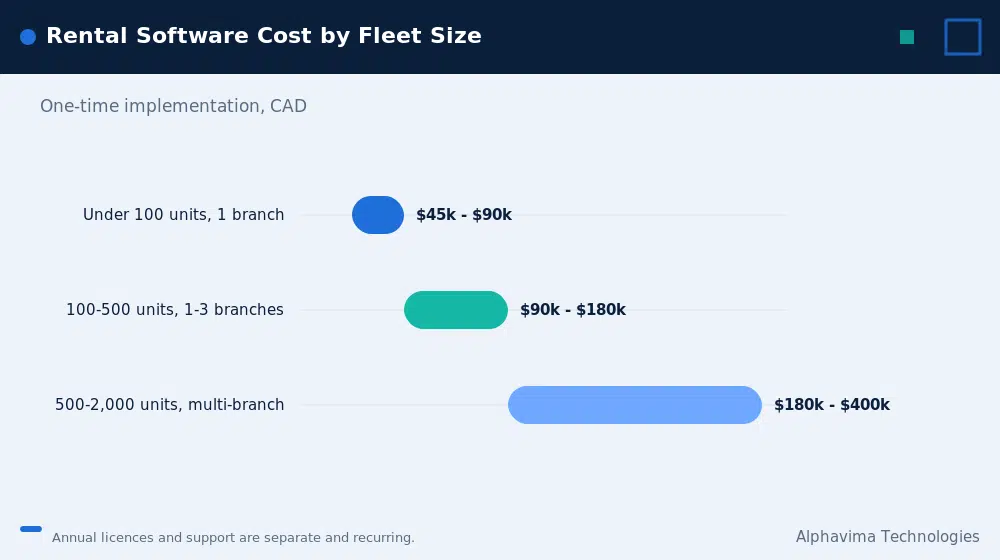
Assumptions: Canadian rental business, Dynamics 365 Business Central as the ERP base, PREXA365 as the rental layer, one to three branches. Planning ranges, not quotes.
| Fleet size | Users | Implementation (one-time, CAD) | Annual licences + support (CAD) |
|---|---|---|---|
| Under 100 units, 1 branch | 5 – 10 | 45,000 – 90,000 | 15,000 – 35,000 |
| 100 – 500 units, 1-3 branches | 10 – 25 | 90,000 – 180,000 | 30,000 – 70,000 |
| 500 – 2,000 units, multi-branch | 25 – 60 | 180,000 – 400,000 | 70,000 – 180,000 |
Add for: customer portal (CAD 15,000 – 40,000), telematics/meter integration (CAD 20,000 – 60,000), route optimisation for delivery (CAD 15,000 – 50,000).
Compare honestly against the alternative: customising a generic ERP to rental parity typically costs more than the ranges above, takes longer, and leaves you owning the code.
Timeline
| Phase | Weeks |
|---|---|
| Discovery: fleet structure, rate cards, contract types | 2 – 3 |
| Data: asset master, serial numbers, meters, condition baseline | 3 – 6 |
| Configure: availability, rates, contracts, inspection templates | 4 – 8 |
| Maintenance and finance integration | 3 – 5 |
| Portal and reporting | 3 – 5 |
| UAT with real contracts and real returns | 3 – 4 |
| Go-live and stabilisation | 2 – 4 |
| Total | 16 – 26 weeks |
Myths vs facts
| Myth | Fact |
|---|---|
| “We’ll just customise our ERP.” | You will be building an availability engine, a contract engine, an inspection engine, and a utilisation model. That is a product, not a customisation. |
| “Our counter staff know what’s available.” | They do, in their heads and in a spreadsheet. That knowledge does not scale, does not survive a resignation, and cannot be reported on. |
| “Damage billing isn’t worth the hassle.” | It is, but only if you can prove condition at dispatch. Without photos, you are right to write it off. |
| “High utilisation is always good.” | Above ~85 percent time utilisation you are turning away work and starving maintenance. |
| “The rental point solution can just integrate to our ERP.” | It can, and now you own an integration, two security models, and two versions of the customer master. |
| “QuickBooks is fine, we’re small.” | Fine until your first double-booking, your first damage dispute, or your first month where you cannot explain where the revenue went. |
Common mistakes
- Buying on features, not on the data model. Ask every vendor to show you availability across reserved, on-rent, in-service, in-transit, and cross-hired states on one screen. Most demos avoid this.
- Skipping condition capture at dispatch because it slows the counter down. It is the only thing that makes damage billing collectable.
- Not migrating meter readings. Your maintenance schedule is worthless without them.
- Treating the customer portal as a nice-to-have. It is the fix for your two biggest leakage sources.
- Not recording lost quotes with a reason. You will never know what your fleet gap costs you.
- Going live in your peak season. Rental has seasons. Go live in the trough.
- Letting finance design the fleet structure without operations. The asset categories that make sense in the GL are not the ones the counter uses.
Our recommendation
If you run a rental fleet of more than roughly 100 units, extend contracts routinely, bill damage, and make fleet purchasing decisions based on utilisation, stop trying to make a generic ERP do this. The customisation is not a project, it is a permanent liability.
If you are already a Microsoft organisation, PREXA365 on Dynamics 365 gives you the rental data model and keeps finance, purchasing and fleet accounting in one platform. If you are not a Microsoft organisation and have no intention of becoming one, a standalone rental platform plus a clean ERP integration is a legitimate alternative, and we will say so.
If you have fewer than 50 units, one branch, and no damage billing: keep what you have and spend the money on fleet.
Key takeaways
- Generic ERP fails rental for a structural reason: it models transactions, not assets over time.
- Availability by date is the core data structure. Everything else depends on it.
- Contract extensions and damage billing are the two largest sources of revenue leakage, and both are fixable with a customer portal and mandatory condition capture.
- Maintenance must be triggered by return date and meter reading, not by the calendar.
- Utilisation, specifically financial utilisation, is the metric that runs the business, and generic ERP cannot compute it.
- PREXA365 exists because customising a generic ERP into a rental system costs more than buying one that already is.
Conclusion
Rental businesses are not manufacturers, distributors, or retailers with a twist. They are a different shape of business, and they need a different shape of system.
The tell is always the same. Walk into any rental yard running a generic ERP and ask to see the availability board. Someone will open a spreadsheet, or point at a whiteboard. That spreadsheet is your ERP. The software you paid for is just the accounting.
Request a PREXA365 fleet demo
Bring your fleet list, one month of contracts, and your last damage write-off. We will show you your availability, your utilisation, and where your revenue is leaking, using your own data. [Request a PREXA365 fleet demo from Alphavima.]

Related case study
BYU Modernizes Campus ERP & Inventory with PREXA365
Brigham Young University replaced PeopleSoft gaps with campus-wide inventory and rental tracking on PREXA365, integrated with Workday.
Read the case study · Next read: Business Central pricing guide
Frequently asked questions
Why can't we just use our existing ERP for equipment rental?
Because generic ERP models a sale: one item, one transaction, item gone. Rental models an asset that returns and earns repeatedly. There is no availability calendar, no contract extension, no off-hire, no return inspection, and no utilisation calculation. Building all of that is developing a product, not configuring an ERP.
What is the most important feature in equipment rental software?
The availability calendar per asset, showing on-rent, reserved, in-service, in-transit and cross-hired states by date. Every other rental capability depends on that data structure being correct.
Where do rental businesses lose the most money?
Unbilled contract extensions, followed by uncharged damage and cleaning. Extensions leak because they are agreed by phone and never recorded. Damage leaks because there is no photographic condition baseline from dispatch, so the charge is not defensible.
What is a good utilisation rate for a rental fleet?
It depends on the asset class, but time utilisation in the 65 to 80 percent range is generally healthy. Above roughly 85 percent you are likely turning away bookings and starving maintenance. Financial (dollar) utilisation, which is annual rental revenue divided by original equipment cost, is the more meaningful number for fleet investment decisions.
How is maintenance different in a rental business?
It is triggered by returns and meter readings, not by the calendar. When a unit comes back, the system should check its meter against the service interval, remove it from availability if service is due, and release it back automatically when the work order closes.
What does PREXA365 do that Business Central does not?
PREXA365 adds the rental data model on top of Dynamics 365: fleet availability by date, rental contracts with rate laddering and extensions, off-hire, return inspection with damage billing, maintenance tied to return dates and meters, a customer self-service portal, and utilisation and fleet ROI reporting. Business Central provides the finance, purchasing and fixed asset foundation underneath.
How much does equipment rental software cost in Canada?
For a fleet of 100 to 500 units across one to three branches, plan for roughly CAD 90,000 to 180,000 implementation and CAD 30,000 to 70,000 per year in licences and support. Customising a generic ERP to the same capability typically costs more and takes longer.
How long does a rental software implementation take?
Typically 16 to 26 weeks for a mid-sized fleet, with the longest phases being asset data (serial numbers, meters, condition baselines) and configuration of availability, rate cards and inspection templates. Go live outside your peak season.