











Manufacturing companies have complex operational requirements that generic accounting software simply cannot meet. Bill of materials management, production order scheduling, capacity planning, MRP runs, and shop floor reporting demand a purpose-built manufacturing ERP — and Dynamics 365 Business Central Premium delivers all of these capabilities in a cloud-native, Microsoft-integrated platform.
This guide covers the full scope of Business Central’s manufacturing capabilities and provides a structured implementation approach for manufacturers moving to Business Central — whether from spreadsheets, legacy ERP, or a competing platform.
Table of contents
Talk to a Business Central consultant
Book a quick call to talk through your Business Central project. No pressure, just practical advice. Or see our Business Central services.
Why Manufacturing Companies Choose Business Central
Business Central Premium includes a comprehensive manufacturing module that covers the full production lifecycle:
- Bills of Materials (BOM): Multi-level BOMs with components, quantities, and scrap factors
- Routings: Production routings with work centres, machine centres, and setup/run times
- Production Orders: Firm planned, released, and finished production orders with real-time status tracking
- Material Requirements Planning (MRP): Automated demand-supply matching with reorder suggestions
- Capacity Planning: Work centre and machine centre loading, bottleneck identification, and finite/infinite scheduling
- Shop Floor Integration: Production journals for output recording, time tracking, and consumption posting
For manufacturers comparing Business Central to alternatives, the value proposition is compelling: full manufacturing ERP capability at a fraction of the cost of tier-one ERP solutions, with native Microsoft 365 integration that tier-one systems cannot match.
Business Central Manufacturing: Module Overview
Bills of Materials (Production BOMs)
Business Central supports multi-level production BOMs with: – Components at multiple levels (sub-assemblies within assemblies) – Scrap percentages per component – Version control — multiple BOM versions with effective dates – Phantom assemblies (virtual sub-components that explode to components during MRP)
Routings
Routings define the sequence of operations required to produce an item: – Work centres (departments or resources performing operations) – Machine centres (specific machines within work centres) – Setup time, run time, and wait time per operation – Parallel and sequential routing operations – Certified and under-development routing versions
Production Orders
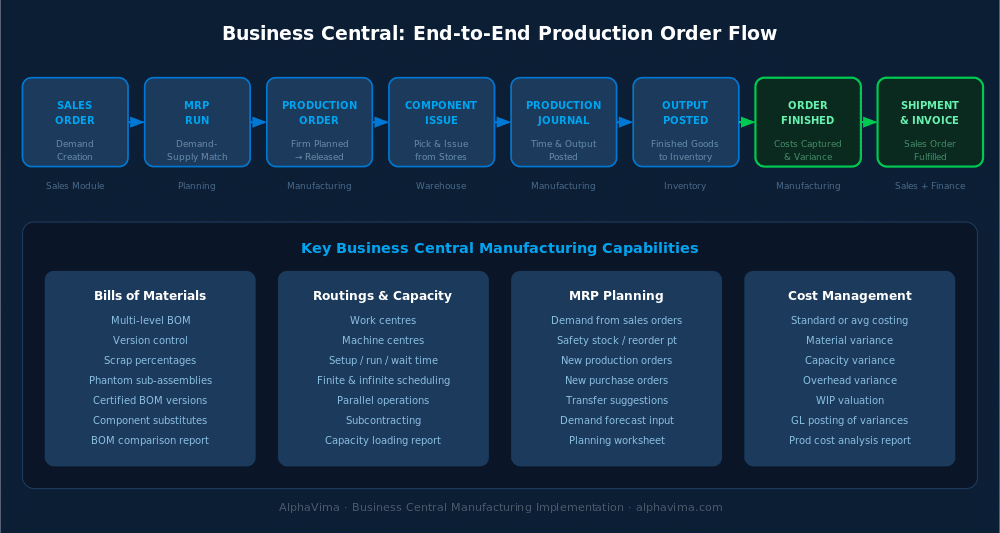
Business Central supports four production order statuses: 1. Simulated — planning only, not included in MRP 2. Planned — included in MRP, not yet actionable 3. Firm Planned — committed requirement, visible on capacity plans 4.
Released — active production order, components reserved, shop floor can book time 5. Finished — production complete, output posted to inventory
Material Requirements Planning (MRP)
Business Central’s MRP engine calculates material requirements based on: – Sales orders and forecasts (demand) – Current inventory levels and safety stock – Production orders, purchase orders, and transfer orders (supply) – Reorder policies (fixed quantity, maximum quantity, lot-for-lot)
MRP generates actionable suggestions: new production orders, purchase orders, or transfer orders with calculated quantities and due dates.
Capacity Requirements Planning (CRP)
CRP analyses work centre and machine centre loading: – Available capacity per period based on shift calendars – Loaded capacity from released production orders – Bottleneck identification and overload warnings – Finite scheduling — forward and backward from due dates
Implementation Approach
Phase 1: Discovery and Design (Weeks 1–4)
Manufacturing Scope Definition – Document all item types: purchased components, semi-finished goods, finished goods – List all production BOMs and their current state – Document production routings and work centre structure – Identify MRP policy requirements per item type
Master Data Assessment – How many active item numbers? Are they clean? – How many BOMs? Are they current and accurate? – What is the routing structure? – What are the current work centre and shift calendars?
Integration Requirements – What shop floor systems need to integrate (MES, SCADA, time-and-attendance)? – What quality management requirements exist? – How is serialisation and lot tracking managed?
Phase 2: Business Central Configuration (Weeks 4–10)
Item Master Setup – Configure item categories and posting groups for raw materials, WIP, and finished goods – Set up replenishment methods (Purchase, Prod. Order, Assembly) – Configure lot/serial tracking for traceability items – Set reorder policies and safety stock levels
Work Centre and Machine Centre Setup – Create work centre groups and individual work centres – Configure machine centres within work centres – Set capacity (shifts, hours per week, efficiency) – Define shop calendars with working days and holidays
BOM and Routing Creation – Import or create production BOMs from spreadsheets or legacy ERP – Build production routings with operation sequences and times – Certify BOMs and routings for MRP and production order use
MRP Configuration – Set up demand forecasts if used – Configure planning parameters (order modifiers, safety lead times, reorder points) – Test MRP planning run against realistic demand scenarios
Phase 3: Production Order Testing (Weeks 10–14)
Test the full production order lifecycle: 1. Create production order from MRP suggestions or manually 2. Reserve or pick components from inventory 3. Post production journal entries (time, output, scrap) 4. Finish the production order 5. Validate cost absorption and inventory movements
(See production order flow diagram below)
Phase 4: Data Migration (Weeks 12–16)
Migrate from legacy system or spreadsheets: – Item master with opening stock quantities and values – Active production BOMs – Production routings – Open production orders as of go-live date – Safety stock levels and reorder points
Phase 5: Training and Go-Live (Weeks 16–20)
Role-based training: – Production Planners: MRP runs, production order creation and management – Shop Floor Supervisors: Production journal posting, output recording, scrap reporting – Purchasing: Purchase order management and vendor communication – Finance: WIP valuation, production cost variance analysis
Advanced Manufacturing Features
Assembly Orders
For made-to-order or configure-to-order scenarios, Business Central’s Assembly Orders provide a lightweight alternative to full production orders — ideal for companies that assemble rather than manufacture.
Demand Forecasting
Business Central supports demand forecasts that feed MRP calculations, enabling proactive production planning rather than purely reactive order-driven production.
Subcontracting
Outsource operations to subcontract vendors by posting purchase orders for specific routing operations. Business Central tracks component send-outs and receipts from subcontractors as part of the production order flow.
Cost Management
Business Central uses standard cost or average cost methods for manufactured items. Standard cost variances (material, capacity, overhead) are captured per production order, enabling detailed manufacturing cost analysis.
Power Automate Integration
Automate production-related notifications and approvals using Business Central’s Power Automate connectors: production order completion alerts, quality hold notifications, capacity overload warnings, and purchase requisition approvals.
Get your Business Central manufacturing implementation scoped
Bring your BOM structure, your routings and your production volumes. We will tell you what Premium actually needs to cover and what the build looks like.
Conclusion
Dynamics 365 Business Central Premium provides manufacturing companies with a complete, cloud-native ERP that covers the full production lifecycle — from demand planning through MRP, production order management, capacity planning, and cost analysis. The platform is designed for mid-market manufacturers who need real ERP capability without the complexity and cost of tier-one systems.
Whether you are migrating from spreadsheets, legacy software, or a competing ERP, Business Central’s manufacturing module provides the depth you need while remaining accessible to your team and tightly integrated with Microsoft’s productivity platform.
Ready to modernise your manufacturing operations? Alphavima’s Business Central manufacturing specialists have delivered implementations across discrete, process, and mixed-mode manufacturers. Contact us for a manufacturing readiness assessment.
Have questions about a specific manufacturing scenario? Leave a comment and our team will address it.

Related case study
Manufacturing ERP on Business Central
A manufacturer put the shop floor, stockroom and finance on one Dynamics 365 Business Central ERP.
Read the case study · Next read: Business Central pricing guide
Frequently asked questions
Does Business Central support finite capacity scheduling?
Yes. Business Central's capacity planning module supports both infinite and finite scheduling. In finite scheduling mode, production orders are scheduled considering actual available capacity on work centres, preventing overloading. Backward and forward scheduling options allow planners to schedule from due dates or from the earliest available start date.
Can Business Central handle complex multi-level bills of materials?
Yes. Business Central supports multi-level production BOMs with no practical limit on depth. Sub-assemblies within assemblies within final assemblies are fully supported. Phantom BOMs — virtual intermediate assemblies that explode directly to components during MRP — are also supported, which is important for companies that use phantom assemblies for planning purposes without physically staging intermediate items.
How does Business Central handle production cost variance analysis?
Business Central captures production cost variances per production order when using standard costing. Variances are split into material variance (actual vs. standard material cost), capacity variance (actual vs. standard routing time cost), and overhead variance. These variances are posted to the general ledger to GL accounts configured in the inventory posting setup, giving finance teams full visibility into manufacturing efficiency.
Is Business Central suitable for process manufacturing (batch/formula-based)?
Business Central Premium is primarily designed for discrete manufacturing (production orders based on BOMs and routings). For process manufacturing — batch production, formulas, yield management, catch weight — additional ISV extensions are available on AppSource. Alphavima can advise on appropriate process manufacturing extensions for your specific industry.
How does Business Central integrate with shop floor systems (MES/SCADA)?
Business Central integrates with MES and SCADA systems via its REST API and OData web services. Standard integrations include production order status updates, real-time output quantity reporting, quality result capture, and machine downtime recording. Power Automate and Azure Logic Apps are commonly used to orchestrate these integrations without custom middleware.
Can Business Central track lot and serial numbers through the production process?
Yes. Business Central provides full lot and serial number traceability through the production process — from component consumption through to finished goods output. Lot/serial tracking is configurable per item (inbound tracking, outbound tracking, or full two-way tracking). Traceability reports show the complete genealogy of a finished item back to its original component lots.
What is the difference between Business Central Essentials and Premium for manufacturing?
Business Central Essentials includes standard inventory management and basic assembly orders but does not include the full manufacturing module. Business Central Premium (£82/user/month) adds the full manufacturing module including production orders, routings, bills of materials, MRP, capacity planning, and finite scheduling. Manufacturing companies require Premium licences for production users.
How long does a Business Central manufacturing implementation typically take?
Implementation duration depends on manufacturing complexity. A light discrete manufacturer with standard BOMs and routings can typically go live in 16–20 weeks. Companies with complex multi-level BOMs, subcontracting, process manufacturing requirements, or MES integration should plan for 24–36 weeks. The BOM and routing data migration and MRP configuration are typically the longest phases.