












Growing businesses rarely stay as single entities. As operations expand across geographies, product lines, or regulatory jurisdictions, the organisational structure inevitably becomes more complex — multiple legal entities, each with its own ledger, bank accounts, and reporting currency.
The challenge then becomes: how do you get a clear, accurate view of the group’s financial position without drowning in spreadsheets and manual reconciliations?
Dynamics 365 Business Central is designed for exactly this scenario. Its multi-company architecture, intercompany transaction framework, and financial consolidation module give finance teams a structured, automated approach to group reporting. This guide explains how it works, how to configure it, and what best practices ensure accurate consolidated reporting.
Table of contents
Talk to a Business Central consultant
Book a quick call to talk through your Business Central project. No pressure, just practical advice. Or see our Business Central services.
Understanding Business Central's Multi-Company Architecture
Business Central organises data at the company level. Each legal entity — whether a UK subsidiary, a German GmbH, or a US LLC — runs as a separate company within the same Business Central tenant.
Companies share the same application environment and can share configuration (chart of accounts, dimensions, exchange rates) while maintaining their own independent ledger entries.
This architecture provides several key advantages:
- Data segregation: Each entity’s financial data is fully isolated — users log into the specific company they are authorised to access
- Shared master data: Customers, vendors, and items can be shared or managed separately per company
- Central currency management: Exchange rates are managed centrally and applied consistently across companies
- Consolidated view: A dedicated consolidation company can receive data from all subsidiaries for group reporting
Setting Up the Consolidation Framework
Step 1: Configure Business Units
The consolidation process in Business Central is managed through the Business Units setup in the consolidation company. Each subsidiary is registered as a Business Unit with:
- Company name (linked to the actual company within the tenant)
- Consolidation % — the ownership percentage (100% for wholly owned; less for minority stakes)
- Starting and Ending Dates — the consolidation period
- Currency Translation Method — how balance sheet and P&L accounts are translated from functional to reporting currency
Navigate to: Finance → Periodic Activities → Consolidation → Business Units
Step 2: Map the Consolidated Chart of Accounts
Each subsidiary company has its own chart of accounts. In the consolidation company, each consolidated GL account must be mapped to the corresponding subsidiary GL accounts. This mapping is configured in the Consol. Debit Acc. and Consol. Credit Acc. fields on the subsidiary’s GL accounts.
Best practice: maintain a consistent account numbering structure across subsidiaries. Business Central does not enforce this, but aligned charts of accounts significantly reduce consolidation mapping effort.
Step 3: Configure Currency Translation
For subsidiaries operating in currencies other than the group’s reporting currency, Business Central applies the appropriate translation method per account:
- Average Rate: Used for P&L accounts (income, expenses)
- Closing Rate: Used for balance sheet accounts (assets, liabilities)
- Historical Rate: Used for equity and capital accounts
Exchange rates are maintained in the Currencies table and the Currency Exchange Rate table. Business Central applies the rates automatically during the consolidation run based on the method configured per account.
Step 4: Run the Consolidation
Navigate to: Finance → Periodic Activities → Consolidation → Run Consolidation
The consolidation wizard: 1. Selects the Business Units to include 2. Specifies the consolidation period (month, quarter, year) 3. Applies currency translation 4. Posts consolidated journal entries to the consolidation company’s GL
The result: a complete consolidated trial balance in the group’s reporting currency.
Intercompany Transactions
Financial consolidation handles the period-end aggregation of subsidiary results. But multi-entity businesses also generate intercompany transactions during normal operations: goods sold between entities, management fees charged from parent to subsidiaries, intercompany loans, and shared service cost allocations. Business Central’s Intercompany (IC) module manages these transactions throughout the month.
Intercompany Transaction Flow
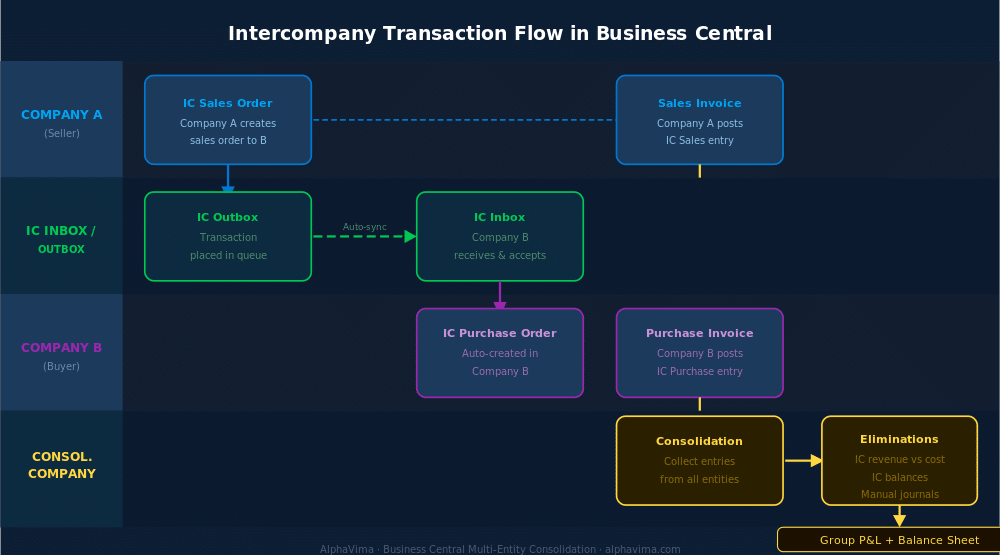
The intercompany framework works through an IC Inbox and Outbox mechanism:
- Company A creates an intercompany sales order to Company B
- The IC transaction is placed in Company A’s IC Outbox
- Business Central synchronises the transaction to Company B’s IC Inbox (automatically if companies share the same tenant)
- Company B accepts the transaction from its IC Inbox
- Business Central creates the corresponding purchase order in Company B automatically
- Both companies post their respective documents — Company A posts the sales invoice; Company B posts the purchase invoice
- Both ledgers are updated with matching entries
This eliminates the error-prone manual process of raising invoices in one company and manually re-entering them in another.
Intercompany Chart of Accounts
An Intercompany Chart of Accounts is maintained at the group level. This shared chart maps to each company’s local accounts, ensuring that intercompany transactions post to the correct GL accounts in each entity regardless of local account code differences.
Navigate to: Finance → Intercompany → Intercompany Chart of Accounts
Intercompany Dimensions
Business Central’s dimension framework extends to intercompany transactions. Dimensions (cost centres, projects, regions) can be mapped between companies, ensuring that intercompany transactions carry the correct analytical attributes in each entity’s ledger. See our guide on Business Central Power Automate integrations for automating intercompany approval workflows.
Intercompany Eliminations
Consolidation requires eliminating intercompany transactions so that group results reflect only external trading. Common eliminations include:
- Intercompany sales and purchases: Revenue recognised in Company A vs. cost recognised in Company B must cancel out at group level
- Intercompany receivables and payables: Balances owed between group entities must be eliminated from the consolidated balance sheet
- Intercompany profit in inventory: Where one entity sells goods to another at a mark-up, the unrealised profit held in the buying entity’s inventory must be eliminated
In Business Central, eliminations are posted as manual journal entries in the consolidation company. Because the IC module ensures that intercompany transactions are matched and consistently coded, generating elimination journals from the consolidated trial balance is straightforward.
Consolidated Reporting with Power BI
Business Central’s built-in consolidation reporting provides a consolidated trial balance and financial statements. For more sophisticated group reporting — variance analysis, entity-by-entity comparison, drill-through from consolidated P&L to subsidiary transactions — embedding Power BI is the recommended approach.
Business Central’s native Power BI integration allows: – Consolidated P&L by entity, region, or cost centre – Group balance sheet with intercompany eliminations visualised – Cash flow statement across all entities – Foreign currency translation gain/loss analysis
Pre-built Power BI content packs for Business Central include finance dashboards that work across multi-company environments. For row-level security configuration to restrict subsidiary visibility per user, see our guide on Power BI Row Level Security setup.
Get your multi-entity consolidation designed properly
Bring your entity list, your currencies and your close calendar. We will map the intercompany and consolidation setup before anyone quotes you.
Best Practices for Multi-Entity Finance in Business Central
Align charts of accounts across subsidiaries. The consolidation mapping is easier to maintain and less error-prone when subsidiaries use consistent account numbering. Allow local variation only where genuinely necessary for local statutory requirements.
Use dimensions for analytical reporting, not separate companies. If entities are divisions rather than legal entities, use Business Central’s dimension framework (cost centres, business units) rather than separate companies. Reserve separate companies for distinct legal entities.
Automate intercompany month-end close. Use Power Automate flows to notify subsidiary finance teams when to process IC transactions, when reconciliations are complete, and when consolidation has been run.
Reconcile IC balances before consolidation. Ensure that intercompany receivables in Company A exactly match intercompany payables in Company B before running consolidation. Unreconciled IC differences are a common source of consolidation errors.
Maintain a consolidation calendar. Define the group close timetable — subsidiary close date, IC reconciliation deadline, consolidation run date, group reporting date — and enforce it consistently.
Conclusion
Multi-entity financial management is one of the most complex requirements for a mid-market ERP system — and it is an area where Dynamics 365 Business Central delivers genuine, production-tested capability. The combination of the intercompany transaction module, the consolidation framework, multi-currency translation, and Power BI integration gives group finance teams a structured, automated approach to month-end close and group reporting.
For growing businesses managing multiple legal entities across currencies and jurisdictions, Business Central eliminates the spreadsheet-based consolidation processes that consume finance team time and introduce material risk. The platform scales from two entities to thirty without requiring a platform change.
Managing multiple entities and outgrowing your current consolidation process? Alphavima’s Business Central specialists have configured group consolidation structures for multi-entity businesses across the UK, Europe, and beyond. Contact us for a consolidation readiness assessment.
Operating a group structure and evaluating your ERP options? Leave a comment or get in touch — we’d be happy to share how Business Central’s consolidation capabilities map to your specific structure.

Related case study
Manufacturing ERP on Business Central
A manufacturer put the shop floor, stockroom and finance on one Dynamics 365 Business Central ERP.
Read the case study · Next read: Business Central pricing guide
Frequently asked questions
How many companies can Business Central consolidate?
Business Central has no hard limit on the number of companies that can be included in a consolidation. In practice, consolidations with 10–30 entities are common in mid-market implementations. For very large group structures with 50+ entities, the consolidation run time and manual elimination volume become the practical constraints — but these are operational rather than technical limits.
Can Business Central consolidate companies in different currencies?
Yes. Business Central supports full multi-currency consolidation. Each subsidiary's functional currency results are translated to the group's reporting currency using average rates (P&L) and closing rates (balance sheet) as configured per account. Currency translation differences are automatically calculated and posted to the translation reserve/equity account.
Does Business Central support minority interest consolidation?
Yes. The Business Unit setup includes a Consolidation % field. For a subsidiary that is 70% owned by the group, set the consolidation percentage to 70. Business Central applies this percentage when pulling subsidiary data into the consolidation company, with the minority interest effectively excluded at the point of consolidation. More complex minority interest disclosures may require supplementary journals.
Can intercompany transactions be automated or do they require manual steps?
The Business Central IC module automates the creation of matching transactions in the receiving company — you create the sales invoice in Company A, and Business Central creates the purchase invoice in Company B via the IC Inbox. The receiving company still needs to review and accept transactions, but the data entry step is eliminated. Power Automate can be used to further automate the acceptance of routine, low-risk IC transactions.
How does Business Central handle intercompany transactions between companies in different Business Central tenants?
For companies on the same Business Central tenant, IC synchronisation is automatic. For companies on different tenants (for example, a recently acquired subsidiary on its own BC tenant), IC transactions must be exchanged via file export/import — Business Central exports the IC transaction as an XML file, which the receiving company imports. This is functional but less automated than the same-tenant scenario.
What is the difference between a consolidation company and a regular company in Business Central?
A consolidation company is a standard Business Central company configured specifically for group reporting purposes. It typically has no operational transactions of its own — only consolidated and elimination journals. It holds the consolidated chart of accounts, the Business Unit definitions, and the group-level reporting. Users access it for group reporting and period-end close, not for day-to-day operations.
How are intercompany eliminations handled in Business Central?
Business Central does not automatically generate elimination journals — these are posted manually in the consolidation company. However, because the IC module ensures matching intercompany transactions are consistently coded in each entity, the elimination amounts can be identified directly from the consolidated trial balance. Most groups create standard elimination journal templates for recurring eliminations (IC sales, IC loans, IC dividends) which are adjusted and posted each period.
Can Business Central produce statutory financial statements for each subsidiary alongside the consolidated accounts?
Yes. Each subsidiary company in Business Central has its own full set of financial reporting — profit and loss, balance sheet, cash flow statement — in its own functional currency. These can be produced as the basis for local statutory accounts. The consolidation company produces the group accounts. Power BI can present both entity-level and consolidated views simultaneously, with drill-through from group results to subsidiary detail.