











Every ERP replacement project starts the same way: someone in the business – usually an operations director, finance director, or IT manager – reaches the point where they can no longer tolerate the limitations of the current system.
Reports are wrong. Processes are manual. Integrations are brittle. The IT team spends more time maintaining aging infrastructure than adding value.
But reaching that conclusion internally is only half the battle. The other half is building a business case that persuades the board, the CFO, and the budget committee to commit the investment. That is where many ERP replacement initiatives stall – not because the project is not justified, but because the justification is not quantified, structured, or presented in the language that decision-makers respond to.
This guide provides a framework for building a compelling, CFO-ready business case for replacing your legacy ERP with Microsoft Dynamics 365 Business Central.
Table of contents
Talk to a Business Central consultant
Book a quick call to talk through your Business Central project. No pressure, just practical advice. Or see our Business Central services.
Why Business Cases Fail to Get Approved
Before building the business case, it is worth understanding why ERP replacement proposals are rejected or indefinitely deferred:
Vague benefits: “We’ll have better visibility” and “processes will be more efficient” are not measurable. Finance committees demand quantified, time-bounded savings.
Underestimated costs: Business cases that present only the software licence cost – ignoring implementation, training, data migration, and change management – are rejected when the full cost emerges in due diligence.
No status quo cost: The business case only shows the cost of change, not the ongoing cost of staying on the current system. Boards need to see what doing nothing actually costs.
No risk assessment: ERP replacement is a significant project with real risks. Business cases that ignore risk are perceived as naive and lose credibility.
Wrong audience: A technically detailed business case presented to a board that thinks in terms of EBITDA and payback periods will not land.
The Business Case Framework
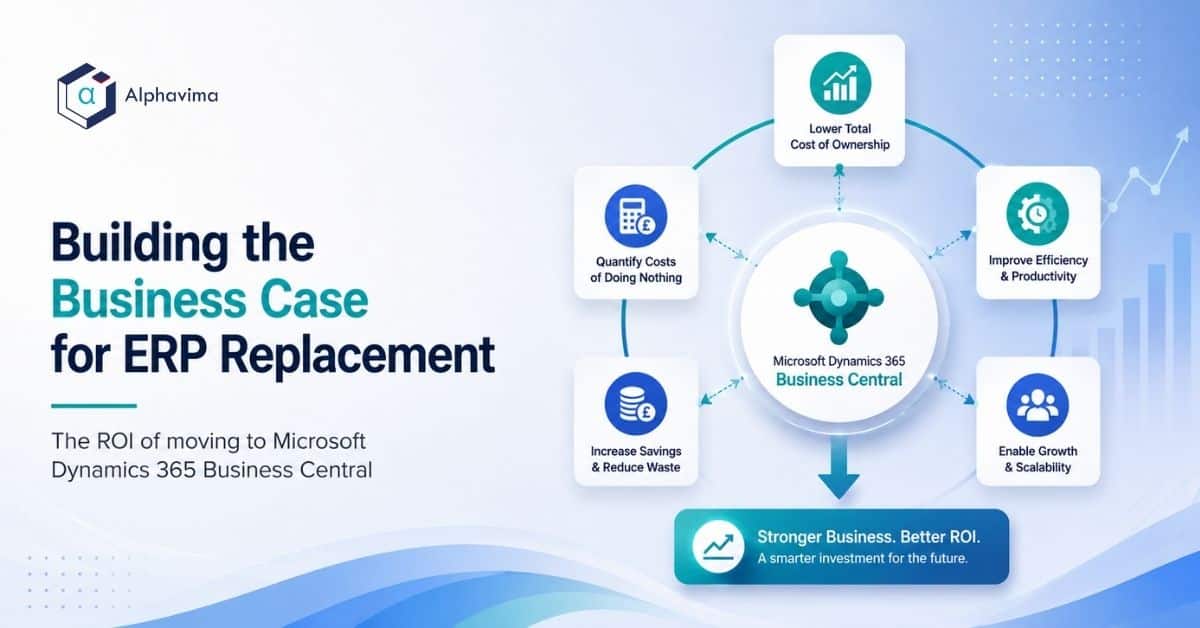
A robust ERP replacement business case has five components:
- Current state cost (the cost of doing nothing)
- Future state benefits (quantified savings and revenue enablement)
- Investment required (total cost of ownership for Business Central)
- ROI and payback period
- Risk assessment and mitigation
Component 1: Current State Cost
The first job is to quantify what your legacy ERP is actually costing the business today. This is often more than stakeholders expect:
Direct costs:
– Software licence fees or annual maintenance/support costs
– Server hardware, virtualisation, and storage (for on-premises systems)
– IT labour for system administration, patching, and backup management
– Periodic upgrade projects (typically £20,000–£100,000 every 2–3 years for on-premises ERP)
– Third-party middleware and integration maintenance costs
– Reporting tools (Crystal Reports licences, SQL Reporting Services infrastructure)
Indirect costs (often overlooked but significant):
– Finance team time spent on manual reconciliations, spreadsheet-based reporting, and re-keying data between systems
– Operations team time spent on manual workarounds for ERP limitations
– Customer service costs from fulfilment errors, manual order entry, and delayed invoicing
– Cost of errors: stock write-offs from inaccurate inventory, overpayments from poor AP controls, lost revenue from billing gaps
– Opportunity cost: strategic initiatives deferred because the ERP cannot support them
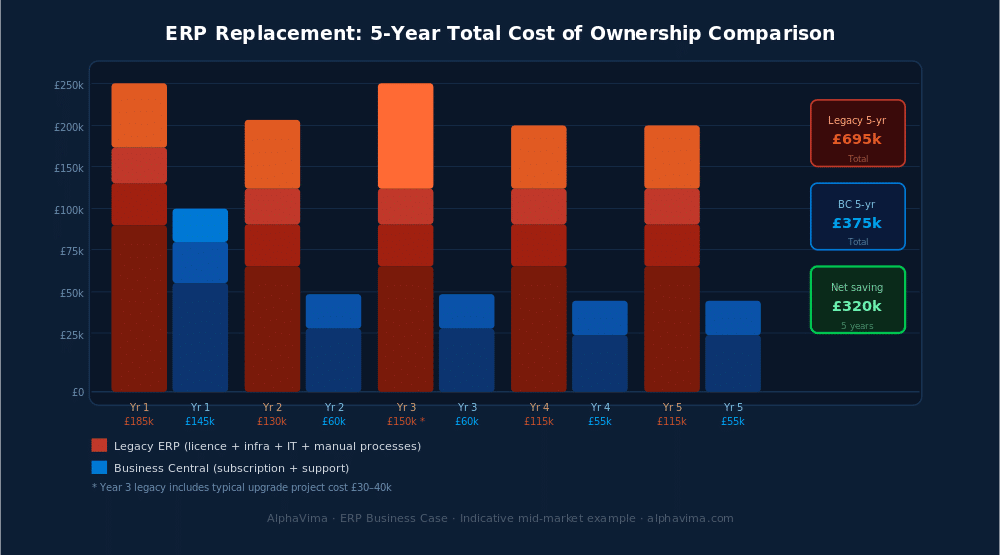
For most mid-market businesses running legacy ERP, the true annual cost of the status quo is between £50,000 and £200,000 per year when all direct and indirect costs are included. This is the number that opens conversations.
Component 2: Future State Benefits
Benefits fall into three categories: cost reduction, process efficiency, and revenue enablement.
Cost Reduction
- Infrastructure elimination: Cloud-native Business Central eliminates server hardware, hosting, SQL licences, and disaster recovery infrastructure – typically £10,000–£30,000 per year for a mid-market business
- IT maintenance reduction: No more patching, backup management, or version upgrades – Microsoft handles this automatically
- Integration maintenance: Modern Power Automate-based integrations are lower maintenance than legacy middleware
- Reduced audit and compliance cost: Built-in controls, audit trails, and MTD compliance reduce external accountancy fees
Process Efficiency
- Finance close acceleration: Businesses moving from legacy ERP to Business Central typically reduce month-end close time by 30–50% through automated bank reconciliation, intercompany elimination, and live Power BI reporting
- Purchasing productivity: Automated replenishment suggestions and approval workflows reduce purchasing team time on routine ordering
- Order processing automation: EDI order import and automated fulfilment workflows reduce manual order entry
- Elimination of re-keying: Connecting Business Central to Microsoft 365 (Outlook, Teams, Excel) eliminates the manual data transfer that consumes finance and operations team time
Revenue Enablement
- Faster invoicing: Automated invoice generation on shipment reduces debtor days – for a business with £10M revenue and 45-day debtor days, reducing to 38 days releases approximately £190,000 of working capital
- Reduced fulfilment errors: WMS with scan-to-confirm picking reduces pick errors – each error has a measurable cost in customer service, returns processing, and re-delivery
- New channel enablement: Business Central’s e-commerce integrations enable online channel expansion that legacy ERP may not support
Component 3: Investment Required (Total Cost of Ownership)
Present the full cost transparently. CFOs who discover hidden costs mid-project lose confidence in the entire initiative.
Year 1 investment:
– Business Central licence (per user per month × headcount × 12)
– Implementation services (configuration, data migration, training, go-live support)
– Integration development
– Change management and project management
Ongoing annual costs:
– Business Central subscription (included in licence)
– Partner support agreement
– Internal IT resource for administration (minimal for cloud)
Business Central licence benchmarks (UK pricing):
– Essentials: ~£57/user/month – covers Finance, Supply Chain, Sales, Projects
– Premium: ~£82/user/month – adds Manufacturing and Service Management
– Team Members: ~£6/user/month – read-only access for reporting users
Implementation cost benchmarks:
– Small business (10–20 users, standard scope): £25,000–£60,000
– Mid-market (25–75 users, multi-module): £60,000–£150,000
– Complex mid-market (75+ users, manufacturing, multi-entity): £150,000–£350,000
For a comparison of Business Central vs competing platforms on pricing, see our detailed Business Central vs NetSuite comparison.
ROI Framework
With current state costs and future state benefits quantified, the ROI calculation follows:
Net benefit: Annual benefit savings + revenue uplift − incremental annual cost of Business Central
Payback period: Year 1 investment ÷ annual net benefit
5-year NPV: Sum of discounted annual net cash flows over 5 years
Worked example for a 50-user mid-market distributor:
| Item | Amount |
|---|---|
| Legacy ERP annual cost (all-in) | £95,000/year |
| Business Central annual licence (50 users Essentials) | £34,200/year |
| Implementation investment (one-time) | £90,000 |
| Annual process efficiency savings | £45,000/year |
| Infrastructure savings | £18,000/year |
| Net annual saving vs. status quo | £59,000/year |
| Payback period | ~18 months |
This is a deliberately conservative example – businesses with higher legacy costs, more manual processes, or significant infrastructure spend often see payback within 12 months.
Component 5: Risk Assessment
Implementation risk: Address directly. What is your partner’s methodology? What are the go/no-go criteria? What is the parallel running approach?
Business disruption risk: ERP go-live is operationally significant. Mitigants: phased rollout, parallel running period, hypercare support.
Data quality risk: Poor data migration is the most common cause of ERP failures. Mitigant: data audit and cleansing before migration.
Change management risk: User adoption is as important as technical delivery. Mitigant: role-based training, super-user programme, change champion network.
Vendor risk: Is Microsoft a credible, stable vendor? With Business Central embedded in Microsoft’s Dynamics 365 family and significant ongoing R&D investment, this risk is demonstrably low compared to niche ERP vendors.
For platform-specific migration risks, see our guides on migrating from Sage and migrating from Dynamics GP.
Get the business case built with real numbers
Bring your current ERP costs and your pain list. We will build the five-year comparison your board will actually sign off on.
Presenting to the Board
Structure the board presentation around business outcomes, not technical features:
- The problem: What the current system costs and what it prevents the business from doing
- The opportunity: What Business Central enables – growth, efficiency, competitive advantage
- The investment: Full cost, transparently presented
- The return: Quantified, with conservative and optimistic scenarios
- The plan: Phased implementation approach that manages risk
- The ask: Specific approval for investment and project initiation
Use CFO language: EBITDA impact, payback period, NPV, risk-adjusted return. Avoid IT language: “cloud-native architecture”, “API integration”, “AL extensions” – these belong in the technical appendix, not the executive summary.
Conclusion
The business case for ERP replacement is stronger than most organisations initially realise. The true cost of the status quo – legacy infrastructure, manual processes, integration maintenance, and constrained growth – is typically higher than the investment required to move to Business Central.
The discipline required is to quantify the status quo cost honestly, model the benefits conservatively, present the full implementation investment transparently, and structure the case for the board’s financial language and risk appetite.
Done properly, the business case for Business Central does not need to be oversold – the numbers make the argument on their own.
Ready to build your ERP business case? Alphavima’s advisory team can help you build a CFO-ready business case for Business Central, grounded in your specific cost structure and operational requirements. Contact us for an ERP business case workshop.
Working on an ERP business case and want a sense check? Leave a comment or get in touch – we’d be glad to review your approach.

Related case study
Manufacturing ERP on Business Central
A manufacturer put the shop floor, stockroom and finance on one Dynamics 365 Business Central ERP.
Read the case study · Next read: Business Central pricing guide
Frequently asked questions
How long does building an ERP business case typically take?
A well-structured ERP business case takes 4–8 weeks to build properly. Rushing the process produces thin analysis that does not survive board scrutiny. The time investment in a rigorous business case pays back in faster board approval, clearer project scope, and a better-defined implementation brief.
Should the business case be built internally or with an implementation partner?
Both approaches work, but a hybrid is usually best: internal teams own the business case and sign off on the numbers; implementation partners provide benchmarking data, cost estimates, and benefit case frameworks. A good implementation partner has delivered enough similar projects to provide realistic cost and benefit benchmarks that an internal team cannot easily produce.
How do I calculate the cost of manual processes in the current state?
Time-activity studies are the most rigorous approach: identify the manual processes that Business Central would automate or eliminate, estimate the time spent per process per period, multiply by fully loaded labour cost. For a finance team spending 8 hours per week on manual reconciliations and re-keying, at £45/hour fully loaded, that is £18,720 per year from a single process. Across the whole business, the total is usually significant.
What is a realistic payback period for a Business Central implementation?
Based on Alphavima's implementation portfolio, businesses with meaningful legacy ERP costs and process inefficiencies typically see payback in 14–24 months. Businesses replacing low-cost accounting software with Business Central where the primary driver is functionality rather than cost reduction may see payback in 24–36 months. Businesses that also achieve working capital improvement through faster invoicing and better stock management can see payback in under 12 months.
How should we handle the "risk of doing nothing" in the business case?
The risk of doing nothing is often underweighted in business cases. For businesses on systems with imminent end-of-support (Dynamics GP's mainstream support ends 2029), the status quo is not risk-free - it carries increasing security, compliance, and operational risk. For businesses where the ERP cannot support planned growth (new products, new geographies, new channels), the status quo risk is a strategic constraint. Quantify these risks and include them in the business case.
What if our board is sceptical about IT projects because of past failures?
Address this directly. Most ERP failures trace to three root causes: poor partner selection, inadequate data migration preparation, and insufficient change management. Present your mitigation plan for each: partner selection criteria, data audit approach, and change management programme. If Alphavima is your chosen partner, reference delivered projects and client references. Scepticism from past failures is healthy - it indicates a board that will hold the project accountable, which improves outcomes.
How does Business Central's pricing compare to other mid-market ERP options?
Business Central is consistently one of the most competitively priced full-function mid-market ERP platforms. Its per-user-per-month pricing is transparent and publicly available - unlike Oracle NetSuite, SAP Business One, and others that use opaque, negotiated pricing. For a detailed feature and pricing comparison, see our Business Central vs NetSuite analysis.
Is there a template or structured framework for the business case document?
Alphavima provides a structured ERP business case framework for qualified prospects as part of our advisory process. The framework includes: current state cost assessment template, benefit quantification workbook, TCO comparison model, and a board presentation template. These are developed from our implementation experience and provide a credible, comparable basis for the business case. Contact us to request the framework.