











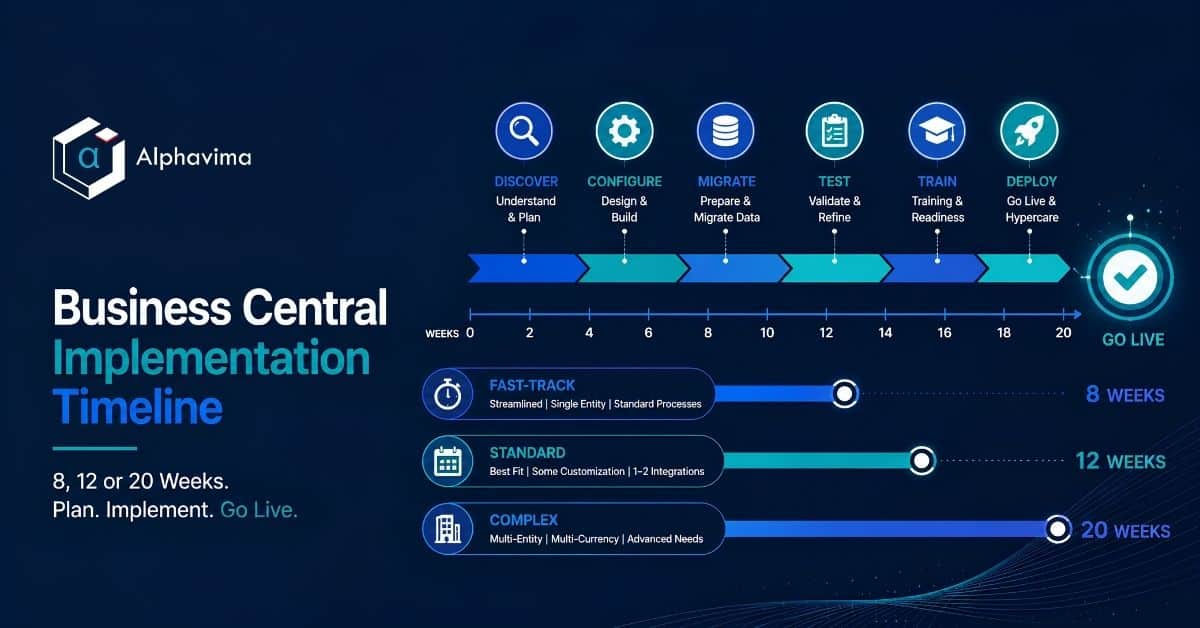
A Business Central implementation typically takes 8 to 20 weeks. An 8-week project suits a single-entity company using out-of-the-box finance and trade with clean data. A 12-week project is the common case: some configuration, one or two integrations, moderate data cleanup. A 20-week project covers multi-entity, multi-currency, manufacturing or heavy integration work.
That is the short answer. The rest of this article is the long answer, because “8 to 20 weeks” only helps you if you know what fills those weeks, who does the work, and what has to be true for the shorter number to be real.
Executive summary
- Three realistic timeline shapes exist for Dynamics 365 Business Central: 8 weeks (fast-track), 12 weeks (standard) and 20 weeks (complex). Anything under 8 weeks is a data-entry exercise, not an implementation. Anything over 26 weeks usually signals scope that belongs in Dynamics 365 Finance & Operations.
- The timeline is set by four variables: number of legal entities, data quality, integration count, and process complexity. Company revenue and user count matter far less than people assume.
- Client-side effort is the most underestimated cost. Expect your own team to contribute 15 to 40 hours per week during the middle third of the project.
- Compressing a timeline does not remove work. It removes testing, training and process redesign, which reappear as post-go-live cost.
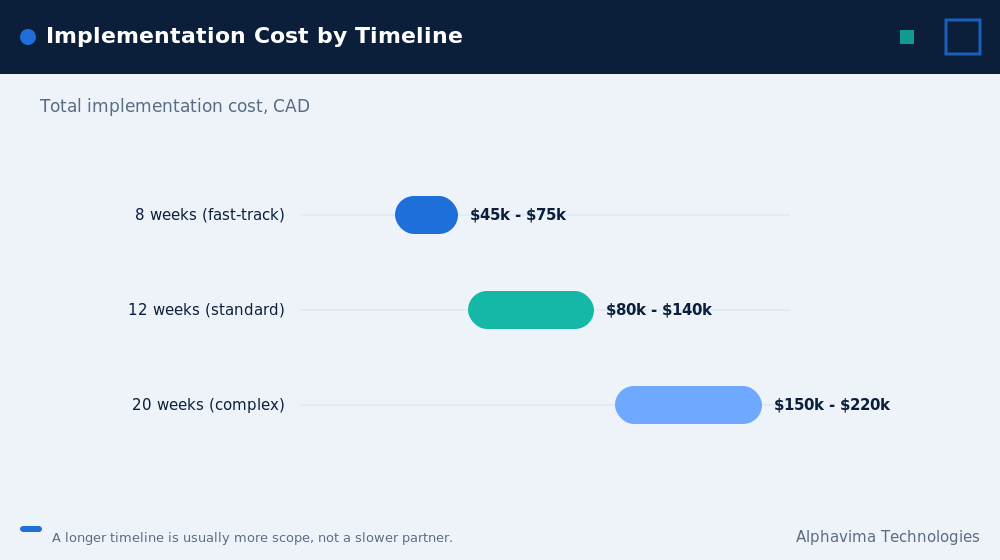
- Implementation fees typically land at CAD $45,000 to $220,000 (USD $33,000 to $160,000) depending on shape. These are indicative ranges, not quotes.
- The project is not finished at go-live. It is finished at the first clean month-end close, usually 4 to 6 weeks later.
Table of contents
Talk to a Business Central consultant
Book a quick call to talk through your Business Central project. No pressure, just practical advice. Or see our Business Central services.
What determines a Business Central implementation timeline
Four variables set the duration. Everything else is noise.
Legal entities. One company in one country is fast. Three entities with intercompany postings and two reporting currencies is not. Each additional entity adds roughly 1 to 2 weeks, mostly in configuration and testing rather than build.
Data quality. This is the variable that sinks timelines. If your item master has 12,000 SKUs and nobody knows which 4,000 are dead, the project stalls until somebody decides. That decision cannot be outsourced to your partner.
Integrations. Each real integration (e-commerce, payroll, warehouse, bank feed, CRM) adds 1 to 3 weeks. “Real” means bidirectional or transactional. A one-way nightly CSV import is not a real integration and should not be priced as one.
Process complexity. Standard order-to-cash and procure-to-pay are quick. Manufacturing with routings and capacity, project accounting with WIP, rental cycles, or regulated utility billing are not. This is where an accelerator matters: for example, equipment rental businesses running PREXA365 skip several weeks of custom build because the rental lifecycle is already modelled.
Notice what is not on the list: headcount. A 200-user rollout of standard finance and distribution is often faster than a 25-user manufacturing implementation. User count drives training and licensing, not build effort.
The three Business Central implementation timeline shapes at a glance
| Dimension | 8 weeks (Fast-track) | 12 weeks (Standard) | 20 weeks (Complex) |
|---|---|---|---|
| Legal entities | 1 | 1 to 2 | 3 or more |
| Currencies | 1 | 1 to 2 | Multiple |
| Users (typical) | 5 to 25 | 20 to 100 | 50 to 300 |
| Modules | Finance, Sales, Purchasing | Above plus Inventory, Fixed Assets, basic Jobs | Above plus Manufacturing, Warehouse, Service, Projects |
| Integrations | 0 to 1 (bank feed) | 1 to 3 | 4 or more |
| Custom AL extensions | None | 0 to 2 small | 3 or more, or an ISV accelerator |
| Data migration scope | Masters plus opening balances | Masters, open transactions, 1 to 2 years history | Full history, multiple sources |
| Reporting | Standard reports plus a Power BI starter pack | Power BI dashboards, some custom | Power BI plus Microsoft Fabric warehouse |
| Testing cycles | 1 | 2 | 3 plus a parallel run |
| Client hours per week (peak) | 15 to 20 | 20 to 30 | 30 to 40 |
| Indicative fee (CAD) | $45,000 to $75,000 | $80,000 to $140,000 | $150,000 to $220,000+ |
| Indicative fee (USD) | $33,000 to $55,000 | $58,000 to $102,000 | $110,000 to $160,000+ |
Fee ranges are indicative for Canadian and US mid-market projects and exclude Microsoft licence subscriptions. Actual pricing depends on scope, and Alphavima quotes fixed ranges after a scoping session rather than off a table.
The 8-week fast-track: week by week
The 8-week project works when you accept Business Central’s standard processes rather than reproducing your old ones. It is a fit-to-standard implementation. If you want your legacy workflow rebuilt, do not attempt 8 weeks.
| Week | Phase | What happens | Client hours |
|---|---|---|---|
| 1 | Kick-off and discovery | Project charter, environment provisioning, chart of accounts review, process walkthroughs (2 days on site or remote) | 20 |
| 2 | Configuration part 1 | Company setup, posting groups, dimensions, number series, VAT/GST/HST setup, banks | 12 |
| 3 | Configuration part 2 + data template issue | Sales and purchase setup, payment terms, approval workflows; client receives data migration templates | 15 |
| 4 | Data load 1 | First load of customers, vendors, items, GL accounts into sandbox. Client reviews and corrects | 20 |
| 5 | Conference room pilot | Key users run their real processes end to end in the sandbox. Gaps logged | 25 |
| 6 | Gap resolution + UAT round 1 | Configuration adjustments, report setup, Power BI starter dashboards, user acceptance testing begins | 20 |
| 7 | Training + data load 2 | End-user training (role based), second data load, opening balance dry run | 25 |
| 8 | Cutover and go-live | Final data load, opening balances posted, production cutover over a weekend, day-one support | 30 |
| 9 to 10 | Hypercare | Daily standups, issue triage, first-week close support (this is beyond the 8 weeks and must be budgeted) | 10 |
The honest caveat: an 8-week timeline assumes your data is already clean, your chart of accounts is already decided, and your key users are available. If any of those three is false, this is a 12-week project wearing an 8-week label.
The 12-week standard implementation: week by week
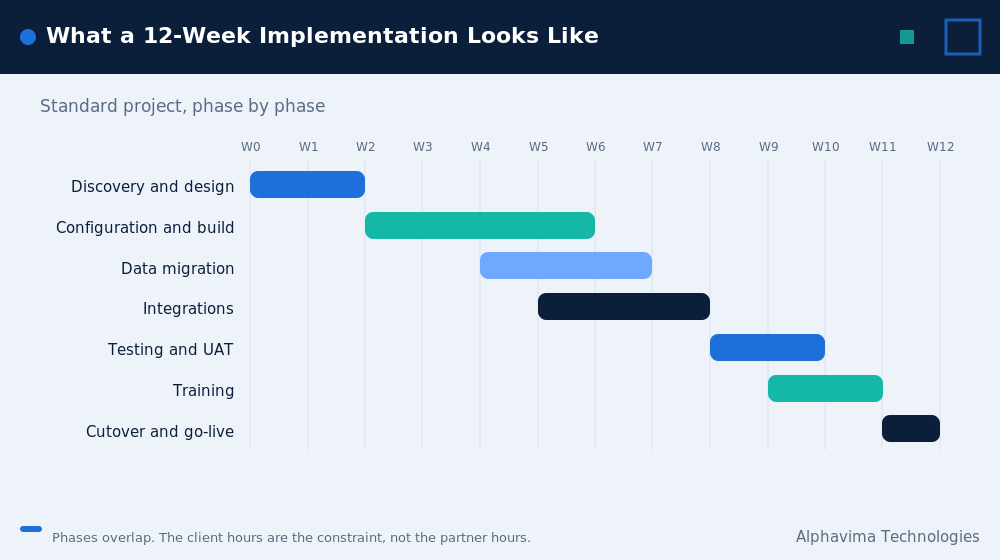
This is the most common shape for Canadian and US mid-market companies moving off QuickBooks, Sage, Dynamics GP or Dynamics NAV.
| Week | Phase | Key activities | Deliverable | Client hours |
|---|---|---|---|---|
| 1 | Initiate | Kick-off, governance, RACI, environment setup, project plan sign-off | Project charter | 15 |
| 2 | Discovery | Process workshops: finance, sales, purchasing, inventory | Process inventory | 25 |
| 3 | Fit-gap | Map each process to standard Business Central. Log gaps as configure / extend / change process / accept | Fit-gap register | 25 |
| 4 | Design sign-off | Solution design document, chart of accounts and dimension model, integration design | Signed design doc | 20 |
| 5 | Build 1 | Core financial configuration, posting setup, approval workflows | Configured sandbox | 10 |
| 6 | Build 2 + data prep | Trade, inventory, fixed assets configuration. Client cleanses master data | Data templates returned | 25 |
| 7 | Data migration 1 | First full load into sandbox. Reconciliation report issued | Load 1 reconciliation | 20 |
| 8 | Conference room pilot | Key users execute real business scenarios end to end. Integration testing begins | CRP issue log | 30 |
| 9 | Resolve + integrate | Fix CRP issues, complete integrations, build Power BI reports, configure Copilot features | Integrated solution | 20 |
| 10 | UAT | Formal user acceptance testing against scripted scenarios. Defect triage | Signed UAT | 30 |
| 11 | Train + rehearse | End-user training by role, cutover rehearsal, opening balance dry run | Trained users, cutover plan | 30 |
| 12 | Cutover and go-live | Freeze legacy, final load, opening balances, go-live, day-one floor support | Live system | 35 |
| 13 to 16 | Hypercare | Issue resolution, first month-end close support, knowledge transfer | First clean close | 10 per week |
Week 8 is the pivot point. If the conference room pilot goes well, the go-live date holds. If it does not, you have four weeks to recover, which is enough. If the problem only surfaces in week 11, you do not.
The 20-week complex implementation: ERP project phases
At 20 weeks, week-by-week granularity is less useful than phase granularity, because streams run in parallel.
| Phase | Weeks | What is happening | Exit criteria |
|---|---|---|---|
| Mobilise | 1 to 2 | Governance, steering committee, environments, integration inventory, data profiling | Charter signed, data profile report delivered |
| Discovery and fit-gap | 3 to 6 | Deep workshops per stream (finance, manufacturing or service, warehouse, projects). Formal fit-gap | Fit-gap register with each gap costed |
| Solution design | 7 to 8 | Architecture: entities, intercompany, currencies, dimension model, Dataverse and Azure integration patterns | Solution blueprint signed |
| Build and configure | 9 to 13 | Configuration per stream, AL extension development, integrations, Power BI and Microsoft Fabric data model | Feature-complete sandbox |
| Data migration cycles | 8 to 16 (overlapping) | Three loads: trial, full, dress rehearsal. Reconciliation after each | Load 3 reconciles to legacy within tolerance |
| Conference room pilot | 13 to 15 | Cross-functional scenario testing. Manufacturing and warehouse scenarios take the longest | CRP sign-off |
| UAT and parallel run | 15 to 18 | Formal UAT plus one month of parallel running in finance | UAT signed, parallel variance explained |
| Training | 16 to 18 | Train-the-trainer, then end-user training by role. Super-user certification | Attendance and competency confirmed |
| Cutover | 19 to 20 | Freeze, final load, opening balances, go-live, floor support | Live, day-one transactions posted |
| Hypercare | 21 to 26 | Daily triage, first close, second close, transition to support | Two clean closes |
Why the parallel run matters at this size. Running the legacy system and Business Central side by side for one month is expensive and unpopular. It is also the only way to prove that a complex, multi-entity chart of accounts produces the same numbers.
Skipping it on a 20-week project is a false economy that shows up at year-end audit.
Sector-specific work compresses here. A utility or energy provider using Olix365, or a nonprofit using GiveLife365 alongside Business Central for finance, starts from a modelled process rather than a blank one, which typically removes 2 to 4 weeks of design and build from the middle phases.
ERP implementation duration: effort split and client hours
This is the table most partners will not show you.
| Role | 8-week | 12-week | 20-week | Who provides it |
|---|---|---|---|---|
| Project manager | 60 hrs | 110 hrs | 220 hrs | Partner |
| Functional consultant (finance) | 90 hrs | 160 hrs | 300 hrs | Partner |
| Functional consultant (trade/ops) | 40 hrs | 120 hrs | 280 hrs | Partner |
| Technical / AL developer | 0 to 20 hrs | 60 hrs | 260 hrs | Partner |
| Data migration specialist | 40 hrs | 90 hrs | 200 hrs | Partner |
| BI / reporting consultant | 20 hrs | 50 hrs | 120 hrs | Partner |
| Client project owner | 80 hrs | 150 hrs | 300 hrs | You |
| Client key users (total) | 90 hrs | 200 hrs | 450 hrs | You |
| Client IT | 20 hrs | 40 hrs | 100 hrs | You |
Hours are indicative averages from mid-market Microsoft Dynamics 365 Business Central projects and vary with scope.
Read the bottom three rows again. On a 12-week project your organisation contributes roughly 390 hours. That is one person nearly full-time for the duration, spread across several people. Projects fail when a CFO signs the statement of work without telling their controller that they just committed 150 of their hours.
What gets excluded at each timeline length
Nobody publishes this table. They should.
| Activity | 8 weeks | 12 weeks | 20 weeks |
|---|---|---|---|
| Process redesign | Excluded. You adopt standard. | Partial. Key processes only. | Included. |
| Historical data (2+ years) | Excluded. Opening balances only. | 1 to 2 years, summarised. | Full, as required. |
| Parallel run | Excluded. | Optional. | Included. |
| Custom AL extensions | Excluded. | 1 to 2 small. | Included. |
| Formal UAT with scripts | Compressed to 1 round. | 1 round plus regression. | 2 rounds plus parallel. |
| Role-based training (all users) | Compressed. Super-users cascade. | Included. | Included plus certification. |
| Power BI reporting beyond standard | Starter pack only. | Included. | Included plus Fabric model. |
| Copilot and AI feature enablement | Basic only. | Included. | Included and tuned. |
| Change management programme | Excluded. | Light. | Included. |
If you want an 8-week timeline, you are choosing to exclude the left column. That can be entirely rational. It is only dangerous when nobody says it out loud.
Business Central implementation cost ranges (CAD and USD)
| Cost component | 8-week (CAD) | 12-week (CAD) | 20-week (CAD) | 8-week (USD) | 12-week (USD) | 20-week (USD) |
|---|---|---|---|---|---|---|
| Discovery and design | $8,000 – $12,000 | $15,000 – $25,000 | $30,000 – $45,000 | $6,000 – $9,000 | $11,000 – $18,000 | $22,000 – $33,000 |
| Configuration and build | $18,000 – $30,000 | $30,000 – $50,000 | $55,000 – $85,000 | $13,000 – $22,000 | $22,000 – $36,000 | $40,000 – $62,000 |
| Data migration | $6,000 – $12,000 | $12,000 – $22,000 | $25,000 – $40,000 | $4,500 – $9,000 | $9,000 – $16,000 | $18,000 – $29,000 |
| Integrations | $0 – $8,000 | $10,000 – $20,000 | $25,000 – $40,000 | $0 – $6,000 | $7,000 – $15,000 | $18,000 – $29,000 |
| Training | $4,000 – $7,000 | $8,000 – $14,000 | $15,000 – $25,000 | $3,000 – $5,000 | $6,000 – $10,000 | $11,000 – $18,000 |
| Testing and cutover | $5,000 – $8,000 | $10,000 – $15,000 | $20,000 – $30,000 | $3,500 – $6,000 | $7,000 – $11,000 | $15,000 – $22,000 |
| Hypercare (4 to 6 weeks) | $4,000 – $6,000 | $8,000 – $12,000 | $15,000 – $25,000 | $3,000 – $4,500 | $6,000 – $9,000 | $11,000 – $18,000 |
| Total implementation | $45,000 – $75,000 | $80,000 – $140,000 | $150,000 – $220,000+ | $33,000 – $55,000 | $58,000 – $102,000 | $110,000 – $160,000+ |
Assumptions stated explicitly: these ranges assume North American partner rates, exclude Microsoft licence subscriptions, exclude third-party ISV licences, and assume the client provides its own project owner. USD figures are converted at an assumed rate of roughly 1.37 CAD to 1 USD and rounded.
Treat every number here as an indicative planning range, not a quote.
Licences are separate and ongoing. (Microsoft’s published Business Central pricing.) Business Central is sold per user per month, with Essentials and Premium tiers plus a low-cost Team Members licence. Microsoft’s published list pricing is USD $80 per user per month for Essentials and USD $110 for Premium, with Team Members at USD $8, each paid yearly. Those rates took effect on 1 November 2025.
Confirm current list pricing with Microsoft or your partner before you build a budget on it.
What actually delays a Business Central implementation timeline
| Delay trigger | Typical slippage | How to detect it early | How to prevent it |
|---|---|---|---|
| No client project owner with real authority | 3 to 8 weeks | Decisions in week 3 take more than 5 days | Name one person with authority to decide scope. Put it in the charter. |
| Dirty master data | 2 to 6 weeks | The first data load produces more than 10 percent exception rows | Profile data in week 1, before design. Not in week 6. |
| Key users skip the conference room pilot | 3 to 5 weeks | CRP attendance below 80 percent | Make CRP attendance a contractual milestone. |
| Scope added after design sign-off | 1 to 4 weeks per change | Any request beginning “while we’re in there” | Formal change control with cost and date impact stated. |
| Integration partner not engaged | 2 to 5 weeks | The third-party vendor has no named contact by week 4 | Get the third party’s technical contact and availability before kick-off. |
| Opening balances late from legacy close | 1 to 3 weeks | Legacy month-end takes longer than 10 business days | Choose a go-live date that follows a quarter close, not a month close. |
| Undecided chart of accounts | 2 to 4 weeks | Finance is “still discussing” the COA in week 5 | Freeze the COA at design sign-off. It is not a build-phase decision. |
The pattern is consistent: almost every material delay originates on the client side, and almost every one is detectable in the first three weeks.
The Business Central go-live readiness gate
Run this as a formal gate meeting, not a conversation. Any red row moves the date.
| Gate item | Green means | Owner |
|---|---|---|
| UAT signed | All critical and high defects closed. Medium defects have owners and dates. | Client project owner |
| Data reconciliation | Final load reconciles to legacy trial balance within agreed tolerance. AR and AP age correctly. | Controller |
| Opening balances | Prepared, reviewed, and dry-run posted in sandbox at least once. | Controller |
| Cutover plan | Hour-by-hour runbook with named owners and rollback point. | Partner PM |
| Training | All roles trained. Attendance recorded. Super-users identified per department. | Client project owner |
| Integrations | Each interface tested in production configuration, not just sandbox. | IT |
| Security and permissions | Every user has a permission set. Segregation of duties reviewed. | IT and Finance |
| Support model | Hypercare hours, escalation path and contact list published to all users. | Partner PM |
| Business calendar | No month-end, audit, peak season or statutory deadline in the go-live week. | Client project owner |
Hypercare and the first close
Go-live is not the finish line. The finish line is the first month-end close completed in Business Central without heroics.
Budget 4 to 6 weeks of hypercare. In practice, week 1 after go-live is transaction chaos (people cannot find things), week 2 is process questions, and weeks 3 and 4 are entirely about the close: accruals, reconciliations, intercompany, reporting.
Three things reliably surface at first close and never before: 1. A posting group that was configured wrong and only bites when you run the income statement. 2. A dimension that everybody agreed on but nobody actually populates on transactions. 3. A management report that existed in the legacy system and nobody mentioned during discovery.
Plan for these. They are not failures, they are the normal shape of a first close.
Myths vs facts
| Myth | Fact |
|---|---|
| “Business Central is cloud, so it installs in days.” | Provisioning takes minutes. Configuring your chart of accounts, posting groups, dimensions and processes takes weeks. The software is not the timeline. The decisions are. |
| “More consultants will make it faster.” | Adding consultants past a point increases coordination cost. The constraint is usually client decision speed, not partner capacity. |
| “We’ll migrate 10 years of history.” | Most organisations never query more than 2 years in the new system. Keep the legacy read-only and migrate less. It saves weeks. |
| “We can train everyone in the last week.” | Training in the final week produces users who have forgotten by go-live. Train in the penultimate week and reinforce during hypercare. |
| “Customisation is what takes the time.” | On most Business Central projects, data migration and testing consume more elapsed time than AL development. |
| “A 12-week project means 12 weeks of our time.” | It means roughly 390 client hours concentrated in weeks 6 to 12. That is not the same thing, and it is worse than most CFOs expect. |
| “Copilot and AI features need a separate project.” | Business Central’s Copilot capabilities are configured during the standard build. They add hours, not weeks. |
Get a Business Central timeline you can hold a partner to
Bring your entity count, your integrations and your data quality. We will tell you which timeline shape you are, and what would make it slip.
Pros and cons of each Business Central implementation timeline
8 weeks – Pros: Lowest cost, fastest payback, forces fit-to-standard discipline, less change fatigue. – Cons: No process redesign, minimal history, compressed training, higher post-go-live support cost, fails badly if data is dirty.
12 weeks – Pros: The best risk-adjusted option for most mid-market companies. Room for one recovery cycle after the conference room pilot. Proper UAT and training. – Cons: Requires sustained client attention for three months. Tempting to add scope in the middle.
20 weeks – Pros: Handles genuine complexity. Parallel run gives finance real confidence. Change management is included, so adoption is higher. – Cons: Expensive. Longer exposure to staff turnover, priority shifts and executive impatience. Scope discipline is essential.
Common mistakes
- Picking the go-live date before the scoping session. The date should fall out of the scope, not the other way around.
- Going live on 1 January. It is the worst week of the year for finance. Choose a quieter fiscal boundary.
- Letting the partner own data cleansing. Your partner can move and validate data. Only you can decide which records are dead.
- Treating the conference room pilot as a demo. It is not a demo. Your users drive. If your consultant is holding the mouse, it is not a CRP.
- Building custom AL extensions before go-live for problems you have not yet felt. Wait one quarter. Most of the requests evaporate.
- Skipping hypercare to save budget. The cost reappears within a month, at a worse rate, under pressure.
- No named super-user per department. Without them, every question routes to the partner, forever.
- Underscoping reporting. Standard reports rarely satisfy a CFO. Plan Power BI from week 1, not as an afterthought, and consider Microsoft Fabric only when data volumes or multiple sources genuinely justify it.
Expert recommendations on your Business Central implementation timeline
- Insist on a fixed-range Business Central implementation timeline estimate after a paid scoping session. A partner who quotes a firm fixed price without scoping is either padding heavily or planning to change-order you.
- Protect the timeline: put the conference room pilot in week 8 of 12, not week 10. You need recovery room.
- Freeze the chart of accounts at design sign-off. Treat any later change as a formal change request with a date impact.
- Choose a go-live that follows a quarter close. Opening balances are cleaner and finance has just done the work.
- Budget hypercare as a line item, not a hope.
- Defer customisation. Go live on standard, live in it for a quarter, then build the extensions you actually need. Extensions built before go-live are the ones most often discarded.
- Ask your partner for their client-hours estimate in writing. If they cannot produce one, they have not planned the project.
Key takeaways
- 8, 12 and 20 weeks are the three realistic Business Central implementation timeline shapes. Choose one deliberately.
- The timeline is set by entities, data quality, integrations and process complexity, not by company size.
- Your own team will contribute 200 to 750 hours. Plan for it explicitly.
- Compressing the timeline removes testing, training and redesign. Those costs return later.
- Indicative implementation fees range from CAD $45,000 to $220,000 (USD $33,000 to $160,000), excluding licences.
- The project ends at the first clean month-end close, not at go-live.
Conclusion
Your Business Central implementation timeline is never really about “how long does Business Central take.” It is “how long does it take for a company like ours, with data like ours, and a team as available as ours.” Those three inputs produce the answer, and they can be assessed in a single scoping session.
What we would ask you to take away is this: a shorter timeline is not a better timeline. It is a different set of trade-offs, and the trade-offs are knowable in advance. The projects that go badly are almost never the ones that chose 20 weeks.
They are the ones that chose 8 weeks and behaved as though they had chosen 20.
Book a 30-minute Business Central scoping call
Alphavima has delivered Microsoft Dynamics implementations for over 20 years across Canada, the USA, the UK, the UAE and India. In 30 minutes we can tell you which of these three timeline shapes fits your business, what your team’s hour commitment will be, and where your specific delay risks sit.
Book a 30-minute Business Central scoping call, or request a fixed-range implementation estimate based on your actual entities, data and integrations.

Related case study
Manufacturing ERP on Business Central
A manufacturer put the shop floor, stockroom and finance on one Dynamics 365 Business Central ERP.
Read the case study · Next read: Business Central pricing guide
Frequently asked questions
How long does a Business Central implementation take?
Most Business Central implementations take 8 to 20 weeks. Eight weeks is realistic for a single-entity company adopting standard processes with clean data. Twelve weeks is the common mid-market case. Twenty weeks or more applies to multi-entity, manufacturing, or heavily integrated environments.
Can Business Central really be implemented in 8 weeks?
Yes, but only under specific conditions: one legal entity, one currency, no significant customisation, minimal history migration, at most one integration, clean master data, and key users who are genuinely available. If any of those is false, the honest answer is 12 weeks.
What is the biggest cause of Business Central project delays?
Client-side decision latency, usually about data. The most common single cause is nobody at the client holding the authority to decide which master records to keep, which stalls migration and pushes every downstream phase.
How much does a Business Central implementation cost?
Indicative ranges are CAD $45,000 to $75,000 for a fast-track project, CAD $80,000 to $140,000 for a standard project, and CAD $150,000 to $220,000 or more for a complex one. In USD that is roughly $33,000 to $55,000, $58,000 to $102,000, and $110,000 to $160,000 or more. Microsoft licence subscriptions are separate and ongoing.
How many hours will my team need to contribute?
Plan for roughly 190 hours on an 8-week project, 390 hours on a 12-week project, and 850 hours on a 20-week project, spread across your project owner, key users and IT. Effort peaks during the conference room pilot, UAT and cutover.
When should we go live?
Immediately after a quarter close, in a month with no statutory deadlines, audit fieldwork or peak trading. Avoid January. Avoid your busiest season. The technically correct date is worthless if your finance team is already at capacity.
Do we need Power BI or Microsoft Fabric during the implementation?
Power BI, yes, in almost every case. Standard Business Central reports rarely satisfy a CFO, and building dashboards during the project costs far less than retrofitting them. Microsoft Fabric is worth including only when you are consolidating multiple source systems or handling large data volumes.
What happens after go-live?
Hypercare, typically 4 to 6 weeks. Daily issue triage in week 1, process coaching in week 2, and close support in weeks 3 and 4. The project is complete when you have run one clean month-end close in Business Central.