











Buying an ERP system is one of the largest single technology commitments most mid-market companies ever make. When it goes well, finance closes faster, inventory stops leaking, and leaders finally trust the numbers.
When it goes badly, the project drags for a year past its deadline, the budget doubles, and the go-live day arrives with staff quietly running the old spreadsheets alongside the new system.
This article is for the CFO, operations lead, or IT director who is about to start, or is halfway through, an ERP project and wants to know where the landmines are. We will cover the real reasons why ERP implementations fail, give you seven concrete warning signs you can check for this month, and show how to fix each one before it sinks the project.
Key takeaway / What you’ll learn: Most ERP failures are not caused by the software. They are caused by weak sponsorship, dirty data, over-customisation, scope creep, poor change management, unrealistic plans, and the wrong partner. Each of those has an early warning sign you can catch, and a fix you can apply.
Table of contents
Talk to an ERP consultant
Book a quick call to talk through your ERP project. No pressure, just practical advice. Or see our ERP consulting services.
First, how often do ERP projects actually fail?
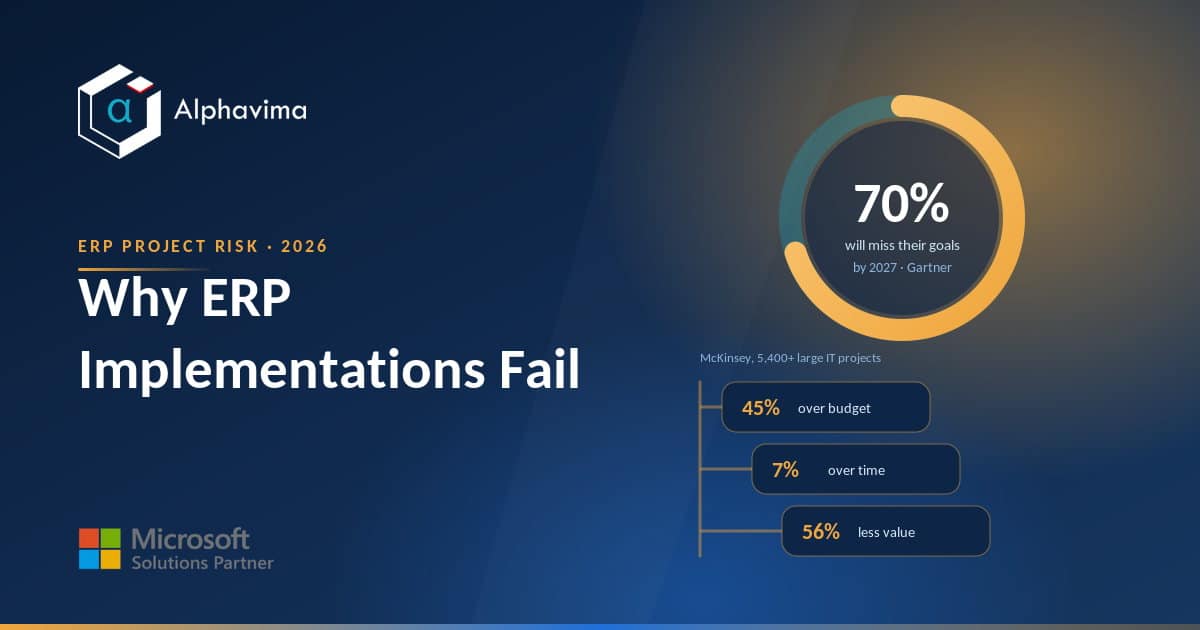
The numbers are sobering, but they are also useful, because they tell you what to watch. Gartner predicts that by 2027, more than 70% of recently implemented ERP initiatives will fail to fully meet their original business goals.
Note the wording: not “crash and burn,” but “fail to meet the goals.” That is the more common outcome. The system goes live, and it simply does not deliver the value the business paid for.
The pattern holds across the wider IT world too. A 2012 study by McKinsey with the University of Oxford, covering more than 5,400 large IT projects with budgets above $15 million, found that on average they run 45% over budget and 7% over time, while delivering 56% less value than predicted. Those are far larger projects than a typical mid-market ERP, so read the figures as a direction of travel rather than a benchmark for your own project.
The pattern we see most often in mid-market projects is not a system that refuses to work. It is a go-live that arrives months later than the board was told, on a budget that quietly grew, because scope was added after kick-off, the data was dirtier than anyone admitted, and the change plan was never funded.
Note: “Failure” rarely means the software never works. It usually means the project cost far more than planned, took far longer, disrupted operations, and never returned the value that justified the investment.
The 7 root causes behind failed ERP projects
Dozens of things can go wrong, but almost every failed implementation traces back to one or more of these seven causes.
1. Weak or absent executive sponsorship
ERP touches every department, so it needs authority that sits above any single department. When the project is delegated entirely to IT or to a middle manager with no budget power, decisions stall.
Nobody can force finance and warehouse to agree on a shared process, so the system ends up bent to fit old habits.
2. Poor data migration
Your new ERP is only as trustworthy as the data you pour into it. Duplicate customers, half-finished product records, and inconsistent units of measure carried over from the legacy system will surface on day one as broken reports and failed transactions.
Data cleansing is unglamorous, and it is the single most underestimated task in the plan.
3. Over-customisation
Every custom change you bolt on is code someone has to build, test, and maintain forever, and re-test at every future update. Teams often customise to preserve a legacy process that was never good to begin with.
In our experience the expensive customisations are the ones nobody planned for: a process misfit found late in testing, a bolt-on bought to paper over it, then a custom build to make the two talk to each other. Standard, configured functionality is faster, cheaper, and far easier to keep current.
4. Scope creep
The project starts as “finance and inventory.” Three months in, someone adds a warehouse mobility module, then a custom CRM integration, then a bespoke reporting layer. Each addition sounds reasonable on its own. Together they blow the timeline and budget without anyone deciding to do so on purpose.
5. Inadequate change management and training
People do not resist ERP because they are difficult. They resist because their daily work is about to change and nobody explained why or how. In the projects we are asked to review, organisational change management is the workstream most likely to be under-resourced, and its absence is the clearest early predictor of poor adoption.
That gap shows up later as low adoption, shadow spreadsheets, and a system that technically works but nobody trusts.
6. Unrealistic timeline and budget
A plan built to win internal approval, rather than to reflect reality, is a plan designed to fail. If the estimate assumes clean data, zero customisation, and staff who are fully available on top of their day jobs, it will slip. Padding is not the enemy; honesty is the goal.
7. The wrong implementation partner
A partner who has never implemented in your industry, or who sells licences and disappears at go-live, will cost you far more than their day rate. The right partner has done your kind of migration before, pushes back on bad customisation, and stays through stabilisation.
Choosing a partner on price alone is one of the most expensive decisions a buyer can make.
A short real-world scenario
Consider a 220-person distributor replacing an ageing accounting package with a modern ERP. The board approves a nine-month plan and a fixed budget. The project is handed to the IT manager, who is competent but has no authority over the warehouse or sales teams.
By month three, sales has asked for a custom pricing engine, and the warehouse insists the new system must replicate an old barcode workflow exactly. Both requests are accepted without a formal change process.
Meanwhile, nobody has budgeted time to clean the customer master, which is riddled with duplicates from a previous migration off QuickBooks.
Go-live slips to month fourteen. When the system finally launches, order confirmations pull the wrong prices because the custom engine was rushed, and finance cannot reconcile balances because the migrated data was never validated.
The software is fine. The project failed on sponsorship, data, customisation, and scope, all of which were visible by month three. That is the point of the warning signs below: every one of these problems announced itself early.
The 7 early warning signs (and how to fix each)
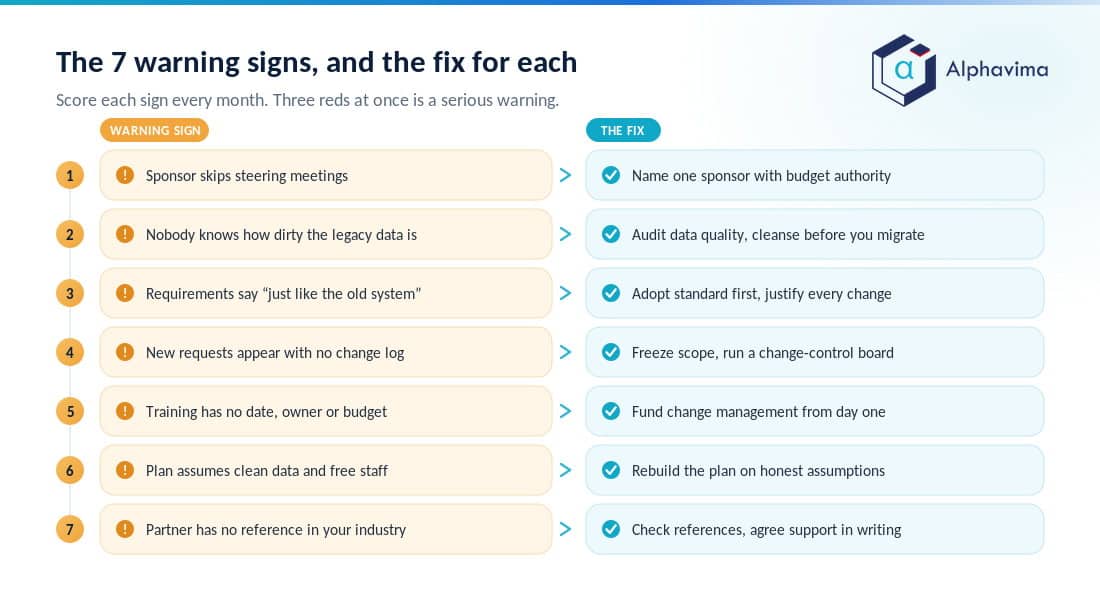
Use this table as a monthly health check. If you can tick more than two or three of the “warning sign” boxes, your project is drifting toward the statistics above.
| # | Warning sign you can see early | Root cause it points to | The fix |
|---|---|---|---|
| 1 | The executive sponsor skips steering meetings or cannot make decisions stick | Weak sponsorship | Name one accountable sponsor with budget authority; make attendance and decision rights explicit in the charter |
| 2 | No one can tell you how many duplicate or incomplete records are in the legacy system | Poor data migration | Run a data-quality audit early; assign a data owner per domain; cleanse before you migrate, not after |
| 3 | The requirements list is full of “make it work exactly like the old system” | Over-customisation | Adopt standard processes first; require a business case and sign-off for every customisation |
| 4 | New modules and “small” requests keep appearing without a change log | Scope creep | Freeze scope in a signed baseline; route every change through a formal change-control board |
| 5 | Training and communication have no dates, owner, or budget | Poor change management | Fund a change-management workstream from day one; schedule role-based training before go-live |
| 6 | The timeline assumes clean data, no customisation, and fully available staff | Unrealistic plan | Rebuild the plan on realistic assumptions; add contingency; backfill day-job time for key users |
| 7 | Your partner has no reference in your industry and no plan for post-go-live support | Wrong partner | Check industry references; agree a stabilisation and support scope in writing before signing |
Tip: Score these seven signs red, amber, or green at the end of every month. A single red is manageable. Three reds at once is how projects quietly become part of the 70% Gartner describes.
How to act on the signs
Catching a warning sign only helps if you act. For sign 1, the fix is structural: put the name of a single accountable executive in the project charter, with the authority to settle cross-department disputes in one meeting rather than three.
For sign 2, treat data as a project in its own right, with its own owner, deadlines, and validation step before anything is loaded.
For signs 3 and 4, the discipline is the same: default to standard, and make every deviation earn its place through a written business case and a change-control decision. For signs 5 and 6, protect the human and the honest parts of the plan, the training and the realistic estimate, because they are the first things cut under pressure and the most expensive to skip.
For sign 7, do the reference calls before you sign, not after go-live.
Worried your ERP project is already drifting?
Send us your project charter, scope baseline and data-migration plan. We will score them against the seven warning signs and tell you, in plain language, which reds to fix first and what each one will cost if you leave it.
Where good governance fits
None of these fixes are exotic. They are governance, and governance is where independent advice earns its keep. A short, structured discovery, before you sign a licence or lock a timeline, tends to catch four or five of the seven root causes while they are still cheap to fix.
This is exactly the ground covered by structured IT advisory services: validating scope, testing the plan’s assumptions, and making sure the sponsor and change-management pieces are real rather than assumed.
It also pays to choose your platform with eyes open. Working through an ERP selection checklist before you shortlist keeps the requirements honest and the comparison fair. If you are still comparing systems, an honest look at the trade-offs, for example Business Central versus SAP Business One, is time well spent, because the wrong-fit platform is much harder to fix once the project is under way.
Sector shapes the risk too: the points where an ERP project in a professional services firm comes unstuck are not the ones a distributor hits.
How Alphavima approaches ERP implementation
Alphavima runs ERP projects on the assumption that the seven causes above are the default risks, not rare edge cases. That means insisting on a named executive sponsor before the project starts, treating data cleansing as a funded workstream rather than an afterthought, and defaulting to standard Dynamics 365 and Business Central functionality so that customisation has to be justified, not assumed.
Our ERP consulting engagements build change management and role-based training into the plan from the first week, use formal change control to hold the line on scope, and keep the same team through stabilisation after go-live.
The goal is simple: land the project inside the budget and timeline you were actually promised, and make sure the system delivers the value that justified it.
Conclusion
ERP projects rarely fail because someone picked the wrong software. They fail because sponsorship was thin, data was dirty, customisation ran wild, scope crept, training was skipped, the plan was optimistic, or the partner was a poor fit.
Every one of those causes announces itself early, which is the good news: the seven warning signs in this article are things you can check this month, not surprises that only appear at go-live.
If you are planning an ERP project, or you suspect the one you are running is starting to drift, the most valuable thing you can do is run an honest health check against these seven signs and fix the reds before they compound.
That single habit separates the projects that land on budget from the majority that do not.
Ready to move forward? If you want an experienced team to pressure-test your plan, clean up your data strategy, and keep your project inside the budget and timeline you were promised, talk to the Alphavima team about our ERP consulting services.

Related case study
Manufacturing ERP on Business Central
A manufacturer put the shop floor, stockroom and finance on one Dynamics 365 Business Central ERP.
Read the case study · Next read: The 12-question ERP selection checklist
Frequently asked questions
Why do most ERP implementations fail?
Most ERP implementations fail because of people and process problems, not software faults. The common causes are weak executive sponsorship, poor data migration, over-customisation, scope creep, inadequate change management, unrealistic timelines and budgets, and choosing the wrong implementation partner. The software usually works; the project management around it is what breaks.
What percentage of ERP projects fail?
Gartner predicts that by 2027, more than 70% of recently implemented ERP initiatives will fail to fully meet their original business goals. “Failure” here usually means missed value, budget, or timeline, rather than a system that never runs, and on that definition it is far more common than an outright abandoned project.
What is the most common cause of ERP failure?
There is no single cause, but weak executive sponsorship and poor data migration are the two that show up most often and do the most damage. Weak sponsorship means cross-department decisions never get made, and poor data migration means the system produces untrustworthy numbers from day one. Both are visible early if you look.
How long should an ERP implementation take?
It depends far more on scope and data quality than on the software itself. In our experience a single-entity implementation with clean data and a dedicated project team is a matter of months, while complex or multi-entity programmes run considerably longer. Be wary of any plan that promises a very fast go-live while also assuming clean data, heavy customisation, and no dedicated project staff. An honest timeline is more valuable than a fast one.
What are the early warning signs of a failing ERP project?
Key signs include a disengaged executive sponsor, no clear picture of data quality, a requirements list full of “make it like the old system,” modules creeping in without change control, no funded training plan, a timeline built on optimistic assumptions, and a partner with no industry references. Score these monthly; three red flags at once is a serious warning.
How can I reduce the risk of ERP failure?
Name one accountable executive sponsor, treat data cleansing as its own workstream, default to standard functionality, freeze scope with formal change control, fund change management and training from day one, build the plan on realistic assumptions, and vet your partner’s industry references before signing. Independent advisory input early tends to catch several of these risks cheaply.
Does over-customisation really cause ERP failure?
Yes, indirectly and often. Every customisation is code you must build, test, maintain, and re-test at every update, which raises cost, extends the timeline, and complicates upgrades. Teams frequently customise to preserve legacy processes that were never efficient. Adopting standard, configured functionality first is faster, cheaper, and more sustainable.
How important is change management in an ERP project?
It is critical and consistently underfunded. It is usually the first budget line cut when costs tighten, and the one teams most often wish they had kept. Without communication and role-based training, staff resist the new system, adoption stays low, and people revert to shadow spreadsheets, so the project fails on value even when the software works.