











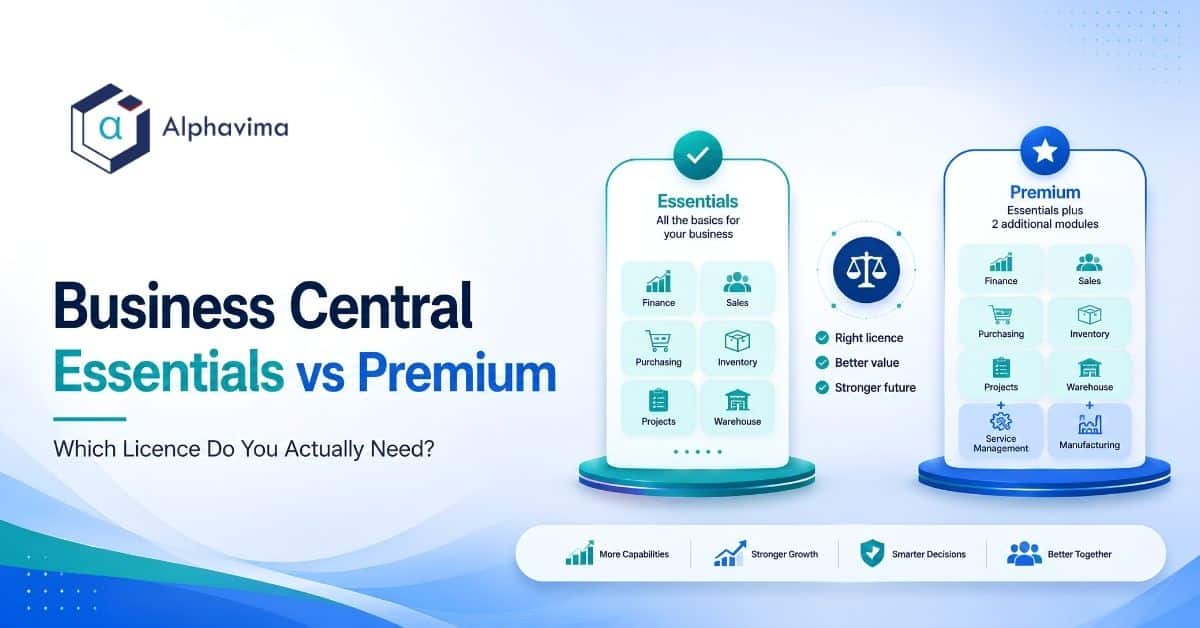
The Business Central Essentials vs Premium answer in one line: Dynamics 365 Business Central Premium includes everything in Essentials plus exactly two additional modules, Service Management and Manufacturing. If you do not run production orders or a field service operation, Essentials is sufficient.
The critical rule most buyers miss: the Essentials or Premium experience is set per company through the User Experience field. Everyone who works in a company set to Premium needs a Premium licence, so tiers can be mixed across companies but not inside one.
That mixing rule is the whole reason this decision has financial weight. If one person needs Manufacturing, every full user in your company moves to Premium.
Executive summary
- Premium = Essentials + Service Management + Manufacturing. There is no third difference. Every other module is in both.
- Essentials and Premium full users can coexist in one Business Central environment, but not inside the same company. One Premium requirement upgrades everyone.
- Team Members is a low-cost licence for people who mainly read, approve and record light data. It is powerful, widely misunderstood, and the most common source of licensing non-compliance.
- Many companies on Premium do not use either Premium module. Over-licensing is common and is worth auditing at renewal.
- Assembly Management is in Essentials. Many businesses that call themselves manufacturers are assemblers and do not need Premium at all.
- Microsoft’s published list pricing has historically sat near USD $80 per user per month for Essentials and USD $110 for Premium, with Team Members near USD $8. Microsoft has announced changes. Verify current pricing with Microsoft or your partner before budgeting. All figures here are indicative.
Table of contents
Talk to a Business Central consultant
Book a quick call to talk through your Business Central project. No pressure, just practical advice. Or see our Business Central services.
Business Central Essentials vs Premium: the licence types in one paragraph each
Dynamics 365 Business Central Essentials. The standard full-user licence. It covers financial management, sales and marketing, purchasing, inventory, warehouse management, project management and jobs, assembly management, fixed assets, basic HR records, and the full Power Platform and Power BI connectivity.
For most mid-market distributors, professional services firms, wholesalers, retailers and assemblers, Essentials is the complete answer.
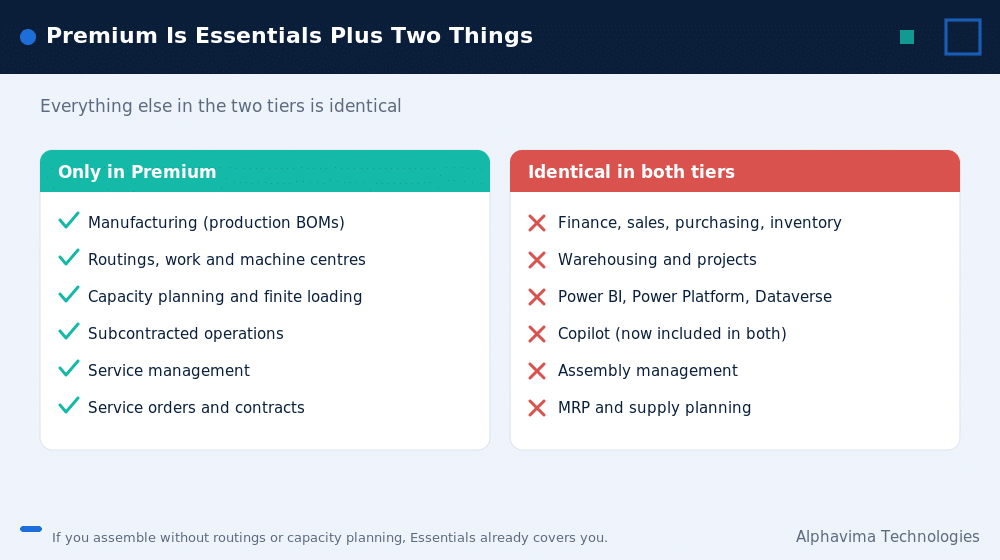
Dynamics 365 Business Central Premium. Everything in Essentials, plus Service Management (service orders, service items, service contracts, dispatch and resource allocation) and Manufacturing (production orders, production bills of materials, routings, machine and work centres, capacity planning, subcontracting). Nothing else. There is no “Premium reporting” or “Premium finance.” The two modules are the entire delta.
Dynamics 365 Business Central Team Members. A low-cost licence for employees who need to see data and perform limited tasks: reading almost anything, approving workflow items assigned to them, updating certain existing records, entering time sheets, and creating or editing quotes.
It is not a cheap full licence. Anyone entering sales orders, posting journals or running finance is a full user, regardless of how occasional their use is.
The rule that decides everything: you cannot mix tiers inside one company
Within a single Business Central company, all full users need the licence that matches the company’s User Experience setting. An Essentials user cannot open a company set to Premium, so you cannot split tiers inside one company.
Read that again, because it is the most financially significant sentence in Business Central licensing and most articles reduce it to a footnote.
What it means in practice. You have 60 employees in one Business Central company. Fifty-six are in finance, sales and purchasing and need only Essentials. Four are in production and need Manufacturing. You do not buy 56 Essentials and 4 Premium. You buy 60 Premium.
What it does not affect. Team Members licences can coexist with either tier. You can run 60 Premium full users and 40 Team Members in the same tenant without a problem. The mixing rule applies only to full users.
Why this changes the decision. The question is never “do these four people need Manufacturing.” It is “is Manufacturing worth roughly USD $30 per user per month across our entire full-user base.” At 60 users, that is a materially different question, and it is the question you should actually be asking.
Feature-by-feature licence comparison matrix
This is the table competitors do not publish in full.
| Capability / module | Team Members | Essentials | Premium |
|---|---|---|---|
| Financial management | |||
| General ledger, chart of accounts | Read only | Full | Full |
| Accounts receivable and payable | Read only | Full | Full |
| Bank reconciliation | Read only | Full | Full |
| Budgets and cash flow forecasting | Read only | Full | Full |
| Fixed assets | Read only | Full | Full |
| Multi-currency | Read only | Full | Full |
| Consolidation and intercompany | Read only | Full | Full |
| Sales and customers | |||
| Sales quotes | Create and edit | Full | Full |
| Sales orders and invoices | No | Full | Full |
| Customer records | Update existing | Full | Full |
| Opportunity and contact management | Read only | Full | Full |
| Purchasing and vendors | |||
| Purchase quotes | Create and edit | Full | Full |
| Purchase orders and invoices | No | Full | Full |
| Vendor records | Update existing | Full | Full |
| Inventory and warehouse | |||
| Item management | Update existing | Full | Full |
| Locations and transfers | Read only | Full | Full |
| Basic and advanced warehousing | Read only | Full | Full |
| Item tracking (lot / serial) | Read only | Full | Full |
| Assembly | |||
| Assembly BOM | Read only | Full | Full |
| Assembly orders | Read only | Full | Full |
| Projects and jobs | |||
| Job planning and costing | Read only | Full | Full |
| Time sheets | Enter own | Full | Full |
| Resource management | Read only | Full | Full |
| Human resources (basic) | |||
| Employee records | Update own | Full | Full |
| Service Management | |||
| Service orders and quotes | No | Not included | Included |
| Service items and contracts | No | Not included | Included |
| Service dispatch and resource allocation | No | Not included | Included |
| Manufacturing | |||
| Production BOM | No | Not included | Included |
| Routings | No | Not included | Included |
| Production orders | No | Not included | Included |
| Machine and work centres | No | Not included | Included |
| Capacity and finite loading | No | Not included | Included |
| Subcontracting | No | Not included | Included |
| Supply planning and MRP | No | Full | Full |
| Platform and reporting | |||
| Power BI content and dashboards | Yes | Yes | Yes |
| Power Apps and Power Automate | Yes | Yes | Yes |
| Dataverse integration | Yes | Yes | Yes |
| Copilot features in Business Central | Yes | Yes | Yes |
| Approve or reject assigned workflow tasks | Yes | Yes | Yes |
| Run and view reports | Yes | Yes | Yes |
| Custom AL extensions / AppSource apps | Per app terms | Yes | Yes |
This matrix reflects Microsoft’s published licensing structure at a general level. Microsoft periodically revises licence terms and specific Team Members rights. Confirm against Microsoft’s current Dynamics 365 Licensing Guide before purchase.
The two things worth noticing:
- Supply planning and MRP are in Essentials. People assume planning is a Premium feature. It is not. What Premium adds is production execution: production orders, routings, work centres and capacity.
- Assembly is in Essentials. This is the most valuable line in the table, and section 5 explains why.
What the Business Central Premium licence actually adds
Service Management
Built for companies that maintain, repair or service equipment, whether their own or their customers’. It provides:
- Service items with full service history per unit
- Service orders and service quotes
- Service contracts with recurring billing
- Fault and resolution coding
- Dispatch board and resource allocation
- Loaner management
Who genuinely needs it: field service organisations, equipment maintenance businesses, repair depots, companies selling service contracts on installed equipment.
Who thinks they need it and does not: professional services firms. Consulting, agencies, engineering and accounting firms should use Jobs, which is in Essentials. Service Management is for servicing things, not for delivering engagements.
Manufacturing
Full production capability:
- Production bills of materials (multi-level)
- Routings with operations and sequencing
- Machine centres and work centres
- Production orders (planned, firm planned, released, finished)
- Capacity planning and finite loading
- Subcontracting operations
- Production output, consumption and scrap posting
Who genuinely needs it: companies that convert raw materials into finished goods through operations with recorded time, capacity constraints and work centre routing.
Who thinks they need it and does not: assemblers. Which brings us to the most useful section in this article.
Assembly vs Manufacturing: the distinction that saves money
Many businesses that describe themselves as manufacturers are, in Business Central terms, assemblers. Assembly Management is in Essentials. Manufacturing is in Premium. The gap between them is roughly USD $30 per user per month across your entire full-user base.
| Question | Assembly (Essentials) | Manufacturing (Premium) |
|---|---|---|
| Do you combine components into a finished item? | Yes | Yes |
| Do you need a bill of materials? | Yes (Assembly BOM) | Yes (Production BOM) |
| Do you need routings (a defined sequence of operations)? | No | Yes |
| Do you need work centres and machine centres? | No | Yes |
| Do you need to record operation time and labour against production? | No | Yes |
| Do you need capacity planning or finite loading? | No | Yes |
| Do you have subcontracted operations in the middle of a production sequence? | No | Yes |
| Do you need multi-level production orders with WIP at each level? | No | Yes |
| Can you assemble on demand against a sales order? | Yes (assemble-to-order) | Yes |
| Do you need scrap, output and consumption posting against work centres? | No | Yes |
How to read this. If your answers are “yes” to the first two and “no” to routings, work centres, operation time and capacity, you are an assembler. Assembly Management in Essentials will handle you. Kitting operations, light configuration, packaging and bundling, and build-to-order from stocked components are all assembly.
The honest boundary. If you need to know how long the CNC machine ran, schedule against its capacity, and post labour hours to a work order, that is Manufacturing and you need Premium. Do not try to fake it in Assembly. The workaround costs more than the licence.
We have taken clients through this exact assessment and found that a genuine assembly operation was about to be moved to Premium across 45 users because someone used the word “manufacturing” in a discovery workshop. Ask the routing question.
The Business Central Team Members licence: what it can and cannot do
Team Members is the most misunderstood licence in the Microsoft catalogue. Used correctly it saves substantial money. Used incorrectly it creates audit exposure.
| Team Members CAN | Team Members CANNOT |
|---|---|
| Read almost any data in Business Central | Post any journal or ledger entry |
| Update existing records in a limited set of tables (broadly: customers, vendors, items) | Create or process sales orders or purchase orders |
| Approve or reject workflow tasks assigned to them | Approve outside of assigned workflow tasks |
| Create, edit and delete a sales quote or purchase quote | Convert those quotes into orders |
| Enter and submit their own time sheets | Manage other people’s time or resources |
| Create, edit and delete their own employee record | Run payroll or manage HR records for others |
| Run and view reports, including Power BI content | Perform finance, inventory or production transactions |
| Use Power Apps and Power Automate with Business Central data (within Team Member rights) | Use those tools to perform actions a full user would need a licence for |
The rule of thumb. If a person’s job requires them to make a transaction happen, they are a full user. If their job is to see, approve, or record their own light activity, they are a Team Member.
Where companies get caught. The classic failure is the warehouse supervisor or the branch manager who “only occasionally” enters a sales order. Frequency is irrelevant. Capability is what is licensed. One sales order a month still requires a full licence.
Where companies leave money on the table. Executives, department heads, approvers, timesheet-only staff, and anyone whose relationship with the ERP is “I need to see the numbers and sign things off” are Team Members, and are routinely over-licensed as full users.
In a 100-person business, moving 25 people from full to Team Members is a large annual saving, and it is entirely legitimate.
Business Central Essentials vs Premium: the five-question decision test
Two minutes. Answer honestly.
Do you run production orders with routings, work centres and recorded operation time? – Yes → Premium. – No → continue.
Do you service, repair or maintain equipment for customers, with service items, service contracts or a dispatch function? – Yes → Premium. – No → continue.
Do you assemble finished goods from components without routings, capacity planning or work centre time recording? – Yes → Essentials. Assembly Management covers you.
Are you a project or professional services business tracking time, cost and WIP on engagements? – Yes → Essentials. Jobs covers you.
Are you a distributor, wholesaler, retailer, nonprofit or financial-services business? – Yes → Essentials. With near certainty.
If you answered yes to 1 or 2, you need Premium, and the mixing rule means every full user in that company moves to Premium. Budget accordingly, using the table in section 8.
If you answered no to both 1 and 2, and a partner is recommending Premium, ask them which specific Premium module you will use. If they cannot name it, you are being over-licensed.
Essentials vs Premium pricing (CAD and USD), including the mixing-rule impact
Pricing disclaimer, stated plainly. Microsoft’s list pricing for Business Central is USD $80 per user per month for Essentials, USD $110 for Premium, and USD $8 for Team Members, each paid yearly. Microsoft raised these list prices on 1 November 2025, and CSP partner pricing, currency, term commitment and volume all affect what you actually pay. The tables below are indicative planning figures only, built on Microsoft’s published USD and CAD list prices.
Verify current pricing with Microsoft or your partner before you build a budget.
Annual licence cost, Essentials vs Premium (indicative)
| Full users | Essentials / year (USD) | Premium / year (USD) | Annual difference (USD) | Essentials / year (CAD) | Premium / year (CAD) | Annual difference (CAD) |
|---|---|---|---|---|---|---|
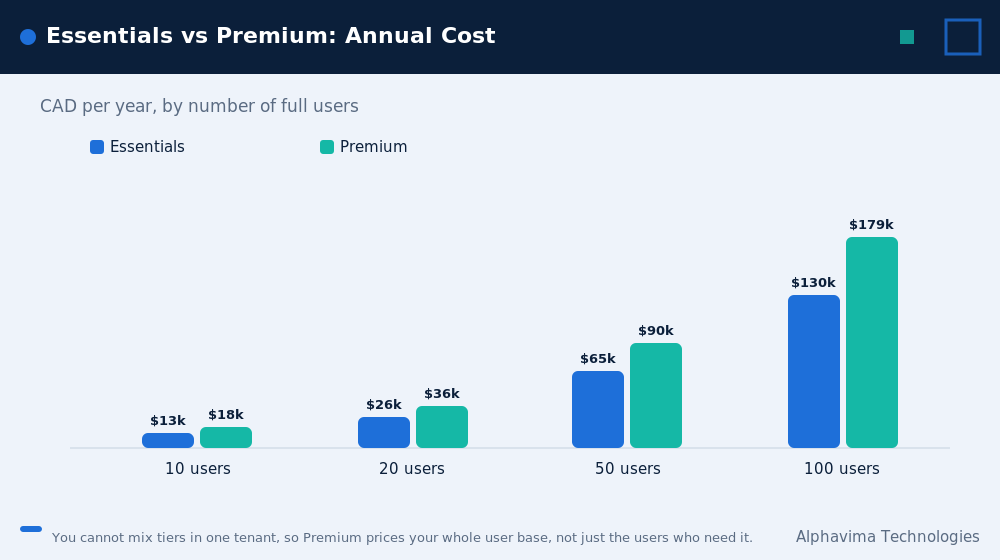
| 10 | $9,600 | $13,200 | $3,600 | $13,020 | $17,904 | $4,884 |
| 20 | $19,200 | $26,400 | $7,200 | $26,040 | $35,808 | $9,768 |
| 50 | $48,000 | $66,000 | $18,000 | $65,100 | $89,520 | $24,420 |
| 100 | $96,000 | $132,000 | $36,000 | $130,200 | $179,040 | $48,840 |
| 200 | $192,000 | $264,000 | $72,000 | $260,400 | $358,080 | $97,680 |
The mixing-rule impact: what Premium really costs you
This is the table nobody publishes. Scenario: only a small number of users actually need a Premium module, but the mixing rule forces every full user in that company up.
| Total full users | Users who genuinely need Premium | What you might expect to pay extra (USD/yr) | What you actually pay extra (USD/yr) | Multiplier |
|---|---|---|---|---|
| 20 | 3 | $1,080 | $7,200 | 6.7x |
| 50 | 5 | $1,800 | $18,000 | 10.0x |
| 100 | 8 | $2,880 | $36,000 | 12.5x |
| 200 | 12 | $4,320 | $72,000 | 16.7x |
Read the multiplier column. At 100 users with 8 people needing Manufacturing, you are not paying an extra USD $2,880 a year. You are paying an extra USD $36,000 a year, roughly CAD $49,300. Over five years that is close to CAD $250,000.
This does not mean avoid Premium. If you genuinely run production, Premium is worth it and the alternative (spreadsheets, a bolt-on system, or a custom build) costs more. It means: be certain, because the decision is much more expensive than the per-user delta suggests.
Five-year cost of the tier decision, 60 full users (indicative)
| Essentials (CAD) | Premium (CAD) | Difference (CAD) | |
|---|---|---|---|
| Year 1 | $78,120 | $107,424 | $29,304 |
| 5-year total | $390,600 | $537,120 | $146,520 |
Assumes flat pricing, which is unlikely. Treat as directional.
Are you over-licensed? A Business Central licence audit checklist
Run this at every renewal. It takes an afternoon and it frequently pays for itself.
| # | Check | If the answer is… | Action |
|---|---|---|---|
| 1 | Are you on Premium? | Yes | Continue. If Essentials, skip to 5. |
| 2 | Have any production orders been posted in the last 12 months? | No | Strong signal you do not need Manufacturing. |
| 3 | Have any service orders been posted in the last 12 months? | No | Strong signal you do not need Service Management. |
| 4 | If both 2 and 3 are “no”: why are you on Premium? | No good answer | Investigate moving the tenant to Essentials at renewal. |
| 5 | How many full users have not logged in in the last 90 days? | More than a few | Remove or reassign those licences. |
| 6 | How many full users only view reports and approve things? | Any | These people are Team Members. Reassign. |
| 7 | How many full users only enter their own time sheets? | Any | Team Members. Reassign. |
| 8 | Do any Team Members users create sales or purchase orders? | Yes | This is a compliance exposure. Upgrade them to full users immediately. |
| 9 | Are you paying for AppSource extensions nobody uses? | Yes | Cancel at renewal. |
| 10 | Has your business model changed since the original implementation? | Yes | Re-run the five-question decision test in section 7. |
A note on honesty. Item 4 reduces our own licence revenue when we run it for a client. We run it anyway, because a client paying CAD $146,520 over five years for two modules they never open is a client who eventually finds out.
How to legitimately stay on Essentials
If you have one Premium-shaped requirement in an otherwise Essentials-shaped business, these are the legitimate routes:
1. Check whether it is really Assembly. See section 5. This resolves a meaningful share of cases.
2. Check whether Jobs solves it. Project-based service delivery, including field work billed by time and materials, is often handled well by Jobs, which is in Essentials. Service Management is for servicing installed equipment with service history, contracts and dispatch.
3. Look at AppSource. Microsoft’s marketplace has extensions that address specific vertical processes on Essentials. For example, an equipment rental business does not need Premium’s Manufacturing module: it needs rental lifecycle management, which is exactly what PREXA365 provides on Business Central.
Buying Premium to solve a rental problem would be paying for the wrong two modules.
4. Consider process change. Some requirements exist because a legacy system worked that way, not because the business needs them. A fit-gap workshop resolves this.
5. Consider a separate company. In some group structures a subsidiary that genuinely manufactures can run its own Business Central company on Premium, while the rest of the group runs Essentials. This adds complexity and integration cost, so it only makes sense at scale. Model it carefully before committing, and take licensing advice.
What is not legitimate: using Team Members licences to do full-user work, or building a custom extension that replicates Premium functionality to avoid the licence. The first is a compliance failure. The second is expressly outside Microsoft’s licence terms and will not survive an audit.
Myths vs facts
| Myth | Fact |
|---|---|
| “Premium is the full version, Essentials is the cut-down one.” | Premium is Essentials plus exactly two modules: Service Management and Manufacturing. Every other capability is identical. |
| “We can buy Premium for the production team and Essentials for everyone else.” | Not inside one company. The User Experience field sets a company to Essentials or Premium, and an Essentials user cannot open a Premium company. Separate companies in the same environment can run different tiers. |
| “We manufacture, so we need Premium.” | If you assemble without routings, work centres or capacity planning, Assembly Management in Essentials covers you. |
| “Premium gives you better reporting and analytics.” | It does not. Power BI, Power Platform, Dataverse, Copilot and reporting are identical across tiers. |
| “Team Members can enter the occasional sales order.” | No. Capability is licensed, not frequency. Anyone who can enter a sales order is a full user. |
| “MRP and supply planning are Premium features.” | Supply planning and MRP are in Essentials. Production execution is what Premium adds. |
| “Our partner put us on Premium, so we must need it.” | Partners frequently default to Premium. Run the audit in section 9. Many companies are on Premium and have never posted a production order. |
| “Professional services firms need Service Management.” | Almost never. Jobs, in Essentials, is the right module for delivering engagements. |
Find out whether you are paying for Premium you do not use
Bring your user list and your module usage. We will run the licence audit and tell you if you can legitimately move to Essentials at renewal.
Pros and cons
Essentials – Pros: Roughly 30 percent lower cost per user. Covers finance, trade, inventory, warehousing, projects and assembly completely. Sufficient for the large majority of mid-market businesses. Full Power Platform, Power BI and Copilot capability.
– Cons: No production orders, routings, work centres or capacity planning. No service orders or service contracts. If you later need either, every full user in that company moves up.
Premium – Pros: Full manufacturing execution and field service capability. No workaround costs. One system rather than an ERP plus a bolt-on production or service tool. – Cons: Roughly 30 percent higher cost per user, applied to every full user because of the mixing rule. Frequently purchased and never used.
Team Members – Pros: Very low cost. Genuinely useful for approvers, executives, timesheet-only staff and report consumers. Mixes freely with either full tier. – Cons: A narrow and easily misunderstood boundary. Misuse creates compliance exposure. Not a substitute for a full licence.
Common mistakes
- Buying Premium “to be safe.” The safety costs CAD $146,520 over five years at 60 users.
- Not knowing the mixing rule until the quote arrives. It reframes the entire decision, and it should be the first thing you learn, not the last.
- Calling assembly “manufacturing” in a discovery workshop. Words have licence consequences. Ask the routing question.
- Assigning Team Members licences to people who enter orders. A compliance exposure, not a saving.
- Over-licensing approvers and executives as full users. In a 100-person business this is often 20 to 30 people who should be Team Members.
- Never re-auditing at renewal. Business models change. Licence tiers rarely get revisited.
- Buying Premium to solve a vertical problem it does not solve. Rental, utilities, nonprofit and HR requirements are not Manufacturing or Service Management requirements. Check AppSource first.
- Assuming Premium gives you better AI or reporting. It does not. Copilot, Power BI and Fabric are the same on both tiers.
Expert recommendations on Essentials vs Premium
- Settle Business Central Essentials vs Premium before you scope the implementation, not after. It affects budget approval, and discovering Premium at week 8 is an unpleasant conversation.
- Ask your partner to name the specific Premium module you will use. If they cannot name it, you do not need Premium.
- Run the routing question with your operations lead, not with your sales contact. “Do we schedule against work centre capacity and post labour time against operations?” That question, answered honestly by someone on the shop floor, decides it.
- Audit your licences every renewal. Users leave. Roles change. Approvers get provisioned as full users and never get corrected.
- Right-size Team Members deliberately. It is the single largest legitimate licence saving available in Business Central, and almost nobody does it properly.
- Check AppSource before you check Premium. If your requirement is vertical rather than production or service, the accelerator route is usually cheaper and a better fit.
- Verify all pricing directly with Microsoft. Every figure in this article is indicative and prices change.
Key takeaways
- Business Central Essentials vs Premium in one equation: Premium = Essentials + Service Management + Manufacturing. That is the complete difference.
- All full users in one company must be on the same tier. The User Experience field sets each company to Essentials or Premium, so one Premium requirement upgrades everybody in that company, which is what makes the decision expensive.
- Assembly Management is in Essentials. Many self-described manufacturers are assemblers and do not need Premium.
- Supply planning and MRP are in Essentials too. Premium adds production execution, not planning.
- Team Members is the biggest legitimate saving available, and also the biggest compliance risk if misused.
- At 60 users, the Essentials-to-Premium decision is worth roughly CAD $147,000 over five years. Get it right.
- All pricing here is indicative. Confirm current figures with Microsoft.
Conclusion
Business Central Essentials vs Premium is simpler than the market makes it look. There are three licences. Premium adds two modules. Everything else follows from the mixing rule.
What makes the decision worth care is not complexity. It is consequence. A single misunderstood word in a discovery workshop, “manufacturing” instead of “assembly”, can commit an entire organisation to roughly 30 percent more licence cost for five years.
And a partner who defaults you to Premium because it is safer for them will not be the one explaining it to your board.
Ask the routing question. Run the audit. Verify the price with Microsoft.
Request a free Business Central licence review
Alphavima is a Microsoft Solutions Partner with over 20 years of Dynamics delivery across Canada, the USA, the UK, the UAE and India. We will look at your actual usage: production orders posted, service orders posted, user activity, and Team Member eligibility, then tell you which tier you need and how many of each licence.
Sometimes that conversation reduces our own licence revenue. We have it anyway.
Request a free Business Central licence review, or book a 30-minute scoping call to establish your tier before you budget your implementation.

Related case study
Manufacturing ERP on Business Central
A manufacturer put the shop floor, stockroom and finance on one Dynamics 365 Business Central ERP.
Read the case study · Next read: Business Central pricing guide
Frequently asked questions
What is the difference between Business Central Essentials and Premium?
Premium includes everything in Essentials plus two additional modules: Service Management and Manufacturing. There are no other differences. Financial management, sales, purchasing, inventory, warehousing, projects, assembly, Power BI, Power Platform and Copilot are identical across both tiers.
Can I mix Essentials and Premium licences in Business Central?
Not inside one company. A company is set to Essentials or Premium through the User Experience field, and an Essentials user cannot open a Premium company, so if any full user in that company needs Premium, every full user in it must be Premium. Separate companies in the same environment can run different tiers. Team Members licences can be mixed with either tier freely.
Do I need Premium if I manufacture products?
Not necessarily. If you assemble finished goods from components without routings, work centres, operation time recording or capacity planning, Assembly Management in Essentials will cover you. Premium is required when you need production orders with routings, work and machine centres, capacity planning or subcontracted operations.
What can a Business Central Team Members licence actually do?
Team Members can read almost all data, approve or reject workflow tasks assigned to them, update existing records in a limited set of tables, create and edit quotes, enter their own time sheets, and maintain their own employee record. They cannot create sales or purchase orders, post journals, or perform finance, inventory or production transactions.
How much does Business Central cost per user?
Microsoft's published list pricing is USD $80 per user per month for Essentials, USD $110 for Premium and USD $8 for Team Members, each paid yearly. Microsoft's published Canadian list prices are CAD $108.50, CAD $149.20 and CAD $10.90. These rates took effect on 1 November 2025. Confirm current pricing with Microsoft or your partner.
Can I upgrade from Essentials to Premium later?
Yes. You can move the tenant from Essentials to Premium at renewal or, with your partner or CSP, during a term subject to your agreement. Because of the mixing rule, the upgrade applies to every full user, so model the full cost rather than the cost for the users who triggered it.
Do we need Premium for professional services or project work?
No. Jobs, which handles project planning, time, cost, WIP and billing, is included in Essentials. Service Management in Premium is designed for servicing physical equipment with service items, contracts and dispatch, not for delivering consulting engagements.
How do I know if we are over-licensed on Business Central?
Check whether any production orders or service orders have been posted in the last 12 months. If neither has, and you are on Premium, you are almost certainly over-licensed. Also check how many full users only view reports, approve items or enter time sheets, since those people qualify as Team Members.