











If you run a consultancy, a creative agency, an engineering practice, an IT services company, or an accounting or legal firm, your “inventory” is people and their billable hours. That single fact changes what you need from an ERP.
A product-centric system built around stock, warehouses and bills of materials will not answer the questions that keep professional services leaders awake: which projects are actually profitable, how well are we using our people, and when can we recognise the revenue we have earned.
This guide is written for business and IT buyers at services firms who are scoping an ERP or a professional services automation (PSA) system in 2026. It lays out the specific capabilities a services business needs, gives you a needs-to-capability mapping table you can reuse in your own selection document, and explains how the Microsoft stack, Dynamics 365 Project Operations alongside Business Central or Finance, plus Power BI, meets each requirement.
Key takeaway / What you’ll learn: Professional services firms need project accounting, resource utilisation and capacity planning, time and expense capture, flexible billing models, revenue recognition with work in process (WIP), and profitability by project and client.
This article maps each of those needs to concrete Microsoft capabilities and shows where the boundaries sit between Project Operations and the finance system.
Table of contents
Talk to an ERP consultant
Book a quick call to talk through your ERP project. No pressure, just practical advice. Or see our ERP consulting services.
Why generic ERP falls short for services firms
Most ERP platforms grew up serving manufacturers, distributors and retailers. Their core model is a physical product moving through a supply chain. A services firm has none of that. Instead, the unit of work is a project or an engagement, and the cost of delivery is overwhelmingly labour.
That mismatch shows up quickly. Generic ERP can tell you your gross margin on a widget, but it struggles to tell you the margin on the “Acme website rebuild” project after you account for the three consultants who logged time against it, the subcontractor invoice, the travel expenses, and the fixed-fee ceiling you agreed.
It rarely has a native concept of resource utilisation, and it usually cannot recognise revenue on a percentage-of-completion basis without heavy customisation.
Services firms also live and die by forward visibility. You need to know not just what happened last month, but whether the people you are paying next quarter are already committed to billable work. That is capacity planning, and it is a first-class requirement, not a nice-to-have.
The seven capabilities professional services firms actually need
Before you look at any product, agree internally on what the system has to do. In our experience running selection projects, seven capability areas separate a fit-for-purpose services ERP from a general one.
1. Project accounting
Every cost and every revenue line has to attach to a project. That means a chart of accounts and a posting model where hours, expenses, items and fees all roll up to a project, and where you can compare budgeted cost against actual and committed cost as delivery progresses.
Without project accounting at the core, everything downstream (profitability, WIP, forecasting) becomes a spreadsheet exercise.
2. Resource utilisation and capacity planning
Utilisation is the heartbeat metric of a services firm. You need to book named and generic (placeholder) resources against projects, match required skills and roles to available people, and track utilisation against a target.
Capacity planning is the forward-looking half: seeing who is available, who is over-committed, and where the bench is, so sales and delivery can plan hiring and pipeline together.
3. Time and expense capture
If time entry is painful, it does not happen, and un-entered time is un-billed revenue. The system needs low-friction time sheets, mobile expense capture, approval workflows, and a clean path from an approved time sheet line straight into project costs and the invoice.
4. Flexible billing models
Real engagements are rarely one shape. You will run fixed-fee projects, time-and-materials (T&M) work, milestone-based billing, retainers, and blends of all of these on a single client. The billing engine has to support each model natively and let you invoice against a contract, a schedule, or actual consumption.
5. Revenue recognition and WIP
Billing and revenue are not the same thing. On a fixed-fee project you may invoice on a schedule but recognise revenue by percentage of completion. Work you have delivered but not yet billed sits in WIP.
Getting this right matters for financial statements and, increasingly, for auditors who expect a defensible, systematic method rather than manual journals.
6. Profitability by project and client
The system should answer “is this profitable?” at the level of a task, a project, a client, a practice, and a delivery manager, using real posted costs including labour at cost rate, expenses and subcontractors, against real revenue. This is where most spreadsheet-run firms are flying blind.
7. Reporting and forward-looking analytics
Finally, all of the above needs to surface in dashboards that a partner or practice lead will actually open: utilisation trends, pipeline-to-capacity, project margin, days sales outstanding, and WIP ageing.
How the Microsoft stack meets these needs
Microsoft’s answer for services firms is not a single product but a pairing. Dynamics 365 Project Operations handles the project and resource side, and a finance system, Business Central for most small and mid-market firms, or Dynamics 365 Finance for larger and more complex ones, handles the general ledger, accounts payable and receivable, and statutory reporting.
Power BI sits across the top for analytics. One boundary to note early: the ERP-integrated Project Operations deployment runs on Dynamics 365 Finance and Supply Chain Management. There is no first-party integration between Project Operations and Business Central, so pairing those two means a partner-built or third-party integration.
Project Operations: the project and resource engine
Dynamics 365 Project Operations is built for exactly this world. Its project management and accounting model supports two external billing methods natively: time-and-material, where you bill for all costs incurred (hours, expenses, items and fees), and fixed-price, where invoicing follows a billing schedule defined on the project contract (Project Operations project management and accounting).
Milestone billing is handled through the fixed-price billing schedule on the contract.
On the resourcing side, Project Operations maintains a repository of skills and proficiency levels, generates resource requirements from task assignments, lets you find and book available qualified resources, and tracks resource utilisation against targets (Project Operations resource management concepts).
You can staff with generic placeholders during pitching and swap in named resources once the work is won, which keeps your capacity picture honest.
It is worth knowing that Project Operations ships in more than one deployment shape. There is a “core” (lite) deployment aimed at project sales and delivery, an ERP-integrated deployment (Project Operations Integrated with ERP) that adds full expense management, customer-facing invoicing and revenue recognition, and a third deployment for project-based manufacturing.
If revenue recognition matters to you, and for most firms it does, that points you at the integrated deployment. Confirm the current deployment options in the Microsoft documentation, because the split affects licensing and architecture.
Revenue recognition and WIP
For fixed-price work, Project Operations can recognise revenue using a completed-percentage (percentage-of-completion) method throughout the project, or a completed-contract method that posts revenue when the project finishes (Project Operations revenue recognition). WIP applies to fixed-price and investment projects and is used to calculate the degree of completion, with a “No WIP” option for short, simple engagements.
For T&M work, cost and revenue recognition are connected and revenue accrues as costs are incurred. That gives finance a systematic, auditable basis rather than month-end guesswork.
Business Central for the finance backbone
For small and mid-market services firms, Business Central is often the finance system of record. It also has its own project (job) capabilities that a leaner firm can use directly: project planning lines, time sheets that integrate with project tasks and post to project journals, WIP monitoring so financial statements reflect ongoing work, and project invoicing tied to usage (Business Central project management).
A boutique consultancy running mostly T&M work can get a long way on Business Central alone; a firm with complex resourcing, multi-currency contracts and formal revenue recognition needs is better served by Project Operations plus a finance system.
If you are weighing the finance layer, our Business Central pricing guide breaks down the licence tiers.
Tip: Do not assume you need the heaviest configuration on day one. Many firms start with Business Central’s native project features and adopt Project Operations later as resourcing complexity grows. Design the chart of accounts and project dimensions so that move is additive, not a re-implementation.
Power BI for the numbers leaders actually watch
Both Business Central and Project Operations feed Power BI, and Business Central ships a Power BI Projects app for project KPI analysis. This is where utilisation trends, project margin, WIP ageing, pipeline-versus-capacity and days sales outstanding come together in one place.
Because the data sits in Dataverse and the finance system rather than in scattered spreadsheets, a partner can drill from a firm-wide margin number down to a single over-running task.
The CRM connection
Services delivery starts before delivery: it starts in the pipeline. Because Project Operations shares the Dataverse foundation with Dynamics 365 Sales, an opportunity can carry its estimate and resource plan straight into a project when it is won, without re-keying.
Firms that want that tight sell-to-deliver loop should look at how the Dynamics 365 CRM solutions layer connects to the project system, and how the wider Power Platform can automate approvals and notifications around it.
Needs-to-capability mapping: what to look for
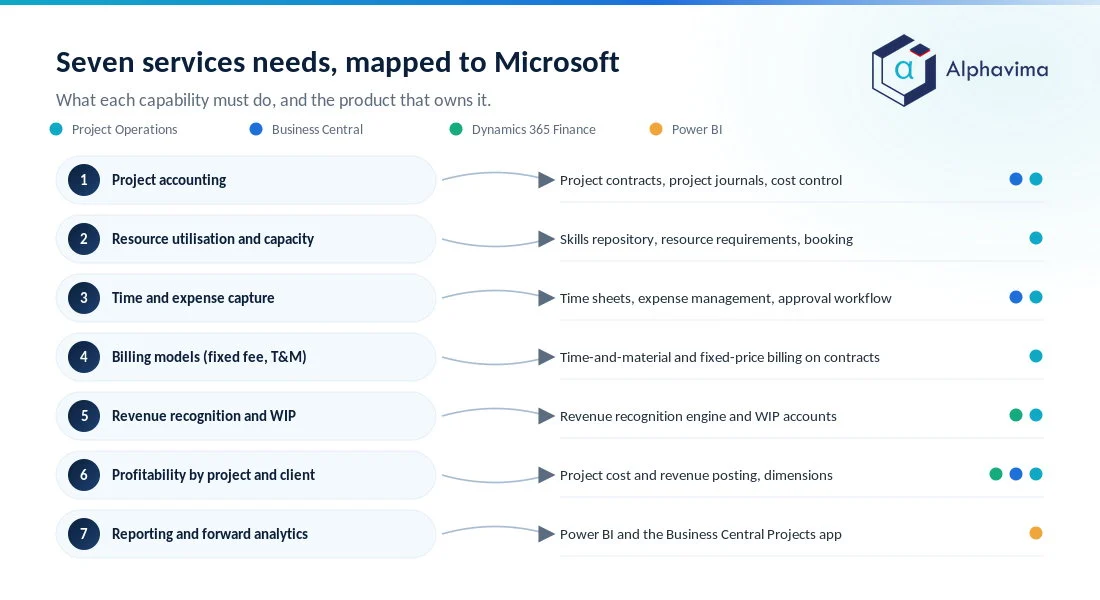
Use this table as the backbone of your requirements document. It maps each professional services need to the Microsoft capability that addresses it and the primary product that owns it.
| Professional services need | What it must do | Microsoft capability | Primary product |
|---|---|---|---|
| Project accounting | Attach all cost/revenue to a project; budget vs actual vs committed | Project contracts, project journals, cost control | Project Operations / Business Central |
| Resource utilisation & capacity | Book skilled resources, track utilisation vs target, plan the bench | Skills repository, resource requirements, booking, utilisation tracking | Project Operations |
| Time & expense capture | Low-friction entry, approvals, straight-through to cost and invoice | Time sheets, expense management, approval workflow | Project Operations / Business Central |
| Billing models (fixed-fee, T&M, milestone) | Invoice by schedule, by consumption, or by milestone | Time-and-material and fixed-price billing on project contracts | Project Operations |
| Revenue recognition & WIP | Percentage-of-completion or completed-contract; WIP for delivered-not-billed | Revenue recognition engine, WIP accounts | Project Operations (integrated) / Finance |
| Profitability by project & client | Real margin at task, project, client, practice level | Project cost/revenue posting, dimensions | Project Operations + Finance / Business Central |
| Reporting & forward analytics | Utilisation, margin, WIP ageing, DSO, pipeline-to-capacity | Power BI, Business Central Projects app | Power BI |
Note: The right split between Business Central and Project Operations depends on firm size, contract complexity and how formal your revenue recognition needs to be. A selection partner should model this against your actual engagement mix rather than defaulting to the largest footprint.
Still tracking utilisation in a Friday spreadsheet?
Send us your engagement mix and how you bill it, and we will show you where the boundary between Business Central and Project Operations should sit for a firm your size. You get a costed scope, not a demo.
A short scenario: a 40-person consultancy
Picture a 40-person management consultancy running a mix of fixed-fee implementation projects and T&M advisory retainers. Today, time lives in one tool, invoices in the accounting package, and resourcing in a shared spreadsheet the operations lead updates on Fridays.
With Project Operations and a finance system behind it, the sequence looks different. A won opportunity becomes a project with a contract that specifies a fixed fee and a milestone schedule. Consultants are booked by skill against the plan, and their utilisation shows up on the operations dashboard the moment they are staffed.
Time and expenses post to project cost as they are approved. Finance recognises revenue on the fixed-fee work by percentage of completion, which needs the ERP-integrated deployment on Dynamics 365 Finance, so the month-end position reflects delivered value, and WIP shows the advisory work done but not yet invoiced.
The managing partner opens one Power BI dashboard and sees margin by project, utilisation by practice, and which two people are on the bench next month. No Friday spreadsheet.
Common mistakes when buying a services ERP
- Buying a product ERP and bolting on projects. If the core data model is stock, you will fight it forever. Start from a project-centric platform.
- Ignoring utilisation until go-live. If resourcing is an afterthought, you lose the one metric that most directly drives profit.
- Treating billing and revenue as the same thing. Design the revenue recognition method up front; retrofitting it is painful.
- Over-scoping day one. A boutique firm does not need the largest configuration to get value. Phase it.
- Under-investing in time-entry adoption. The best billing engine is worthless if half the hours never get entered.
This is where an experienced ERP consulting partner earns its fee: mapping your engagement mix and revenue policy to the right product split, and designing the dimensions and chart of accounts so the system answers your profitability questions from day one.
Alphavima works with services firms to do exactly that across the Microsoft stack.
Conclusion
Professional services firms are not smaller manufacturers; they are a different kind of business with a different core metric. The right ERP treats the project as the centre of gravity, gives you honest utilisation and capacity numbers, captures time and expense without friction, bills the way your contracts actually work, recognises revenue systematically, and shows profitability where you can act on it.
The Microsoft stack meets those needs through Project Operations for project and resource management, Business Central or Finance for the accounting backbone, and Power BI for the analytics leaders rely on.
The practical next step is to write down your seven capability requirements, map your real engagement mix against them, and decide where the boundary between Business Central and Project Operations should sit for your firm. That decision shapes cost, architecture and how quickly you get answers.
Ready to move forward? Talk to the Alphavima team about scoping the right project-centric setup for your firm; our ERP consulting practice maps your engagement mix and revenue policy to the Microsoft stack so the system answers your profitability questions from day one.
If you are building the business case, Gartner’s ERP research hub is a useful vendor-neutral reference on how the ERP category is developing.

Related case study
Project Margin Visibility with D365 Project Operations
A professional services firm made project margin visible early enough to act on with Dynamics 365 Project Operations.
Read the case study · Next read: The 12-question ERP selection checklist
Frequently asked questions
What is the best ERP for professional services firms in 2026?
There is no single answer, because it depends on your size and contract complexity. For most small and mid-market services firms on the Microsoft stack, Business Central with its native project module is the usual starting point, and Dynamics 365 Project Operations is added when resourcing and contract complexity grow. Project Operations integrates with Dynamics 365 Finance out of the box, while pairing it with Business Central needs a partner-built integration.
What is the difference between ERP and professional services automation (PSA)?
PSA focuses on the front-to-back project lifecycle: opportunity, resourcing, time and expense, and billing. ERP adds the finance backbone: general ledger, payables, receivables and statutory reporting. Project Operations is effectively Microsoft’s PSA, and it integrates with an ERP finance system to cover both.
Does Dynamics 365 Project Operations handle revenue recognition?
Yes, in its ERP-integrated deployment. For fixed-price projects it supports percentage-of-completion and completed-contract methods, and it uses WIP to calculate the degree of completion. For time-and-material work, revenue accrues as costs are incurred. Always confirm the deployment type, because the lite deployment does not include revenue recognition.
Can Business Central alone run a professional services firm?
For a smaller firm running mostly time-and-materials work, often yes. Business Central has native project features including planning lines, time sheets, WIP monitoring and project invoicing. Firms with complex resourcing, milestone billing and formal revenue recognition usually add Project Operations, which integrates with Dynamics 365 Finance rather than with Business Central.
How does the Microsoft stack handle resource utilisation and capacity planning?
Project Operations maintains skills and proficiency, generates resource requirements from tasks, books available qualified resources, and tracks utilisation against targets. You can staff with generic placeholders during pitching and swap in named resources once work is won, which keeps the forward capacity view accurate.
Which billing models does Project Operations support?
Natively, time-and-material (billing for all costs incurred) and fixed-price (invoicing against a billing schedule on the project contract). Milestone billing is handled through the fixed-price schedule. Retainers and blended engagements are configured on top of these.
How much does an ERP for professional services cost?
Cost depends on the products, the number of users and their licence types, and implementation scope, so there is no flat figure. Pricing is per-user per-month plus implementation. Check the current Microsoft pricing pages for Project Operations, Business Central and Finance, and budget separately for configuration and data migration.
How is profitability measured by project and client?
Because all hours, expenses, items and subcontractor costs post to the project with dimensions for client, practice and manager, you can report real margin at task, project, client and practice level in Power BI, comparing posted cost against recognised revenue rather than against invoices alone.