











If your business sells time, expertise, or delivery work rather than physical stock, your accounting system was probably built for the wrong shape of company. Project Operations is Microsoft’s answer to that gap: an application that runs the whole life of a billable project, from the first sales conversation to the revenue you recognise once the work is delivered.
This guide is for owners, finance leaders, and IT decision-makers at consulting firms, agencies, engineering practices, and professional services organisations who are weighing up Project Operations in 2026. You will get a plain explanation of the quote-to-cash-for-projects flow, the deployment options and what each one costs, and an honest comparison with Project for the Web and with running projects inside Business Central.
Key takeaway / What you’ll learn: Dynamics 365 Project Operations connects sales, resourcing, scheduling, time and expense, and project accounting in one system. There are three deployment types (Project Operations Core, Project Operations Integrated with ERP, and Project Operations for manufacturing), and the right one depends on whether you need customer invoicing and revenue recognition inside the same platform.
Table of contents
Talk to a Dynamics 365 consultant
Book a quick call to talk through your Dynamics 365 project. No pressure, just practical advice. Or see our Dynamics 365 services.
What Dynamics 365 Project Operations actually is
Project Operations is the project-centric member of the Dynamics 365 family. Think of it as the connective tissue between a CRM opportunity and a finance ledger, built specifically for organisations whose product is a project.
It brings together capabilities that most firms otherwise stitch across three or four disconnected tools: a sales process for projects (built on top of Dynamics 365 Sales), a scheduling and resource-management engine, timesheets and expense capture, and, in the fuller deployments, project accounting with work-in-progress and revenue recognition.
Microsoft positions it as a single system for managing both billable and internal projects, so the same numbers flow from the quote a salesperson builds to the invoice finance issues.
The point is not the individual features. It is that the estimate, the resource plan, the actual hours logged, and the eventual invoice all reference the same project record, so margin is visible while the work is still in flight rather than discovered three months after the fact.
The quote-to-cash-for-projects flow
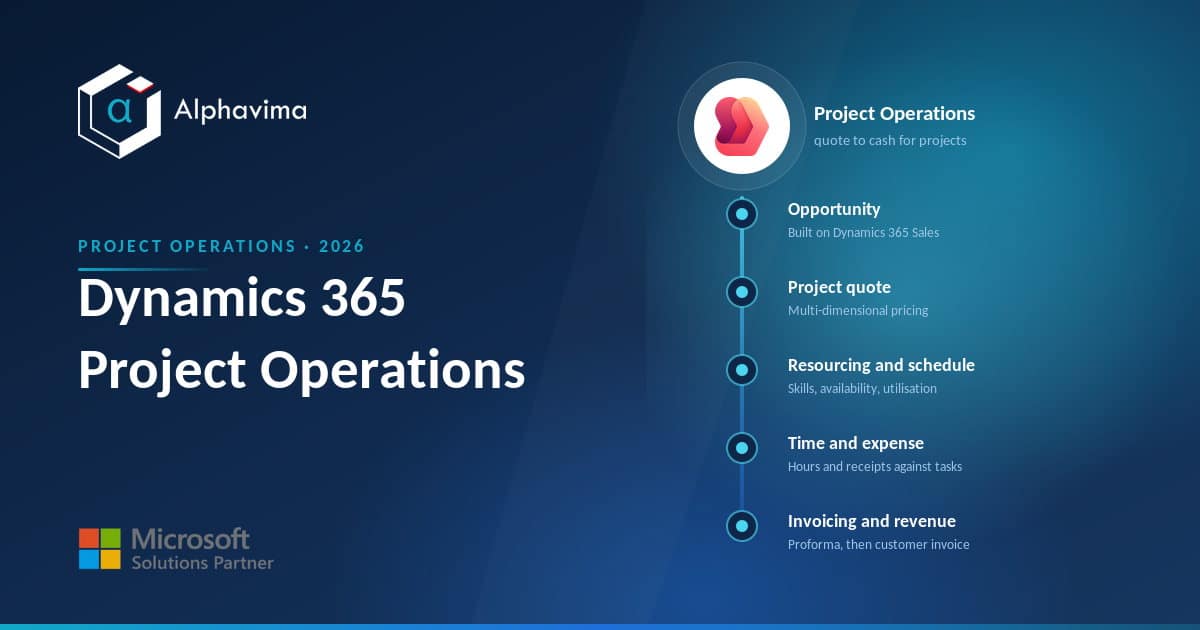
The core idea behind Project Operations is a single spine that runs the length of a project. Here is how the stages connect.
Opportunity. A project starts as a sales opportunity, using the Dynamics 365 Sales foundation. Your pipeline, accounts, and contacts live in the same Dataverse environment, so there is no re-keying between CRM and delivery.
Project quote. From the opportunity you build a project-based quote: an estimate of effort, cost, and price by role and task. Multi-dimensional pricing lets you set rates by role, resource, category, or transaction type, so a senior consultant in one region can carry a different bill rate from a junior in another.
Resourcing. Once the deal is likely, you resource it. The unified resource scheduling engine matches named or generic resources to demand based on skills, roles, and availability, and shows utilisation across the whole practice so you can spot who is over- or under-booked.
Scheduling. Delivery work is planned as a work breakdown structure. Project Operations Core uses Microsoft Project for the Web (now part of the Microsoft Planner family) for the schedule, giving project managers Gantt-style planning, dependencies, and task assignment.
Time and expense. Consultants log hours against tasks and submit expenses. The fuller deployments add receipt capture with OCR, policy enforcement, and reimbursement, so both project and non-project costs are tracked against the right cost centre.
Project accounting. Approved time and expense become actuals. Configurable cost and revenue profiles, work-in-progress accounting, and accrual rules turn effort into financials that follow international accounting standards.
Invoicing and revenue recognition. Finally, proforma invoices are reviewed and issued as customer-facing invoices, and revenue is recognised according to the profile you set. This closes the loop: the margin you estimated in the quote can be compared with the margin you actually earned.
Note: Not every deployment includes the last two stages in full. Project Operations Core stops at proforma invoicing for internal review and does not do customer-facing invoicing or revenue recognition on its own. That distinction drives most buying decisions, so it is worth being clear about it early.
Deployment types: capabilities at a glance
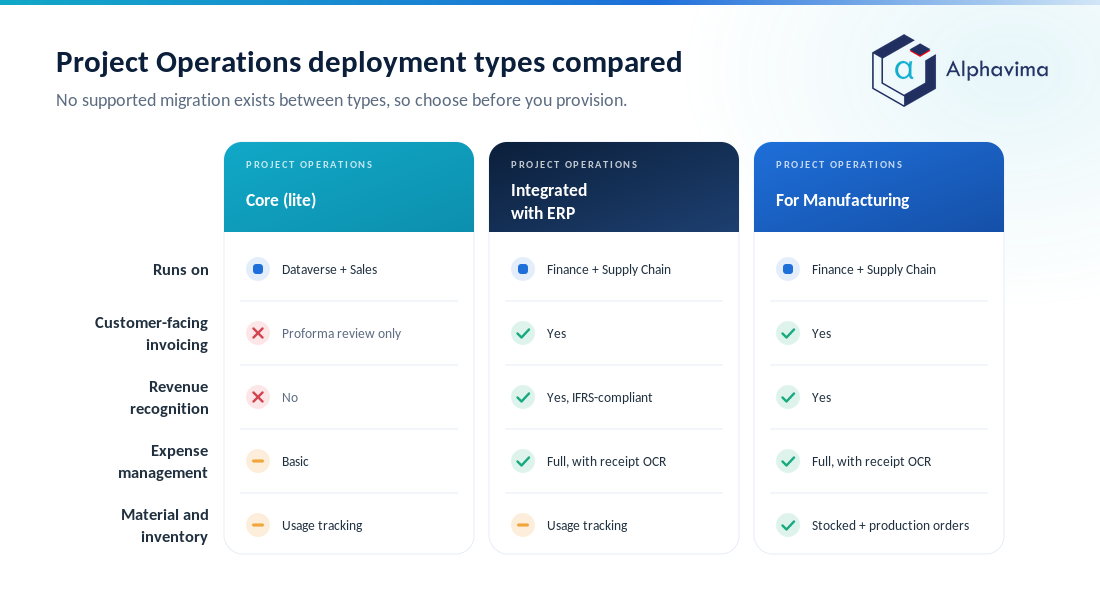
Microsoft supports three deployment types, and choosing between them is the single most important decision in a Project Operations project. The table below summarises what each covers. Figures and capability boundaries are drawn from Microsoft’s determine your deployment type guidance.
| Capability | Project Operations Core (lite) | Project Operations Integrated with ERP | Project Operations for Manufacturing |
|---|---|---|---|
| Runs on | Dataverse + Dynamics 365 Sales | Dynamics 365 Finance + Supply Chain Management | Finance + Supply Chain Management |
| Sales / opportunity to quote | Yes | Yes | Not listed for this deployment |
| Project planning & scheduling | Project for the Web | Project for the Web | WBS-based planning |
| Resource management | Yes | Yes | Yes |
| Time tracking | Yes | Yes | Yes |
| Expense management | Basic | Full, with receipt OCR | Full, with receipt OCR |
| Material / stocked inventory | Usage tracking | Usage tracking | Stocked materials + production orders |
| Customer-facing invoicing | No (proforma review only) | Yes | Yes |
| Revenue recognition | No | Yes (IFRS-compliant) | Yes |
| Best for | Agencies and smaller services firms billing time & materials | Mid-market and enterprise services with complex accounting | Project-based manufacturers and EPC firms |
A useful way to read this: Core is the entry point for firms that need sales, resourcing, scheduling, and time capture but keep their invoicing and revenue in a separate finance system. The integrated deployment, described in Microsoft’s integrated with ERP overview, is the full picture, with enterprise sales tax, exchange rates, WIP, and revenue recognition inside Dynamics 365 Finance.
The manufacturing variant adds production orders and real inventory for firms that build to project.
Tip: Microsoft states there is no out-of-the-box supported migration of data between deployment types, so moving from Core to the integrated deployment later means custom scripts, custom mapping and manual effort. Microsoft does document one move path, from the older manufacturing (production order) deployment to the modern architecture. Decide where you need to land before you provision. This is exactly the kind of scoping question where an experienced ERP consulting partner saves you a rebuild.
Project Operations vs Project for the Web
People often confuse the two because Project Operations uses Project for the Web for its scheduling. They are not competitors; one sits inside the other.
Project for the Web (now delivered through the Microsoft Planner experience) is a task and schedule planning tool. It gives you boards, timelines, Gantt charts, dependencies, and assignments. It is excellent for planning and tracking the work of a project, and for many teams that is all they need.
What it does not do is connect that plan to money. There is no bill rate, no cost actual, no customer invoice, no revenue recognition, and no resource utilisation across a whole practice.
If your only question is “who is doing what by when”, Project for the Web is enough and far cheaper. If your question is “are we making margin on this engagement and what should we invoice”, you need Project Operations.
Project Operations vs projects in Business Central
The harder comparison for most mid-market firms is Project Operations against the project (jobs) functionality already inside Business Central. Both can run billable projects, and choosing the wrong one wastes real money.
Business Central includes a capable projects module: project cards, planning lines, resource and time sheet entry, WIP calculation, and project invoicing, all inside the same ERP that runs your general ledger, payables, and receivables.
For a services firm of, say, 10 to 60 people that already wants full accounting in one place, this is often the pragmatic choice. It is simpler to run, cheaper to licence, and the finance team only learns one system.
Our Business Central pricing guide walks through what that costs.
Project Operations pulls ahead when project complexity grows: sophisticated multi-dimensional pricing, deep resource scheduling with skills and utilisation across hundreds of consultants, tight integration with a Dynamics 365 Sales pipeline, and enterprise revenue recognition.
In short, Business Central is the strong default for smaller, accounting-led project firms; Project Operations is built for larger, delivery-led professional services organisations where resourcing and margin analytics are the daily battle.
Be honest with yourself about scale. Plenty of firms buy Project Operations for capabilities they never switch on, when the Business Central jobs module would have carried them for years.
Project Operations or the Business Central jobs module?
Tell us your headcount, how many live projects you run and how you invoice. We will tell you which of the two fits, which deployment type to provision, and what the licence mix would actually cost.
Who Project Operations is for
The clearest fit is any organisation that sells and delivers billable projects at scale:
- Consulting and advisory firms that live and die by consultant utilisation and realised rates.
- Marketing, creative, and digital agencies juggling many concurrent client projects and retainers.
- Engineering, architecture, and EPC firms managing long, multi-phase deliverables with subcontractors.
- IT services and systems integrators who need resourcing, time capture, and clean project P\&L.
- Professional services arms of product companies that want project revenue reported alongside product revenue.
If you are a smaller firm, or if project work is a side line to a product business, weigh Business Central’s jobs module first, and read it alongside our guide to ERP for professional services.
If your project business is the business and you already run Dynamics 365 Sales, Project Operations is the natural home. Alphavima helps firms make exactly this call and then implement it, whether that lands on Project Operations or Business Central.
Licensing and pricing in 2026
Project Operations is licensed per user, per month, on an annual commitment. As of 2026, Microsoft’s pricing page lists the full user licence at USD 135 per user per month, billed yearly.
Two other price points matter for most rollouts. Neither is published on the Project Operations pricing page, so treat these partner-published figures as indicative and confirm them in the current Dynamics 365 licensing guide:
- Attach licence at around USD 30 per user per month for users who already hold a qualifying “base” Dynamics 365 application, so you are not paying full price twice for the same person. Our Dynamics 365 licensing guide explains how base and attach pricing works across the family, and partner-published pricing guides list the same attach and Team Member rates.
- Team Members at about USD 8 per user per month for light users who only submit timesheets, update task status, or approve expenses rather than manage projects.
A few practical notes on cost. The integrated deployment requires Dynamics 365 Finance (and Supply Chain Management for the manufacturing scenario), which are licensed separately, so the platform cost is materially higher than Core alone.
New Copilot-driven agents for time entry, expenses, and approvals are billed through separate Copilot Credits on a prepaid or pay-as-you-go basis, and using them needs an Azure subscription. Verify every figure against the live Microsoft pricing page before you budget, because Dynamics licensing is revised regularly and varies by region and currency.
Note: A worked example. A 40-person consultancy might licence 25 full project users at USD 135, 10 light users at USD 8 as Team Members, and add Finance for the finance team. The full-user line alone is roughly USD 3,375 per month before Finance, implementation, and Copilot Credits.
Always model your real user mix rather than multiplying headcount by the top rate.
Integration and the wider Microsoft stack
Because Project Operations is built on Dataverse, it inherits the integration strengths of the Power Platform. It connects natively to Dynamics 365 Sales for pipeline, to Microsoft Teams for collaboration, and to Power BI for utilisation and margin dashboards.
Data lives where Power Automate and Power Platform can extend it, so approval flows, custom apps, and Copilot agents sit close to your project data rather than bolted on.
If you already run Dynamics 365 CRM, the sales-to-delivery handover is the biggest single win: the opportunity your team has been nurturing becomes the project your delivery team resources, with no export or re-entry. That continuity is the practical reason many Microsoft-shaped services firms choose Project Operations over a standalone PSA tool.
Conclusion
Dynamics 365 Project Operations is Microsoft’s system for organisations that sell projects rather than products. Its value is the single spine that runs from opportunity through quote, resourcing, scheduling, and time capture to project accounting and revenue, so you can see margin while the work is still live.
The one decision that shapes everything else is the deployment type: Core for firms that keep invoicing elsewhere, and the Finance-integrated deployment for those who want the full quote-to-cash cycle in one platform.
For many mid-market firms the honest answer is to compare it squarely against the projects module in Business Central and pick based on scale and complexity, not brand. Model your real user mix against the 2026 pricing, decide where you need to land before you provision, and you will avoid the two most common and expensive mistakes.
Ready to move forward? If you want an impartial view on whether Project Operations, Business Central, or a mix of the two fits your project business, talk to the Alphavima team through our ERP consulting service and we will map it to your delivery model.

Related case study
Project Margin Visibility with D365 Project Operations
A professional services firm made project margin visible early enough to act on with Dynamics 365 Project Operations.
Read the case study · Next read: Dynamics 365 licensing guide
Frequently asked questions
What is Dynamics 365 Project Operations used for?
It runs the full lifecycle of billable projects: sales opportunity, project quote and estimate, resourcing, scheduling, time and expense capture, project accounting, invoicing, and revenue recognition. It is designed for firms whose product is a project rather than physical stock.
What are the Project Operations deployment types?
There are three: Project Operations Core (lite), which extends Dynamics 365 Sales and stops at proforma invoicing; Project Operations Integrated with ERP, which adds full invoicing and revenue recognition; and a manufacturing variant with production orders and stocked inventory. Microsoft provides a questionnaire to help you choose.
How much does Dynamics 365 Project Operations cost in 2026?
Microsoft’s pricing page lists the full user licence at USD 135 per user per month on an annual commitment. Attach and Team Members pricing is not shown on that page. Partner-published figures put the attach licence at around USD 30 for users who already hold a qualifying Dynamics 365 app, and Team Members at about USD 8. Confirm both in the current Dynamics 365 licensing guide, as they change.
What is the difference between Project Operations and Project for the Web?
Project for the Web (now part of Microsoft Planner) is a task and schedule planning tool with Gantt charts and dependencies. Project Operations uses it for scheduling but adds pricing, resourcing across the practice, cost actuals, invoicing, and revenue. If you only need task planning, Project for the Web is cheaper and enough.
Can I run projects in Business Central instead?
Yes. Business Central includes a projects (jobs) module with planning lines, resources, time sheets, WIP, and project invoicing inside the same ERP. For smaller, accounting-led project firms it is often the better and cheaper fit. Project Operations suits larger, delivery-led firms with heavy resourcing needs.
Does Project Operations Core include customer invoicing?
No. Core supports proforma invoices for internal project-manager review only. Customer-facing invoicing and revenue recognition require the deployment integrated with Dynamics 365 Finance, or the manufacturing variant.
Can I upgrade from Core to the integrated deployment later?
Microsoft states there is no out-of-the-box supported migration of data between deployment types, so moving from Core to the integrated deployment involves custom scripts, custom mapping and manual data work. Microsoft does document one move path, from the older manufacturing (production order) deployment to the modern architecture. It is best to choose the target deployment before you provision.
Who is Project Operations best suited to?
Consulting firms, agencies, engineering and EPC practices, IT services providers, and professional services teams that manage many billable projects and care about consultant utilisation, margin, and revenue recognition, especially those already using Dynamics 365 Sales.