











Choosing an ERP is one of the few software decisions a growing company makes that is genuinely hard to reverse. The right system carries you through a decade of growth; the wrong one quietly taxes every finance close, stock count and audit for years.
This guide is for owners, finance leaders and IT managers at small and mid-sized businesses (SMBs) who want a straight comparison rather than a vendor pitch.
We look at the six ERP platforms most SMBs shortlist in 2026, plus a note on where entry-level accounting tools fit. For each one, you get who it suits, what it does well, where it falls short, and how pricing works, taking vendor list prices where they are published and saying so where they are not.
Alphavima implements Microsoft Dynamics 365 Business Central, so we will say plainly where Microsoft wins and where it does not.
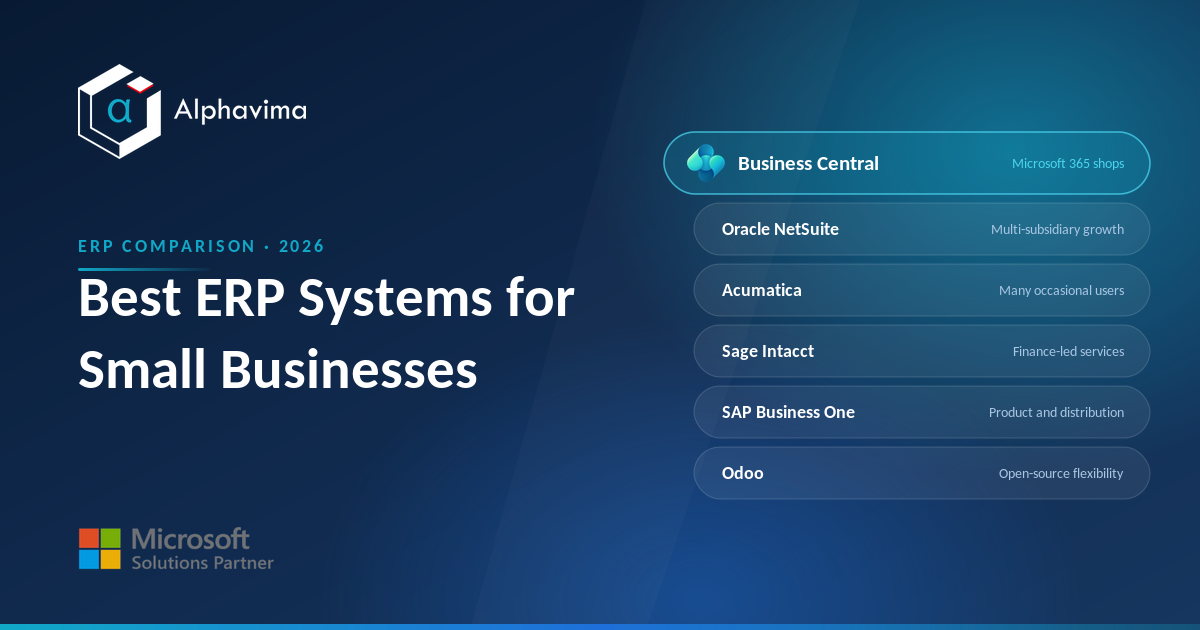
Key takeaway: There is no single best ERP for small business. Business Central suits Microsoft-centric firms, NetSuite suits fast-scaling multi-entity companies, Acumatica suits teams with many light users, Sage Intacct suits finance-led service businesses, SAP Business One suits product and distribution firms, and Odoo suits those who want open-source flexibility.
Match the tool to your shape, not the marketing.
Table of contents
At a glance: the six ERPs compared
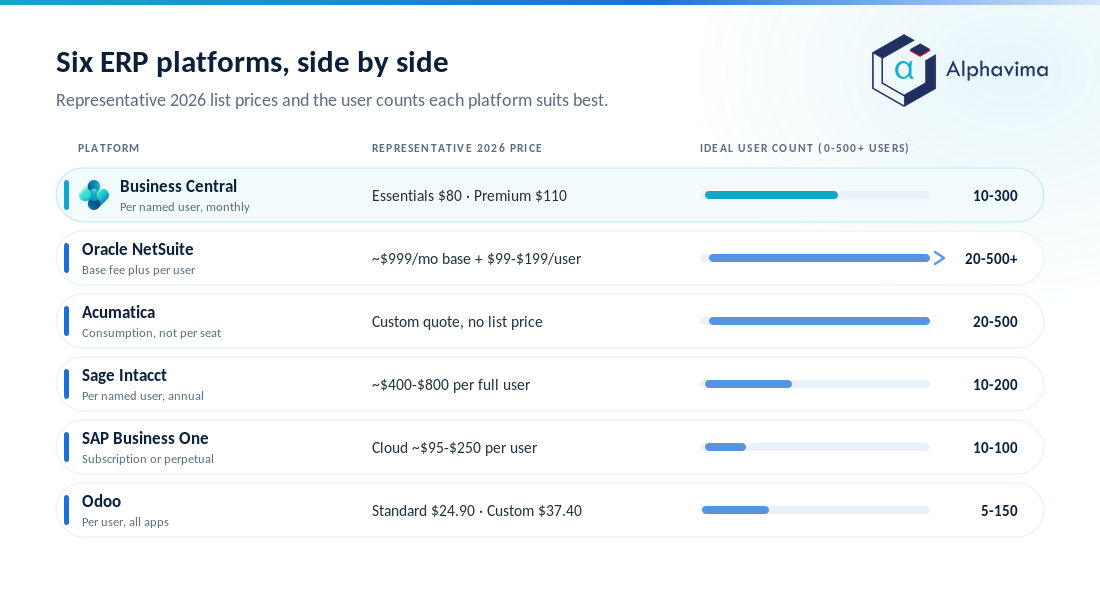
The table below sets out the essentials. Prices are per user per month unless noted. The Microsoft and Odoo figures come from those vendors’ own pricing pages. NetSuite, Acumatica, Sage Intacct and SAP Business One do not publish list prices, so those figures are third-party estimates. Every real quote depends on modules, users and implementation.
| System | Pricing model | Representative 2026 price | Best for | Deployment | Ideal size |
|---|---|---|---|---|---|
| Dynamics 365 Business Central | Per named user, monthly | Essentials $80, Premium $110, Team Members $8 | Microsoft 365 shops wanting one connected stack | Cloud (SaaS), on-prem option | 10-300 users |
| Oracle NetSuite | Base platform fee + per user | ~$999/mo base + $99-$199/user | Fast-growing, multi-subsidiary firms | Cloud only | 20-500+ users |
| Acumatica | Consumption/resource-based, not per seat | Custom quote (no public list price) | Teams with many occasional users | Cloud, private cloud, on-prem | 20-500 users |
| Sage Intacct | Per named user, annual | ~$400-$800/user (full user) | Finance-led services, nonprofits | Cloud only | 10-200 users |
| SAP Business One | Per user; subscription or perpetual | Cloud ~$95-$250/user; perpetual ~$3,500-$5,500/user one-off | Product, manufacturing, distribution | On-prem or partner cloud | 10-100 users |
| Odoo | Per user, all-apps | Free (1 app); Standard $24.90; Custom $37.40 | Customisation and tight budgets | Cloud, Odoo.sh, on-prem | 5-150 users |
Note: A price per user is not a total cost. Implementation, data migration, integrations and training usually cost more than the first year of licences. Budget for the whole project, not the sticker.
Microsoft Dynamics 365 Business Central
Who it’s best for: Companies already living in Microsoft 365 (Outlook, Teams, Excel, SharePoint) that want finance, inventory, sales and projects in one place without stitching together disconnected tools.
Business Central is a genuine mid-market ERP with strong financials, supply chain, manufacturing (Premium) and project accounting. Its biggest advantage is not a single feature; it is the fact that it sits inside the Microsoft estate.
Data flows into Power BI, automation runs through Power Automate, and Copilot features assist with bank reconciliation, sales-line suggestions and document handling. For a business standardised on Microsoft, the learning curve and integration cost drop noticeably.
Strengths: Deep Excel and Teams integration, a large partner and app ecosystem (AppSource), predictable per-user licensing, and a clear upgrade path from QuickBooks or older Dynamics products. Our QuickBooks to Business Central migration guide walks through that specific jump.
Limitations: Heavy customisation needs a skilled partner. Very large or highly specialised operations sometimes outgrow it toward Dynamics 365 Finance & Operations. Team Member licences are deliberately limited to light tasks.
Pricing: Per named user per month, billed yearly: Essentials at $80, Premium at $110, and Team Members at $8, per the official Microsoft pricing page. For a full module-by-module breakdown, see our Business Central pricing guide.
Oracle NetSuite
Who it’s best for: Ambitious, fast-growing companies, often venture-backed or multi-entity, that expect to add subsidiaries, currencies and revenue streams quickly.
NetSuite was born in the cloud and remains one of the most complete SaaS ERPs available. Its multi-subsidiary consolidation, revenue recognition and built-in CRM and e-commerce make it a natural fit for scale-ups that will look very different in three years than they do today.
If you want the direct head-to-head with Microsoft, our Business Central vs NetSuite comparison sets the two side by side.
Strengths: Mature multi-entity and multi-currency handling, one unified data model across finance, CRM and commerce, and a deep feature set that rarely runs out of room as you grow.
Limitations: Cost climbs fast, contracts renew annually and often rise, and the platform is complex enough that most changes need a consultant. There is no on-premises option.
Pricing: Oracle does not publish NetSuite list prices. Third-party analysis puts it at a base platform fee of roughly $999 per month plus $99-$199 per user per month, with everything negotiated and add-on modules priced separately. Small deployments commonly land in the low tens of thousands per year; mid-market rollouts run into six figures.
Acumatica
Who it’s best for: Businesses where lots of people need occasional access, warehouse staff, field technicians, project managers, and who would be penalised by paying per seat.
Acumatica’s headline differentiator is its licensing. Instead of charging per user, it prices on the resources and applications you consume, so you can add users without adding licence lines. That is a strong fit for construction, distribution and project-based firms with wide, light user bases.
Strengths: Genuinely unlimited users under consumption pricing, strong project and construction editions, a modern browser interface, and flexible deployment (public cloud, private cloud or on-prem).
Limitations: No public price list, so budgeting requires a partner quote and careful attention to resource tiers, which can rise as transaction volume grows. The partner network is smaller than Microsoft’s or Oracle’s.
Pricing: Consumption-based and quoted per business, not per seat, per Acumatica’s official pricing page. There is no representative published figure; cost depends on the applications selected and your transaction volume.
Sage Intacct
Who it’s best for: Finance-led service organisations, professional services, SaaS, nonprofits and healthcare, that want best-in-class accounting depth more than heavy manufacturing or inventory features.
Sage Intacct is, first and foremost, an accounting powerhouse. Its dimensional general ledger, multi-entity consolidation and project and grant accounting are genuinely excellent, and it is a favourite of controllers and CFOs who live in the numbers.
Strengths: Outstanding core financials, strong reporting and dashboards, well-regarded for nonprofit fund accounting, and a cloud-native design.
Limitations: Lighter on manufacturing, warehousing and field operations, so product-centric firms often need bolt-ons. Pricing is custom and not cheap at the full-user level.
Pricing: Sage does not publish a list price. Third-party analysis puts full named users at around $400-$800 per user per month billed annually. Entry deployments typically start near $10,000-$15,000 per year before modules.
SAP Business One
Who it’s best for: Small and mid-sized product companies, discrete manufacturers, wholesalers and distributors, that want SAP-grade structure at an SMB scale.
SAP Business One is a long-established ERP aimed squarely at physical-goods businesses. It handles inventory, production, purchasing and financials well, and appeals to companies that value SAP’s brand and its global reseller network. If you want a direct head-to-head, our Business Central vs SAP Business One comparison goes deeper.
Strengths: Solid manufacturing and inventory control, a choice of perpetual or subscription licensing, and a worldwide partner base for local support.
Limitations: The interface feels dated next to cloud-native rivals, cloud deployment usually runs through a partner rather than SAP directly, and perpetual licences carry annual maintenance of around 18-20 percent.
Pricing: No public list price; set by SAP resellers. Third-party pricing guides put cloud subscriptions at roughly $95-$250 per user per month, and on-premises perpetual licences at a one-off $3,500-$5,500 per professional user plus annual maintenance.
Odoo
Who it’s best for: Cost-conscious teams and technically confident businesses that want to customise heavily or start small and add modules over time.
Odoo is a modular, open-source suite spanning accounting, inventory, CRM, manufacturing, e-commerce and more. Its per-user, all-apps pricing is unusually generous, and its open codebase gives developers freedom that closed platforms cannot match.
Strengths: Low licence cost, a huge module library, an open-source Community edition, and flexible hosting on Odoo Online, Odoo.sh or on-premises.
Limitations: Real-world value depends heavily on implementation quality; complex builds can get expensive and hard to maintain. Official support and app quality vary, and heavy customisation can complicate upgrades.
Pricing: One App Free for a single app, then the Standard plan at $24.90 per user per month and Custom at $37.40 per user per month (billed yearly, both rates including Odoo’s discount for the first 12 months), per Odoo’s official pricing page. The Custom plan adds Studio, multi-company and API access.
Shortlist of six, and no obvious winner?
Tell us your headcount, industry and the systems you run today, and we will come back with a costed shortlist and the reasoning behind it. That includes saying so plainly when Business Central is not the right fit for you.
QuickBooks and Xero: capable accounting, not ERP
It is worth being clear about the entry level. QuickBooks Online and Xero are excellent accounting tools, but they are not ERPs. They handle bookkeeping, invoicing and basic reporting; they do not natively run manufacturing, multi-entity consolidation or deep inventory and project operations.
For 2026, QuickBooks Online runs from about $38 per month for Simple Start up to $340 per month for Advanced, while Xero spans roughly $25 to $90 per month across its Early, Growing and Established plans. Xero has said its US prices rise from 1 October 2026.
These are strong, affordable choices, but treat them as pre-ERP. When month-end takes days, spreadsheets multiply, or you are managing stock and entities they cannot see, that is the signal to move up.
Tip: The best time to plan an ERP move is before the pain becomes constant. Migrating while your data is still clean is far cheaper than migrating in crisis.
Which ERP should you choose? A decision guide by scenario
There is no universal winner, so match the platform to your situation. Working through an ERP selection checklist first turns that match into something you can defend to a board.
- You run on Microsoft 365 and want one connected stack. Choose Business Central. The integration with Excel, Teams, Power BI and Copilot removes friction that other systems charge you to rebuild.
- You are scaling fast with multiple subsidiaries and currencies. Choose NetSuite, provided you can fund it. Its multi-entity depth is hard to beat.
- You have many occasional users and hate per-seat maths. Choose Acumatica. Consumption pricing keeps a wide user base affordable.
- You are a finance-led service firm or nonprofit. Choose Sage Intacct for its accounting and reporting depth.
- You are a manufacturer, wholesaler or distributor who values SAP. Choose SAP Business One.
- You want open-source flexibility or the lowest licence cost. Choose Odoo, and invest in a strong implementation partner.
For most SMBs already invested in Microsoft, Business Central is the pragmatic default: familiar tools, predictable licensing and a clear growth path. That is the platform Alphavima specialises in, and if you want a neutral second opinion first, our ERP consulting team will tell you honestly when another system fits you better.
What actually drives ERP total cost
Licences are the visible cost; the project is the real one. Three factors move the number more than the per-user price: the depth of your customisation, the state of the data you migrate, and the number of integrations.
A clean, well-scoped rollout can cost less overall than a sprawling “cheap-licence” project that never stops needing developers. Judge on total cost of ownership over three to five years, not month one.
Conclusion
The honest answer to “which ERP is best for a small business” is: the one that fits how you actually operate. Business Central rewards Microsoft-centric firms, NetSuite rewards fast multi-entity growth, Acumatica rewards wide user bases, Sage Intacct rewards finance-led services, SAP Business One rewards product companies, and Odoo rewards flexibility on a budget.
Compare on total cost of ownership and fit, not the headline price.
If your business runs on Microsoft, the shortlist gets simpler, and Business Central is usually the strongest starting point. The most important step is a clear-eyed selection, followed by an implementation that respects your data and your people.
Ready to move forward? Talk to Alphavima’s ERP consulting team for a straight assessment of whether Business Central, or another platform, is the right fit for your business.
Frequently asked questions
What is the best ERP for a small business in 2026?
There is no single best ERP for small business; the right choice depends on your industry and existing tools. Microsoft 365 users usually do best with Business Central, product companies with SAP Business One or Acumatica, and finance-led services with Sage Intacct. Match the platform to your operating shape.
How much does an ERP cost for a small business?
Licences commonly range from about $25 to $200 per user per month, depending on platform and edition. Business Central Essentials is $80; Sage Intacct full users are estimated at $400-$800, though Sage does not publish a list price. Implementation, migration and integration usually cost more than the first year of licences.
Is QuickBooks or Xero an ERP?
No. QuickBooks Online and Xero are accounting packages, not ERPs. They manage bookkeeping and invoicing well but do not natively handle manufacturing, multi-entity consolidation or deep inventory. Many businesses use them until growth forces a move to a true ERP.
What is the difference between Business Central and NetSuite?
Business Central is per-user, integrates tightly with Microsoft 365, and offers cloud or on-premises deployment. NetSuite is cloud-only, charges a base platform fee plus per-user costs, and excels at multi-subsidiary consolidation for fast-growing companies. Microsoft shops usually prefer Business Central; rapid multi-entity scale-ups often prefer NetSuite.
Why does Acumatica not publish per-user prices?
Acumatica prices on consumption, the applications you use and your resource needs, rather than per seat. This lets you add users without new licence fees, which suits businesses with many light users. The trade-off is that you need a partner quote to know your cost.
Which ERP is best for manufacturing SMBs?
SAP Business One and Acumatica are both strong for manufacturing and distribution, and Business Central Premium adds solid manufacturing and service management. The best pick depends on your process complexity, existing systems and appetite for customisation.
Is open-source Odoo cheaper than the alternatives?
Odoo’s licences are cheaper, starting free for one app and $24.90 per user per month for all apps. But total cost depends heavily on implementation and customisation, which can be significant. Cheap licences do not always mean a cheap project.
Should I move from QuickBooks to an ERP now?
Consider it when month-end close drags, spreadsheets are patching gaps, or you are managing inventory or multiple entities your accounting tool cannot handle. Migrating while data is still clean is cheaper and less risky than waiting for a crisis.