











Choosing where your ERP runs is one of the more consequential decisions a finance or IT leader will make this year. It shapes your cost model for the next five years, who patches your servers at 2am, how fast you can add a subsidiary, and whether your auditors are comfortable with where the data lives.
This guide is for business and IT buyers weighing cloud (SaaS) ERP against a traditional on-premise deployment, and it aims to be genuinely balanced rather than pushing one answer for everyone.
We will cover the cost model (capex versus opex and five-year total cost of ownership), upgrades and maintenance, security and data control, customisation, scalability, performance and connectivity, compliance and data residency, and the hybrid option.
Throughout, we use Microsoft Dynamics 365 Business Central as a practical example, because it is offered both as a Microsoft-hosted cloud service and as a self-managed on-premises install, so it lets us compare like for like.
Key takeaway / What you’ll learn: Cloud ERP wins on speed, predictable cost, and freedom from infrastructure work, and it is where the industry is clearly heading. On-premise still earns its place for organisations with strict data-control, connectivity, or deep-customisation needs.
The right choice depends on your constraints, not on fashion, and this guide gives you a scenario-based way to decide.
Table of contents
Talk to an ERP consultant
Book a quick call to talk through your ERP project. No pressure, just practical advice. Or see our ERP consulting services.
The two models in plain terms
Cloud ERP (SaaS) means the vendor runs the software and the infrastructure. You access it through a browser and app, pay a per-user subscription, and the provider handles servers, patching, backups, and upgrades. With Business Central online, Microsoft hosts everything and pushes updates automatically, per the official Business Central deployment documentation.
On-premise ERP means you (or a hosting partner) run the software on servers you control, usually in your own data centre or a co-located rack. You buy or licence the software, provide the hardware and database (SQL Server for Business Central on-premises), and take responsibility for security, backups, and upgrades.
Legacy systems such as older Dynamics NAV, Dynamics GP, or long-standing SAP and Sage installs typically sit here.
The industry has tilted firmly towards cloud. NetSuite’s roundup of ERP statistics reports that more than half (53%) of organisations with ERP software use cloud-based solutions rather than on-premises platforms, and cites Fortune Business Insights forecasting the cloud ERP market to grow at a compound annual rate of nearly 16% to 2030 (see the ERP statistics roundup).
That shift is real, but “most people are doing X” is a starting point for your analysis, not the end of it.
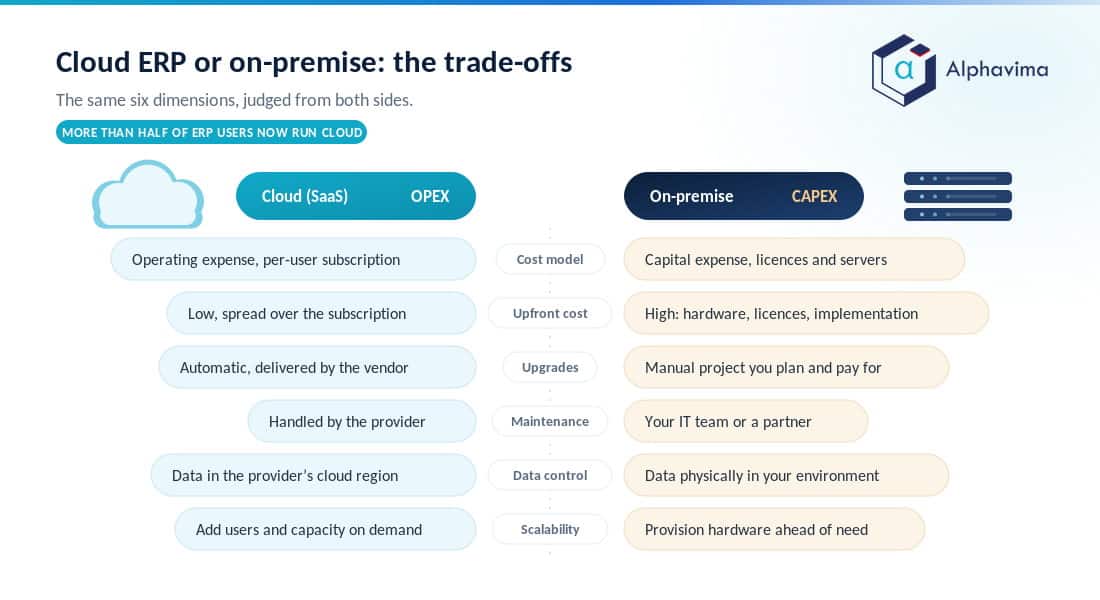
At a glance: cloud ERP vs on-premise ERP
| Dimension | Cloud (SaaS) ERP | On-Premise ERP |
|---|---|---|
| Cost model | Operating expense (opex): predictable per-user subscription | Capital expense (capex): upfront licences, servers, database |
| Upfront cost | Low, spread over the subscription | High: hardware, perpetual licences, implementation |
| Upgrades | Automatic, delivered by the vendor | Manual project you plan and pay for |
| Maintenance | Handled by the provider | Your IT team or a partner |
| Security | Vendor-managed, enterprise-grade data centres | You control it end to end (and own the risk) |
| Data control | Data in the provider’s cloud region | Data physically in your environment |
| Customisation | Extensions and APIs; no low-level server changes | Deep customisation possible, including infrastructure |
| Scalability | Add users and capacity on demand | Buy and provision hardware ahead of need |
| Performance | Depends on internet connectivity | Runs on the local network, works offline |
| Best for | Most SMBs and growing mid-market firms | Firms with strict control, offline, or deep-custom needs |
| Ideal company size | Start-up to large mid-market | Regulated, complex, or infrastructure-heavy organisations |
Use the table as a map, then read the sections below for the nuance behind each row.
Cost model: capex vs opex and five-year TCO
The clearest difference is how you pay. On-premise ERP is a capital purchase: perpetual licences, servers, a database, and a sizeable implementation, all paid up front and depreciated over time. Cloud ERP is an operating cost: a monthly or annual per-user fee that includes the infrastructure and updates.
Neither is automatically the lower-cost option. Cloud looks less expensive on day one because there is little upfront spend, while on-premise can look competitive over a long horizon if you already own hardware and rarely upgrade.
The honest comparison is total cost of ownership (TCO) across five years, including the costs that do not appear on the sticker. For on-premise, that should account for:
- Server hardware, plus a refresh cycle within those five years
- SQL Server and operating-system licences
- Backup, disaster recovery, and redundancy
- The IT staff time (or partner retainer) to patch, monitor, and upgrade
- A future upgrade project, which for legacy ERPs can rival the original implementation
For cloud, the five-year TCO is closer to subscription plus implementation plus any premium apps, with infrastructure, patching, and upgrades already inside the fee. As a benchmark, industry research puts the cost of owning an ERP at roughly 3 to 5% of annual revenue for midsize companies with revenue under $1 billion. That figure rests on research published in 2020, so treat it as a rough sanity check rather than a current benchmark.
Tip: When you build the business case, model both options over the full five years including one hardware refresh and one major upgrade for the on-premise side. That single step changes many “on-premise costs less” conclusions.
For a worked view of subscription costs on the Microsoft side, see our Business Central pricing guide.
Upgrades and maintenance
This is where the two models feel most different in daily life. Cloud ERP is kept current by the vendor: Business Central online receives Microsoft’s major updates twice a year and minor updates monthly, so you stay on a supported version without running a project. The trade-off is less control over timing.
On-premise upgrades are yours to plan, budget, and test. That gives you control, but it also means many organisations fall years behind, because each upgrade is a funded project. Falling behind is how firms end up on unsupported versions with security exposure and expensive catch-up migrations.
If you are on an ageing on-premise system today, our guide to a NAV to Business Central cloud migration walks through what a move to the cloud version involves.
Security and data control
Security is often cited as a reason to stay on-premise, and the instinct is understandable: the data is in your building, behind your firewall. In practice, major cloud providers invest more in physical security, threat monitoring, encryption, and certifications than most individual companies can match, and updates that close vulnerabilities are applied automatically.
The real distinction is who owns the responsibility. With cloud ERP you trust the provider’s controls and shared-responsibility model. With on-premise you own the full stack, which means both the control and the burden: if a patch is missed or a backup fails, that is on your team.
For organisations with mature security operations, on-premise control is a genuine benefit. For everyone else, the vendor’s security posture is usually an upgrade.
Customisation and integration
On-premise ERP allows the deepest customisation, right down to the database and server, which is why some organisations with unusual processes have historically preferred it. That flexibility comes at a price: heavy custom code is what makes upgrades painful and expensive.
Modern cloud ERP takes a different approach. Instead of editing the core, you extend it through supported extensions, connectors, and APIs, so your changes survive automatic updates. Business Central online is customised through AL extensions and integrated across the Microsoft stack (Power Platform, Power BI, and Microsoft 365) rather than by modifying the base application.
For most buyers this is the better long-term model, though a small number of highly specialised requirements can still favour on-premise depth.
Scalability and performance
Cloud ERP scales on demand. Adding users, entities, or a new country is a configuration and licensing change, not a hardware order, which suits growing and seasonal businesses. On-premise scaling means provisioning capacity ahead of need, which ties up capital and can leave you either short or over-provisioned.
Performance is the mirror image. Cloud ERP depends on reliable internet; a good connection makes this a non-issue for most offices, but a genuinely poor or intermittent link is a real constraint. On-premise runs on your local network and can keep working when the internet is down, which matters for a factory floor, a remote site, or an operation that cannot tolerate connectivity gaps.
Is on-premise really the lower-cost option for you?
Send us your current server, licence and support costs and we will build a five-year comparison against cloud, including the hardware refresh and the upgrade project most business cases forget. You will see the crossover point in writing.
Compliance and data residency
For regulated industries and some public-sector bodies, the deciding factor is where the data physically lives and who can access it. On-premise gives you an unambiguous answer: the data is in your environment, in your jurisdiction.
Cloud ERP has largely caught up here. Providers now offer regional data centres and residency commitments, and Microsoft publishes where Business Central data is stored by region. The question is not “cloud or not” but whether the provider’s available regions and contractual commitments satisfy your specific regulatory obligation.
Often they do; occasionally a specific rule still points to on-premise or a sovereign-cloud arrangement.
Note: Data residency is a contractual and configuration question, not a slogan. Before ruling cloud in or out, confirm the exact region, sub-processor list, and certifications against your compliance requirement rather than assuming.
The hybrid option
Hybrid sits between the two. In an ERP context it usually means keeping the core system on-premise while connecting selected data and workloads to cloud services, for example reporting, analytics, or AI features, so you get some cloud benefits without a full migration.
Microsoft has offered on-premises Business Central deployments that connect to cloud services for exactly this kind of scenario.
Hybrid can be a sensible transition state, letting you modernise reporting or add cloud analytics while you plan a fuller move. It is rarely a permanent destination, though, because you still carry the cost and effort of running infrastructure.
Treat it as a bridge for organisations that cannot move everything at once, not as a way to avoid choosing.
Which should you choose? A decision guide by scenario
Rather than a blanket recommendation, match your situation to the pattern below, then write the answer up against our ERP selection checklist so the requirement is documented before you talk to vendors.
- Growing SMB or mid-market firm, small IT team. Choose cloud. Predictable cost, no infrastructure to run, and automatic updates free your team to focus on the business. This describes most of the mid-market buyers we work with, and our guide to the best ERP for small business narrows the shortlist further at that end of the market.
- Regulated organisation with a strict data-residency rule your provider cannot meet. Choose on-premise (or a sovereign-cloud arrangement) until a compliant region is available.
- Operation with unreliable connectivity or offline-critical sites. Choose on-premise or hybrid, so core operations keep running independently of the internet.
- Business with deep, low-level customisation that cannot be re-expressed as extensions. On-premise may be justified, but test whether a modern extension model can meet the need first, because that keeps the cloud upgrade path open.
- Legacy on-premise ERP nearing an expensive upgrade. Use that upgrade budget to move to cloud instead of reinvesting in hardware and a like-for-like on-premise upgrade.
- Cannot move everything at once. Adopt hybrid as a staged bridge, cloud-first for new workloads, with a plan to retire the on-premise core over time.
For most Dynamics-shaped buyers, cloud is the stronger long-term fit, but the scenarios above show why a minority of organisations are right to stay on-premise for now. Alphavima helps companies work through exactly this decision through our ERP consulting practice, and plans the migration where cloud is the answer.
Conclusion
The balance has shifted decisively towards cloud for the majority of businesses in 2026, because it removes infrastructure work, makes cost predictable, keeps you current automatically, and scales as you grow. That is why more than half of organisations with an ERP now run it in the cloud, and the shift has been steady rather than sudden. In the selection exercises we run, on-premise is now the exception and needs a specific reason behind it.
On-premise still earns its place for organisations with strict data-control needs, offline-critical operations, or deep customisation that cannot yet be re-expressed as extensions. The right decision comes from matching your real constraints to the scenarios above, then modelling the full five-year cost of each path rather than the headline price.
Ready to move forward? If you are weighing cloud ERP against on-premise, or planning a move to Business Central online, talk to the Alphavima team through our ERP consulting services for a deployment recommendation and a five-year TCO built around your business.

Related case study
Manufacturing ERP on Business Central
A manufacturer put the shop floor, stockroom and finance on one Dynamics 365 Business Central ERP.
Read the case study · Next read: The 12-question ERP selection checklist
Frequently asked questions
What is the main difference between cloud ERP and on-premise ERP?
Cloud ERP is hosted and maintained by the vendor and paid for by subscription, while on-premise ERP runs on servers you own and manage. The practical differences follow from that: cloud shifts cost from capex to opex and hands infrastructure and upgrades to the provider, whereas on-premise gives you full control along with full responsibility.
Is cloud ERP less expensive than on-premise ERP?
Not always, but often over a five-year horizon. Cloud has lower upfront cost and includes infrastructure, patching, and upgrades in the fee, while on-premise adds hardware refreshes, database licences, and periodic upgrade projects. Model the full total cost of ownership, including one hardware refresh and one major upgrade, before concluding either is less expensive.
Is cloud ERP secure enough for sensitive data?
For most organisations, yes. Major cloud providers invest heavily in physical security, encryption, monitoring, and certifications, and they apply security updates automatically. The key question is whether their available regions and contractual commitments meet your specific compliance and data-residency obligations.
Can I customise a cloud ERP as much as an on-premise one?
You customise cloud ERP through supported extensions, connectors, and APIs rather than by editing the core, so your changes survive automatic updates. This meets the needs of most businesses. A small number of very specialised, low-level requirements can still favour on-premise, but they are the exception.
Does Business Central come in both cloud and on-premise versions?
Yes. Microsoft offers Business Central as an online (SaaS) service that it hosts and updates automatically, and as an on-premises deployment you run on your own SQL Server infrastructure. This is why it works well as a like-for-like example when comparing the two models.
What is a hybrid ERP deployment?
Hybrid keeps the core ERP on-premise while connecting selected data or workloads, such as reporting, analytics, or AI, to cloud services. It is a useful transition state for organisations that cannot migrate everything at once, though it still carries the cost of running infrastructure and is rarely a permanent destination.
What happens to on-premise ERP if I have poor internet?
On-premise runs on your local network, so it can keep operating when the internet is down, which matters for factories and remote sites. Cloud ERP depends on connectivity, so a genuinely unreliable link is a real constraint, though a solid business connection removes the concern for most offices.
Should I move my legacy on-premise ERP to the cloud?
If your on-premise system is nearing an expensive upgrade or is falling out of support, moving to cloud is usually the better use of that budget than reinvesting in hardware. The right time is often when a major on-premise upgrade would otherwise be due, since you spend once and land on a continuously updated platform.