











If your business sends people into the field to install, repair or maintain equipment, the work order is where money is made or lost. A technician who arrives without the right part, or a dispatcher juggling appointments in a spreadsheet, quietly drains margin every day.
Dynamics 365 Field Service is Microsoft’s answer to that problem: a platform that connects the customer request, the schedule, the technician on site and the invoice into one system.
This guide is written for operations leaders, service managers and IT buyers who are weighing up Field Service in 2026. We will walk through what it actually does, how Copilot fits in, who it suits, how it connects to the rest of Dynamics 365, what it costs, and what a sensible implementation looks like.
Key takeaway / What you’ll learn: Dynamics 365 Field Service handles the full service cycle, from work order to scheduling to the technician’s mobile app to billing. It is licensed at $105 per user per month for a full licence, with a $50 contractor option and a $30 per-resource scheduling optimisation add-on.
It fits manufacturers, utilities, equipment servicers and facilities teams, and it works best when connected to Customer Service and, for finance, Business Central.
Table of contents
Talk to a Dynamics 365 CRM consultant
Book a quick call to talk through your Dynamics 365 CRM project. No pressure, just practical advice. Or see our Dynamics 365 CRM services.
What Dynamics 365 Field Service does
At its core, Field Service turns a service request into structured, trackable work. According to Microsoft’s Field Service overview, the platform covers work order management, scheduling and dispatch, a technician mobile app, asset tracking, preventive maintenance, inventory and returns, billing, and customer communications.
Each of those is a module in its own right, but they share one data model, so information entered once flows through the whole cycle.
Work order management
The work order is the central record. It defines what needs doing at a customer location: the tasks to complete, the parts likely to be needed, the labour to bill, and the skills or certifications a technician must hold.
Work orders can be created manually, generated from a customer service case, raised automatically from a maintenance schedule, or triggered by a signal from a connected asset. Because the work order carries the customer’s location, asset history and service terms, the technician arrives with context rather than a bare address.
Scheduling, the dispatch board and Resource Scheduling Optimization
Scheduling is where field service operations succeed or fail. Field Service gives dispatchers an interactive schedule board that shows appointments, resource availability and travel on a single screen, with a live map showing routes and traffic.
A dispatcher can drag a job onto a technician, or use the scheduling assistant to find the best match by location, availability, skill set and priority.
For larger operations, Resource Scheduling Optimization (RSO) automates this. RSO runs continuously in the background and builds optimised schedules across your whole workforce, minimising drive time and honouring appointment windows and skills. It is a paid add-on, which we cover in the pricing section, and it is usually the feature that pays for itself fastest in high-volume dispatch teams.
The mobile app for technicians
The Field Service mobile app runs on iOS, Android and Windows. On site, a technician sees the work order, step-by-step task guidance, the customer’s asset and service history, and the parts to use.
They can capture photos and video, collect a customer signature, record time and parts, and complete inspections. Crucially, the app works offline, so a technician in a basement plant room or a rural site can keep working and sync when a connection returns.
Asset and IoT-connected field service
Field Service tracks customer assets, the specific pieces of equipment your team services, and keeps a full history against each one. That history is what makes preventive maintenance possible: the system can automatically generate recurring service appointments so equipment is maintained before it fails.
Connected (IoT) field service takes this further. When assets are instrumented with sensors, an anomaly can raise an alert, and that alert can open a work order automatically or even trigger a remote fix before a truck is ever dispatched.
For asset-heavy industries, this shift from “break then fix” to “sense then prevent” is the strongest argument for the platform.
Inspections, inventory and customer communications
Inspections are digital, mobile-friendly checklists that capture readings, pass/fail results and photos, and attach the results to the work order. Inventory management covers truck stock, purchase orders, and returns, and it reduces stock automatically when a part is installed, so your parts position stays accurate without manual reconciliation.
On the customer side, the platform sends status updates and estimated arrival notifications, which cut down the “where is my technician” calls that tie up a service desk.
How the field service cycle works end to end
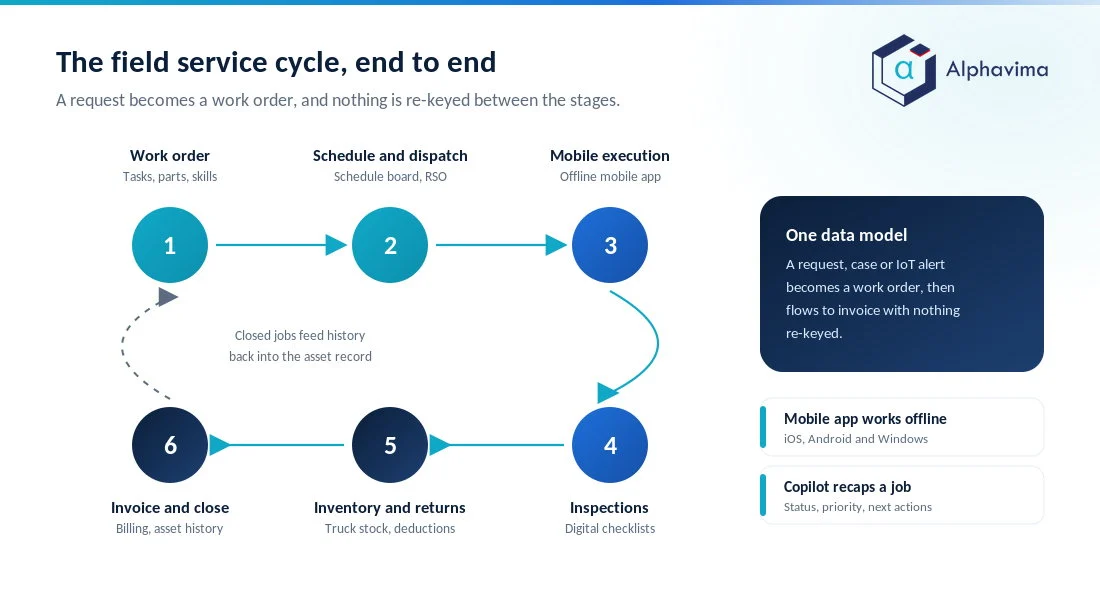
Put together, the pieces form a loop: a request or IoT alert becomes a work order; the work order is scheduled and optimised; the job is dispatched to a technician; the technician completes it on the mobile app; and the visit is inspected, invoiced and closed, feeding history back into the asset record.
The value is not any single module but the fact that nothing is re-keyed between them.
Tip: Before you buy, map your own version of this loop on a whiteboard and mark where data is re-entered today. Those re-entry points are exactly where Field Service tends to pay back.
Copilot in Field Service
Microsoft has built generative AI into the product rather than bolting it on. The Copilot in Field Service documentation describes several capabilities that were generally available or in preview as of 2026:
- Natural-language questions. In the web app, dispatchers and managers can ask questions about their data in plain language and draw on a library of predefined prompts, rather than building a report.
- Work order recap. Copilot generates an on-demand summary of a work order, covering status, priority, related activity and recommended next actions, so a manager can grasp a job in seconds.
- AI-powered work order update (preview). On the mobile app, a technician can speak or type an update and Copilot suggests changes to booking status, times, tasks and line items, which cuts admin time between jobs.
- Inspection template creation (preview). Copilot can turn an uploaded PDF or image of a paper checklist into a draft digital inspection template ready to edit and publish.
Copilot assistance in Field Service, covering work order creation and updates, scheduling and summarisation, is included with the full Field Service licence rather than the Contractor licence. The prebuilt agents, such as the Scheduling Operations Agent, run on Copilot Credits, which are bought separately. If AI assistance across your Microsoft estate is on your roadmap, it is worth planning it alongside your wider Copilot and AI services strategy rather than as a Field Service afterthought.
Field Service capabilities at a glance
| Capability | What it covers | Typical benefit |
|---|---|---|
| Work order management | Tasks, parts, labour, skills, location, service terms | One record from request to invoice |
| Scheduling and dispatch board | Interactive board, scheduling assistant, live map and routing | Faster, better-matched assignments |
| Resource Scheduling Optimization (add-on) | Automated, continuous schedule optimisation | Less drive time, higher jobs per day |
| Mobile app | iOS/Android/Windows, offline, guidance, photos, signature | Technician productivity on site |
| Asset management and preventive maintenance | Asset history, recurring maintenance appointments | Fewer failures, planned workload |
| IoT / connected field service | Sensor alerts, auto-created work orders, remote fixes | Shift from reactive to proactive service |
| Inspections | Digital checklists with readings and photos | Consistent, auditable site records |
| Inventory and returns | Truck stock, purchase orders, auto stock deduction | Accurate parts position |
| Customer communications | Status and arrival notifications | Fewer inbound “where is my tech” calls |
| Copilot | Recaps, natural-language queries, mobile updates, inspections | Less admin, faster decisions |
Who Dynamics 365 Field Service is for
Field Service fits any organisation that manages a mobile workforce against physical assets. Four profiles come up most often:
- Manufacturers who service the equipment they sell and want warranty, maintenance and spare-parts revenue tied to each machine.
- Utilities and energy operators with dispersed infrastructure, strict compliance inspections and high-volume dispatch, the pattern behind our utility and energy asset management work.
- Equipment servicing and OEM service arms, from medical devices to industrial HVAC, where uptime commitments and SLAs are contractual.
- Facilities and property management teams handling reactive and planned maintenance across many sites.
The common thread is asset-centric work with SLAs. If your service is purely remote or desk-based, Customer Service alone may be enough. If technicians go on site against specific equipment, Field Service earns its place.
This is the kind of fit assessment our team handles as part of Dynamics 365 CRM solutions engagements, and industry-specific starting points exist for sectors such as rental and equipment management.
Still dispatching technicians from a spreadsheet?
Send us a week of your real jobs, technicians and travel. We will show you what Field Service would schedule differently and what the licences and add-ons would cost for your actual team size.
How it connects to Customer Service and Business Central
Field Service is not an island. It is part of the Dynamics 365 Customer Engagement family and shares the Dataverse data platform with Customer Service, so a support agent can escalate a case straight into a work order without a hand-off gap.
Contact centre and field teams see the same customer, the same asset and the same history.
For finance, the practical pairing is Business Central. Field Service captures the parts and labour delivered; Business Central handles the general ledger, procurement and the outbound invoice. Connecting the two means service revenue and parts costs land in finance without manual re-keying.
If you are running, or planning, Business Central for your back office, aligning the two systems early is worth the effort, and it is a common thread in our ERP consulting work.
Dynamics 365 Field Service pricing in 2026
Pricing is per user per month, billed annually, from Microsoft’s official Field Service pricing page. The headline figures for 2026 are below.
| Plan | Price (USD, per user/month, billed yearly) | Who it is for |
|---|---|---|
| Dynamics 365 Field Service | $105 | Full-function dispatchers, managers and employed technicians |
| Field Service Contractor | $50 | External or contract technicians with limited access |
| Team Member | $8 | Light users needing read and basic access |
| Resource Scheduling Optimization (add-on) | $30 per resource/month | Automated schedule optimisation |
A few points worth knowing. The full Field Service licence includes the guidance and remote-assist capabilities; the Contractor licence deliberately limits access for external technicians at a lower cost. Resource Scheduling Optimization is priced per scheduled resource, not per user, so you pay for the technicians whose day RSO is optimising.
Copilot Credits, which run the prebuilt and custom agents, are a separate purchase, available pay-as-you-go or prepaid, and an Azure subscription is required to use agents. The Team Member rate, and the base and contractor prices, are corroborated independently by partner-published pricing guides.
If you are buying more than one Customer Engagement app, our Dynamics 365 Customer Engagement licensing guide covers how the seats fit together.
Note: Microsoft adjusts list prices and licensing terms periodically, and regional pricing varies. Treat these figures as a 2026 starting point and confirm the current numbers on the Microsoft pricing page before you budget.
The costs beyond the licence
The subscription is rarely the largest line in year one. Budget also for implementation and configuration, data migration, integration with Customer Service and Business Central, mobile device rollout, technician training, and any IoT hardware if you are pursuing connected service.
A modest deployment is comfortably delivered in a few months; a large, IoT-connected, multi-region rollout is a bigger programme.
Implementation considerations
A few decisions shape whether a rollout goes smoothly:
- Model your assets and work order types first. The asset hierarchy and the small set of standard work order types are the backbone. Get them wrong and every downstream schedule and report inherits the mess.
- Decide your scheduling model. Start with the manual schedule board and the scheduling assistant, then add RSO once your data and processes are clean. Automating a broken process just breaks it faster.
- Design for offline from day one. Test the mobile app in the worst connectivity your technicians actually face, not in the office.
- Plan the integrations early. The Customer Service and Business Central connections are where the business case lives; leaving them to “phase two” often means the numbers never close the loop.
- Bring technicians in early. Adoption on the mobile app is the make-or-break. Involve a few respected technicians in configuration so the tool fits how they actually work.
None of this is exotic, but it rewards experience. This is the kind of scoping where a Microsoft partner earns its keep, and where Alphavima typically starts a Field Service engagement.
Conclusion
Dynamics 365 Field Service is a mature, asset-centric platform that ties together work orders, scheduling, the technician’s mobile app, inventory and billing, with Copilot now woven through the daily workflow. For manufacturers, utilities, equipment servicers and facilities teams, its strength is the single thread of data from customer request to closed, invoiced job, and increasingly from IoT signal to prevented failure.
The right first step is not a licence purchase but an honest look at your current service loop: where work is re-keyed, where technicians lose time, and where finance and service disagree on the numbers.
Get that map right, plan the Customer Service and Business Central integrations early, and the platform pays back through completed jobs rather than saved clicks.
Ready to move forward? Talk to the Alphavima team about scoping a Dynamics 365 Field Service rollout that fits your assets, technicians and SLAs, starting with our Dynamics 365 CRM solutions practice.

Related case study
PWSC Unifies Sales, Warranty & Claims on Dynamics 365
PWSC brought sales, warranty and claims onto one Dynamics 365 CRM, with self-serve portals for builders and homeowners.
Read the case study · Next read: Dynamics 365 Customer Engagement licensing explained
Frequently asked questions
What is Dynamics 365 Field Service used for?
It manages the end-to-end field service cycle: creating work orders, scheduling and dispatching technicians, guiding them through jobs on a mobile app, tracking customer assets and inventory, and billing for the work. It is aimed at organisations that send people on site to install, maintain or repair equipment.
How much does Dynamics 365 Field Service cost in 2026?
The full Field Service licence is $105 per user per month billed annually, with a $50 Field Service Contractor option and an $8 Team Member licence. Resource Scheduling Optimization is an add-on at $30 per resource per month. Always confirm current figures on the Microsoft pricing page, as prices change and vary by region.
What is Resource Scheduling Optimization?
Resource Scheduling Optimization (RSO) is an add-on that automatically builds and continuously refines technician schedules. It matches jobs to resources by location, skills, availability and priority while minimising travel, which lets high-volume dispatch teams complete more jobs per day.
Does Dynamics 365 Field Service include a mobile app?
Yes. The Field Service mobile app runs on iOS, Android and Windows and works offline. Technicians use it to view work orders and task guidance, access asset and service history, capture photos and signatures, complete inspections, and record time and parts.
How does Copilot help in Field Service?
Copilot generates work order summaries, answers natural-language questions about your data, lets technicians update work orders by voice or text on mobile, and can turn a PDF checklist into a digital inspection template. Some features are generally available and others are in preview. Copilot assistance is included with the full Field Service licence, while the prebuilt agents run on Copilot Credits bought separately.
Who is Dynamics 365 Field Service best suited to?
It fits manufacturers that service their own equipment, utilities and energy operators, equipment and OEM service teams with SLA commitments, and facilities or property management teams. The common factor is asset-centric, SLA-bound work carried out by a mobile workforce.
How does Field Service connect to other Dynamics 365 apps?
It shares the Dataverse platform with Customer Service, so cases escalate straight into work orders. For finance, it pairs with Business Central so parts, labour and invoicing flow into the general ledger without re-keying. Both connections are central to the business case.
What is connected (IoT) field service?
Connected field service uses sensors on customer equipment to detect problems early. An anomaly can raise an alert that opens a work order automatically or triggers a remote fix, moving your operation from reactive repair toward planned, preventive maintenance.