











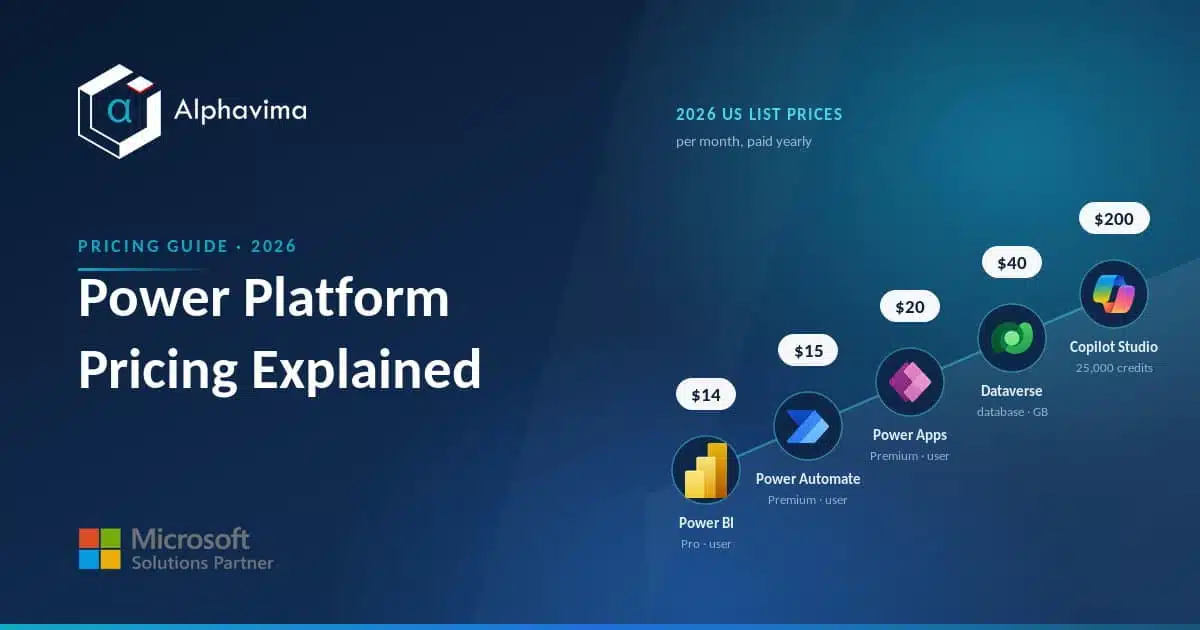
Microsoft Power Platform is easy to start with and surprisingly easy to over-buy. The product family spans low-code apps, automation, analytics, websites and AI agents, and each one has its own licensing logic.
If you have ever stared at a Microsoft pricing page and still not known what a project will actually cost, you are not alone.
This guide is written for business and IT buyers who need a straight answer. We cover the 2026 list prices for Power Apps, Power Automate, Power BI, Power Pages, Copilot Studio, Dataverse and AI Builder, explain what comes free with Microsoft 365, flag the charges that catch teams out, and finish with a simple way to pick the right plan.
All prices are US list prices verified against Microsoft pricing pages and are quoted per month; most require an annual commitment.
Key takeaway / What you’ll learn: Power Platform pricing is built from three layers: per-user or per-capacity licences for each product, consumption charges for Dataverse storage and AI, and premium connector access. Get those three right and the rest is arithmetic.
Table of contents
Talk to a Power Platform consultant
Book a quick call to talk through your Power Platform project. No pressure, just practical advice. Or see our Power Platform services.
At a glance: Power Platform plans and 2026 list prices
Here are the headline plans across the family. Prices are US list, paid yearly, per month, and taken from the official Microsoft pricing pages in 2026.
| Product / plan | 2026 list price | What you get |
|---|---|---|
| Power Apps Premium | $20 / user / month | Unlimited custom apps and pages, standard and premium connectors, Dataverse (250 MB DB + 2 GB file entitlement) |
| Power Apps Premium (2,000+ seats) | $12 / user / month | Same as Premium at volume pricing |
| Power Apps Developer Plan | Free | Non-production: build and test unlimited apps, 3 dev environments, 750 flows/month |
| Power Automate Premium | $15 / user / month | Cloud flows, attended RPA (desktop flows), process/task mining, premium connectors |
| Power Automate Process | $150 / bot / month | Unattended RPA for one process (bot), not tied to a named user |
| Power Automate Hosted Process | $215 / bot / month | Unattended RPA plus a Microsoft-hosted virtual machine |
| Power BI Pro | $14 / user / month | Author and share reports, collaborate in workspaces |
| Power BI Premium Per User (PPU) | $24 / user / month | Pro features plus paginated reports, larger models, more refreshes |
| Power Pages authenticated users | $200 / pack / month | Capacity pack: 100 authenticated users per site per month |
| Power Pages anonymous users | $75 / pack / month | Capacity pack: 500 anonymous users per site per month |
| Copilot Studio message pack | $200 / month | 25,000 Copilot Credits per month for custom agents |
| Dataverse database capacity | $40 / GB / month | Add-on storage beyond your entitled allowance |
Use this table as a map, not the final bill. The sections below explain what each row means and where the extra costs hide. Microsoft does not publish every figure on its main pricing pages, so where Power Platform seats sit next to Dynamics 365 seats an independent partner price guide is a sensible cross-check before you order.
Power Apps: per-user is now the main road
For years Power Apps offered two paid routes: a per-app plan (pay for access to a limited number of apps) and a per-user plan (one user, unlimited apps). In 2026 the Power Apps pricing page leads with a single Power Apps Premium plan at $20 per user per month, dropping to $12 per user per month at 2,000 seats or more.
Microsoft’s pricing page no longer features the older per-app plan, although it can still be bought through the Microsoft 365 admin centre and partner channels, so budget around per-user unless an existing agreement still carries per-app rights.
What “premium” actually buys
The free Power Apps capability inside Microsoft 365 lets people build apps that use standard connectors (SharePoint, Outlook, Teams, Office files). The moment an app touches a premium connector (SQL Server, Dataverse, Azure services, third-party APIs like Salesforce) or you want a standalone app outside the M365 context, you need a premium licence.
That single distinction, standard versus premium connectors, is the most common reason a “free” project suddenly needs paid seats.
Note: The Developer Plan is genuinely free and excellent for prototyping, but it is non-production. Do not build a live business app on it.
Power Automate: users, bots and the RPA question
Automation splits into two worlds, and the pricing follows the split.
Cloud flows run in Microsoft’s cloud (API-to-API automation: approvals, notifications, data sync). Basic cloud flows with standard connectors are included with most Microsoft 365 plans. Premium connectors, business-process flows and AI steps need Power Automate Premium at $15 per user per month, per the Power Automate pricing page.
Desktop flows (RPA) automate the user interface of legacy or unsupported systems. Here the model changes:
- Attended RPA (a bot that runs alongside a signed-in person) is included in the Premium per-user plan.
- Unattended RPA (a bot that runs on its own, on a schedule, with no one logged in) needs the Process plan at $150 per bot per month. This is licensed per process, not per user, which is why an automation team of three might still only buy one or two Process licences.
- Hosted Process at $215 per bot per month adds a Microsoft-hosted virtual machine, so you avoid standing up and maintaining your own RPA server.
There is also a Process Mining add-on at $5,000 per tenant per month for organisations analysing large event logs. Power Automate Premium itself includes 50 MB of process mining data storage per user licence, pooled up to a maximum of 100 GB per tenant, so check that allowance against your event volumes before you rule the add-on out.
Tip: If you only need attended automation for a handful of people, per-user Premium is cheapest. If you need one robot running overnight, the per-bot Process plan is the right tool even for a single automation.
Power BI: Pro, Premium Per User and Fabric capacity
Power BI has the widest pricing range because it scales from one analyst to an enterprise-wide platform.
- Power BI Pro at $14 per user per month is the standard seat. Everyone who authors reports, and (in a Pro-only tenant) everyone who views shared content, needs Pro.
- Premium Per User (PPU) at $24 per user per month adds enterprise features: paginated reports, larger datasets, more frequent refreshes and advanced AI. PPU is per user, so it suits a small analytics team that needs premium features without buying a whole capacity.
- Fabric capacity (the F-SKUs) is the capacity-based route. You buy a pool of compute (F2, F4, up through F64 and beyond) that the whole organisation shares. The pricing is per capacity, either pay-as-you-go by the hour or a cheaper annual reservation, and Microsoft’s Power BI pricing page advertises around 40 percent savings for reserved annual capacity over pay-as-you-go.
The decision that saves the most money is the F64 threshold. At F64 (and above), report viewers no longer each need a Pro licence to consume content; free Power BI licences can view.
Below F64, or on Pro/PPU, every consumer needs their own paid seat. For an organisation with hundreds of read-only viewers, capacity can be dramatically cheaper than buying that many Pro seats. Because Fabric now underpins Power BI capacity, it is worth reading our Microsoft Fabric pricing guide alongside this.
If the same people also sit on Dynamics 365, our Dynamics 365 licensing guide explains how those seats and your Power Platform seats stack up side by side.
Power Pages: capacity packs, not seats
Power Pages (external-facing low-code websites built on Dataverse) is priced by capacity packs per site, not by named users.
- Authenticated users: $200 per pack per month, where each pack covers 100 logged-in users per site per month. Use this for portals where customers or partners sign in.
- Anonymous users: $75 per pack per month, where each pack covers 500 anonymous visitors per site per month. Use this for public sites where people browse without logging in.
You buy as many packs as your expected traffic needs, and you can mix authenticated and anonymous packs on the same site. A 30-day free trial lets you build and evaluate before committing.
Copilot Studio and AI Builder: the consumption layer
This is the fastest-moving part of Power Platform pricing, so read it carefully.
Copilot Studio (for building custom AI agents and copilots) is billed on Copilot Credits. A message pack costs $200 per month for 25,000 Copilot Credits, and a pay-as-you-go option lets you consume without a commitment and pay for what you use.
Different agent actions (a simple answer, a generative AI response, an autonomous action) consume different numbers of credits, so estimate volume before you assume 25,000 is plenty. Separately, Microsoft 365 Copilot at $30 per user per month includes the ability to build agents for internal use.
If you are weighing a custom agent, our walkthrough on the Copilot Studio computer use agent shows what those credits are actually spent on.
AI Builder (prebuilt AI models for forms, documents and predictions) is in transition. Microsoft has confirmed the end of AI Builder credits: AI Builder capacity add-ons reached end of sale on 1 November 2025, and seeded AI Builder credits inside premium licences are scheduled to be removed on 1 November 2026.
AI Builder features continue to work, but they will consume Copilot Credits instead. If your 2026 plan relies on AI Builder, budget for Copilot Credits rather than the old AI Builder allowance.
Note: Because AI billing is consumption-based, a pilot that looks cheap can scale into a meaningful monthly line item. Set spending limits and monitor usage from day one.
Dataverse: the storage that sits under everything
Dataverse is the shared database behind Power Apps, Power Automate, Power Pages and many Dynamics 365 apps. Premium licences come with a default entitlement (for example, Power Apps Premium includes a 250 MB database and 2 GB file allowance per licence, pooled at tenant level), but production systems routinely exceed it.
Additional capacity is an add-on. Database capacity is around $40 per GB per month, with lower rates for file and log storage. Database storage is the expensive tier, so watch what you put where: large attachments belong in file storage, and audit logs consume log storage.
Dataverse capacity is the single most common surprise on a Power Platform invoice, because it grows quietly as your apps collect data. Default entitlements also move: the December 2025 Dataverse default capacity changes are worth reading if Dynamics 365 apps share the same tenant.
Not sure what your Power Platform build will really cost?
Send us the workloads you want to run and we will size the licences, the Dataverse storage and the Copilot Credits behind them. You get a monthly figure you can budget against before a single seat is bought.
What’s included free with Microsoft 365
Plenty of Power Platform capability is already bundled with qualifying Microsoft 365 business and enterprise plans:
- Power Apps to build and run apps that use standard connectors within the Microsoft 365 context.
- Power Automate cloud flows using standard connectors for approvals, notifications and file automation.
- Power BI (free) for personal report building; note that sharing and collaboration still require Pro or capacity.
- Basic Dataverse for Teams environments for lightweight apps and bots inside Microsoft Teams.
The boundary is almost always the premium connector, standalone app, unattended automation, or external sharing. As long as you stay inside standard connectors and the M365 apps, you may not need a single paid Power Platform licence.
Hidden costs to budget for
The list price is rarely the full price. Plan for these:
- Premium connectors. The trigger for most unplanned licences. One SQL or third-party connector turns a free app into a paid one.
- Dataverse storage growth. Cheap to start, steadily billable as data accumulates at roughly $40 per GB per month for database.
- Copilot Credits. Consumption-based AI that scales with usage, plus the 2026 shift of AI Builder onto the same credits.
- Unattended RPA per bot. Each overnight robot is a separate $150 (or $215 hosted) monthly line.
- Power BI viewers below F64. Every read-only consumer needs a Pro seat until you reach F64 capacity.
- Environments and governance. Multiple production environments, managed environments and DLP policies carry administrative overhead even where the licence is bundled.
A worked example
Picture a 200-person manufacturer. Twenty people build and use a production job-tracking app on Dataverse: that is 20 Power Apps Premium seats at $20, or $400 per month. One overnight robot posts data into a legacy ERP: one Power Automate Process bot at $150.
Ten analysts author dashboards and 150 staff view them, so the maths tips towards Fabric capacity rather than 160 Pro seats. Add roughly 10 GB of extra Dataverse database at $40 per GB, or $400 per month, and a Copilot Studio message pack at $200 for a support agent.
The named-user licences are the predictable part. The capacity, storage and AI credits are where a plan lives or dies, and where an experienced Power Platform partner earns their fee by right-sizing before you commit.
How to pick the right plan
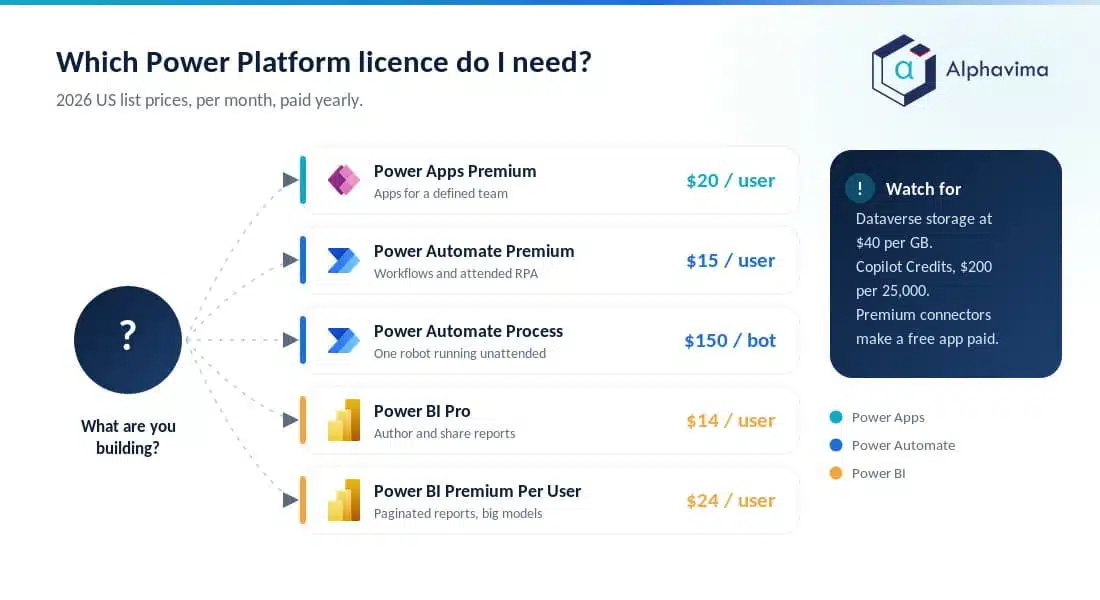
Work from the workload, not the price list:
- Building apps for a defined team? Buy Power Apps Premium per user.
- Automating workflows for people? Power Automate Premium per user. Automating processes that run unattended? Process per bot.
- Delivering reports to a few analysts? Pro or PPU. Delivering to hundreds of viewers? Model Fabric capacity at F64+ against per-seat cost.
- Publishing an external site? Power Pages capacity packs sized to traffic.
- Adding AI agents? Budget Copilot Credits and set limits.
Then add the shared costs, Dataverse storage and any AI credits, on top. That order stops you paying for a capacity you do not need or under-buying storage you do.
Conclusion
Power Platform pricing looks complicated because it is really three questions stacked together: which per-user or per-capacity licences you need, how much Dataverse and AI consumption you will use, and whether your apps stay inside standard connectors.
Answer those in order and the cost becomes predictable rather than a nasty surprise on the invoice.
The plans move quickly, especially the AI credits, so always confirm the current figure on the Microsoft pricing page before you sign. When the workload is real, right-sizing licences and capacity is where the money is made or lost.
Ready to move forward? Talk to the Alphavima team about your specific Power Platform build, we will map your workloads to the right licences, size your Dataverse and Fabric capacity, and stop you paying for seats you do not need.
Start with our Microsoft Power Platform services or explore our Microsoft Fabric services for the analytics side.

Related case study
M&GN Rebuilds CRM & Member Portal on Power Platform
M&GN Joint Railway Society replaced spreadsheets with a Power Platform CRM and self-service member portal, cutting onboarding time 65%.
Read the case study · Next read: Dynamics 365 licensing guide
Frequently asked questions
How much does Power Platform cost per month in 2026?
There is no single figure, because each product is licensed separately. As a reference, Power Apps Premium is $20 per user per month, Power Automate Premium is $15, Power BI Pro is $14, and Power BI Premium Per User is $24, all US list prices paid yearly. Add Dataverse storage and any AI credits on top.
What is the difference between Power Apps per app and per user pricing?
The per-user plan (now the main Premium plan at $20 per user per month) gives one person unlimited apps. The older per-app plan gives a user access to one app or one site in a single environment. It can still be bought, but Microsoft’s Power Apps pricing page no longer features it, so most 2026 buyers should plan around per-user licensing.
Do I need a paid licence if I already have Microsoft 365?
Not always. Microsoft 365 includes Power Apps and Power Automate for standard connectors within the M365 context, plus free personal Power BI. You need paid licences once you use premium connectors, standalone apps, unattended automation, or share Power BI content.
How is Power Automate RPA priced?
Attended RPA (a bot running alongside a signed-in user) is included in Power Automate Premium at $15 per user per month. Unattended RPA needs the Process plan at $150 per bot per month, or Hosted Process at $215 per bot per month if you want a Microsoft-hosted virtual machine.
When is Power BI Fabric capacity cheaper than Pro seats?
At F64 capacity and above, report viewers no longer each need a Pro licence, so free licences can consume content. For an audience of many read-only viewers, capacity often costs far less than buying hundreds of $14 Pro seats. Below F64, every viewer still needs Pro or PPU.
What are Copilot Credits and how much do they cost?
Copilot Credits are the consumption currency for Copilot Studio agents. A message pack is $200 per month for 25,000 credits, with pay-as-you-go also available. From November 2026, AI Builder features also draw on Copilot Credits as the old AI Builder credits are retired.
Why did my Dataverse bill go up?
Dataverse capacity grows as apps collect data. Premium licences include a small pooled entitlement, and beyond that database storage costs about $40 per GB per month. Large attachments and audit logs are frequent culprits, so route them to file and log storage where possible.
How is Power Pages priced compared with Power Apps?
Power Pages is priced by capacity packs per site, not per named user. Authenticated user packs are $200 per month for 100 users per site, and anonymous packs are $75 per month for 500 visitors per site. Power Apps, by contrast, is licensed per user.