











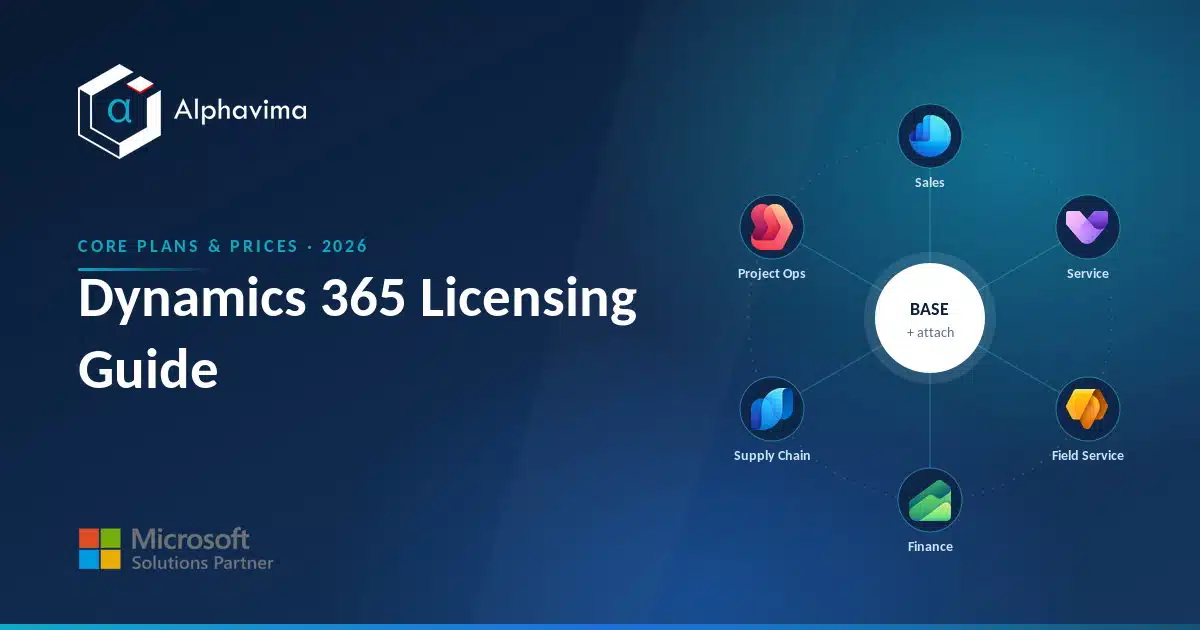
Dynamics 365 is not one product with one price. It is a family of business applications, each licensed separately, with a discount model that rewards you for putting more than one app on the same person.
If you have ever looked at a quote and wondered why two users doing similar work cost wildly different amounts, the answer is almost always in how the licences were assigned, not in the software itself.
This Dynamics 365 licensing guide is written for the person who has to sign off the budget: a finance lead, an IT manager, or an operations director comparing quotes. It explains the app families, the base plus attach model, the difference between per-user and Team Members licences, how Business Central tiers work, and the mistakes that quietly add thousands to a renewal.
All prices are 2026 US list prices from Microsoft; your regional and channel pricing will differ, so treat them as a planning baseline.
Key takeaway / What you’ll learn: Dynamics 365 charges full price for a user’s first app (the “base” licence) and a much lower “attach” price for each additional qualifying app on the same user.
Get the base and attach assignments right, match full users against Team Members correctly, and in our experience you can often cut a licence bill by 20 to 40 per cent, though the real figure depends on your user mix, contract and licensing programme without removing any capability.
| App | Base (USD/user/month) | Attach (USD/user/month) |
|---|---|---|
| Sales Enterprise | $105 | $20 |
| Customer Service Enterprise | $105 | $20 |
| Field Service | $105 | $20 |
| Finance | $210 | $30 |
| Supply Chain Management | $210 | $30 |
| Project Operations | $135 | $30 |
Table of contents
Talk to a Dynamics 365 consultant
Book a quick call to talk through your Dynamics 365 project. No pressure, just practical advice. Or see our Dynamics 365 services.
The Dynamics 365 app families
Dynamics 365 splits into two broad groups, and the split matters because it drives which licences can “attach” to which.
Customer Engagement (CE) apps run on Dataverse and cover the front office:
- Sales (Professional, Enterprise, Premium) for pipeline, opportunities and forecasting.
- Customer Service (Professional, Enterprise, Premium) for cases, queues and knowledge.
- Field Service for scheduling, work orders and mobile technicians.
- Customer Insights (Journeys and Data) for marketing and customer data unification.
Finance and Operations (F\&O) apps cover the back office:
- Finance for general ledger, AP/AR, budgeting and financial reporting.
- Supply Chain Management for inventory, manufacturing, warehousing and planning.
- Project Operations which spans both worlds, project accounting plus resourcing.
Then there is Business Central, the all-in-one ERP for small and mid-sized organisations. It is licensed on its own model (Essentials, Premium, Team Members) and does not use the base-plus-attach mechanism the enterprise apps use.
If your organisation is under roughly 300 employees, Business Central is usually the starting point, and our Business Central pricing guide goes deeper on it.
How base plus attach licensing works
This is the single most important concept in Dynamics 365 licensing, and the one buyers most often get wrong.
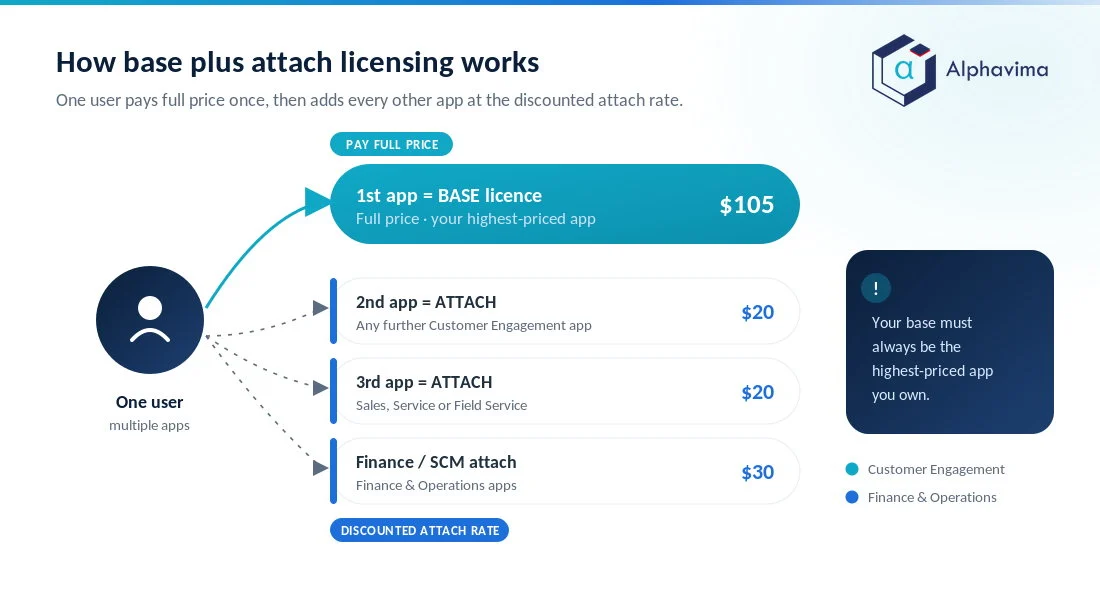
For every full-access user, the first Dynamics 365 app must be licensed at full price. Microsoft calls this the base licence, and it must always be the highest-priced app that user needs. Every additional qualifying app for that same user is then available at a reduced attach price.
As Microsoft’s Dynamics 365 licensing guidance puts it, base and attach licences are identical in capability and differ only in price.
A worked example. Suppose a service manager needs both Customer Service Enterprise and Field Service.
- Base licence: Customer Service Enterprise at $105/user/month.
- Attach licence: Field Service at $20/user/month.
- Total: $125/user/month, versus $210 if you bought both at full price.
That is a $85 per user per month saving, roughly $1,000 a year per person, purely from ordering the licences correctly. The rules to remember:
- The base must be the most expensive app the user holds. If you make Field Service the base and try to attach Customer Service Enterprise, Microsoft’s compliance checks will flag it.
- Attach licences can only be assigned to a user who already holds a qualifying base licence.
- Attach pricing is tiered by app family. CE apps attach cheaply; F\&O apps attach at a higher rate.
Tip: Before any renewal, list every user and every app they actually use, then re-derive who should hold the base and who should hold attaches. Reorganising base/attach assignments is free and is the fastest legitimate way to cut a Dynamics 365 bill.
2026 Dynamics 365 pricing table (per user/month, paid yearly)
The table below shows verified 2026 US list prices from Microsoft’s product pricing pages, plus the attach price for the qualifying enterprise apps.
| App / plan | Base price (USD) | Attach price (USD) | Notes |
|---|---|---|---|
| Sales Professional | $65 | n/a | Lighter Sales feature set |
| Sales Enterprise | $105 | $20 | Full pipeline + forecasting |
| Sales Premium | $150 | n/a | Enterprise + AI/Copilot features |
| Customer Service Professional | $50 | n/a | Core case management |
| Customer Service Enterprise | $105 | $20 | Full omnichannel-ready service |
| Customer Service Premium | $195 | n/a | Enterprise + Contact Center bundle |
| Contact Center | $110 | n/a | Standalone digital contact centre |
| Field Service | $105 | $20 | Full scheduling + work orders |
| Field Service Contractor | $50 | n/a | Limited technician access |
| Finance | $210 | $30 | Core financials |
| Finance Premium | $300 | n/a | Finance + Copilot agents |
| Supply Chain Management | $210 | $30 | Inventory, manufacturing, WMS |
| Supply Chain Management Premium | $300 | n/a | SCM + Copilot agents |
| Project Operations | $135 | $30 | Project accounting + resourcing |
| Customer Insights | $1,700/tenant | $1,000/tenant | Attach needs 10+ qualifying users |
These are United States list prices for annual billing, checked against Microsoft’s pricing overview and the individual product pricing pages. They are not a quotation. What you pay can differ by country, currency, agreement type and negotiated terms, and Microsoft runs time-limited promotions on individual apps from time to time.
Several products also carry a minimum seat count, Finance and Supply Chain Management among them, so a per-user price does not always mean you can buy a single seat. Check the current Product Terms and your own agreement before you budget.
Per-user vs Team Members licences
Not everyone who touches Dynamics 365 needs a full licence. Microsoft offers a low-cost Team Members licence for light users, and using it correctly is where a lot of savings live, and also where a lot of compliance risk hides.
A Team Members licence grants read access to Dynamics 365 data plus a defined set of light write tasks, for example approving records, entering time or expenses, or updating your own contact details.
It is designed for employees whose job is not in the system all day: a manager who approves timesheets, a warehouse supervisor who reads reports, an employee who submits an expense claim.
What Team Members cannot do is run the core business process. It is not a cheap way to give salespeople a CRM or accountants a ledger. Team Members is capped to specific scenarios and light entities; the moment a user needs to manage opportunities, process cases at volume, or post financial transactions, they need the full app licence.
Note: Team Members is a named-user licence, not a concurrent one. Every individual who uses it needs their own. And it is not a workaround for full functionality, Microsoft’s licensing terms define exactly which tables and actions it covers, and audits do check.
For Business Central, Team Members is $8/user/month. The enterprise apps have their own light-user licences with their own separate rights, so do not assume a single equivalent exists across the whole family. Do not judge eligibility by how often someone signs in either.
Team Members covers a defined set of scenarios, so check the specific tables, actions and business process a person performs against Microsoft’s current Team Members use rights. That is what an audit tests, and it is the difference between a compliant $8 licence and an expensive correction.
Paying for licences you do not need?
Send us your current Dynamics 365 quote or renewal. We will map every user to the cheapest correct licence and show you, line by line, what you can save before you sign.
Business Central: Essentials, Premium and Team Members
Business Central uses its own three-tier model rather than base plus attach, which makes it simpler to reason about.
| Business Central plan | Price (USD/user/month) | Best for |
|---|---|---|
| Team Members | $8 | Light users: read, approve, light entry |
| Essentials | $80 | Finance, sales, purchasing, inventory, projects |
| Premium | $110 | Everything in Essentials + Manufacturing + Service Management |
The key decisions with Business Central:
- Essentials and Premium are set per company, not per tenant. You can mix Essentials and Premium users in the same environment. Each company carries a User Experience setting of either Essentials or Premium, and that setting decides both which features are switched on and which licence a user needs to open it. An Essentials user can open companies set to Essentials. A Premium user can open any company, but only gets Premium features in a company configured as Premium. So if one team needs Manufacturing or Service Management, you licence that team for Premium rather than moving everyone up. Model it company by company, because the $30 difference only needs to apply to the people who genuinely need it.
- Team Members do most of the counting. In a typical 60-person company, perhaps 15-20 are full users and the rest are Team Members. That ratio is what makes Business Central affordable.
- Business Central sits outside the base plus attach ladder, with one exception. Business Central is licensed on its own three-tier model rather than the enterprise base plus attach matrix. Microsoft does allow one crossover: a user whose base licence is Business Central Premium can add Sales Enterprise, Customer Service Enterprise or Field Service at the $20 attach price. Outside that exception, someone who needs Business Central and an enterprise app needs both full licences.
You can see current figures on the Business Central pricing page. For a full modelling exercise, our ERP consulting team builds a per-user map before any purchase so the Essentials/Premium call is made on evidence, not guesswork.
Device licences and other special cases
Most Dynamics 365 licensing is named-user (one licence per person). But a few scenarios use device licences, where one licence covers a shared device used by many people, for example a shop-floor terminal, a warehouse scanning station, or a shared kiosk in a service centre.
Device licensing appears in the Finance and Operations and Commerce space, where shift workers rotate across the same hardware.
Device licences make sense when the number of people exceeds the number of stations and no single person needs continuous personal access. If your users each have their own login and work all day, named-user licences are almost always cheaper and cleaner.
Because device licensing has specific eligibility rules, confirm the details in the current Microsoft licensing guide before you assume it applies.
Storage and Dataverse capacity
Licences do not just buy functionality, they also accrue storage. CE apps, Customer Insights and the Power Platform all consume Dataverse capacity, measured in three pools: database, file and log.
A tenant with qualifying Dynamics 365 subscriptions receives a default capacity entitlement plus additional capacity that accrues with each qualifying full-user licence. Microsoft’s Dataverse capacity documentation is the source of truth for the exact per-licence accruals, which change periodically. Two practical points:
- Database capacity is the expensive pool. It fills faster than teams expect, especially with high case or transaction volumes and long retention. Additional database capacity is billed monthly, so it is a real running cost, not a one-off.
- Housekeeping is cheaper than buying capacity. Archiving closed records, cleaning up attachments (which hit file capacity), and setting sensible retention often defers a capacity purchase entirely.
Business Central handles storage differently, with its own database capacity model per environment rather than shared Dataverse pools, so plan the two separately.
Copilot and agent licensing in 2026
Copilot is no longer a single line item, and this is the part of the model that has moved most in 2026. It helps to separate three things.
Copilot features included in a licence. Several apps now bundle assistive Copilot capability into the subscription itself. Sales Premium, Finance Premium and Supply Chain Management Premium each include a monthly allowance of Copilot Credits per user alongside their AI features, which is a large part of what the Premium tier is buying.
Copilot Credits. Agents that do autonomous work draw on Copilot Credits, a consumption currency rather than a per-user licence. Credits can be included with a licence, bought as prepaid capacity, or billed as you go.
If you plan to run agents at any scale, model credit consumption separately from seats, because it behaves like cloud consumption rather than a fixed monthly cost.
Agents that need their own entitlement. Some agents sit behind a specific product or add-on rather than a general Copilot allowance. Check the individual product page for the agent you want before assuming it is covered.
The practical point for budgeting: a per-user price no longer tells you the whole cost of an AI-enabled deployment. Ask your partner to quote seats and expected credit consumption as two separate lines.
Common licensing mistakes and how to optimise cost
After many licensing reviews, the same avoidable errors come up again and again.
- Full licences for light users. Sales or Service Enterprise assigned to people who only read reports or approve records. Move them to Team Members and the saving is immediate.
- Wrong base/attach order. Buying two full apps for a user instead of one base and one attach. This is the most common overspend and the easiest to fix.
- Over-provisioning Premium. Putting everyone on Sales Premium or Business Central Premium “to be safe” when only a subset needs the premium features.
- Forgotten leavers. Named-user licences that are never reclaimed when staff leave. A quarterly reconciliation between HR and licence assignments usually finds several.
- Assuming an old promotion still applies. Microsoft runs time-limited offers on individual apps (such as the 2026 Customer Service offer) on new purchases or expansions.
- Buying capacity instead of managing it. Paying for Dataverse add-ons that a retention and archiving policy would have avoided.
Tip: A licence optimisation review pays for itself. Even a mid-sized Dynamics 365 estate typically has 15-25% of spend that can be reassigned or removed without losing a single capability.
Getting this right is exactly the kind of unglamorous, high-return work our IT advisory and Dynamics 365 CRM teams do before a renewal. Alphavima models your actual usage against the base/attach and Team Members rules, then hands you a per-user plan you can take straight to your Microsoft partner or CSP.
Conclusion
Dynamics 365 licensing looks complicated because it is modular, but the logic is consistent: pick the right app tier for each role, make each user’s most expensive app their base, attach the rest cheaply, and push light users onto Team Members.
Business Central runs on its own simpler Essentials/Premium/Team Members model, and Dataverse storage is a running cost worth managing rather than ignoring.
The prices in this guide are 2026 US list figures and will move, so always confirm against the current Microsoft pricing pages before you commit. The bigger win, though, is not the headline price, it is the assignment. Most organisations are paying for capability they have mis-allocated, not capability they use.
Ready to move forward? Talk to the Alphavima team for a Dynamics 365 licence review that maps your real usage to the right base, attach and Team Members mix, start with our ERP consulting service and we will build the plan with you.
Where these figures come from
Every price and rule in this guide was checked against Microsoft’s own material on 20 August 2026. Licensing changes often, so verify before you sign anything.
- Dynamics 365 pricing overview and the individual product pricing pages, for list prices
- Microsoft Dynamics 365 Licensing Guidance, for the base and attach rules
- Licensing in Business Central, for how Essentials and Premium work per company
- Microsoft Product Terms, which is the document that actually governs your contractual rights, including minimum seat counts
Microsoft states that its licensing guidance is informational and that Product Terms govern your rights, so treat this guide as a working map rather than a contract.

Related case study
PWSC Unifies Sales, Warranty & Claims on Dynamics 365
PWSC brought sales, warranty and claims onto one Dynamics 365 CRM, with self-serve portals for builders and homeowners.
Read the case study · Next read: Dynamics 365 Customer Engagement licensing explained
Frequently asked questions
What is the base plus attach model in Dynamics 365 licensing?
Each full user’s first Dynamics 365 app is licensed at full price (the base), and it must be the highest-priced app they use. Every additional qualifying app for that same user is then available at a lower attach price, for example $20/user/month for Sales, Customer Service or Field Service, and $30 for Finance, Supply Chain or Project Operations.
How much does Dynamics 365 Sales Enterprise cost in 2026?
Dynamics 365 Sales Enterprise is $105 per user per month (paid yearly) as a base licence, or $20 per user per month as an attach if the user already holds a qualifying, higher-priced base licence. Sales Professional is $65 and Sales Premium is $150.
What is the difference between a full user and a Team Members licence?
A full (per-user) licence lets someone run a business process, manage opportunities, process cases, post ledger entries. A Team Members licence, at around $8/user/month, only allows reading data and a limited set of light tasks like approvals, time entry or expenses. It is not a discount route to full functionality.
Should we choose Business Central Essentials or Premium?
Choose Premium for the users who need Manufacturing or Service Management; otherwise Essentials covers finance, sales, purchasing, inventory and projects. Essentials is $80 and Premium is $110 per user per month. You can mix the two in one environment: each company has a User Experience setting of Essentials or Premium, which decides the features that are switched on and the licence needed to open that company. So a Premium requirement in one part of the business does not force everyone onto Premium.
Can a user hold both a Customer Engagement app and a Finance app cheaply?
Yes, through attach. If a user’s base licence is a Finance and Operations app, they can attach a CE app, and vice versa, subject to the rule that the base is the highest-priced app. Business Central is licensed on its own model rather than the enterprise ladder, with one documented exception: a user whose base licence is Business Central Premium can attach Sales Enterprise, Customer Service Enterprise or Field Service at the $20 attach price.
How does Dynamics 365 storage and Dataverse capacity work?
CE and Customer Insights apps consume Dataverse database, file and log capacity. A tenant gets a default entitlement plus capacity that accrues per qualifying full licence, with more available for purchase. Check the current Microsoft Dataverse capacity page for exact figures, as accruals change over time.
Are there device licences for Dynamics 365?
Yes, mainly in Finance and Operations and Commerce scenarios where many people share one device, such as a shop-floor or warehouse terminal. Device licences suit shared, high-rotation hardware; named-user licensing is usually cheaper when each person has their own login.
What is the fastest way to reduce a Dynamics 365 licence bill?
Fix base/attach ordering, move light users to Team Members, right-size Premium versus Enterprise, and reclaim licences from leavers. These four steps commonly free up 15-25% of spend with no loss of capability. A structured licence review is the reliable way to find it.