











Twice a year Microsoft ships a wave of updates to Dynamics 365, and twice a year the same question lands on the desks of finance leads, sales managers and IT teams: which of these features actually change how we work, and which are just line items in a very long document?
This roundup answers that for the Dynamics 365 Release Wave 2026, so you can plan around the changes that matter instead of reading hundreds of feature entries.
This is written for business and IT buyers already running, or evaluating, Dynamics 365. We have grouped the notable features by product area: Business Central, Sales and Customer Service on the customer engagement side, Finance and Supply Chain Management, and the Copilot and AI agents that now run across the whole platform.
Every grouping is tied to Microsoft’s official release plans, and where the timing is confirmed we say so.
Key takeaway / What you’ll learn: 2026 release wave 1 (April to September 2026) is live and its headline theme is agentic AI: named agents that do real work across finance, sales, service and supply chain.
Wave 2 2026 detail is not public yet (Microsoft publishes those plans on 16 September 2026), so this roundup focuses on what you can actually confirm and use today.
Table of contents
Talk to a Dynamics 365 consultant
Book a quick call to talk through your Dynamics 365 project. No pressure, just practical advice. Or see our Dynamics 365 services.
First, the 2026 release calendar
A “release wave” is Microsoft’s twice-yearly bundle of planned features. Each wave has a published plan, an early-access period for testing in a sandbox, and a general availability (GA) date when features start reaching production.
For 2026 the dates are fixed. Wave 1 plans were published on 18 March 2026 and reached general availability from 1 April 2026, covering April to September 2026. Wave 2 plans are scheduled for publication on 16 September 2026, with general availability from 1 October 2026, covering October 2026 to March 2027.
You can see the full calendar on Microsoft’s release schedule page.
That timing matters for this article. As of mid-2026, wave 2 2026 feature plans are not yet public. So rather than guess at what October will bring, this roundup concentrates on wave 1, which is already generally available, and flags wave 2 only where Microsoft has confirmed the dates.
When the wave 2 plan lands in September, it is worth a second read.
Note: Features tagged “enabled for users automatically” arrive without you doing anything. Others are tagged for admins or makers to switch on. Always check the tag before assuming a feature is live in your tenant.
Business Central: an agent for accounts payable, and smarter everyday tools
The standout in Business Central for wave 1 is the Payables Agent. It reads incoming vendor invoices, matches them to the right vendor and general ledger accounts, and prepares them for approval, keeping a person in the loop for the final sign-off.
For a small finance team, that removes a large slice of manual data entry from the accounts payable cycle while keeping human control over what actually gets paid. Note that Business Central agents are available to online customers only, not on-premises deployments.
Around that headline, wave 1 adds a set of practical improvements that business users feel day to day. Full-text search on lists, drill-downs and look-ups makes finding a record faster and more forgiving of imperfect search terms.
Copilot’s everyday skills continue to grow across guide, find, compare, analyse, suggest and summarise actions, and it is included at no extra cost with a Business Central licence. There are also refinements to bank account reconciliation assistance, Shopify integration, and Excel exports that stay refreshable rather than going stale the moment you save them.
Operations and governance get attention too: a job queue that runs in first-in-first-out order with priorities, reduced locking during concurrent warehouse postings, and customer-managed encryption keys. None of these is glamorous, but together they reduce the friction finance and warehouse teams hit at month-end.
You can read the full picture on Microsoft’s Business Central 2026 release wave 1 overview, and our ERP consulting team can map these features to your rollout.
Sales and Customer Service: AI moves into the front office
On the customer engagement (CE) side, both Sales and Customer Service lean hard into agents and Copilot for wave 1.
Dynamics 365 Sales
Microsoft describes the Sales Agent as the seller’s daily command centre, with a chat-first experience that summarises opportunities and leads, prepares sellers for meetings, and surfaces account news. Note the product boundary: Sales Agent is one of the role-based agents in Microsoft 365 Copilot rather than a feature of Dynamics 365 Sales, so it is licensed and governed separately. Alongside it sit lead management agents that research leads across multiple sources, draft personalised outreach, qualify prospects against your ideal-customer profile and purchase intent, and disqualify low-intent leads automatically.
For opportunity work, Copilot generates opportunity summaries, recommends which deals to prioritise, and can build a pitch from an RFP, SharePoint content or product documents.
The point for a sales manager is less about any single feature and more about where the seller spends time. Research, list-building and first-draft writing move to the agent, so the seller spends more of the day in conversations.
If your team already runs Dynamics 365 Sales, our CRM solutions practice can help you decide which of these to switch on first.
Dynamics 365 Customer Service
Customer Service in wave 1 builds on four AI agents: a Case Management Agent that handles case workflow, a Customer Intent Agent that identifies and routes what the customer actually needs, a Quality Evaluation Agent that assesses service quality, and a Customer Knowledge Management Agent that keeps answers current for agents and self-service alike.
The wave 1 work focuses on moving these from assisted to semi-autonomous and autonomous handling, with tighter Copilot integration.
Frontline representatives get contextual answer drafting for email and chat pulled from internal and external sources, automated case and conversation summaries, and embedded Teams collaboration. Supervisors get real-time metrics and negative-sentiment detection so they can step in before a conversation goes wrong.
The combined effect is shorter handling times and fewer escalations, provided your knowledge base is in good shape to begin with.
Finance and Supply Chain: agentic operations in the back office
Wave 1 pushes the same agent theme into the ERP core, under the banner Microsoft calls agentic operations.
In Dynamics 365 Finance, teams most often ask about the Finance Agent, which supports reconciliation, variance analysis and data preparation in Excel, plus customer communications in Outlook. Finance Agent is a role-based agent in Microsoft 365 Copilot that works against ERP data, not a feature of Dynamics 365 Finance. The agent inside Dynamics 365 Finance itself is the Account Reconciliation Agent, which Microsoft describes as a production-ready preview. Wave 1 also adds financial support for rental business models (tracking rental assets and their revenue recognition), stronger multi-entity capabilities, close acceleration, and a flexible e-invoicing integration framework for meeting regulatory submission requirements.
If your finance team is weighing how far to let AI into the ledger, Microsoft’s Dynamics 365 Finance 2026 release wave 1 plan lists every feature in scope.
In Dynamics 365 Supply Chain Management, the Supplier Communications Agent gains support for Excel attachments and lets communications be entered directly inside Supply Chain Management, with extensibility for custom fields and actions. Microsoft names it the Supplier Communications Agent and currently describes it as a production-ready preview. Demand planning gets smarter at spotting correlations between price and demand, so pricing and demand can be planned together, and supply planning protects confirmed capable-to-promise dates when using Planning Optimization.
Procurement teams get supplier qualification evaluation, a global supplier 360 view and a new supplier portal, while warehouse operations gain AI-driven picking-route optimisation, inventory rebalancing and support for hands-free wearable scanners. For asset-heavy and distribution businesses, these are the features to test in a sandbox during early access before they touch production planning runs.
Copilot and AI agents across the platform
The connective tissue for all of the above is Copilot Studio, the low-code environment where organisations build and govern their own agents. Wave 1 makes agent-building more capable and more controllable at the same time.
Two features stand out. Generative answers let an agent create conversational responses from your existing internal and external data without you hand-authoring a topic for every question. Generative actions let an agent decide, in real time, which plugins to call and in what order to complete a request.
Together they move agent-building away from scripting every path and toward describing the outcome you want. There is also extended support for agents built with Agent Builder in Microsoft 365 Copilot, a library of out-of-the-box workflow actions, and expanded governance for publishing, resource allocation, logging and data retention so IT keeps visibility as agent use grows.
Microsoft’s Copilot Studio 2026 release wave 1 overview has the detail.
Across the wider platform, wave 1 also introduces a Scheduling Operations Agent in Field Service, agent-authoring and self-healing capabilities in Power Automate, and multi-agent orchestration so several agents can coordinate on a task.
If you want a practical starting point, our walkthrough of the Copilot Studio computer use agent shows the mechanics, and our Microsoft Copilot and AI service covers governance and rollout.
Not sure which 2026 wave 1 agents to switch on first?
Tell us which Dynamics 365 apps you run and where your team still keys data by hand. We will come back with a short pilot list, the data clean-up each agent needs, and a sandbox test plan before wave 2 lands in September.
AI agents at a glance: who does what
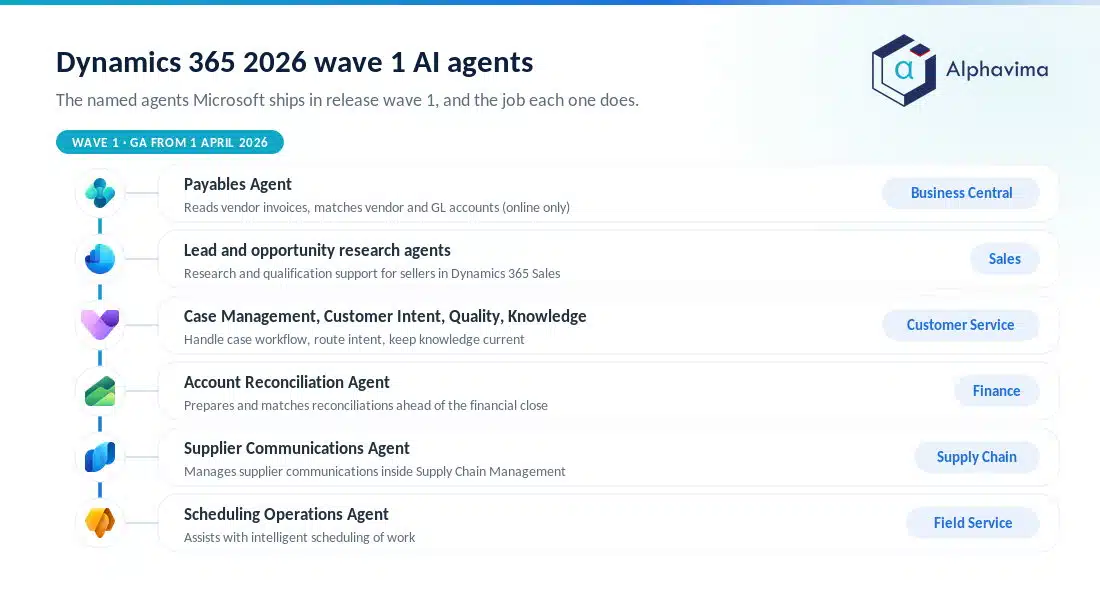
The wave 1 story is easiest to hold in your head as a list of named agents mapped to the job each one does.
| Product area | Named agent(s) | What it does |
|---|---|---|
| Business Central | Payables Agent | Reads vendor invoices, matches vendor and GL accounts, prepares them for human approval (online only) |
| Sales | Sales Agent, lead management agents | Sales Agent is a role-based agent in Microsoft 365 Copilot; summarises opportunities and leads, researches and qualifies leads, drafts outreach |
| Customer Service | Case Management, Customer Intent, Quality Evaluation, Knowledge Management agents | Handle case workflow, route intent, assess quality, keep knowledge current |
| Finance | Finance Agent | Role-based agent in Microsoft 365 Copilot; supports reconciliation, variance analysis and data preparation |
| Supply Chain Management | Supplier Communications Agent | Manages supplier communications inside SCM, with Excel attachments and custom actions |
| Field Service | Scheduling Operations Agent | Assists with intelligent scheduling of work |
Most of these reach general availability across the April to September 2026 window rather than on a single date, and exact GA timing varies by feature. Check the individual entries in the Dynamics 365 2026 release wave 1 plan for the current status of any one agent before you build a plan around it.
How to plan your adoption
A release wave is a menu, not a mandate. A sensible approach for wave 1 looks like this:
- Separate automatic from optional. List the features tagged “enabled automatically” for the apps you run; those are coming whether you plan for them or not.
- Pick two or three agents to pilot. Choose the agents that map to your biggest manual workload, often accounts payable, lead research, or case triage.
- Fix the data first. Agents are only as good as the vendor records, knowledge articles and CRM hygiene they read. Clean data is the difference between a helpful agent and a confidently wrong one.
- Test in early access, then set governance. Validate against your own processes before production, and use Copilot Studio’s controls to decide who can build agents and what data they may read before you scale.
Tip: Keep a human approval step on any agent that touches money or customer commitments. Wave 1’s finance and payables agents are designed for exactly that: the agent prepares, a person approves.
Conclusion
The clear theme of the Dynamics 365 Release Wave 2026 is agentic AI moving from demo to day job. Wave 1 gives finance a Payables Agent in Business Central and an Account Reconciliation Agent in Dynamics 365 Finance, sales and finance the role-based Sales Agent and Finance Agent in Microsoft 365 Copilot, service four case agents, supply chain a Supplier Communications Agent, and IT a more capable and more governable Copilot Studio to build on.
It is a lot, but most of it maps to a specific manual task you can point to today.
The practical move is not to adopt everything at once. Identify the two or three agents that match your biggest workloads, make sure the data behind them is clean, and pilot in a sandbox before wave 2 detail arrives on 16 September 2026. Then reassess with the full picture.
Ready to move forward? Talk to the Alphavima team about which 2026 release wave features to prioritise for your business, from Business Central and CRM to Copilot agents, through our ERP consulting and Microsoft Copilot and AI services.
For a vendor-neutral view of how fast AI adoption is moving in the wider market, McKinsey’s global State of AI survey is worth reading next to the release plans.

Related case study
PWSC Unifies Sales, Warranty & Claims on Dynamics 365
PWSC brought sales, warranty and claims onto one Dynamics 365 CRM, with self-serve portals for builders and homeowners.
Read the case study · Next read: Dynamics 365 licensing guide
Frequently asked questions
What is the Dynamics 365 Release Wave 2026?
It is Microsoft’s set of planned feature updates for Dynamics 365 in 2026, delivered in two waves. Wave 1 covers April to September 2026 and is generally available now. Wave 2 covers October 2026 to March 2027, with its plan published on 16 September 2026.
Is the 2026 release wave 2 plan available yet?
Not as of mid-2026. Microsoft publishes the wave 2 2026 plans in English on 16 September 2026, with general availability from 1 October 2026. Until then, only wave 1 detail is confirmed, so any wave 2 feature list circulating before that date is speculation.
What is the biggest change in Business Central for 2026 wave 1?
The Payables Agent, which reads vendor invoices, matches them to vendors and general ledger accounts, and prepares them for human approval. It is available to Business Central online customers only. Full-text search and growing Copilot skills are the other notable everyday wins.
What new AI features does Dynamics 365 Sales get in 2026 wave 1?
A Sales Agent, one of the role-based agents in Microsoft 365 Copilot, that acts as a chat-first daily hub for sellers, plus lead management agents that research, qualify and disqualify leads and draft personalised outreach. Copilot can also summarise opportunities, recommend deal priorities and build pitches from RFPs and documents.
What are the Customer Service AI agents in 2026 wave 1?
Four agents: Case Management, Customer Intent, Quality Evaluation and Customer Knowledge Management. Wave 1 moves them toward semi-autonomous and autonomous handling and adds contextual answer drafting, automated summaries and supervisor sentiment detection.
Does Copilot cost extra in Business Central?
No. In Business Central, Copilot is included at no additional cost with the Business Central licence. For other Dynamics 365 and Copilot Studio scenarios, agent consumption and premium capabilities can carry separate costs, so check the current Microsoft licensing and pricing pages for your apps.
Do I have to turn these features on, or do they arrive automatically?
Both. Some features are enabled for users automatically at general availability, while others must be switched on by an administrator, maker or analyst. Each feature in the release plan carries a tag telling you which category it falls into.
How should we prepare for the 2026 release waves?
Review the automatic features first, pick two or three agents to pilot against your heaviest manual work, clean the underlying data, test in the early-access sandbox, and set Copilot Studio governance before scaling. A Microsoft partner such as Alphavima can help prioritise which features to adopt.